TrueCrypt

Roderunner

Exterminator
Guru
Gold Member
VIP
Local time
9:40 PM
Messages
2,362
Location
Scotland
Hi Folks, I have just created a file using TrueCrypt 7.0a in portable mode. I did so by reading the 'Beginners Tutorial'
As you see in my image, after 'Dismounting' the file :-
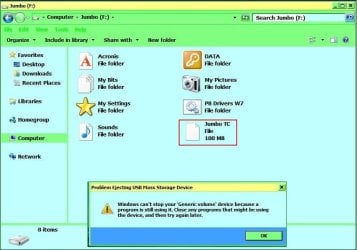
SF.jpg

How do I safely remove my external hdd ?
 

My Computer My Computer

Computer Manufacturer/Model Number
Look in my Signature.
OS
Win7 H.Prem. 32bit+SP1
Looking at the screenshot you have posted, your external drive is still open via explorer. If you close all the windows that are open does this still happen?
 

My Computer My Computer

OS
.
Looking at the screenshot you have posted, your external drive is still open via explorer. If you close all the windows that are open does this still happen?
Hi TCG, they were all closed after taking the snips for my image. 5 minutes later I still could not safely remove external hdd.
 

My Computer My Computer

Computer Manufacturer/Model Number
Look in my Signature.
OS
Win7 H.Prem. 32bit+SP1
or just use a batch file something like:
Code:
@ECHO OFF
REM edit the config details.
Set Drive=F
Set Path="Jumbo.tc"
Set TrueCrypt="TrueCrypt.exe"
Set EjectUSB="EjectUSB.exe"
IF EXIST %Drive%: GoTo Dismount
GOTO Mount
:Dismount
START /WAIT %EjectUSB% %Drive%:\
%TrueCrypt% /d %Drive% /f /w /q /s
Exit
:Mount
%TrueCrypt% /v /l %Drive% %Path% /m rm /m ts /q /e
You will need http://www.portablefreeware.com/?id=1425 a tiny usb removal program for this batch file to work properly.
 

Attachments

  • true crypt.PNG
    true crypt.PNG
    15.3 KB · Views: 43

My Computer My Computer

OS
Windows 7 Profesional 64 Bit
CPU
AMD Athlon II X4 620
Motherboard
GA-MA770-UD3
Memory
6 Gigs
Graphics Card(s)
gts 450
Sound Card
built in
Monitor(s) Displays
HP w2338h
Screen Resolution
1920 X 1080
Hard Drives
sata barracuda 1tb seagate X2 IDE Mode
PSU
huh
Case
generic
Cooling
box w/cpu
Internet Speed
LOL 3mbs
Problem solved. I have decided not to use TrueCrypt.
 

My Computer My Computer

Computer Manufacturer/Model Number
Look in my Signature.
OS
Win7 H.Prem. 32bit+SP1
Hi Folks, I have just created a file using TrueCrypt 7.0a in portable mode. I did so by reading the 'Beginners Tutorial'
As you see in my image, after 'Dismounting' the file :-

View attachment 155025

How do I safely remove my external hdd ?

From :TrueCrypt - Free Open-Source On-The-Fly Disk Encryption Software for Windows 7/Vista/XP, Mac OS X and Linux - FAQ

Can I unplug or turn off a hot-plug device (for example, a USB flash drive or USB hard drive) when there is a mounted TrueCrypt volume on it?
Before you unplug or turn off the device, you should always dismount the TrueCrypt volume in TrueCrypt first, and then perform the 'Eject' operation if available (right-click the device in the 'Computer' or 'My Computer' list), or use the 'Safely Remove Hardware' function (built in Windows, accessible via the taskbar notification area). Otherwise, data loss may occur.
 

My Computer My Computer

Computer type
PC/Desktop
Computer Manufacturer/Model Number
Custom Build
OS
Windows 7 Professional SP1 - x64 [Non-UEFI Boot]
CPU
Ivy Bridge Core i5 3570K (Delidded)
Motherboard
Asus P8Z77-V LE PLUS
Memory
G.Skill "Ares" DDR3 PC3-12800 - 1600MHz (16Gb)
Graphics Card(s)
Asus Dual-RX480-O4G
Sound Card
Creative Sound Blaster Z w/5.1 sound system
Monitor(s) Displays
Asus IPS 23"
Screen Resolution
16/9
Hard Drives
Internal:
500Go Sata 6Gb/s (x2)
500Go Sata 3Gb/s (x2)
SSD 60Go Sata 6Gb/s
PSU
In Win C 900W Series 80+ Platinum
Case
Thermaltake Chaser A71
Cooling
Custom Water Cooling Loop
Keyboard
Cooler Master QuickFire XTi
Mouse
Razer Imperator 2012 (4G)
Antivirus
MSE
Browser
IE 11.0.xxx Rtm
Other Info
"Raid0" with Intel Smart Response Technology (HDD/SSD)
Hi NoN,
Can I unplug or turn off a hot-plug device (for example, a USB flash drive or USB hard drive) when there is a mounted TrueCrypt volume on it?
Before you unplug or turn off the device, you should always dismount the TrueCrypt volume in TrueCrypt first, and then perform the 'Eject' operation if available (right-click the device in the 'Computer' or 'My Computer' list), or use the 'Safely Remove Hardware' function (built in Windows, accessible via the taskbar notification area). Otherwise, data loss may occur
I had read TC faq including above.
 

My Computer My Computer

Computer Manufacturer/Model Number
Look in my Signature.
OS
Win7 H.Prem. 32bit+SP1
Hi NoN,
Can I unplug or turn off a hot-plug device (for example, a USB flash drive or USB hard drive) when there is a mounted TrueCrypt volume on it?
Before you unplug or turn off the device, you should always dismount the TrueCrypt volume in TrueCrypt first, and then perform the 'Eject' operation if available (right-click the device in the 'Computer' or 'My Computer' list), or use the 'Safely Remove Hardware' function (built in Windows, accessible via the taskbar notification area). Otherwise, data loss may occur
I had read TC faq including above.

I've been a little like you about TrueCrypt...i'm still not decided to use it or not...

PS:
I'm using a little soft call "MyWinLocker" able to encrypt only a part (4Gb max) of my documents and also on Windows 7 Pro the EFS encryption certificat.

That not might be the best that's why i though about TrueCrypt...I'm always afraid to do something wrong with those tools that will mess my files!!!!!:confused:
 

My Computer My Computer

Computer type
PC/Desktop
Computer Manufacturer/Model Number
Custom Build
OS
Windows 7 Professional SP1 - x64 [Non-UEFI Boot]
CPU
Ivy Bridge Core i5 3570K (Delidded)
Motherboard
Asus P8Z77-V LE PLUS
Memory
G.Skill "Ares" DDR3 PC3-12800 - 1600MHz (16Gb)
Graphics Card(s)
Asus Dual-RX480-O4G
Sound Card
Creative Sound Blaster Z w/5.1 sound system
Monitor(s) Displays
Asus IPS 23"
Screen Resolution
16/9
Hard Drives
Internal:
500Go Sata 6Gb/s (x2)
500Go Sata 3Gb/s (x2)
SSD 60Go Sata 6Gb/s
PSU
In Win C 900W Series 80+ Platinum
Case
Thermaltake Chaser A71
Cooling
Custom Water Cooling Loop
Keyboard
Cooler Master QuickFire XTi
Mouse
Razer Imperator 2012 (4G)
Antivirus
MSE
Browser
IE 11.0.xxx Rtm
Other Info
"Raid0" with Intel Smart Response Technology (HDD/SSD)

My Computer My Computer

Computer type
PC/Desktop
Computer Manufacturer/Model Number
Custom Build
OS
Windows 7 Professional SP1 - x64 [Non-UEFI Boot]
CPU
Ivy Bridge Core i5 3570K (Delidded)
Motherboard
Asus P8Z77-V LE PLUS
Memory
G.Skill "Ares" DDR3 PC3-12800 - 1600MHz (16Gb)
Graphics Card(s)
Asus Dual-RX480-O4G
Sound Card
Creative Sound Blaster Z w/5.1 sound system
Monitor(s) Displays
Asus IPS 23"
Screen Resolution
16/9
Hard Drives
Internal:
500Go Sata 6Gb/s (x2)
500Go Sata 3Gb/s (x2)
SSD 60Go Sata 6Gb/s
PSU
In Win C 900W Series 80+ Platinum
Case
Thermaltake Chaser A71
Cooling
Custom Water Cooling Loop
Keyboard
Cooler Master QuickFire XTi
Mouse
Razer Imperator 2012 (4G)
Antivirus
MSE
Browser
IE 11.0.xxx Rtm
Other Info
"Raid0" with Intel Smart Response Technology (HDD/SSD)
Back
Top