Solved Windows Firewall and Windows Security Center can't be started

compheadache

New member
Local time
12:15 AM
Messages
24
Hi-

My Windows Firewall and Windows Security Center are unable to start in Windows 7 Home Premium. Here are the error messages I get:

1) When I go to Update your firewall settings and push the Use Recommended Settings button, it says: "Windows Firewall can't change some of your settings
Error code 0x80070424"

2) When I go to Action Center and click the "Turn on Now" button under Security, it says "The Windows Security Center Service can't be started"

3) When I go to Windows Firewall with Advanced Security, I get the message: "There was an error opening the Windows Firewall with Advanced Security snap-in. Restart the windows Firewall service on the computer that you are managing. Error Code 0x6D9.

Here is what happened that may (or may not - not sure) have caused the problem:

*I installed the Adblock Lite Firefox plugin from the official Mozilla plugin site. Old popup ads stopped coming, but a new kind of ad may have appeared within a Firefox window & I may have clicked on it. As happens when any official program tries access, a User Account Control alert appeared for Adobe Flash Player, asking for permission to access my hard drive - every time I declined, it asked again.

After the 5th time, I checked the security certificate - it was verified, so I said yes. It unloaded the Adobe Flash Player installer & asked to install it on my PC - then Windows Firewall and Windows Security Center shut down, and I haven't been able to restart them since. Messages about malware found & blocked by my Comodo Internet Security Premium program (which has been on my computer for 9 months) began popping up - the program always worked in the background but I rarely saw messages from it before.

Every time I accessed the internet after this, the Adobe Flash Player installer started to download and again asked if I wanted to install it. I never did - it would re-download every 20 minutes. Using CC Cleaner's Remove Program function, I removed the Adblock Lite plugin, Adobe Flash Player, Adobe Reader and other Adobe products.

Here's what I've done so far to try to solve it:

*Called my manufacturer and they asked me to go to System Restore, but I couldn't, since no restore points were set. I found out neither they or my retailer's warranty covers software issues - the only other solution they offered was a Windows 7 Home Premium reinstall. (Beware Acer and Staples warranties).

*I ran SuperAntiSpyware Free Edition, which used to often locate malware, but hasn't in recent days.

*I ran Malwarebytes Anti-Malware - it caught 1-2 things, I rebooted & eliminated the issues, but still can't start Windows Firewall or Security Center.

*I downloaded the Kaspersky TDSSKiller program. It removed 4 items and when I restarted the computer & went online, the Adobe Flash Player installer was at least no longer downloading. Comodo (which includes Antivirus, Defense+ and a firewall) continued to work when I checked its status, but its activity alerts no longer popped up.

*Going to the Microsoft help site, I found this page with three possible fixes:

windows security center service can't be started in windows 7 - Microsoft Answers

1) Tried the first possible fix (Error message:), but Security Center and Windows Firewall do not appear under the Services list.

2) Under instructions at How to use the System File Checker tool to troubleshoot missing or corrupted system files on Windows Vista or on Windows 7 , I ran the System File Checker scan (sfc /scannow). It did find corrupt files and successfully repaired them, but when I rebooted, Windows Firewall and Security Center still weren't working. I ran System File Checker a 2nd time, and it found no errors.

3) Only one I did not do was the "Clean boot" to check the status (How to troubleshoot a problem by performing a clean boot in Windows Vista or in Windows 7), as this seemed too complicated & possibly inconclusive

*I then uninstalled Comodo Internet Security Premium (which has antivirus, firewall, defense+) to see if a conflict caused the problem, & rebooted - Windows Firewall and Security Center still weren't working. I reinstalled Comodo.

*I downloaded several Microsoft FixIt programs from their site and ran them all - none of them were able to solve the problem. They are:

MicrosoftFixit.WindowsFirewall.RNP.21266068210132453.9.1.Run
MicrosoftFixit.WinSecurity.RNP.23266070503149393.1.1.Run
MicrosoftFixit.malware.FISC.23266070503149393.5.1.Run
MicrosoftFixit.WinSecurity.FISC.23266070503149393.5.2.Run
MicrosoftFixit.WindowsFirewall.FISC.23266070503149393.5.3.Run
MicrosoftFixit.WindowsFirewall.MATSKB.Run

*I ran the Error Checking function for the C drive - found a couple things and said it would fix them when I rebooted, which I did. Still no Win.F/Win.SC.

*I ran the Kaspersky TDSSKiller program again and there were no problems found.

*I downloaded the Microsoft Safety Scanner at consumersecuritysupport.microsoft.com and ran it. It said it caught 5 problems, then said it removed these four (not sure what happened to #5):

Exploit:Java/CVE-2012-0507.BB
Exploit:Java/CVE-2012-0507.CG
Trojan:Win64/Sirefef
Trojan:Win64/Sirefef.AA

*After this, I had a very scary moment where I rebooted. Windows said it was reconfiguring my desktop, and the PC launched to an almost blank screen with some bare bones version of a Start menu on the right-hand side in basic graphics. (I didn't write down the entire error message). I selected Restart and thankfully it restarted normally - but again, Windows Firewall and Security Center still wouldn't restart.

I would like more solutions to fix the problem--and clear out any existing underlying problems causing it - without a reinstall, which would be a nightmare, or spending $99 for a one-time Microsoft customer support session (especially if they can't fix the problem & I'd have to reinstall anyway). A Geek Squad subscription would be around $280 for a year or two and it's just too much right now. Please let me know other things I can try to fix the problem. Thanks.
 
Last edited:

My Computer My Computer

Computer Manufacturer/Model Number
Acer Aspire Timeline X
OS
Windows 7 Home Premium 64bit
Memory
4GB

My Computer My Computer

Computer type
PC/Desktop
Computer Manufacturer/Model Number
Custom
OS
Windows 8.1 Pro x64
CPU
Intel Core i5-4570 CPU @ 3.20GHz
Motherboard
Gigabyte Z87-D3HP-CF
Memory
8GB DDR3-1596 - Dual Channel
Graphics Card(s)
NVIDIA GeForce GTX 750 Ti SC
Sound Card
Onboard
Monitor(s) Displays
Samsung
Screen Resolution
1920x1080
Hard Drives
SSD - 120GB
Second - 1TB
Antivirus
MSE
Browser
Chrome
Thanks much for the quick reply. I checked, and I don't have either C:/WINDOWS/SYSTEM64 or a file called consrv.dll (C:/WINDOWS/SYSTEM32/CONSRV.DLL), so unfortunately that's not the issue. Will keep an eye out for more suggestions
 

My Computer My Computer

Computer Manufacturer/Model Number
Acer Aspire Timeline X
OS
Windows 7 Home Premium 64bit
Memory
4GB
Did you download both registry files?
 

My Computer My Computer

Computer type
PC/Desktop
Computer Manufacturer/Model Number
Custom
OS
Windows 8.1 Pro x64
CPU
Intel Core i5-4570 CPU @ 3.20GHz
Motherboard
Gigabyte Z87-D3HP-CF
Memory
8GB DDR3-1596 - Dual Channel
Graphics Card(s)
NVIDIA GeForce GTX 750 Ti SC
Sound Card
Onboard
Monitor(s) Displays
Samsung
Screen Resolution
1920x1080
Hard Drives
SSD - 120GB
Second - 1TB
Antivirus
MSE
Browser
Chrome
I downloaded both registry files as you suggested (a bit reluctantly, since I didn't have the folder & file indicating that was the precise problem I needed to fix)

I started the base filtering engine service (which worked) and then tried to start the windows firewall service (which didn't work - said "Windows could not start the Windows Firewall on Local Computer")

I also downloaded the security center service (http://download.bleepingcomputer.com/win-services/7/wscsvc.reg) and windows defender (http://download.bleepingcomputer.com/win-services/7/WinDefend.reg), then rebooted.

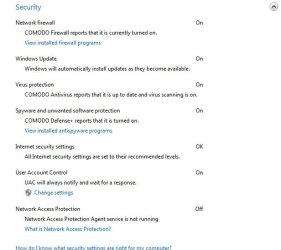
When I went to Action Center, Windows Security Center was no longer an option under Security - instead there were a list of options, and it would still not allow me to turn on my Windows Firewall when I tried. So I selected the Comodo Firewall, which is now on. I've uploaded a screen shot of what it says now as an attachment (see below).

I also went to Windows Firewall with Advanced Security & got the same message as before: "There was an error opening the Windows Firewall with Advanced Security snap-in. Restart the windows Firewall service on the computer that you are managing. Error Code 0x6D9."

My concern, despite what the new Security list says, is that the underlying problem preventing Windows Firewall from opening is still there, and the new fix seems to have erased Windows Security Center in place of a piecemeal list.

I'm ok with using Comodo, but my concern is that I don't know if this makes my computer less safe, or if it didn't fix the initial problem, possibly leaving a security hole or other issue down the road. Can anyone advise on this?
 

Attachments

  • windows security.jpg
    windows security.jpg
    31.1 KB · Views: 51

My Computer My Computer

Computer Manufacturer/Model Number
Acer Aspire Timeline X
OS
Windows 7 Home Premium 64bit
Memory
4GB

My Computer My Computer

Computer type
PC/Desktop
Computer Manufacturer/Model Number
Custom
OS
Windows 8.1 Pro x64
CPU
Intel Core i5-4570 CPU @ 3.20GHz
Motherboard
Gigabyte Z87-D3HP-CF
Memory
8GB DDR3-1596 - Dual Channel
Graphics Card(s)
NVIDIA GeForce GTX 750 Ti SC
Sound Card
Onboard
Monitor(s) Displays
Samsung
Screen Resolution
1920x1080
Hard Drives
SSD - 120GB
Second - 1TB
Antivirus
MSE
Browser
Chrome
compheadache,

Although I can tell that much more needs to be done, I would like for you to start by following the procedure I give.

Do NOT under any circumstances deviate from the given procedure.

And yes, I read everything you had done which one of the main reasons for this procedure being necessary.

HOW TO USE WINDOWS DEFENDER OFFLINE ON A USB STICK
Windows Defender Offline
· is a free standalone, bootable malware and virus remover from Microsoft.
· performs an offline scan of an infected PC to remove viruses, rootkits and other advanced malware.

Download Windows Defender Offline (about 764 kB)

You will have the choice of downloading the 32bit version (x86) or the 64 bit version (x64).
The link will help you determine whether you are running a 32 bit version or 64 bit version of Windows

NOTE!! You can download and prepare a 32 bit version using a 64 bit version of Windows
NOTE!! You can download and prepare a 64 bit version using a 32bit version of Windows.

You run the 32 bit version on a 32 bit version of Windows.
You run the 64 bit version on a 64 bit version of Windows.

The 32 bit download file name is: mssstool32.exe
The 64 bit download file name is: mssstool64.exe

For the curious, this program was originally name Microsoft Standalone System Sweeper.


INSTALLATION:
You will need an Internet Connection.
Insert 512 mB (Microsoft’s 256 mB is no longer accurate) or larger USB stick into a usb port.
Run the downloaded program--mssstool64.exe or mssstool32.exe
NEXT button
Choose the option On a USB flash drive that is not password protected
NEXT button
NEXT button
.
The install program will format the usb stick using the NTFS format.
The install program will download about 210 mB.
The install program will name the USB stick WDO_Media32 or WDO_Media64
The WDO_Media32 usb stick will have used space of 255 mB (268,140,544 bytes)
The WDO_Media64 usb stick will have used space of 282 mB (296,165,376 bytes)
You can expect the number of mB to increase as more malware appears.

UPDATE Windows Defender Offline USB stick:
· reinsert the usb stick
· run the installation program, mssstool64.exe or mssstool32.exe, again.
· the update will download about 66 mB (mssstool32.exe) and 68 mB (mssstool64.exe).

Since the malware database is sometimes updated several times in a day, always update before running.

PERFORM AN OFFLINE SCAN
Bootup your computer from the USB stick
Windows Defender Offline will automatically perform a quick scan.
After the quick scan finishes, Choose Full Scan
Select all of your drives

The initial, full scan can easily take several hours, but
Remember, your computer is being very thoroughly checked for all types of malware.


RESULTS OF THE SCAN
The results will be in 4 log files on your computer's disk in:
\Windows\Microsoft Antimalware\Support
 

My Computer My Computer

Computer Manufacturer/Model Number
Toshiba Satellite S875D-S7239 laptop
OS
MS Windows 7 Ultimate SP1 64-bit
CPU
AMD A10-4600M
Motherboard
AMD Pumori (Socket FT1)
Memory
6.00 GB Dual-Channel DDR3 @ 798MHz (11-11-12-28)
Graphics Card(s)
AMD Radeon HD 7660G
Sound Card
High Definition Audio Device
Monitor(s) Displays
Generic PnP Monitor (1600x900@60Hz)
Screen Resolution
1600x900@60Hz
Hard Drives
SSD 119GB Corsair CSSD-V128GB2 ATA Device
Keyboard
Standard PS/2 Keyboard
Mouse
HP Wireless Optical Mobile Mouse Model FHA-3410
Internet Speed
What the local pub, local coffee shop offers.
Other Info
Optical Drive:MATSHITA BD-CMB UJ160B ATA Device


Also have an Asus ha1002xp netbook with Win 7 Ultimate installed.
Re: Error 0x80070424 ocurs when you use Windows Update, Microsoft Update, or Windows Firewall

--I ran it, said the Updates didn't need fixing. But that FixIt program and the other steps on that page don't seem to address Windows Firewall, and that's still not working.

Re: Download Windows Defender Offline

--I appreciate the advice, but before I take these steps, I just need to know why - I already have the Comodo program with a Defender+ aspect, already ran the downloadable Microsoft Safety Scanner (msert.exe) from Microsoft that took 2 hrs to run. How is Windows Defender Offline better than that?
 

My Computer My Computer

Computer Manufacturer/Model Number
Acer Aspire Timeline X
OS
Windows 7 Home Premium 64bit
Memory
4GB
Have a nice day.
 

My Computer My Computer

Computer Manufacturer/Model Number
Toshiba Satellite S875D-S7239 laptop
OS
MS Windows 7 Ultimate SP1 64-bit
CPU
AMD A10-4600M
Motherboard
AMD Pumori (Socket FT1)
Memory
6.00 GB Dual-Channel DDR3 @ 798MHz (11-11-12-28)
Graphics Card(s)
AMD Radeon HD 7660G
Sound Card
High Definition Audio Device
Monitor(s) Displays
Generic PnP Monitor (1600x900@60Hz)
Screen Resolution
1600x900@60Hz
Hard Drives
SSD 119GB Corsair CSSD-V128GB2 ATA Device
Keyboard
Standard PS/2 Keyboard
Mouse
HP Wireless Optical Mobile Mouse Model FHA-3410
Internet Speed
What the local pub, local coffee shop offers.
Other Info
Optical Drive:MATSHITA BD-CMB UJ160B ATA Device


Also have an Asus ha1002xp netbook with Win 7 Ultimate installed.
My sincere apologies, Karl - I've spent 2 days with Microsoft, Acer, Kaspersky & Staples giving me misleading advice, taking a gajillion steps that don't solve the problem and, faced with trying to dig up a long, lost zip drive after a torturous day, I expressed my skepticism to you. Clearly you've done this a lot - hope you'll forgive the question. I'm close to finding the zip now, will follow your advice & post to let you know how it goes.
 

My Computer My Computer

Computer Manufacturer/Model Number
Acer Aspire Timeline X
OS
Windows 7 Home Premium 64bit
Memory
4GB
Have a nice day.

Whats the point of this useless reply Karl? Op has asked a legitimate question - why not just provide your logic behind your suggested approach instead of getting your knickers in a twist about this? :confused:

Regards,
Golden
 

My Computer My Computer

Computer type
PC/Desktop
Computer Manufacturer/Model Number
Golden Mk. I.4
OS
Windows 10 Pro x64 ; Xubuntu x64
CPU
Intel i7 860 @ 2.80 GHz O/C'ed to 4.0GHz
Motherboard
Gigabyte P55A-UD3R Rev.1. Award BIOS F13
Memory
16GB Corsair Vengance DDR3 @ 661 MHz Dual Channel (9-9-9-24)
Graphics Card(s)
EVGA NVidia GTX 560 1024MB
Sound Card
Realtek Integrated
Monitor(s) Displays
Dual Samsung SyncMaster 2494HS
Screen Resolution
1920*1080 and 1920*1080
Hard Drives
1*Samsung 840 EVO 120GB SSD;
1*OCZ Vertex 2 60GB SSD;
2*Samsung F3 SpinPoint 1TB in RAID0;
1*Samsung F1 SpinPoint 1TB;
2*Western Digital 1TB External USB 3.0
1*Western Digital 500GB External USB 3.0
1*Seagate 500GB External USB 2.0
PSU
Thermaltake ToughPower QFan 750W
Case
Thermaltake Element S VK60001W2Z
Cooling
Corsair H60 Water Cooling, 2*230mm and 2*80mm case fans
Keyboard
Logitech G110
Mouse
Logitech MX518
Found a 1 GB zip drive, cleaned it out & it formatted initially fine (with 711mb of 983 mb free)... but after safely ejecting it and reinserting it & running it again, it downloads an extra 60mb then says "the virus and spyware definitions cannot be updated for the Windows Defender Offline installation on the selected USB flash drive"

Tried reformatting & retrying it twice - no luck. I'll have to go find a new one, but if anyone has a solution to this problem, please let me know
 

My Computer My Computer

Computer Manufacturer/Model Number
Acer Aspire Timeline X
OS
Windows 7 Home Premium 64bit
Memory
4GB
Results of Windows Defender Offline scan

Found a USB that worked and, as you suggested, ran the scan. I'd really appreciate any help you could give based on reading the info below. Here are the results from the 4 log files:

*From MpCacheStats.log:

**********Cache stats************
No. Of buckets -> 12800
Each Bucket has max capacity of -> 1 entries
number of Entries is 0
Number of invalid entries is 0
Number of Inserts issued is 0
Number of replaces issued is 0
Number of Insert failures is 0
Number of lookups is 0
Number of misses is 0
Number of false fast lookups is 0
Number of invalidations is 0
Number of maintenance invalidations is 0
Current File Size is 311296
Journal ID = 0
Trusted image state = 0 USN = 0


*From MPDetection-07192012-124058.log:

2012-07-19T20:40:58.939Z Version: Product 4.0.1538.0 Service 4.0.1538.0 Engine 0.0.0.0 AS 0.0.0.0 AV 0.0.0.0
2012-07-19T20:41:26.301Z Version: Product 4.0.1538.0 Service 4.0.1538.0 Engine 1.1.8601.0 AS 1.131.241.0 AV 1.131.241.0
2012-07-19T22:28:57.892Z Version: Product 4.0.1538.0 Service 4.0.1538.0 Engine 0.0.0.0 AS 0.0.0.0 AV 0.0.0.0
2012-07-19T22:29:25.286Z Version: Product 4.0.1538.0 Service 4.0.1538.0 Engine 1.1.8601.0 AS 1.131.241.0 AV 1.131.241.0


*From MPLog-07192012-124058.log:

--------------------------------------------------------------------------------
2012-07-19T20:40:58.861Z Trace session started - MpWppTracing-07192012-124058-00000003-ffffffff.bin
2012-07-19T20:40:58.861Z Service is asked to be reenabled.
2012-07-19T20:40:58.876Z Task(-EnableService) launched**********Cache stats************
No. Of buckets -> 12800
Each Bucket has max capacity of -> 1 entries
number of Entries is 0
Number of invalid entries is 0
Number of Inserts issued is 0
Number of replaces issued is 0
Number of Insert failures is 0
Number of lookups is 0
Number of misses is 0
Number of false fast lookups is 0
Number of invalidations is 0
Number of maintenance invalidations is 0
Current File Size is 311296
Journal ID = 0
Trusted image state = 0 USN = 0

2012-07-19T20:40:58.923Z Loading engine...
2012-07-19T20:40:58.923Z loaded!
2012-07-19T20:40:58.923Z NisUpdate from SignatureDropLocation returns S_OK
2012-07-19T20:40:58.923Z NisUpdate from SignatureDefaultLocation returns S_OK
2012-07-19T20:40:58.923Z Cache Disabled: 0
2012-07-19T20:40:58.923Z Verifying license file...
2012-07-19T20:40:58.939Z verified!
2012-07-19T20:40:58.939Z Product supports installmode: 0
Product Version: 4.0.1538.0
Service Version: 4.0.1538.0
Engine Version: 0.0.0.0
AS Signature Version: 0.0.0.0
AV Signature Version: 0.0.0.0
************************************************************
2012-07-19T20:41:21.762Z Verifying engine and signature files (source: 0) ...
2012-07-19T20:41:22.089Z verified!
2012-07-19T20:41:26.192Z Initializing SQM in engine...
2012-07-19T20:41:26.192Z SQM initialized in the engine successfully
Signature updated on ‎07‎-‎19‎-‎2012 12:41:26
Product Version: 4.0.1538.0
Service Version: 4.0.1538.0
Engine Version: 1.1.8601.0
AS Signature Version: 1.131.241.0
AV Signature Version: 1.131.241.0
************************************************************
2012-07-19T22:16:23.634Z Task(SpyNetService -RestrictPrivileges -AccessKey EB06BA00-1982-CFCA-5B8C-F1409E7C9DE6) launched
--------------------------------------------------------------------------------
2012-07-19T22:28:57.814Z Trace session started - MpWppTracing-07192012-142857-00000003-ffffffff.bin
2012-07-19T22:28:57.814Z Service is asked to be reenabled.
2012-07-19T22:28:57.814Z Task(-EnableService) launched**********Cache stats************
No. Of buckets -> 12800
Each Bucket has max capacity of -> 1 entries
number of Entries is 0
Number of invalid entries is 0
Number of Inserts issued is 0
Number of replaces issued is 0
Number of Insert failures is 0
Number of lookups is 0
Number of misses is 0
Number of false fast lookups is 0
Number of invalidations is 0
Number of maintenance invalidations is 0
Current File Size is 311296
Journal ID = 0
Trusted image state = 0 USN = 0

2012-07-19T22:28:57.876Z Loading engine...
2012-07-19T22:28:57.876Z loaded!
2012-07-19T22:28:57.876Z NisUpdate from SignatureDropLocation returns S_OK
2012-07-19T22:28:57.876Z NisUpdate from SignatureDefaultLocation returns S_OK
2012-07-19T22:28:57.876Z Cache Disabled: 0
2012-07-19T22:28:57.876Z Verifying license file...
2012-07-19T22:28:57.892Z verified!
2012-07-19T22:28:57.892Z Product supports installmode: 0
Product Version: 4.0.1538.0
Service Version: 4.0.1538.0
Engine Version: 0.0.0.0
AS Signature Version: 0.0.0.0
AV Signature Version: 0.0.0.0
************************************************************
2012-07-19T22:29:20.808Z Verifying engine and signature files (source: 0) ...
2012-07-19T22:29:21.136Z verified!
2012-07-19T22:29:25.176Z Initializing SQM in engine...
2012-07-19T22:29:25.176Z SQM initialized in the engine successfully
Signature updated on ‎07‎-‎19‎-‎2012 14:29:25
Product Version: 4.0.1538.0
Service Version: 4.0.1538.0
Engine Version: 1.1.8601.0
AS Signature Version: 1.131.241.0
AV Signature Version: 1.131.241.0
************************************************************


*From msssWrapper.log:

ERRORS_ONLY=0
MAX_SIZE=5120
APPEND=1
MAX_LINE_SIZE=256
-------------------------------------------------
START 2012/07/19 12:40:58:627 TID:828 PID:772

INFO 2012/07/19 12:40:58:627 TID:828 PID:772
Binary architecture is amd64

INFO 2012/07/19 12:40:58:658 TID:828 PID:772
UtilIsFileExists(D:\Windows\SysWOW64\ntdll.dll) returned 0x00000000

INFO 2012/07/19 12:40:58:658 TID:828 PID:772
CheckProcessorArchitecture returned 0x00000000

INFO 2012/07/19 12:40:58:658 TID:828 PID:772
Setting target OS key: "D:\Windows"

INFO 2012/07/19 12:40:58:658 TID:828 PID:772
SetRecoveryEnvironmentKey returned 0x00000000

INFO 2012/07/19 12:40:58:658 TID:828 PID:772
Searching for signatures. Default signature path: ""

INFO 2012/07/19 12:40:58:658 TID:828 PID:772
Searching for signatures at root of drives...

WARNING 2012/07/19 12:40:58:658 TID:828 PID:772
Missing definitions file in 'C:\mpam-fex64.exe'

WARNING 2012/07/19 12:40:58:674 TID:828 PID:772
Missing definitions file in 'D:\mpam-fex64.exe'

WARNING 2012/07/19 12:40:58:674 TID:828 PID:772
Missing definitions file in 'E:\mpam-fex64.exe'

WARNING 2012/07/19 12:40:58:674 TID:828 PID:772
Missing definitions file in 'F:\mpam-fex64.exe'

INFO 2012/07/19 12:40:58:674 TID:828 PID:772
Found definitions file in 'G:\mpam-fex64.exe'

INFO 2012/07/19 12:40:58:674 TID:828 PID:772
Using signature path: "G:\mpam-fex64.exe"

INFO 2012/07/19 12:40:58:674 TID:828 PID:772
SearchForSignatures returned 0x00000000

INFO 2012/07/19 12:40:58:674 TID:828 PID:772
Initializing offline environment and service...

INFO 2012/07/19 12:41:26:317 TID:828 PID:772
Launching user interface...

INFO 2012/07/19 12:41:26:317 TID:828 PID:772
Launched UI, waiting...

INFO 2012/07/19 14:27:32:158 TID:828 PID:772
Wait finished (UI signaled)

INFO 2012/07/19 14:27:32:158 TID:828 PID:772
RunCallisto returned 0x00000000

INFO 2012/07/19 14:27:35:168 TID:828 PID:772
Offline scan completed with 0x00000000

FINISH 2012/07/19 14:27:35:168 TID:776 PID:772


START 2012/07/19 14:28:57:533 TID:900 PID:780

INFO 2012/07/19 14:28:57:549 TID:900 PID:780
Binary architecture is amd64

INFO 2012/07/19 14:28:57:580 TID:900 PID:780
UtilIsFileExists(D:\Windows\SysWOW64\ntdll.dll) returned 0x00000000

INFO 2012/07/19 14:28:57:580 TID:900 PID:780
CheckProcessorArchitecture returned 0x00000000

INFO 2012/07/19 14:28:57:580 TID:900 PID:780
Setting target OS key: "D:\Windows"

INFO 2012/07/19 14:28:57:580 TID:900 PID:780
SetRecoveryEnvironmentKey returned 0x00000000

INFO 2012/07/19 14:28:57:580 TID:900 PID:780
Searching for signatures. Default signature path: ""

INFO 2012/07/19 14:28:57:580 TID:900 PID:780
Searching for signatures at root of drives...

WARNING 2012/07/19 14:28:57:580 TID:900 PID:780
Missing definitions file in 'C:\mpam-fex64.exe'

WARNING 2012/07/19 14:28:57:580 TID:900 PID:780
Missing definitions file in 'D:\mpam-fex64.exe'

WARNING 2012/07/19 14:28:57:580 TID:900 PID:780
Missing definitions file in 'E:\mpam-fex64.exe'

WARNING 2012/07/19 14:28:57:580 TID:900 PID:780
Missing definitions file in 'F:\mpam-fex64.exe'

WARNING 2012/07/19 14:28:57:596 TID:900 PID:780
Missing definitions file in 'G:\mpam-fex64.exe'

WARNING 2012/07/19 14:28:57:611 TID:900 PID:780
Missing definitions file in 'H:\mpam-fex64.exe'

INFO 2012/07/19 14:28:57:611 TID:900 PID:780
Found definitions file in 'I:\mpam-fex64.exe'

INFO 2012/07/19 14:28:57:611 TID:900 PID:780
Using signature path: "I:\mpam-fex64.exe"

INFO 2012/07/19 14:28:57:611 TID:900 PID:780
SearchForSignatures returned 0x00000000

INFO 2012/07/19 14:28:57:611 TID:900 PID:780
Initializing offline environment and service...

INFO 2012/07/19 14:29:25:286 TID:900 PID:780
Launching user interface...

INFO 2012/07/19 14:29:25:301 TID:900 PID:780
Launched UI, waiting...

INFO 2012/07/19 14:29:39:029 TID:900 PID:780
Wait finished (UI signaled)

INFO 2012/07/19 14:29:39:029 TID:900 PID:780
RunCallisto returned 0x00000000

INFO 2012/07/19 14:29:41:042 TID:900 PID:780
Offline scan completed with 0x00000000

FINISH 2012/07/19 14:29:41:042 TID:784 PID:780
 

My Computer My Computer

Computer Manufacturer/Model Number
Acer Aspire Timeline X
OS
Windows 7 Home Premium 64bit
Memory
4GB
The following will make sure that I get all info an in a format that I can easily read.

# **********************INSTRUCTIONS**************************
# STEP 1 ** RUN POWERSHELL AS ADMINISTRATOR ******************
# ************************************************************
#
# WIN key | type POWERSHELL | do NOT hit ENTER |
# in the PROGRAMS list, right-click on WINDOWS POWERSHELL |
# choose "Run as administrator" |
# Click on the YES button (if such appears)
#
# WIN key = key with Microsoft log on top
#
# for the guru:
# WIN | type POWERSHELL | CTRL+SHIFT+ENTER key combo | ALT+Y keycombo
# ************************************************************
# STEP 2 ** COPY AND PASTE ***********************************
# ************************************************************
#
# COPY the script using CTRL+C,
# COPY every line of script down thru both EXIT statements
#
# PASTE into Powershell
#----Right-Click at the PowerShell Prompt
#----(Ctrl+V does not work)
#
# Start copying with first script line without a # at start of the line
# Note: Actually, you can paste the entire file if you rather
#-------Lines starting with a # are ignored by PowerShell
# ************************************************************
# STEP 3 ** SCRIPT OUTPUT & SCRIPT PURPOSE *******************
# ************************************************************
# --The script output and purpose is given at the very front of the script
#
# --The script output and purpose is given at the very front of the script
#
# ************************************************************
# ***************** NOTE - POWERSHELL VERSION*****************
# if you receive this error msg:
#--The system can not find the path specified
# you may need to update your PowerShell
# you must be using Powershell 2.0 or later.
#
# To determine your Powershell version:
#---Run PowerShell
#---enter $host.version
#---you should see at least:
# Major Minor Build Revision
# ----- ----- ----- --------
# 2......0......-1.....-1
#
# If you do not see the above, update your Vista/Win 7.
# ************************************************************
# *************** NOTE - EXECUTION POLICY*********************
# If you haven't set the execution policy, you may need to:
#---Run PowerShell
#---enter SET-EXECUTIONPOLICY -EXECUTIONPOLICY REMOTESIGNED
# ************************************************************

PHP:
# ************************************************************
# Zips up your log files from Windows Defender Offline
#  and extended info about the log files
# Places WDOlogs.ZIP on your Desktop
#
# ************************************************************

function New-Zip {
    param([Parameter(Mandatory=$true, Position=0, ValueFromPipeline=$true)]
    [String] $Path, [Switch] $PassThru, [Switch] $Force )
    Process { if (Test-Path $path) {if (-not $Force) { return } }
    Set-Content $path ("PK" + [char]5 + [char]6 + ("$([char]0)" * 18))
    $item = Get-Item $path; $item.IsReadOnly = $false;if ($passThru) { $item } } }
function Copy-ToZip {param(
  [Parameter(Mandatory=$true,Position=0,ValueFromPipelineByPropertyName=$true)] [Alias('FullName')] 
  [String]$File, [Parameter(Mandatory=$true,Position=1)] [String]$ZipFile,[Switch]$HideProgress,[Switch]$Force )
  Begin {$ShellApplication = New-Object -ComObject Shell.Application
  if (-not (Test-Path $ZipFile)) {New-Zip $ZipFile};$Path = Resolve-Path $ZipFile
  $ZipPackage =$ShellApplication.Namespace("$Path")}
  Process {$RealFile = Get-Item $File; if (-not $RealFile) { return }        
  if (-not $hideProgress) {$perc +=5; if ($perc -gt 100) { $perc = 0 } 
    Write-Progress "Copying to $ZipFile" $RealFile.FullName -PercentComplete $perc}
  $Flags = 0; if ($force) {$flags = 16 -bor 1024 -bor 64 -bor 512};Write-Verbose $realFile.Fullname
   $ZipPackage.CopyHere($realFile.Fullname, $flags);Start-Sleep -Milliseconds 500}}

$fileinfo = join-path $env:TEMP \wdofileinfo.txt
IF (test-path $fileinfo) {del $fileinfo -ea:silentlycontinue -force:$true}
$dir = $env:windir + '\Microsoft Antimalware\Support'
$a = dir $dir  -rec -force -ea:silentlycontinue | sort-object -property lastwritetime 
$b = $a | where {$_.extension -eq '.log'} |Select  mode, fullname, name, creationtime, lastwritetime,  lastaccesstime, length, extension
$b | out-file -append $fileinfo
$b | foreach ($_.fullname) {get-content -path $_.fullname} | out-file -append $fileinfo 
$ziploc = $env:userprofile + '\desktop\WDOlogs.ZIP'
new-zip $ziploc -verbose:$false -ea:silentlycontinue -force:$true
copy-tozip  $fileinfo $ziploc -verbose:$false -hideprogress:$true
del $fileinfo

EXIT
EXIT

# ************************************************************

===================================================

Upload that resulting wdologs.zip please.

karl
 

My Computer My Computer

Computer Manufacturer/Model Number
Toshiba Satellite S875D-S7239 laptop
OS
MS Windows 7 Ultimate SP1 64-bit
CPU
AMD A10-4600M
Motherboard
AMD Pumori (Socket FT1)
Memory
6.00 GB Dual-Channel DDR3 @ 798MHz (11-11-12-28)
Graphics Card(s)
AMD Radeon HD 7660G
Sound Card
High Definition Audio Device
Monitor(s) Displays
Generic PnP Monitor (1600x900@60Hz)
Screen Resolution
1600x900@60Hz
Hard Drives
SSD 119GB Corsair CSSD-V128GB2 ATA Device
Keyboard
Standard PS/2 Keyboard
Mouse
HP Wireless Optical Mobile Mouse Model FHA-3410
Internet Speed
What the local pub, local coffee shop offers.
Other Info
Optical Drive:MATSHITA BD-CMB UJ160B ATA Device


Also have an Asus ha1002xp netbook with Win 7 Ultimate installed.
WDOlogs.ZIP file

Here's the file - thanks
 

Attachments

My Computer My Computer

Computer Manufacturer/Model Number
Acer Aspire Timeline X
OS
Windows 7 Home Premium 64bit
Memory
4GB
That was excellent! and you system was clean. I had to be sure before proceeding.

I'm trying to avoid you needing to do a reinstall.

Some program on your computer is causing the problem or has caused some irreversible changes.

To help fault isolate, would you please:

completely uninstall any anti-malware, anti-virus, internet security, firewall software.

After they are all uninstalled, then install MSE (link in my signature).

When you system is back in order then, if you desire, you can install the very latest version of your favorite AV software.

The motivation here is that MSE does not interfere with anything from Microsoft plus providing exellent protection, very frequent updates, and so on.

After performing the above, IF you still have problems, THEN please:

Install CCleaner:
CCleaner - PC Optimization and Cleaning - Free Download

list of STARTUP PROGRAMS

CCleaner | Tools
icon | Startup button | Windows tab |
click on Save to text file button (bottom right side) |
accept Startup.txt as file name | SAVE button

list of SCHEDULED TASKS

CCleaner | Tools
icon | Startup button | Scheduled Tasks tab |
click on Save to text file button (bottom right side) |
enter Scheduled Tasks as File name | Save button

List of INSTALLED PROGRAMS

CCleaner | Tools
icon | Uninstall button |
click on Save to text file button (bottom right side) |
accept install.txt as File name | Save button


UPLOAD, as an attachment, the startup.txt file
UPLOAD, as an attachment, the Scheduled Tasks.txt file
UPLOAD, as an attachment, the install.txt file.

HOW TO UPLOAD
Post a File or Screenshot in Seven Forums

================================
thanks,
karl
 

My Computer My Computer

Computer Manufacturer/Model Number
Toshiba Satellite S875D-S7239 laptop
OS
MS Windows 7 Ultimate SP1 64-bit
CPU
AMD A10-4600M
Motherboard
AMD Pumori (Socket FT1)
Memory
6.00 GB Dual-Channel DDR3 @ 798MHz (11-11-12-28)
Graphics Card(s)
AMD Radeon HD 7660G
Sound Card
High Definition Audio Device
Monitor(s) Displays
Generic PnP Monitor (1600x900@60Hz)
Screen Resolution
1600x900@60Hz
Hard Drives
SSD 119GB Corsair CSSD-V128GB2 ATA Device
Keyboard
Standard PS/2 Keyboard
Mouse
HP Wireless Optical Mobile Mouse Model FHA-3410
Internet Speed
What the local pub, local coffee shop offers.
Other Info
Optical Drive:MATSHITA BD-CMB UJ160B ATA Device


Also have an Asus ha1002xp netbook with Win 7 Ultimate installed.
I will do that right now, but there's one thing I wanted to get your feedback on: Based on the recommendation of HonorGamer, I followed all the instructions at this link ( ), even though I didn't have the "C:/WINDOWS/SYSTEM64" or "C:/WINDOWS/SYSTEM32/CONSRV.DLL" files that link said were indications I should try those solutions. (I told him this & he replied "Did you download both registry files", so I went ahead & did it anyway.

The result is that my old "Run as administrator" icon has changed when it appears, and the single button I once had to start Windows Security Center was replaced by a checklist - I uploaded a jpeg of it with #5 on this thread:
http://www.sevenforums.com/system-s...security-center-cant-started.html#post2013561

So my question is: did doing this possibly unnecessary "fix" change anything that shouldn't have been changed, and should I undo it? I don't want those fixes/changes to complicate or cloud the original problem(s), or change my Run as Administrator settings to anything less secure than they were before.
 

My Computer My Computer

Computer Manufacturer/Model Number
Acer Aspire Timeline X
OS
Windows 7 Home Premium 64bit
Memory
4GB
compheadache,
Stay away from registry changes!

Only make registry changes where the advice comes straight from Microsoft or from one of our tutorials.

In the case of Microsoft, they nearly always give you another way which does not involve direct registry editing, in the case of sevenforums, nearly always there is a zip file for you to download which will contain a reg file.

In other words, stay away from advice which advocates a registry change. Don't tweak or play with the registry. We end up with many unfixable problems here because someone has made registry changes.

If I'm dwelling on this point, then I hope so.

karl
 

My Computer My Computer

Computer Manufacturer/Model Number
Toshiba Satellite S875D-S7239 laptop
OS
MS Windows 7 Ultimate SP1 64-bit
CPU
AMD A10-4600M
Motherboard
AMD Pumori (Socket FT1)
Memory
6.00 GB Dual-Channel DDR3 @ 798MHz (11-11-12-28)
Graphics Card(s)
AMD Radeon HD 7660G
Sound Card
High Definition Audio Device
Monitor(s) Displays
Generic PnP Monitor (1600x900@60Hz)
Screen Resolution
1600x900@60Hz
Hard Drives
SSD 119GB Corsair CSSD-V128GB2 ATA Device
Keyboard
Standard PS/2 Keyboard
Mouse
HP Wireless Optical Mobile Mouse Model FHA-3410
Internet Speed
What the local pub, local coffee shop offers.
Other Info
Optical Drive:MATSHITA BD-CMB UJ160B ATA Device


Also have an Asus ha1002xp netbook with Win 7 Ultimate installed.
One last thing: I have CCCleaner already - should I uninstall that, too? I was going to use that to uninstall the anti-malware, anti-virus, internet security & firewall software I have

Here's the list of programs I have now:

Acer Backup Manager NTI Corporation 3/13/2011 336 MB 3.0.0.85
Acer Crystal Eye Webcam CyberLink Corp. 5/5/2011 33.5 MB 1.0.1324
Acer ePower Management Acer Incorporated 5/5/2011 6.00.3006
Acer eRecovery Management Acer Incorporated 3/13/2011 5.00.3002
Acer Games WildTangent 3/13/2011 1.0.2.4
Acer Registration Acer Incorporated 5/5/2011 1.03.3004
Acer ScreenSaver Acer Incorporated 5/5/2011 1.1.0222.2011
Acer Updater Acer Incorporated 3/13/2011 1.02.3005
Acer USB Charge Manager Acer Incorporated 3/13/2011 1.00.3000
Acer VCM Acer Incorporated 3/13/2011 4.05.3004
Acrobat.com Adobe Systems Incorporated 3/13/2011 1.60 MB 1.6.65
Ad-Aware Security Toolbar Lavasoft 2/1/2012 0.9.1.20
Apple Application Support Apple Inc. 12/3/2011 61.2 MB 2.1.5
Apple Software Update Apple Inc. 12/3/2011 2.38 MB 2.1.3.127
Atheros Communications Inc.(R) AR81Family Gigabit/Fast Ethernet Driver Atheros Communications Inc. 3/13/2011 1.0.0.36
Audacity 1.2.6 2/16/2012
Avidemux 2.5 (32-bit) 6/15/2012 2.5.6.7716
CCleaner Piriform 6/22/2012 3.20
clear.fi CyberLink Corp. 5/5/2011 141 MB 1.0.1229.00
clear.fi Client Acer Incorporated 5/5/2011 1.00.3008
COMODO GeekBuddy COMODO 7/18/2012 3.3.217083.59
COMODO Internet Security COMODO Security Solutions Inc. 7/18/2012 162 MB 5.10.31649.2253
COMODO Internet Security COMODO Security Solutions Inc. 7/18/2012 5.10.31649.2253
Conexant HD Audio Conexant 3/13/2011 8.54.1.55
eBay Worldwide OEM 8/27/2011 100 KB 2.1.0901
eSobi v2 esobi Inc. 3/13/2011 20.4 MB 2.0.4.000274
Google Chrome Google Inc. 8/27/2011 20.0.1132.57
Identity Card Acer Incorporated 5/5/2011 1.00.3006
Intel(R) Control Center Intel Corporation 11/4/2011 1.2.1.1007
Intel(R) Management Engine Components Intel Corporation 11/4/2011 7.0.0.1144
Intel(R) Processor Graphics Intel Corporation 11/4/2011 8.15.10.2287
Intel(R) Rapid Storage Technology Intel Corporation 11/4/2011 10.1.2.1004
Java(TM) 6 Update 31 Oracle 4/4/2012 95.1 MB 6.0.310
Launch Manager Acer Inc. 5/5/2011 5.1.4
Malwarebytes Anti-Malware version 1.62.0.1300 Malwarebytes Corporation 7/12/2012 18.7 MB 1.62.0.1300
Microsoft .NET Framework 4 Client Profile Microsoft Corporation 11/4/2011 38.8 MB 4.0.30319
Microsoft .NET Framework 4 Extended Microsoft Corporation 2/16/2012 51.9 MB 4.0.30319
Microsoft Office 2010 Microsoft Corporation 5/5/2011 6.31 MB 14.0.4763.1000
Microsoft Office Click-to-Run 2010 Microsoft Corporation 8/27/2011 14.0.4763.1000
Microsoft Office Starter 2010 - English Microsoft Corporation 8/27/2011 14.0.4763.1000
Microsoft Silverlight Microsoft Corporation 7/1/2012 20.5 MB 4.1.10329.0
Microsoft SQL Server 2005 Compact Edition [ENU] Microsoft Corporation 3/13/2011 1.69 MB 3.1.0000
Microsoft Visual C++ 2005 ATL Update kb973923 - x86 8.0.50727.4053 Microsoft Corporation 1/24/2012 252 KB 8.0.50727.4053
Microsoft Visual C++ 2005 Redistributable Microsoft Corporation 8/29/2011 300 KB 8.0.61001
Microsoft Visual C++ 2008 Redistributable - x86 9.0.21022 Microsoft Corporation 1/7/2012 2.86 MB 9.0.21022
Microsoft Visual C++ 2008 Redistributable - x86 9.0.30729.17 Microsoft Corporation 3/13/2011 240 KB 9.0.30729
Microsoft Visual C++ 2008 Redistributable - x86 9.0.30729.4148 Microsoft Corporation 3/13/2011 596 KB 9.0.30729.4148
Microsoft Visual C++ 2008 Redistributable - x86 9.0.30729.6161 Microsoft Corporation 8/29/2011 600 KB 9.0.30729.6161
Microsoft Visual C++ 2010 x86 Redistributable - 10.0.30319 Microsoft Corporation 4/7/2012 11.0 MB 10.0.30319
Mozilla Firefox 14.0.1 (x86 en-US) Mozilla 7/17/2012 36.9 MB 14.0.1
Mozilla Maintenance Service Mozilla 7/17/2012 309 KB 14.0.1
MSXML 4.0 SP2 (KB954430) Microsoft Corporation 5/25/2012 1.27 MB 4.20.9870.0
MSXML 4.0 SP2 (KB973688) Microsoft Corporation 5/25/2012 1.33 MB 4.20.9876.0
MyWinLocker Suite Egis Technology Inc. 3/13/2011 2.59 MB 4.0.14.11
NOOK for PC Barnesandnoble.com 5/5/2011 38.0 MB 2.5.1.237
Norton Online Backup Symantec Corporation 3/13/2011 6.19 MB 2.1.17869
NTI Media Maker 9 NTI Corporation 5/5/2011 1.60 GB 9.0.2.8939
Pam Call Recorder 4.8 Scendix Software-Vertriebsges. mbH 6/15/2012 4.8
QuickTime Apple Inc. 12/3/2011 73.2 MB 7.71.80.42
Realtek PCIE Card Reader Realtek Semiconductor Corp. 3/13/2011 6.1.7600.74
Renesas Electronics USB 3.0 Host Controller Driver Renesas Electronics Corporation 5/5/2011 1.00 MB 2.0.26.0
Skype™ 5.10 Skype Technologies S.A. 7/19/2012 19.4 MB 5.10.116
SMRecorder 1.2.4 SMRecorder 7/1/2012 1.2.4
SolveigMM AVI Trimmer Solveig Multimedia 3/20/2012 2.0.1203.13
SUPERAntiSpyware SUPERAntiSpyware.com 12/11/2011 74.4 MB 5.0.1136
Synaptics Pointing Device Driver Synaptics Incorporated 5/5/2011 46.4 MB 15.2.9.0
Times Reader The New York Times Company 8/27/2011 2.055
VLC media player 1.1.11 VideoLAN 8/27/2011 1.1.11
WavePad Sound Editor NCH Software 8/29/2011
Welcome Center Acer Incorporated 5/5/2011 1.02.3102
Windows Live Essentials Microsoft Corporation 3/13/2011 15.4.3508.1109
WinRAR 4.01 (64-bit) win.rar GmbH 8/28/2011 4.01.0
Wisdom-soft Set up ASR 3.1 Free Wisdom Software Inc. 7/1/2012
Yahoo! BrowserPlus 2.9.8 Yahoo! Inc. 8/27/2011
Yahoo! Messenger Yahoo! Inc. 4/24/2012
Yahoo! Software Update 8/27/2011
Yahoo! Toolbar Yahoo! Inc. 4/24/2012
YouTube Downloader 3.4 BienneSoft 12/3/2011
 

My Computer My Computer

Computer Manufacturer/Model Number
Acer Aspire Timeline X
OS
Windows 7 Home Premium 64bit
Memory
4GB
Back
Top