Solved Windows Security Center turning off, Looks like Bidvertiser

debadideb

New member
Local time
8:04 AM
Messages
7
Hi. I need help.
My Windows 7 Home Premium 64-bit laptop is infected with some virus/malware.

The Windows Security Center is turned of. If I start it from Services, it gets turned off immediately or after some time.
Clicking on Google search results randomly takes me to advertisement sites after a couple of automatic redirects. This does not happen all the time, but often. The first redirect normally goes to secure.bidvertiser.com/....

This infection is the result of my own unbelievable stupidity. :o Last Sunday I was looking for a calculator on google and opened some of the results in new tabs. One of these clicks directly downloaded a zip file which had a google_photography_rates.exe file in it. In spite of the knowing the obvious thing to do, I went ahead and installed the file. The installation file immediately disappeared and within minutes Microsoft Security Essentials and Windows Security Center shut down.

Since then I have done the following:
1. In safe mode, run TDSSKiller
2. Run Malware Bytes Anti-Malware as administrator (No infections found)
3. Run Spybot - Search & Destroy as administrator (removed 2 registry entries that disable Windows Security Center. But these registry values reappear automatically after some time even without a reboot.)
4. Run SUPERAntiSpyware Free Edition as administrator (removed a lot of tracking cookies)
5. Run Norton 360 (No infections found)
6. Run Microsoft Malicious Software Removal Tool (No infections found)
7. Run HiJackThis (results attached)
8. Run RKill (results attached)

But the problem still remains. Please help.
 

Attachments

My Computer My Computer

At a glance

Windows 7 Home Premium 64 bit
OS
Windows 7 Home Premium 64 bit
I literally had the sam excact virus on a friends computer. After messing with it for almost an entire day, it would seem to go bye bye and then come back and become a devil. Even resulted in bsod that would not allow anything to boot. Our only way out was to backup the files an factory reset:/ i am not sure how to solve the malware and i went through everything. Safe mode, cmd, used all different malware scans, replaced with security center registry keys. It damages the computer to much. Once i got it into system restore we scanned and removed viruses this time the viruses left, but damaged so much. For example the security center ad other things we performed a factory restore. :/ i don't know man maybe someone else can find the solution but i couldn't. Avast found a rootkit over and over and kept blocking it but couldn't delete it. I tried everything. Hitman pro worked the best and removed the malware at , its just the virus leaves the pc too damaged. Best bet is to run a factory reset and or a clean install. If u need instructions be sure to ask.
 

My Computer My Computer

At a glance

Microsoft Windows 7 Ultimate 64-bit 7601 Mult...Intel(R) Core(TM) i7 CPU Q [email protected] (Turbo...4.00 GBATI Mobility Radeon HD 5730
Computer type
Laptop
Computer Manufacturer/Model Number
Lenovo Y560 Laptop
OS
Microsoft Windows 7 Ultimate 64-bit 7601 Multiprocessor Free Service Pack 1
CPU
Intel(R) Core(TM) i7 CPU Q [email protected] (Turbo boost 2.93ghz)
Motherboard
Lenovo KL3
Memory
4.00 GB
Graphics Card(s)
ATI Mobility Radeon HD 5730
Sound Card
(1) ATI HDMI Audio (2) Realtek High Definition Audio
Monitor(s) Displays
1024 x 768 x 32 bits (4294967296 colors) @ 60 Hz
Screen Resolution
1366 x 768 x 32 bits (4294967296 colors) @ 60 Hz
Hard Drives
WDC WD5000BEVT-24A0RT0
Mouse
Logitech M305
Internet Speed
10 Mbps
Antivirus
My brain
Browser
Google Chrome
Other Info
Trying my best to learn.
Backing Up

I literally had the sam excact virus on a friends computer. After messing with it for almost an entire day, it would seem to go bye bye and then come back and become a devil. Even resulted in bsod that would not allow anything to boot. Our only way out was to backup the files an factory reset:/ i am not sure how to solve the malware and i went through everything. Safe mode, cmd, used all different malware scans, replaced with security center registry keys. It damages the computer to much. Once i got it into system restore we scanned and removed viruses this time the viruses left, but damaged so much. For example the security center ad other things we performed a factory restore. :/ i don't know man maybe someone else can find the solution but i couldn't. Avast found a rootkit over and over and kept blocking it but couldn't delete it. I tried everything. Hitman pro worked the best and removed the malware at , its just the virus leaves the pc too damaged. Best bet is to run a factory reset and or a clean install. If u need instructions be sure to ask.

Thanks for the warning Skylais. Am backing up all my data right now before any further damage is done.
 

My Computer My Computer

At a glance

Windows 7 Home Premium 64 bit
OS
Windows 7 Home Premium 64 bit
Download and run OTL

Download http://oldtimer.geekstogo.com/OTL.exe by Old Timer and save it to your Desktop.

  • Double click on OTL.exe to run it.
  • Under Output, ensure that Minimal Output is selected.
  • Under Extra Registry section, select Use SafeList.
  • Click the Scan All Users checkbox.
  • Click on Run Scan at the top left hand corner.
  • When done, two Notepad files will open.
    • OTL.txt <-- Will be opened and the that I need posted back here
    • Extra.txt <-- Will be minimized - save this one on your desktop in case I ask for it later
  • Please post the contents of OTL.txt in your next reply.
 

My Computer My Computer

At a glance

32 bit
OS
32 bit
OTL results

Download and run OTL

Download http://oldtimer.geekstogo.com/OTL.exe by Old Timer and save it to your Desktop.

  • Double click on OTL.exe to run it.
  • Under Output, ensure that Minimal Output is selected.
  • Under Extra Registry section, select Use SafeList.
  • Click the Scan All Users checkbox.
  • Click on Run Scan at the top left hand corner.
  • When done, two Notepad files will open.
    • OTL.txt <-- Will be opened and the that I need posted back here
    • Extra.txt <-- Will be minimized - save this one on your desktop in case I ask for it later
  • Please post the contents of OTL.txt in your next reply.

Thanks so much shawn77. The OTL.txt is attached.
 

Attachments

My Computer My Computer

At a glance

Windows 7 Home Premium 64 bit
OS
Windows 7 Home Premium 64 bit
Copy and Paste the following code into the
customscanfix.png
textbox.

:OTL
:Files
C:\windows\SysWow64\ir50_qc8.dll
ipconfig /flushdns /c
:Commands
[PURITY]
[emptyjava]
[EMPTYFLASH]

Then click the Run Fix button at the top.

  • Click
    btnOK.png
    .
  • OTL may ask to reboot the machine. Please do so if asked.
    On reboot,you should be able to start security center service
 

My Computer My Computer

At a glance

32 bit
OS
32 bit
Copy and Paste the following code into the
customscanfix.png
textbox.

:OTL
:Files
C:\windows\SysWow64\ir50_qc8.dll
ipconfig /flushdns /c
:Commands
[PURITY]
[emptyjava]
[EMPTYFLASH]

Then click the Run Fix button at the top.

  • Click
    btnOK.png
    .
  • OTL may ask to reboot the machine. Please do so if asked.
    On reboot,you should be able to start security center service

Thank you Shawn77! :D You are a genius!
Did exactly as told. No reboot was required but restarted the computer anyway and everything seems to be working perfectly. Did some random Google searches and the results are opening as they should without any redirects. :party:
Will keep this thread open for the next 24 hours just to be sure that teh problem does not reappear.
Thanks again.:)
 

My Computer My Computer

At a glance

Windows 7 Home Premium 64 bit
OS
Windows 7 Home Premium 64 bit
Hi Shawn77! The computer seems to be behaving itself - Security Center is On and no search redirects are happening.
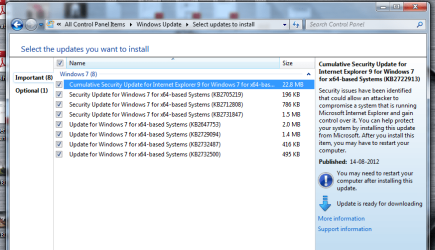
However, a windows update that was downloaded is failing it install. At shutdown the installations happen normally but when the machine powers back the configuration fails.
Can you help me resolve/reset this? Thanks.
 

My Computer My Computer

At a glance

Windows 7 Home Premium 64 bit
OS
Windows 7 Home Premium 64 bit

Attachments

  • Screenshot_23Aug12.png
    Screenshot_23Aug12.png
    48.3 KB · Views: 17

My Computer My Computer

At a glance

Windows 7 Home Premium 64 bit
OS
Windows 7 Home Premium 64 bit
Install them one by one and post here the result
 

My Computer My Computer

At a glance

32 bit
OS
32 bit
Also try giving the attached tool a run, it seems to work pretty well.
 
Last edited:

My Computer My Computer

At a glance

Microsoft Windows 7 Ultimate 64-bit 7601 Mult...Intel(R) Core(TM) i7 CPU Q [email protected] (Turbo...4.00 GBATI Mobility Radeon HD 5730
Computer type
Laptop
Computer Manufacturer/Model Number
Lenovo Y560 Laptop
OS
Microsoft Windows 7 Ultimate 64-bit 7601 Multiprocessor Free Service Pack 1
CPU
Intel(R) Core(TM) i7 CPU Q [email protected] (Turbo boost 2.93ghz)
Motherboard
Lenovo KL3
Memory
4.00 GB
Graphics Card(s)
ATI Mobility Radeon HD 5730
Sound Card
(1) ATI HDMI Audio (2) Realtek High Definition Audio
Monitor(s) Displays
1024 x 768 x 32 bits (4294967296 colors) @ 60 Hz
Screen Resolution
1366 x 768 x 32 bits (4294967296 colors) @ 60 Hz
Hard Drives
WDC WD5000BEVT-24A0RT0
Mouse
Logitech M305
Internet Speed
10 Mbps
Antivirus
My brain
Browser
Google Chrome
Other Info
Trying my best to learn.
Missed your last post. But just installing one update at a time worked great. The ones that failed worked after some of the other updates were installed. So i think it was a matter of order of the updates that was creating problems.
So all problems resolved.
Thanks so much shawn77! :)
I owe you one.
 

My Computer My Computer

At a glance

Windows 7 Home Premium 64 bit
OS
Windows 7 Home Premium 64 bit
you are more than welcome :)
 

My Computer My Computer

At a glance

32 bit
OS
32 bit
Hi shawn77, wondering if you could help me as I'm having similar issues?

Thanks in advance,
Peter
 

Attachments

My Computer My Computer

At a glance

Windows 7 Professional 64 bit
OS
Windows 7 Professional 64 bit
Here you go

Copy and Paste the following code into the
customscanfix.png
textbox.

:OTL
:Files
C:\Windows\SysWow64\mscanduin.dll
ipconfig /flushdns /c
:Commands
[PURITY]
[emptyjava]
[EMPTYFLASH]
Then click the Run Fix button at the top.

  • Click
    btnOK.png
    .
  • OTL may ask to reboot the machine. Please do so if asked.
    On reboot,you should be able to start security center service
 

My Computer My Computer

At a glance

32 bit
OS
32 bit
Thanks shawn77, you're a legend. I have been trying to fix this for days and in the end you made it easy.

Cheers
Peter
 

My Computer My Computer

At a glance

Windows 7 Professional 64 bit
OS
Windows 7 Professional 64 bit
You are more than welcome
 

My Computer My Computer

At a glance

32 bit
OS
32 bit
Hello! I currently have similar problems with Windows Security Centre and I wanted to see if you (shawn77) could help me with it as well.

My OTL text: View attachment OTL.Txt

Any help would be greatly appreciated.
 

My Computer My Computer

At a glance

Windows 7 Ultimate x64
OS
Windows 7 Ultimate x64
Back
Top