Solved How to handle "The Windows Security Center service can't be started."

yildizabdullah

New member
Member
Local time
10:13 AM
Messages
53
How to handle "The Windows Security Center service can't be started."

I continuously receive the following message within the Action Center:

Turn on Windows Security Center service (Important)

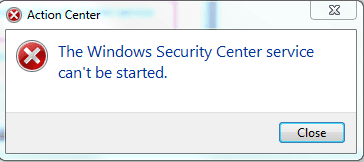
When I click on this message I get the error "The Windows Security Center service can't be started."

I am trying to apply the solution at the link support.microsoft.com/en-us/kb/2510301

However the Security Center service is not in the Services list.
 

Attachments

  • Untitled.png
    Untitled.png
    5.2 KB · Views: 31

My Computer My Computer

At a glance

Windows 7 Home Premium 64-bit
Computer type
Laptop
OS
Windows 7 Home Premium 64-bit
Have you clicked on 'open Action Center'? (the flag on the task bar that has the warning)

If you have, what are your "Security" settings showing?
 

My Computer My Computer

At a glance

Windows 7 Ultimate 32bit SP1Intel(R) Core(TM)2 Quad CPU @ 2.40GHz, 2400 MHz4 GBATI Radeon HD 2600 Pro
Computer type
PC/Desktop
Computer Manufacturer/Model Number
Bruce ... somewhere in his 40's
OS
Windows 7 Ultimate 32bit SP1
CPU
Intel(R) Core(TM)2 Quad CPU @ 2.40GHz, 2400 MHz
Motherboard
INTEL/D975XBX2
Memory
4 GB
Graphics Card(s)
ATI Radeon HD 2600 Pro
Monitor(s) Displays
Samsung SyncMaster 914v
Screen Resolution
1280 x 1024
Hard Drives
2/500GB each ... ST3500630AS ATA Device.
One is not connected
PSU
Rocketfish 700 W
Case
G.Skill Gigabyte Chassis
Keyboard
Standard PS/2 Keyboard
Mouse
Microsoft PS/2 Mouse
Internet Speed
DSL
Antivirus
Avira Internet Security
Browser
IE 11
Other Info
ATI HDMI Audio
I get the following error when I click on the message in the Action Center:

Capture_2.PNG

Here is what Services shows in my computer.

Capture.PNG
 

My Computer My Computer

At a glance

Windows 7 Home Premium 64-bit
Computer type
Laptop
OS
Windows 7 Home Premium 64-bit

My Computer My Computer

At a glance

Windows 7 pro x64 (or win 10 pro)
OS
Windows 7 pro x64 (or win 10 pro)
Yes I have. No viruses were detected.

I use Comodo Antivirus.

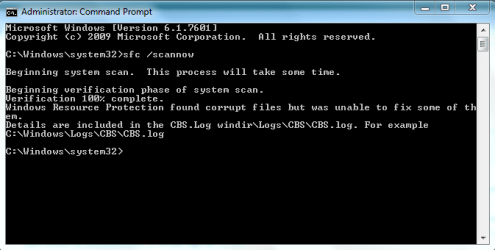
Here is CBS.log after running
Code:
sfc /scannow

Capture.PNG
 
Last edited:

My Computer My Computer

At a glance

Windows 7 Home Premium 64-bit
Computer type
Laptop
OS
Windows 7 Home Premium 64-bit
Finally I found a solution to my problem.

I applied a registry fix to enable the missing Security Center service again.

Click here for details.
 

My Computer My Computer

At a glance

Windows 7 Home Premium 64-bit
Computer type
Laptop
OS
Windows 7 Home Premium 64-bit
Back
Top