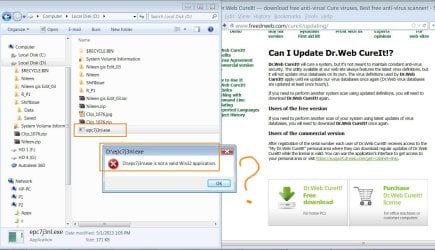
Solved Virus - Access denied - H:\system volume information

If you do not wish to use avast!, let's download Dr.Web CureIt!
Scroll down to the bottom of the page to download the free version.
Save to the Desktop.


After the file downloads, temporarily disable your antivirus program and disconnect from the Internet.
Info: How To Temporarily Disable Your Anti-virus, Firewall And Anti-malware Programs - Security Mini-Guides

Right-click the cureit.exe file
Drweb-cureit-9_zpsa6b7b265.gif
and select: Run as Administrator


At the Dr.Web CureIt console, License and Updates prompt, agree to participate, and select: Continue
At the Scan Mode prompt, click: Select objects for scanning

At the next prompt, Custom Scan, check all the items except:
Temporary files
System Restore points.


Next, press: Click to select files and folders
Under Browse, select the drives to scan making sure the drive containing the Operating System, normally C:, is selected, as well as the external Hard Drive. When done, click: OK


Reboot computer to Safe Mode (Tap F8 key before the Microsoft logo appears. Select Safe Mode from the options).


Back at Dr.Web, click: Start Scanning


Please do not run any other programs while the scan is in progress.
The time needed for a full scan depends on factors, such as system performance, available memory, running processes, number of drives and files, etc. Please be patient since it may take a while.


If a threat is detected, a screen similar to the following appears:
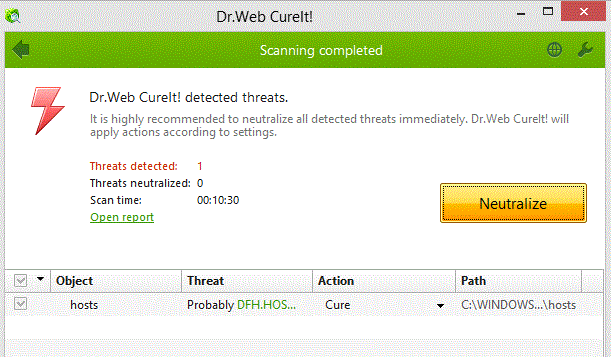
Drweb-cureit-5_zpsd7be6acf.gif


For each entry detected, click on the down arrow by Action, and select: Cure (or Ignore, if it is something you recognize):
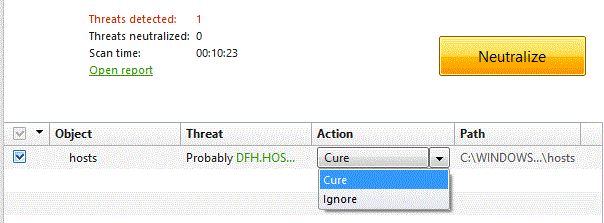

Drweb-cureit-8_zpsb099f9d5.gif


For the program to apply the selection on the Action column, click: Neutralize


When the actions are applied, a message appears: All security threats were neutralized successfully!


Now, click on the green: Open Report
The report appears in Notepad, and is called: Cureit.log
Save the report to the Desktop.


Close Dr.Web Cureit

Restart the computer to allow the files in use to be acted upon during reboot.


After the reboot, attach the Cureit.log, saved previously, in your reply.


Also re-enable your antivirus program when done.


Next, do the following:

Please download the Farbar Recovery Scan Tool
Select the 64-bit version.


Save it to your Desktop.
  • Double-click the downloaded file to run it.
  • When the tool opens click Yes to disclaimer.
  • Press the Scan button.
  • When done, FRST64 makes a log (FRST.txt) in the same directory from which the tool is run (Desktop).
Please copy/paste the FRST.txt in your reply. <<---
The first time the tool is run, it also makes another log: Addition.txt
Please post the Addition.txt in your reply also. <<---
 
Last edited:

My Computer My Computer

At a glance

Windows 7 Home Premium
Computer type
PC/Desktop
Computer Manufacturer/Model Number
An ol' eMachines
OS
Windows 7 Home Premium
Internet Speed
Fine for me...I'm retired!
If you do not wish to use avast!,let's download Dr.Web CureIt!
Scroll down to the bottom of the page to download the free version.
Save to the Desktop.


After the file downloads, temporarily disable your antivirus program and disconnect from the Internet.
Info: How To Temporarily Disable Your Anti-virus, Firewall And Anti-malware Programs - Security Mini-Guides

Right-click the cureit.exe file
Drweb-cureit-9_zpsa6b7b265.gif
and select: Run as Administrator


At the Dr.Web CureIt console, License and Updates prompt, agree to participate, and select: Continue
At the Scan Mode prompt, click: Select objects for scanning

At the next prompt, Custom Scan, check all the items except:
Temporary files
System Restore points.


Next, press: Click to select files and folders
Under Browse, select the drives to scan making sure the drive containing the Operating System, normally C:, is selected, as well as the external Hard Drive. When done, click: OK


Reboot computer to Safe Mode (Tap F8 key before the Microsoft logo appears. Select Safe Mode from the options).


Back at Dr.Web, click: Start Scanning


Please do not run any other programs while the scan is in progress.
The time needed for a full scan depends on factors, such as system performance, available memory, running processes, number of drives and files, etc. Please be patient since it may take a while.


If a threat is detected, a screen similar to the following appears:

Drweb-cureit-5_zpsd7be6acf.gif


For each entry detected, click on the down arrow by Action, and select: Cure (or Ignore, if it is something you recognize):


Drweb-cureit-8_zpsb099f9d5.gif


For the program to apply the selection on the Action column, click: Neutralize


When the actions are applied, a message appears: All security threats were neutralized successfully!


Now, click on the green: Open Report
The report appears in Notepad, and is called: Cureit.log
Save the report to the Desktop.


Close Dr.Web Cureit

Restart the computer to allow the files in use to be acted upon during reboot.


After the reboot, attach the Cureit.log, saved previously, in your reply.


Also re-enable your antivirus program when done.


Next, do the following:

Please download the Farbar Recovery Scan Tool
Select the 64-bit version.


Save it to your Desktop.
  • Double-click the downloaded file to run it.
  • When the tool opens click Yes to disclaimer.
  • Press the Scan button.
  • When done, FRST64 makes a log (FRST.txt) in the same directory from which the tool is run (Desktop).
Please copy/paste the FRST.txt in your reply. <<---
The first time the tool is run, it also makes another log: Addition.txt
Please post the Addition.txt in your reply also. <<---


[FONT=&quot] [/FONT]
[FONT=&quot]Thank you very much cottonball for the distinct help,[/FONT]
[FONT=&quot] [/FONT]
[FONT=&quot]I couldn’t manage to install the cureit.exe. Please, have a look on the attached file[/FONT]
[FONT=&quot] [/FONT]
[FONT=&quot] [/FONT]
[FONT=&quot]Does everyone need all of these tools just to kill this virus?[/FONT]
[FONT=&quot] [/FONT]
[FONT=&quot]Best[/FONT]
[FONT=&quot] [/FONT]
[FONT=&quot]Jamal[/FONT]
 

Attachments

  • Clip_1081.jpg
    Clip_1081.jpg
    162.9 KB · Views: 5

My Computer My Computer

At a glance

Windows 7 Ultimate x64
OS
Windows 7 Ultimate x64
Jamal NUMAN,

Does everyone need all of these tools just to kill this virus?

There is an arsenal of tools available. Have only provided instructions on a few, and sometimes one or more tools were just presented as options.

Unfortunately, in Post # 17 the avast! Scan Log was requested, and was not provided.

In Post # 18 running the Farbar Recovery Scan Tool (FRST) was requested.
Your reply:
... I couldn’t follow the instructions that you have sent! Sounds to be long and I got confused. By the way, as an end user, do I need to struggle all my life just to kill this virus!
The instructions provided to run FRST are written as simple and explicit as possible to assist individuals that are not computer savvy. The tool has been used successfully numerous times by Users with limited computer knowledge. It normally provides helpful information in resolving the issue at hand. However, the report produced by the tool was not provided.

In Post # 20 AutorunExterminator was suggested along with the use of your current AntiVirus or avast!.
Additionally, Post # 21 also suggested the use of Dr. Web CureIt, and a new, and very easy to use version of Farbar Recovery Scan Tool. Have no clue as to whether AutoRunExterminator was used, and information from Dr. Web CureIt or the new version of FRST was not provided.


My apology, Jamal NUMAN, for my incompetence in handling this issue, blindly. For several years I have dedicated much time and effort helping individuals remove malware from their computers, and this time, I'll jump out of the boat.

Respectfully, I withdraw from this thread, and welcome anyone to resume its work to help you with the issue. Good luck.
 
Last edited:

My Computer My Computer

At a glance

Windows 7 Home Premium
Computer type
PC/Desktop
Computer Manufacturer/Model Number
An ol' eMachines
OS
Windows 7 Home Premium
Internet Speed
Fine for me...I'm retired!
Jamal NUMAN,

Does everyone need all of these tools just to kill this virus?
There is an arsenal of tools available. Have only provided instructions on a few, and sometimes one or more tools were just presented as options.

Unfortunately, in Post # 17 the avast! Scan Log was requested, and was not provided.

In Post # 18 running the Farbar Recovery Scan Tool (FRST) was requested.
Your reply:
... I couldn’t follow the instructions that you have sent! Sounds to be long and I got confused. By the way, as an end user, do I need to struggle all my life just to kill this virus!
The instructions provided to run FRST are written as simple and explicit as possible to assist individuals that are not computer savvy. The tool has been used successfully numerous times by Users with limited computer knowledge. It normally provides helpful information in resolving the issue at hand. However, the report produced by the tool was not provided.

In Post # 20 AutorunExterminator was suggested along with the use of your current AntiVirus or avast!.
Additionally, Post # 21 also suggested the use of Dr. Web CureIt, and a new, and very easy to use version of Farbar Recovery Scan Tool. Have no clue as to whether AutoRunExterminator was used, and information from Dr. Web CureIt or the new version of FRST was not provided.


My apology, Jamal NUMAN, for my incompetence in handling this issue, blindly. For several years I have dedicated much time and effort helping individuals remove malware from their computers, and this time, I'll jump out of the boat.

Respectfully, I withdraw from this thread, and welcome anyone to resume its work to help you with the issue. Good luck.


[FONT=&quot]Let me first thank you for the massive effort and considerable time you have offered to help.[/FONT]
[FONT=&quot] [/FONT]
[FONT=&quot]With your district help, I could recover the hidden files and the shortcuts but the virus is still living in my machine.[/FONT]
[FONT=&quot] [/FONT]
[FONT=&quot]I’m sorry to bother you again and again. All what I wanted is a simple tool to kill the virus and then to have a deep breath.[/FONT]
[FONT=&quot] [/FONT]
[FONT=&quot] [/FONT]
[FONT=&quot]Very much appreciated. Your help meant a lot to me[/FONT]
[FONT=&quot] [/FONT]
[FONT=&quot]Best[/FONT]
[FONT=&quot] [/FONT]
[FONT=&quot]Jamal[/FONT]
 

My Computer My Computer

At a glance

Windows 7 Ultimate x64
OS
Windows 7 Ultimate x64
hi
I download RogueKiller and saved it to the desktop and performed the first scan with windows and browsers open. then realized that they should be closed so did another scan with everything closed. you can find both reports attached.
then as you instructed I used the "attrib -h -s -r -a /s /d G:\*.*"
my flash drive name is G:\
nothing seemed to happen in the command prompt as you see in the attached photo
then I checked my G:\ drive
the administrator shortcut still exists but the autorun.ini is gone for now. not sure if its permenantly gone though.
when i double click on the administrator shortcut i recevie this error: can not find script file "G:\Microsoft.exe".
at some point in the middle of these steps an unnamed folder showed up in the G:\ drive and a file with this extention: ".init" or something and one more file which sadly i can not recall its name. i shift+deleted them successfully.
after these steps I downloaded Rkill and ran scan. you can also find the report attached to this post.

I shoud also inform you that prior to these steps I used autorun exterminator for killing the autorun.ini but it did no good and kept cycling in a loop which the program deleted the autorun file but it kept regenerating itself over and over again.
oh and my anti virus does not detect any threats. it is ESET Smart Security.
there is also this wierd thing about my flash drive! the other day I inserted it into a pc at coffe net and on that pc I could see some stuff on my flash drive which I have deleted really long time ago(over 3years ago). what is wrong? how to fix it?
Is it possible that the virus aslo spread to my other flash drives or even my external hard drive?
one more thing! every time I insert this flash drive into my laptop, it says that it is recommanded to scan and fix the flash drive which I have done in a few times but the problem seems to resist no matter what!
could you plz check these out and help me with my problem?
 
Last edited:

My Computer My Computer

At a glance

Windows 7 Ultimate service pack 1 64bitIntel(R) Core(TM) i3
Computer type
Laptop
Computer Manufacturer/Model Number
HP
OS
Windows 7 Ultimate service pack 1 64bit
CPU
Intel(R) Core(TM) i3
Antivirus
ESET Smart Security
Browser
internet explorer / firefox
tooca,


Please start your own topic right in this forum:
System Security - Windows 7 Help Forums
Just press the orange New Thread button.

:info: Also, plug in the infected USB drive in your computer while pressing the left Shift key so that autorun is disabled (if present).

:info: Press on with RogueKiller as follows...
•Quit all programs
•Right-click the RogueKiller file and select: Run as Administrator
•Wait until the Prescan finishes
•Press: Scan
•Then, press the [Delete] button.

Please post the new RKreport (Mode: Delete) (created on the Desktop) in your reply. <<---


:info: Next, to find the User Name you are currently using, click the Start menu.
In the top right corner Windows 7 displays the current Windows profile that is running, right below your account picture.


:info: Now, go to Start > All Programs > Accessories > Command Prompt
Right-click Command Prompt, and select: Run as Administrator

Please copy (with mouse) the entire contents of the quote box below, paste it at the blinking cursor of the Command Prompt, and press: Enter

g:
attrib -s -h -a -r /s /d *.*
dir/b /s > C:\Users\username\Desktop\dirlist.txt

Note: Assumes g, on the first line, is the letter of your USB drive.
Replace username with yours.

Please provide the contents of the dirlist.txt (created on the Desktop) in your reply.

:info: Also, please quote this post in the new thread you create.

Thanks!
 

My Computer My Computer

At a glance

Windows 7 Home Premium
Computer type
PC/Desktop
Computer Manufacturer/Model Number
An ol' eMachines
OS
Windows 7 Home Premium
Internet Speed
Fine for me...I'm retired!
hi
I download RogueKiller and saved it to the desktop and performed the first scan with windows and browsers open. then realized that they should be closed so did another scan with everything closed. you can find both reports attached.
then as you instructed I used the "attrib -h -s -r -a /s /d G:\*.*"
my flash drive name is G:\
nothing seemed to happen in the command prompt as you see in the attached photo
then I checked my G:\ drive
the administrator shortcut still exists but the autorun.ini is gone for now. not sure if its permenantly gone though.
when i double click on the administrator shortcut i recevie this error: can not find script file "G:\Microsoft.exe".
at some point in the middle of these steps an unnamed folder showed up in the G:\ drive and a file with this extention: ".init" or something and one more file which sadly i can not recall its name. i shift+deleted them successfully.
after these steps I downloaded Rkill and ran scan. you can also find the report attached to this post.

I shoud also inform you that prior to these steps I used autorun exterminator for killing the autorun.ini but it did no good and kept cycling in a loop which the program deleted the autorun file but it kept regenerating itself over and over again.
oh and my anti virus does not detect any threats. it is ESET Smart Security.
there is also this wierd thing about my flash drive! the other day I inserted it into a pc at coffe net and on that pc I could see some stuff on my flash drive which I have deleted really long time ago(over 3years ago). what is wrong? how to fix it?
Is it possible that the virus aslo spread to my other flash drives or even my external hard drive?
one more thing! every time I insert this flash drive into my laptop, it says that it is recommanded to scan and fix the flash drive which I have done in a few times but the problem seems to resist no matter what!
could you plz check these out and help me with my problem?

Hi tooca,

I used the RogueKiller.exe (or RogueKillerX64.exe) and worked fine for me

Best

Jamal
 

My Computer My Computer

At a glance

Windows 7 Ultimate x64
OS
Windows 7 Ultimate x64
Hi there, Hidden Virus Remove

Type these on command prompt,
assume if your drive is f

f:\
attrib -a -s -r -h /s /d
del /f /q *.lnk
del /f /q *.ini
del /f /q *.inf
del /f /q *.db

remember press enter after a line

type %temp% on RUN then OK.. select all files then press shift+del on keyboard. close that window.
then type %userprofile% on RUN then OK.. find an un-proper file name and del that file or folder. thats a virus.
type msconfig on RUN then OK.. go to startup tab, un-tick an item that its command path aim to user account then save and restart your computer.

If you do it right, you might solve that virus manually without antivirus.
 

My Computer My Computer

At a glance

Windows 7 Professional x64intel Centrino 2
Computer type
Laptop
Computer Manufacturer/Model Number
HP
OS
Windows 7 Professional x64
CPU
intel Centrino 2
Type these on command prompt,
assume if your drive is f

f:\
attrib -a -s -r -h /s /d
del /f /q *.lnk
del /f /q *.ini
del /f /q *.inf
del /f /q *.db

remember press enter after a line

type %temp% on RUN then OK.. select all files then press shift+del on keyboard. close that window.
then type %userprofile% on RUN then OK.. find an un-proper file name and del that file or folder. thats a virus.
type msconfig on RUN then OK.. go to startup tab, un-tick an item that its command path aim to user account then save and restart your computer.

If you do it right, you might solve that virus manually without antivirus.

Thanks afada

Best

Jamal
 

My Computer My Computer

At a glance

Windows 7 Ultimate x64
OS
Windows 7 Ultimate x64
Back
Top