- Local time
- 10:49 AM
- Messages
- 47
Hi
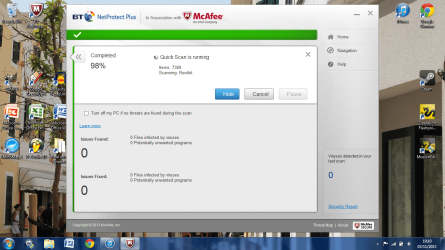
So today I was running a quick scan with my anti-virus/malware software (Bt Netprotect + in association with McAfee) and happened to glance at the screen to see this:
The file being scanned was labelled Rootkit
The quick scan was 99% complete
0 issues had been detected
0 issues has been fixed
My computer was secure, no action required. (according to the software)
The scan was taking quite a while over this mystery rootkit file, leading me to become obviously concerned.
FYI, no viral symptoms have been noticed in the hour or two after I first noticed this file in the scan. I've checked running processes, installed programs, run Ccleaner and multiple custom and complete virus scans using McAfee. I also searched the registry using regedit for any instances of 'bootrecord', although I didn't really know what the 3 returned items meant because I don't know what I'm doing in the registry - which is why i quit regedit and left it alone after that!
Nothing so far suggests I have an infection except the name, the file scan length and one other thing...
McAfee returns a result in its system scans which has led to much confusion in the past. I intend to also post this on to the McAfee community to try and determine exactly what they mean by it, but so far I'll just tell you what I know.
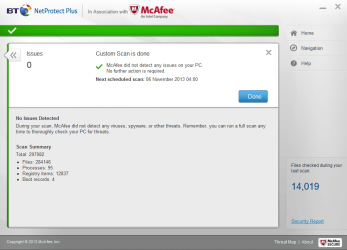
At the end of a scan of critical system files McAfee with return a result for 'Boot Records'. As I understand it this is likely linked to boot sectors, perhaps logging the number of times a set of files for booting a drive are stored.
Until today it used to return 3 boot records.
Today, the same day that 'rootkit' appeared, it returned 4.
Now I will advise you that the McAfee software underwent a graphical (and presumably virus definition) update in the last day or two also.
So...
My questions to you are:
1) Is 'rootkit' a rootkit, or a harmless file/folder?
I saw in regedit a branch for anti-virus stuff which contained the 3 returned items when I searched rootkit, is it possible it's a bit like having a folder for storing information about rootkits, called rootkit, but isn't actually a rootkit?
If it was a rootkit, how likely is it it would have been let through as safe by McAfee?
Why have my boot records gone up?
I've asked about boot records before and it seems to confuse non-McAfee people, but if you know anything about this please do help clarify. If it means I have files in the boot sector for 4 drives...why? Can I bring it back down to 3?
Can I locate, or even remove this file somehow?
I don't know anything about it, thanks to McAfee not providing anything other than the name 'rootkit' [which could be the file name but could equally be some nickname McAfee slapped on] I can't find anything on it's properties, location or file type.
FYI again; I run a pretty tight ship in terms of PC security, and I've no idea where this would have come from in regards to recent browsing. I checked browser history to make sure I hadn't been somehow redirected to a bad page and didn't spot anything.
That's all I can think of for now.
Thanks in advance.
MID
So today I was running a quick scan with my anti-virus/malware software (Bt Netprotect + in association with McAfee) and happened to glance at the screen to see this:
The file being scanned was labelled Rootkit
The quick scan was 99% complete
0 issues had been detected
0 issues has been fixed
My computer was secure, no action required. (according to the software)
The scan was taking quite a while over this mystery rootkit file, leading me to become obviously concerned.
FYI, no viral symptoms have been noticed in the hour or two after I first noticed this file in the scan. I've checked running processes, installed programs, run Ccleaner and multiple custom and complete virus scans using McAfee. I also searched the registry using regedit for any instances of 'bootrecord', although I didn't really know what the 3 returned items meant because I don't know what I'm doing in the registry - which is why i quit regedit and left it alone after that!
Nothing so far suggests I have an infection except the name, the file scan length and one other thing...
McAfee returns a result in its system scans which has led to much confusion in the past. I intend to also post this on to the McAfee community to try and determine exactly what they mean by it, but so far I'll just tell you what I know.
At the end of a scan of critical system files McAfee with return a result for 'Boot Records'. As I understand it this is likely linked to boot sectors, perhaps logging the number of times a set of files for booting a drive are stored.
Until today it used to return 3 boot records.
Today, the same day that 'rootkit' appeared, it returned 4.
Now I will advise you that the McAfee software underwent a graphical (and presumably virus definition) update in the last day or two also.
So...
My questions to you are:
1) Is 'rootkit' a rootkit, or a harmless file/folder?
I saw in regedit a branch for anti-virus stuff which contained the 3 returned items when I searched rootkit, is it possible it's a bit like having a folder for storing information about rootkits, called rootkit, but isn't actually a rootkit?
If it was a rootkit, how likely is it it would have been let through as safe by McAfee?
Why have my boot records gone up?
I've asked about boot records before and it seems to confuse non-McAfee people, but if you know anything about this please do help clarify. If it means I have files in the boot sector for 4 drives...why? Can I bring it back down to 3?
Can I locate, or even remove this file somehow?
I don't know anything about it, thanks to McAfee not providing anything other than the name 'rootkit' [which could be the file name but could equally be some nickname McAfee slapped on] I can't find anything on it's properties, location or file type.
FYI again; I run a pretty tight ship in terms of PC security, and I've no idea where this would have come from in regards to recent browsing. I checked browser history to make sure I hadn't been somehow redirected to a bad page and didn't spot anything.
That's all I can think of for now.
Thanks in advance.
MID
My Computer
At a glance
windows 7 home premium
- OS
- windows 7 home premium