3 Boot records detected. Is this ok?

mrirondream

New member
Member
Local time
4:11 PM
Messages
47
I have had this problem on numerous occasions.

I have occasionally noticed before (1 or two times far apart) that Mcafee showed 3 boot records, but put it down to fluke or possibly having a form of harddrive present - but I noticed yesterday that this had happened again, but didn't worry in the hope it would go away. Since then Mcafee has shown 3 boot records on at least 2 other occasions.

After the last scan I restarted the laptop and ran a scan again, with the same result. The only equipment connected to my laptop is a wireless USB mouse I have always used.

Please help?
Should I be worried? No items have been detected in recent scans with the exception of 1 Trojan (W32/sality!dam) which was lurking on a memory stick my friend lent me - an old virus that was successfully removed.

If memory serves correctly I had seen a mysterious 3rd boot record before I connected the USB this morning, although naturally I am now doubting myself.

With thanks, MID
 

My Computer My Computer

At a glance

windows 7 home premium
OS
windows 7 home premium
What do you mean by boot records?

Are you talking about selectable boot entries at startup?

Run bcdedit (no parameters) from an Elevated Command Prompt. What does it show you?
 

My Computer My Computer

At a glance

Windows 10 Pro X64Intel Quad Core i7-4770 @ 3.4Ghz16.0GB PC3-12800 DDR3 SDRAM 1600 MHzIntel Integrated HD Graphics
Computer type
PC/Desktop
Computer Manufacturer/Model Number
Lenovo IdeaCenter 450
OS
Windows 10 Pro X64
CPU
Intel Quad Core i7-4770 @ 3.4Ghz
Memory
16.0GB PC3-12800 DDR3 SDRAM 1600 MHz
Graphics Card(s)
Intel Integrated HD Graphics
Sound Card
Realtek HD Audio
Monitor(s) Displays
HP 22" LCD
Screen Resolution
1680 x 1050
Hard Drives
250GB Samsung EVO SATA-3 SSD
2TB Seagate ST2000DM001 SATA-2
1.5TB Seagate ST3150041AS SATA
Keyboard
Dell USB
Mouse
Lenovo USB
Internet Speed
Cable via Road Runner 3MB Upload, 30MB Download
Antivirus
Windows Defender, MBAM Pro, MBAE
Browser
Seamonkey
Other Info
UEFI/GPT
PLDS DVD-RW DH16AERSH
When McAfee runs a full scan it shows a list of results at the end. One of the fields is "boot records", which usually reads 2. Previous research suggests it's affiliated with master boots and whatnot - ensuring they aren't infected. Am i right in saying all harddrives will contain a "boot record" basically containing startup instructions?

I called up cmd and ran bcdedit, with the following return:
Code:
Windows Boot Manager
Identifier: {bootmgr}
Device: partition=\Device\HarddiskVolume1
Description: Windows Boot Manager
Lacale: en-US
Inherit: {globalsettings}
Extended input: Yes
Default: {current}
resume object: {(string of numbers)}
display order: {current}
tooldisplayorder: {memdiag}
timeout: 30
customactions: 0x1000085000001
0x5400000f
custom: 5400000f   (string of numbers)
 
Windows Boot Loader
identifier: {current}
device: partition=C:
path: \windows\system32\winload.exe
description: windows 7
locale: en-US
inherit: {bootloadersettings}
recoverysequence: {(string of numbers)}
recoverenabled: yes
osdevice: partition=C:
systemroot: \windows
resumeobject: (string of numbers)
nx: OptIn

MID
 

My Computer My Computer

At a glance

windows 7 home premium
OS
windows 7 home premium
"A Master Boot Record (MBR) is a special type of boot sector at the very beginning of partitioned computer mass storage devices like fixed disks or removable drives intended for use with IBM PC-compatible systems and beyond."

This quote from wikipedia suggests each partition would have it's own "boot record" - hence the usual reading of 2. One for the C drive and one for the recovery drive D.

Given that I don't have any mass storage devices connected to my computer, and nothing in the CD tray, the logical conclusion is that perhaps I have another partition on my laptops harddrive.

Unfortunately there are currently no signs of this illusive third partition, and I know not of a way to search for it.

MID
 

My Computer My Computer

At a glance

windows 7 home premium
OS
windows 7 home premium
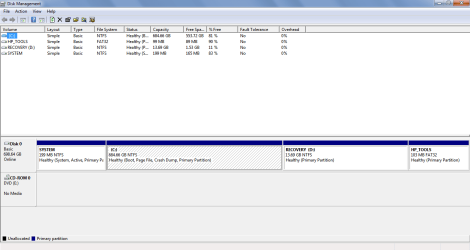
I just typed partition into the start menu and opened a Disk management program

Here i see 4 subheadings, 3 of which are NTFS:

[C:]
RECOVERY [D:]
SYSTEM

and one of which is FAT32:

HP_TOOLS


Not sure if this helps or not. There are 3 NTFS headings (which I presume are partitions) but none of them look like they would have been made recently.
 

My Computer My Computer

At a glance

windows 7 home premium
OS
windows 7 home premium
Please post back a screenshot of your maximized Disk Management drive map and listings:

1. Type Disk Management in Start :orb: Search box.
2. Open Disk Mgmt. window and maximize it.
3. Type Snipping Tool in Start Search box.
4. Open Snipping Tool, choose Rectangular Snip, click New, draw a box around full drive map and all listings.
5, Save Snip, attach using paper clip in Reply Box.

Tell us what is on each partition.

As you have HP, have you gotten the Clean Reinstall - Factory OEM Windows 7? If not I would strongly consider it since HP has the worst load of preinstalled crapware of any brand which no tech enthuiasts would impose on Win7. At least Clean Up Factory Bloatware .

Further, one of the worst problems we see here is MucAfee. I would immediately uninstall it to replace with lean mean Microsoft Security Essentials and keep the Win7 firewall and all other Important and optional Windows Updates current.
 
Here is my maximised screenshot of the disk management screen:

As for McAfee, I have never had any problems - in fact It's always done a more than adequet job of protecting my PC without glitches so far, so forgive me if I don't immediately change the software I have become accustomed to.


What's on the partitions:

C: All my personal files etc
HP_TOOLS: I have no idea, probably some HP tools
Recovery D: The recovery drive
SYSTEM: presumably system files


MID
 

Attachments

  • disk management.png
    disk management.png
    19.4 KB · Views: 19

My Computer My Computer

At a glance

windows 7 home premium
OS
windows 7 home premium
Thank you for the advice on increasing performance, but can I please redirect your attention to the problem at hand?

The HP pre-installs should not be the source of my third boot record because I have always had them installed, and yet the scan previously read 2 boot records (with the bloatware).

MID
 

My Computer My Computer

At a glance

windows 7 home premium
OS
windows 7 home premium
I looked at your boot manager output and it looks normal, so I didn't comment upon it but instead - since you mentioned unrelated performance problems - focused on why someone so knowledegable would be running the corrupt factory preinstall which affects all aspects of the OS and boot negatively.

Code:
Windows Boot Manager
Identifier: {bootmgr}
Device: partition=\Device\HarddiskVolume1
Description: Windows Boot Manager
Lacale: en-US
Inherit: {globalsettings}
Extended input: Yes
Default: {current}
resume object: {(string of numbers)}
display order: {current}
tooldisplayorder: {memdiag}
timeout: 30
customactions: 0x1000085000001
0x5400000f
custom: 5400000f   (string of numbers)
 
Windows Boot Loader
identifier: {current}
device: partition=C:
path: \windows\system32\winload.exe
description: windows 7
locale: en-US
inherit: {bootloadersettings}
recoverysequence: {(string of numbers)}
recoverenabled: yes
osdevice: partition=C:
systemroot: \windows
resumeobject: (string of numbers)
nx: OptIn
 
Last edited:
I think those HP machines will boot off of at least one other partition if you hold the proper key combo during bootup. If you completely and total destroy your Win7 setup, you can use the alt boot option to do a system restore to day one condition.

I think it's a terrible waste of HD space, [more so when drives were under a Gig] but it does work
 

My Computer My Computer

At a glance

Windows 7 Ultimate x64/Windows 8.1 Pro x64AMD FX 835016 Gigs [1 Gig for Shared Vid mem]Integrated ATI Radeon HD 4250 GPU
Computer type
PC/Desktop
Computer Manufacturer/Model Number
Custom Build
OS
Windows 7 Ultimate x64/Windows 8.1 Pro x64
CPU
AMD FX 8350
Motherboard
Asus M5A88-M
Memory
16 Gigs [1 Gig for Shared Vid mem]
Graphics Card(s)
Integrated ATI Radeon HD 4250 GPU
Sound Card
ALC892 8-Channel High Def Audio
Monitor(s) Displays
VGA main, HDMI to TV
Screen Resolution
VGA Screen: 1440 x 900 TV Screen: 1920 x 1080
Hard Drives
120 Gig SSD
150 Gig HDD
~2TB on server. [My Docs, Photos, My Music, dedicated drives, Desktop is a folder. All on the server. Used by both Win7/Win8.1, and other machines in the house]
PSU
850 Watt
Case
Smilodon Raidmax
Cooling
Cooler Master Hyper212EVO
Keyboard
[2,] Wireless
Mouse
[2,] Wireless
Internet Speed
Broadband
Antivirus
Microsoft Security Essentials
Browser
IE, Chrome, Opera
Other Info
Blue-Ray DL drive Z:\
Server: 2.4Ghz Dual core, with about 2TB on it. WinServ2003Enterprise x32 w 8Gigs usable RAM [YES]
MacBook: 2Ghz Core2Duo, 2Gigs, Snow 160Gigs
Acer AspireOne: 1.6Ghz, Dual-Core, 1 Gig, XP Home
6 Android Devices
iPod Touch
So you're saying at some point I pressed some keys on startup which caused the system to boot off an additional partition?

Well as long as it's nothing to worry about I'll ignore it for now and look at removing this useless HP stuff when I have more free time.

Thanks for your help guys!
MID
 

My Computer My Computer

At a glance

windows 7 home premium
OS
windows 7 home premium
I'm saying that during the first splash screen [before windows logo] you CAN press certain key to make the computer do other things...
 

My Computer My Computer

At a glance

Windows 7 Ultimate x64/Windows 8.1 Pro x64AMD FX 835016 Gigs [1 Gig for Shared Vid mem]Integrated ATI Radeon HD 4250 GPU
Computer type
PC/Desktop
Computer Manufacturer/Model Number
Custom Build
OS
Windows 7 Ultimate x64/Windows 8.1 Pro x64
CPU
AMD FX 8350
Motherboard
Asus M5A88-M
Memory
16 Gigs [1 Gig for Shared Vid mem]
Graphics Card(s)
Integrated ATI Radeon HD 4250 GPU
Sound Card
ALC892 8-Channel High Def Audio
Monitor(s) Displays
VGA main, HDMI to TV
Screen Resolution
VGA Screen: 1440 x 900 TV Screen: 1920 x 1080
Hard Drives
120 Gig SSD
150 Gig HDD
~2TB on server. [My Docs, Photos, My Music, dedicated drives, Desktop is a folder. All on the server. Used by both Win7/Win8.1, and other machines in the house]
PSU
850 Watt
Case
Smilodon Raidmax
Cooling
Cooler Master Hyper212EVO
Keyboard
[2,] Wireless
Mouse
[2,] Wireless
Internet Speed
Broadband
Antivirus
Microsoft Security Essentials
Browser
IE, Chrome, Opera
Other Info
Blue-Ray DL drive Z:\
Server: 2.4Ghz Dual core, with about 2TB on it. WinServ2003Enterprise x32 w 8Gigs usable RAM [YES]
MacBook: 2Ghz Core2Duo, 2Gigs, Snow 160Gigs
Acer AspireOne: 1.6Ghz, Dual-Core, 1 Gig, XP Home
6 Android Devices
iPod Touch
Back
Top