Technical Expert help with Windows 7 Boot Records Please

Andreamstowe

New member
Local time
5:21 PM
Messages
19
I have a HP Desktop PC running Windows 7 64 bit- C: Operating System D: Recovery Petition no amendments or extras added. Recently I had to use HP System Recovery to Reload Windows to Factory Settings due to a serious error. Everything went well and the system is error free, boots up no problems. However when I run McAfee I have noticed it now scans 3 Boot Records whereas before it only scanned 2. I am no technological queen and this concerned me a bit, should I be concerned when the system is working perfectly. IS McAfee reading all the old data on my Desktop? Can someone explain why I have 3 Boot Records in plain easy to follow English and also if this is acceptable. All answers appreciated and thank you for reading. PS In Msconfig I only have one C: Operating system showing in boot up. Apologies if this is in the wrong section, I am relatively new and will stand corrected.:eek:
 

My Computer

OS
Windows 7 64 bit
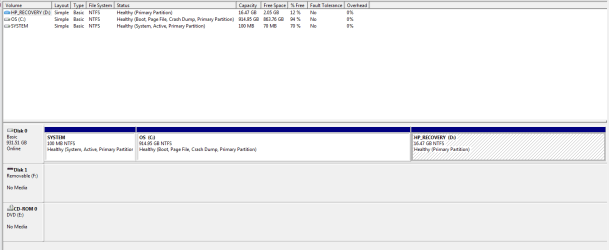
It may help answer your question about the additional third boot record if you could post a screenshot of the expanded (maximized) view of disk management. The HP System Recovery may have added a new partition to the hard drive.

How To Access Disk Management in Windows 7

http://www.sevenforums.com/tutorials/9733-screenshots-files-upload-post-seven-forums.html

TO OTHER READERS OF THIS THREAD: PLEASE DO NOT TURN THIS INTO ANOTHER DEBATE ABOUT WHICH ANTI-VIRUS PRODUCT IS THE BEST!

Many long-times users of Windows 7 (people who have been testing and using it since Beta and before) feel that McAfee is not a good choice. It is a known contributor to crashes, BSODs, etc and has been nicknamed MuckAfee. Unless you have a compelling reason to keep it on your computer (like you just paid for a 3 year subscription with no money back option) it would probably be in your computer's best interests to use a different product.

NOTE: If you decide to uninstall McAfee you must uninstall it from Control Panel > Program and Features first and then use the McAfee Consumer Products Removal tool. Failure to use the removal tool could leave behind file remnants that may interfere with getting a clean install of a replacement product.

How to uninstall or reinstall supported McAfee products using the Consumer Products Removal tool (MCPR)

Since your computer appears to be working just fine, I wouldn't be overly concerned about this situation. It probably wouldn't hurt to use the built-in Windows 7 utilities for general maintenance purposes. I'd run disk cleanup (including the removal of unnecessary system files in Step 5), defrag, and just for grins and giggles a system file checker scan. (Run the SFC from an elevated command prompt in option two. If problems are found, run the scan 3 times and reboot the computer after each scan.)

http://www.sevenforums.com/tutorials/818-disk-cleanup-open-use.html

http://www.sevenforums.com/tutorials/11733-disk-defragmenter-open-use.html?ltr=D

http://www.sevenforums.com/tutorials/1538-sfc-scannow-command-system-file-checker.html
 

My Computer

Computer type
Laptop
Computer Manufacturer/Model Number
Sony Vaio VPCEB47GM Laptop
OS
Win 7 Pro 64-bit
CPU
Intel i5 2.4 Ghz
Memory
8GB DDR3
Graphics Card(s)
Intel HD 3000
Sound Card
IDT High Definition
Monitor(s) Displays
15.6 WGXA Anti-Glare LED
Screen Resolution
1280x800
Hard Drives
640Gb 7200rpm
Antivirus
MSE
Browser
Opera (primary) with IE9 backup
Thanks for your response

I am afraid I am not celver enough to do a maximized screen shot but I can give you the following Information from the Maximised screen:

System: Healthy, System, Active, Primary Petition 100MB 70MB Free Space

OS (C:) Healthy, Boot, Page File, Crash Dump, Primary Petition 914.95 Capacity 863.79GB Free

HP Recovery (D:) Healthy, Primary Petition Capacity 16.47GB Free Space 2.05GB

Thanks for your comments regarding McAfee, very interesting and makes one think twice. Thanks also for responding to my query.

I Hope this helps, I am starting to think I am just over cautious.:cool:
 

My Computer

OS
Windows 7 64 bit
From what you described about your Disk, it sounds OK. As was said above, it you have not paid for McAfee Anti-Virus, you could probably switch out and it might be better. If you paid for it, I wouldn't worry about it. If you PC is running OK, I wouldn't get too concerned about it.
 

My Computer

Computer type
PC/Desktop
Computer Manufacturer/Model Number
Custom Build
OS
Windows 7 Home Premium 32-Bit - Build 7600 SP1
CPU
Intel Core i3-2120 3.30Ghz
Motherboard
Asus P8Z68-V LX Intel Z68 Socket H2 ATX
Memory
Kingston 4 GB DDR3 1333 mhz
Graphics Card(s)
AMD Radeon HD6670
Sound Card
Sound Blaster Audigy SE 24-Bit
Monitor(s) Displays
Asus VE228
Screen Resolution
1440 X 900
Hard Drives
OCZ Vertex 3 120 GB Sata 3 SSD ==
Kingston SH103/S3 120 G Hyper X 120 GB SSD ==
Western Digital 500 GB Caviar Green 7200 RPM ==
PSU
Corsair CX600M == 600 Watt
Case
NZXT Apollo - Silver with Clear Side Panel
Cooling
Three 120 mm Fans
Keyboard
Microsoft Natural 4000
Mouse
Microsoft Custom Optical 3000
Internet Speed
AT&T Fiber Optic Wireless Network
Antivirus
Microsoft Security Essentials
Browser
Chrome
Other Info
120 mm Blue LED Fan -- Three Blue LED Lazer Light Sticks
:) Thank you for your response, it is appreciated.
 

My Computer

OS
Windows 7 64 bit
Did you have the 100MB partition before?

Now tou have 3 partitions and so 3 "volume boot records".

When pc boots it:
  • reads the first sector on physical disk. It's called the MBR or master boot record. It contains some code that executes. It searches for the active partition on that disk.
  • it loads the first sector of that partition. It's called the VBR or "Volume Boot Record". That piece of code is executed. If partition has been made with win7... it has instructions the find and execute file bootmgr in root of partition
  • this small program loads the boot menu. (\boot\bcd)
Master boot record - Wikipedia, the free encyclopedia
Volume boot record - Wikipedia, the free encyclopedia
 

My Computer

Computer type
Laptop
Computer Manufacturer/Model Number
ACER ASPIRE 5742G
OS
Microsoft Windows 7 Home Premium 64-bits 7601 Multiprocessor Free Service Pack 1
CPU
Intel(R) Core(TM) i3 CPU M 370 @ 2.40GHz
Motherboard
Acer Aspire 5742G
Memory
4,00 GB
Graphics Card(s)
ATI Mobility Radeon HD 5400 Series
Sound Card
(1) AMD High Definition Audio Device (2) Realtek High Defi
Screen Resolution
1366 x 768 x 32 bits (4294967296 colors) @ 60 Hz
Hard Drives
WDC WD5000BEVT-22ZAT0

My Computer

Computer Manufacturer/Model Number
HP, Dell, Gateway, Toshiba - 4 laptops and 2 desktops
OS
Vista, Windows7, Mint Mate, Zorin, Windows 8
CPU
from 1.6GHz Duo to i7
Monitor(s) Displays
2x HP w2207
Hard Drives
5x HDD, 7x SSD, 12x Externals
Keyboard
with trackball - no mices
Mouse
Trackball mice
Internet Speed
DSL 6000
Thanks for your responses

In all honesty I have never looked at the disc managment before so I cannot honestly say if all 3 were there before. However, My daughter and husband got new HP Systems at the same time and we have just checked those and they have 4 boot records , the 3 I have and one called HP Tools?

As for McAfee, |I think I have the message loud and clear but I feel sure before it has only ever said it has checked two Boot Records but I could be wrong.

Should I really only have two then or, as some members say, is it fine as it is?:confused:
 

My Computer

OS
Windows 7 64 bit
system: not realy needed. it's 100MB in size. It's for the bootmanager and bootmenu. From this bootmenu you can start vista,winxp,win7,linux and so on...if installed on pc. So you can format win7OS partition and reinstall win7.... menu is still intact and can still boot linux, vista, winxp etc. partition system is unencrypted and can have bitlocker code so you can encrypt win7os partition.

you don't have bitlocker I assume and will never use it (?) And you only have win7 ... so it is not very usefull.

HP_RECOVERY partition for "restore is for factory to settings".
HP_TOOLS partition is for special HP_TOOLS... most of the time: drivers, free trial software etc.

Leave it the way it is!! It's working fine
 

My Computer

Computer type
Laptop
Computer Manufacturer/Model Number
ACER ASPIRE 5742G
OS
Microsoft Windows 7 Home Premium 64-bits 7601 Multiprocessor Free Service Pack 1
CPU
Intel(R) Core(TM) i3 CPU M 370 @ 2.40GHz
Motherboard
Acer Aspire 5742G
Memory
4,00 GB
Graphics Card(s)
ATI Mobility Radeon HD 5400 Series
Sound Card
(1) AMD High Definition Audio Device (2) Realtek High Defi
Screen Resolution
1366 x 768 x 32 bits (4294967296 colors) @ 60 Hz
Hard Drives
WDC WD5000BEVT-22ZAT0
Andreamstowe we understand your questions and concerns. I would like to mentions two things.
1. Just as whs has stated you disk management looks normal.
2. McAfee is always one update away from screwing up your computer. McAffe is living on a very, very old reputation of being a quality product. It no longer can back up that reputation.
 

My Computer

Computer type
PC/Desktop
Computer Manufacturer/Model Number
Home made Desktop
OS
Windows 10 Pro. 64/ version 1709 Windows 7 Pro/64
CPU
Intel i7-6800K @ 4.3
Motherboard
ASUS X-99 Deluxe II
Memory
Corsair Platinum 16 gig @2400
Graphics Card(s)
EVGA GTX 1070 OC
Monitor(s) Displays
Asus 27" LED LCD/VE278Q
Screen Resolution
1920-1080 or 1280-720 HDMI
Hard Drives
INTEL SSD 730-240 Gb Sata 3.0/
PSU
EVGA Platium 1200W
Case
Phanteks Luxe Tempered Glass 8 fans/ one radiator
Cooling
XSPC/ Water Cooled CPU
Keyboard
Das 4 Professional
Mouse
Logitech M705/MX Anywhere 2-S
Internet Speed
100 mbits
Antivirus
Microsoft Security Essentials/ Malwarebytes Premium 3.0/ SAS
Browser
I.E. 11 default/Firefox/ ISP Time Warner Cable/Spectrum
Other Info
LG BluRay Burner/
Sound system-KLipsch-THX/
Icy Dock ssd Hot Swap bays.
Thank you

:) Thanks ever so much for all your comments, you have been really helpful.
I feel much better now, I obviously have not messed up in the way I thought I had. Cheers.....
 

My Computer

OS
Windows 7 64 bit
I think you are confusing 'boot records' and 'partitions'. It would be a lengthy explanation - so I will skip that. Just be assured that your system looks OK.

Different manufacturers make different setups. Some add a tools partition. That's probably the least important. The System partition and the C partition you need to run the PC. Don't touch those. And the recovery partition you need if you ever want to reinstall the system - although making frequent images is a better strategy in order to recover from a fatal crash.
 

My Computer

Computer Manufacturer/Model Number
HP, Dell, Gateway, Toshiba - 4 laptops and 2 desktops
OS
Vista, Windows7, Mint Mate, Zorin, Windows 8
CPU
from 1.6GHz Duo to i7
Monitor(s) Displays
2x HP w2207
Hard Drives
5x HDD, 7x SSD, 12x Externals
Keyboard
with trackball - no mices
Mouse
Trackball mice
Internet Speed
DSL 6000
Back
Top