Instant Savings App

Seagasm

New member
I have been trying to remove the "Instant Savings App" from my Chrome Browser Extensions with a tremendous amount of difficulty, and without success.

I have uninstalled it via the windows7 Programs and features tab, removed a duplicate copy from Chrome Extensions (how I got a duplicate copy I do not know), removed from Firefox (which I have reverted back to) but have not used this for at least 12 months, searched with what I know from the registry, checked through the various folders for the program, installed the latest Malwarebytes program and ran a full scan, removed whatever file that was recommended, ran CCleaner and Junkware Removal Tool utility.

OK, so this is what I have got: I found that I could NOT remove the duplicated Instant Savings App from the extensions in Google Chrome. There is NO Rubbish Bin icon to do this. I discovered also the app showed it was managed by a company and could not be removed! I sent a message to Google but I do not expect to get a reply, something I'm afraid they are not good at.

What pissed me off was whenever I did a search with Google search, as I read down all of a sudden this App would appear at the top of the page displaying say three further options a prices??? and push the remaining options I was reading down the page. Bloody annoying, and I really have no idea how the App got there in the first place, or when.

I have since uninstalled Chrome, then re-installed it but no, the damb thing is still there. I have uninstalled it again in discussed and switched Back to Firefox.

Has anyone else had this experience and if so, how did you overcome the problem above? I notice that there is no support forum at Google, or have I missed something?

Thank you in advance.
 

My Computer

Computer type
Laptop
Computer Manufacturer/Model Number
Toshiba Qosimo
OS
Windows 7 32bit Home
Type chrome://extensions in the address bar.

This will open a page showing all the installed extensions - is this one listed there? If so, is there an uninstall option? If yes, try removing it that way for a start.
 

My Computer

Computer type
PC/Desktop
Computer Manufacturer/Model Number
Golden Mk. I.4
OS
Windows 10 Pro x64 ; Xubuntu x64
CPU
Intel i7 860 @ 2.80 GHz O/C'ed to 4.0GHz
Motherboard
Gigabyte P55A-UD3R Rev.1. Award BIOS F13
Memory
16GB Corsair Vengance DDR3 @ 661 MHz Dual Channel (9-9-9-24)
Graphics Card(s)
EVGA NVidia GTX 560 1024MB
Sound Card
Realtek Integrated
Monitor(s) Displays
Dual Samsung SyncMaster 2494HS
Screen Resolution
1920*1080 and 1920*1080
Hard Drives
1*Samsung 840 EVO 120GB SSD;
1*OCZ Vertex 2 60GB SSD;
2*Samsung F3 SpinPoint 1TB in RAID0;
1*Samsung F1 SpinPoint 1TB;
2*Western Digital 1TB External USB 3.0
1*Western Digital 500GB External USB 3.0
1*Seagate 500GB External USB 2.0
PSU
Thermaltake ToughPower QFan 750W
Case
Thermaltake Element S VK60001W2Z
Cooling
Corsair H60 Water Cooling, 2*230mm and 2*80mm case fans
Keyboard
Logitech G110
Mouse
Logitech MX518
With Respect, please read the post. I cannot remove or even disable the app.
Instant Savings App 1.0
Instant Savings App shows you the latest deals and discounts while you surf the web!Permissions Visit website
ID: gpccbgnnmhlpdilognneiahbojndgchh
(This extension is managed and cannot be removed or disabled.)
Inspect views: background.html

Installed by enterprise policy.

I have reinstalled Google Chrome and it is still there.
 

My Computer

Computer type
Laptop
Computer Manufacturer/Model Number
Toshiba Qosimo
OS
Windows 7 32bit Home
Thank you maxie, I am familiar with that link but had not installed Hitman Pro. I have done this since with nil results. What I did find was that the DOS program JRT did not work, maybe SE virus program or firewall prevented that. I have uninstalled Chrome prior to Hitman Pro for the third time and will reboot and try Chrome again to see what happens.

I appreciate your help, thank you ;)
 

My Computer

Computer type
Laptop
Computer Manufacturer/Model Number
Toshiba Qosimo
OS
Windows 7 32bit Home
No problem please let us know how things work out
 

My Computer

Computer Manufacturer/Model Number
W530-3630QM1
OS
windows 7 home 64bit
CPU
INTEL-CORE I7
Memory
16GB
Hard Drives
750GB
Browser
Chrome
Please download AdwCleaner by Xplode and save to your Desktop.
  • Double click on AdwCleaner.exe to run the tool.
    Vista/Windows 7/8 users right-click and select Run As Administrator.
  • Click on the Scan button.
  • AdwCleaner will begin...be patient as the scan may take some time to complete.
  • After the scan has finished, click on the Report button...a logfile (AdwCleaner[R#].txt) will open in Notepad for review (where the largest value of # represents the most recent report).
  • The contents of the log file may be confusing. Unless you see a program name that you know should not be removed, don't worry about it. If you see an entry you want to keep, let me know about it.
  • Copy and paste the contents of that logfile in your next reply.
  • A copy of all logfiles are saved in the C:\AdwCleaner folder which was created when running the tool.

Using AdwCleaner v3: Scan & Clean:
Double click on AdwCleaner.exe to run the tool again.
Click on the Scan button.
AdwCleaner will begin to scan your computer like it did before.
After the scan has finished...

This time click on the Clean button.
Press OK when asked to close all programs and follow the onscreen prompts.
Press OK again to allow AdwCleaner to restart the computer and complete the removal process.
After rebooting, a logfile report (AdwCleaner[S#].txt) will open automatically (where the largest value of # represents the most recent report).
Copy and paste the contents of that logfile in your next reply.
A copy of that logfile will also be saved in the C:\AdwCleaner folder
 

My Computer

Computer type
PC/Desktop
Computer Manufacturer/Model Number
Bruce ... somewhere in his 40's
OS
Windows 7 Ultimate 32bit SP1
CPU
Intel(R) Core(TM)2 Quad CPU @ 2.40GHz, 2400 MHz
Motherboard
INTEL/D975XBX2
Memory
4 GB
Graphics Card(s)
ATI Radeon HD 2600 Pro
Monitor(s) Displays
Samsung SyncMaster 914v
Screen Resolution
1280 x 1024
Hard Drives
2/500GB each ... ST3500630AS ATA Device.
One is not connected
PSU
Rocketfish 700 W
Case
G.Skill Gigabyte Chassis
Keyboard
Standard PS/2 Keyboard
Mouse
Microsoft PS/2 Mouse
Internet Speed
DSL
Antivirus
Avira Internet Security
Browser
IE 11
Other Info
ATI HDMI Audio
Thank you Jacee, I did backup, ran AWDCleaner, obtained the report and saved it. As I was browsing I hit the clean by mistake ($hit happens), the system rebooted and provided a report. Things appear to be operating OK but I have not reinstalled Chrome yet. Now, do you want me to copy and paste here?
Regards
 

My Computer

Computer type
Laptop
Computer Manufacturer/Model Number
Toshiba Qosimo
OS
Windows 7 32bit Home

My Computer

Computer type
PC/Desktop
Computer Manufacturer/Model Number
Home Built Desktop By DataTech
OS
Windows 7 Ultimate X64 SP1
CPU
Intel i5-2550K, Differing ~4.4-4.8GHz No built in GPU
Motherboard
ASUS P8Z68-V PRO/GEN3
Memory
16GB G.Skill Sniper 1866MHz @ 2133MHz 2x8GB
Graphics Card(s)
ASUS GTX650TIB-DC2OC-2GD5, (650TI Boost)
Sound Card
Onboard Realtek 5-1
Monitor(s) Displays
Samsung P2570HD
Screen Resolution
1920x1080
Hard Drives
Samsung 840 Pro 256GB SSD for OS, 500GB Seagate Constellation (Enterprise drive) for Data
PSU
Corsair HX650W
Case
Inwin Dragon Rider
Cooling
Hyper 212 EVO w/two Noctua fans, push-pull, @1300 RPM
Keyboard
E-Z Eyes, bright yellow keys with large characters
Mouse
steelseries SENSEI Laser Pro Gaming
Internet Speed
48-51Mbs Mbs down, 11 Mbs up Xfinity Cable
Antivirus
Norton Internet Security 2013
Browser
IE 10, Opera, Pale Moon if needed
Other Info
4 case fans, LG BluRay-RE, ASUS DVD-RW, Mr. Fusion power supply, 1.21 gigawatts.
Thank you Jacee, I did backup, ran AWDCleaner, obtained the report and saved it. As I was browsing I hit the clean by mistake ($hit happens), the system rebooted and provided a report. Things appear to be operating OK but I have not reinstalled Chrome yet. Now, do you want me to copy and paste here?
Regards
Yes, please :)
 

My Computer

Computer type
PC/Desktop
Computer Manufacturer/Model Number
Bruce ... somewhere in his 40's
OS
Windows 7 Ultimate 32bit SP1
CPU
Intel(R) Core(TM)2 Quad CPU @ 2.40GHz, 2400 MHz
Motherboard
INTEL/D975XBX2
Memory
4 GB
Graphics Card(s)
ATI Radeon HD 2600 Pro
Monitor(s) Displays
Samsung SyncMaster 914v
Screen Resolution
1280 x 1024
Hard Drives
2/500GB each ... ST3500630AS ATA Device.
One is not connected
PSU
Rocketfish 700 W
Case
G.Skill Gigabyte Chassis
Keyboard
Standard PS/2 Keyboard
Mouse
Microsoft PS/2 Mouse
Internet Speed
DSL
Antivirus
Avira Internet Security
Browser
IE 11
Other Info
ATI HDMI Audio
Good! Now, download (free version) Malwarebytes' Anti-Malware to your desktop
Malwarebytes : Malwarebytes Anti-Malware FREE
* Double-click mbam-setup.exe and follow the prompts to install the program.Right click to run as Administrator, using Windows 7 or Vista.
* At the end, be sure a checkmark is placed next to Update Malwarebytes' Anti-Malware and Launch Malwarebytes' Anti-Malware, then click Finish.
* If an update is found, it will download and install the latest version.
* Once the program has loaded, select Perform full scan, then click Scan.
* When the scan is complete, click OK, then Show Results to view the results.
* Be sure that everything is checked, and click Remove Selected.
* When completed, a log will open in Notepad. Please save it to a convenient location. Copy and Paste that log into your next reply.
 

My Computer

Computer type
PC/Desktop
Computer Manufacturer/Model Number
Bruce ... somewhere in his 40's
OS
Windows 7 Ultimate 32bit SP1
CPU
Intel(R) Core(TM)2 Quad CPU @ 2.40GHz, 2400 MHz
Motherboard
INTEL/D975XBX2
Memory
4 GB
Graphics Card(s)
ATI Radeon HD 2600 Pro
Monitor(s) Displays
Samsung SyncMaster 914v
Screen Resolution
1280 x 1024
Hard Drives
2/500GB each ... ST3500630AS ATA Device.
One is not connected
PSU
Rocketfish 700 W
Case
G.Skill Gigabyte Chassis
Keyboard
Standard PS/2 Keyboard
Mouse
Microsoft PS/2 Mouse
Internet Speed
DSL
Antivirus
Avira Internet Security
Browser
IE 11
Other Info
ATI HDMI Audio
I have exactly the same problem! I have uninstalled it using the control panel. I have no trashcan option to remove it in Google chrome. I have followed countless instructions over the internet to remove it. I have ran CCleaner, AdWCleaner, Junkware Removal Tool Utility, Hitman Pro, Malwarebytes Anti-Malware, Norton Power Eraser, Spyhunter, Instant Savings App Removal Tool. None of these programs or the specific step by step instructions provided any help. These programs do detect the Instant Savings App and give me the option to remove it, however when I go back into Google Chrome the Instant Savings App is still there soldiering on and ruining my life!!!!! I have since followed instructions to remove this App manually, again to no avail!

PLEASE HELP!!!!!! LOL.
 

My Computer

Computer type
PC/Desktop
Computer Manufacturer/Model Number
Toshiba
OS
windows 7
Hello Ryanh, Well I have done the works and followed Jaycee's instructions to the letter. I have installed Chrome again and yes, it is still there. I do point out that prior to reinstalling Chrome, I deleted anything google but it still appeared. It leaves me to wondering if this is actually part of the google setup file and delete the old setup file then download another copy and try again. Anyway, removed again and back to FireFox..........
 

My Computer

Computer type
Laptop
Computer Manufacturer/Model Number
Toshiba Qosimo
OS
Windows 7 32bit Home
How to uninstall and re-move Chrome 'extensions' https://support.google.com/chrome/answer/113907?hl=en

Now, do this:
Removing/Uninstalling AdwCleaner:
Double click on AdwCleaner.exe to run the tool again. Click on the Uninstall button.
Click Yes when asked are you sure you want to uninstall.
Both AdwCleaner.exe, its folder and all logs will be removed.

Reinstall AdwCleaner.....
AdwCleaner by Xplode and save to your Desktop.
  • Double click on AdwCleaner.exe to run the tool.
    Vista/Windows 7/8 users right-click and select Run As Administrator.
  • Click on the Scan button.
  • AdwCleaner will begin...be patient as the scan may take some time to complete.
  • After the scan has finished, click on the Report button...a logfile (AdwCleaner[R#].txt) will open in Notepad for review (where the largest value of # represents the most recent report).
  • The contents of the log file may be confusing. Unless you see a program name that you know should not be removed, don't worry about it. If you see an entry you want to keep, let me know about it.
  • Copy and paste the contents of that logfile in your next reply.
  • A copy of all logfiles are saved in the C:\AdwCleaner folder which was created when running the tool.

Using AdwCleaner v3: Scan & Clean:
Double click on AdwCleaner.exe to run the tool again.
Click on the Scan button.
AdwCleaner will begin to scan your computer like it did before.
After the scan has finished...

This time click on the Clean button.
Press OK when asked to close all programs and follow the onscreen prompts.
Press OK again to allow AdwCleaner to restart the computer and complete the removal process.
After rebooting, a logfile report (AdwCleaner[S#].txt) will open automatically (where the largest value of # represents the most recent report).
Copy and paste the contents of that logfile in your next reply.
A copy of that logfile will also be saved in the C:\AdwCleaner folder
 

My Computer

Computer type
PC/Desktop
Computer Manufacturer/Model Number
Bruce ... somewhere in his 40's
OS
Windows 7 Ultimate 32bit SP1
CPU
Intel(R) Core(TM)2 Quad CPU @ 2.40GHz, 2400 MHz
Motherboard
INTEL/D975XBX2
Memory
4 GB
Graphics Card(s)
ATI Radeon HD 2600 Pro
Monitor(s) Displays
Samsung SyncMaster 914v
Screen Resolution
1280 x 1024
Hard Drives
2/500GB each ... ST3500630AS ATA Device.
One is not connected
PSU
Rocketfish 700 W
Case
G.Skill Gigabyte Chassis
Keyboard
Standard PS/2 Keyboard
Mouse
Microsoft PS/2 Mouse
Internet Speed
DSL
Antivirus
Avira Internet Security
Browser
IE 11
Other Info
ATI HDMI Audio
Jacee, thank you for your reply. Firstly, as previousley advised, the How to uninstall and re-move Chrome 'extensions' https://support.google.com/chrome/answer/113907?hl=en link does not work. There is is no trash can Icon and the notation beneath the extension says "This extension is managed and cannot be removed or disabled."

I have carried out the AdwCleaner as suggested above and it cannot locate ANY files or folders that require quarantine or removal on my system.

I would suggest that this Instant Savings App is a part of the Chrome Browser or the seach engine and that it leaves cookies on the computer. I searched the internet and found that maybe the answer possible has something to do with the Google-Opt-Out-Plugin. I did manage to ban the app for 24hours and that worked but was advised if I cleared my internet cookies, the app would return. I would also suggest that maybe this has something to do with the Google search engine???? Additionally, I think I am only having this problem with Chrome, not FireFox. Unfortunately, I am not that experienced in such matters and rely on the excellent advise from this forum to assist me.

Thank you, Barry
 

My Computer

Computer type
Laptop
Computer Manufacturer/Model Number
Toshiba Qosimo
OS
Windows 7 32bit Home
I would suggest that this Instant Savings App is a part of the Chrome Browser or the seach engine and that it leaves cookies on the computer.

If that was the case then everyone using Chrome would have the same experience.....but that's not the case. Perhaps it piggy-backed off something else you downloaded?
 

My Computer

Computer type
PC/Desktop
Computer Manufacturer/Model Number
Golden Mk. I.4
OS
Windows 10 Pro x64 ; Xubuntu x64
CPU
Intel i7 860 @ 2.80 GHz O/C'ed to 4.0GHz
Motherboard
Gigabyte P55A-UD3R Rev.1. Award BIOS F13
Memory
16GB Corsair Vengance DDR3 @ 661 MHz Dual Channel (9-9-9-24)
Graphics Card(s)
EVGA NVidia GTX 560 1024MB
Sound Card
Realtek Integrated
Monitor(s) Displays
Dual Samsung SyncMaster 2494HS
Screen Resolution
1920*1080 and 1920*1080
Hard Drives
1*Samsung 840 EVO 120GB SSD;
1*OCZ Vertex 2 60GB SSD;
2*Samsung F3 SpinPoint 1TB in RAID0;
1*Samsung F1 SpinPoint 1TB;
2*Western Digital 1TB External USB 3.0
1*Western Digital 500GB External USB 3.0
1*Seagate 500GB External USB 2.0
PSU
Thermaltake ToughPower QFan 750W
Case
Thermaltake Element S VK60001W2Z
Cooling
Corsair H60 Water Cooling, 2*230mm and 2*80mm case fans
Keyboard
Logitech G110
Mouse
Logitech MX518
Yes I had thought of that as well, maybe someone may have an answer. Thank you
 

My Computer

Computer type
Laptop
Computer Manufacturer/Model Number
Toshiba Qosimo
OS
Windows 7 32bit Home

My Computer

Computer type
PC/Desktop
Computer Manufacturer/Model Number
Home Built Desktop By DataTech
OS
Windows 7 Ultimate X64 SP1
CPU
Intel i5-2550K, Differing ~4.4-4.8GHz No built in GPU
Motherboard
ASUS P8Z68-V PRO/GEN3
Memory
16GB G.Skill Sniper 1866MHz @ 2133MHz 2x8GB
Graphics Card(s)
ASUS GTX650TIB-DC2OC-2GD5, (650TI Boost)
Sound Card
Onboard Realtek 5-1
Monitor(s) Displays
Samsung P2570HD
Screen Resolution
1920x1080
Hard Drives
Samsung 840 Pro 256GB SSD for OS, 500GB Seagate Constellation (Enterprise drive) for Data
PSU
Corsair HX650W
Case
Inwin Dragon Rider
Cooling
Hyper 212 EVO w/two Noctua fans, push-pull, @1300 RPM
Keyboard
E-Z Eyes, bright yellow keys with large characters
Mouse
steelseries SENSEI Laser Pro Gaming
Internet Speed
48-51Mbs Mbs down, 11 Mbs up Xfinity Cable
Antivirus
Norton Internet Security 2013
Browser
IE 10, Opera, Pale Moon if needed
Other Info
4 case fans, LG BluRay-RE, ASUS DVD-RW, Mr. Fusion power supply, 1.21 gigawatts.
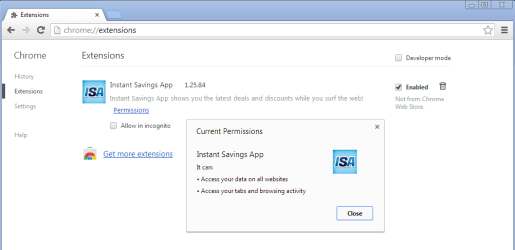
Please post a screenshot of the extension that you are having trouble getting rid of...

When I install the extension (inside a virtual machine), I see this:

isa1.png

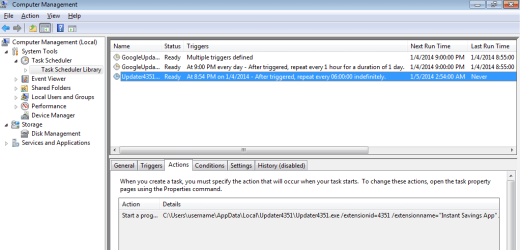
The installation creates a scheduled task.
AdwCleaner does not remove that task nor the app that it calls.
The task re-installs the extension.

isa2.png

Do you have a scheduled task like that?
If so, disable it, but don't delete it - yet.
 

My Computer

Computer type
Laptop
Computer Manufacturer/Model Number
Employer provided Dell Latitude
OS
W7 Pro SP1 64bit
CPU
i7
Memory
8GB
Graphics Card(s)
Intel HD Graphics
Hard Drives
crappy SSD
Antivirus
Employer mandated Symantec Endpoint Protection
Browser
Pale Moon 64bit, IE11 64bit & Chrome 64bit
Back
Top