Instant Savings App

Its not in the registry I searched the whole thing for the ID Number no luck. The only thing I was able to find was the hidden folder in your user directory (not in regedit).

1- Turn on hidden folders/files
2- search for chrome in your user directory.
3- Its in the extension folder inside chrome. There you will see a bunch of other folders each starting with an ID number with all the files in it. Problem is when you delete that folder and restart chrome the thing is back with a new ID number.

So basically, getting rid of the ID number is not the problem. Its what is behind that gives the ID Number. There should be an executable somewhere that is effected by this and behind it all.
...and Process Monitor should be able to show you exactly what app is putting it back.

You can modify the steps in my post to filter on
AppData\Local\Google\Chrome\User Data\Default\Extensions
just paste that in instead of the ID letters shown in the video.

Bingo I think you are on to it. I will try it out at earliest convenience. Thank you!
 

My Computer

Computer type
PC/Desktop
OS
Win 7 Home Premium
Usernameissues,

I'm not that technical on windows and not too familiar with process monitor but I think you are on the right track to get this thing gone. Its got to be an executable doing all this imho.

Its not in the list of programs in windows 7 as far as add remove programs goes. Its a malicious virus for adware and God knows what else.

I'm currently on my mac that doesn't have this problem I will get back about it when I get on my windows machine later.
Thanks for being willing to look into this via Process Monitor (PM).

Glance at the video in my edited post above.
You should be able to modify the steps to just:
start PM
delete the folder for this evil extension
start chrome
stop PM
filter on AppData\Local\Google\Chrome\User Data\Default\Extensions
 

My Computer

Computer type
Laptop
Computer Manufacturer/Model Number
Employer provided Dell Latitude
OS
W7 Pro SP1 64bit
CPU
i7
Memory
8GB
Graphics Card(s)
Intel HD Graphics
Hard Drives
crappy SSD
Antivirus
Employer mandated Symantec Endpoint Protection
Browser
Pale Moon 64bit, IE11 64bit & Chrome 64bit
Maybe it's just a semantics thing, but are you searching the registry or opening each key?

I'm looking for
expand HKEY_Local_Machine
expand the subkey Software
expand the subkey Policies
expand the subkey Google
expand the subkey Chrome

Why? Becasue I have fat fingers and make a few typos.

Do you still get "This extension is managed and cannot be removed or disabled."?

Good morning, I believe I mentioned previously I do not have the subkey Google or the subkey Chrome in the Policies folder.

Yes, having another look at the reinstalled Chrome, the message This extension is managed and cannot be removed or disabled. is still there.
 

My Computer

Computer type
Laptop
Computer Manufacturer/Model Number
Toshiba Qosimo
OS
Windows 7 32bit Home
I did a search on both HKEY_Local_Machine\Software\Policies\ and there is no Google\Chrome. I also previously searched the registry for the ID number with no results. Now bear in mind I have removed Chrome as previously advised, but what the hell, I will reinstall it and see what happens!!! Standby.
Just to make sure that we are on the same page...
...please download the full chrome installer from here:
Download Google Chrome 31.0.1650.63 - FileHippo.com

View attachment 300678

We have three members in this thread now with the same version of the Instant Savings App (version 1.0). Can anyone tell us what this app might have come bundled with?

When this extension comes back, does the Instant Savings App also appear in Window 7's list of Programs and Features?

Are any of you familiar with using Process Monitor? It should be able to tell you how the extension is getting back in.

edit:
There is nothing to install:
Download the zipped (compressed) file
Open the zipped (compressed) file (folder)
Copy the files somewhere
Run the exe
Agree to the EULA

When it starts for the first time, it automatically starts gathering data. Just let it keep doing that while you install Chrome. Once Chrome completes its install, check that the problem extension is present. If it is there, you can now stop Process Monitor's data gathering:

Stop it by pressing on this button:
294490d1385110278-ie-skype-stopped-working-chrome-ff-ok-after-windows-update-pm1.png


In the stopped mode, there should be a red X thru that magnifying glass:
294491d1385110278-ie-skype-stopped-working-chrome-ff-ok-after-windows-update-pm2.png


Go to Chrome > Settings > Extensions
Place a check by the Developer mode option.
Highlight and copy the extension ID letters to the Windows clipboard.

Go to Process Monitor.
Set up a filter for that ID as shown in this video:

Best viewed at 720p and in the full screen mode.


The video shows me using Procmon64.exe. You don't need to worry about that. When you start Procmon.exe on a 64bit OS, it extracts Procmon64.exe and runs that. I use Process Monitor so often, that I grabbed a copy of Procmon64.exe from my user temp folder and I start it directly.

I apologise, I did not see this post. I will uninstall Chrome again, download a new copy and go through the motions you suggest above, stay tuned!
 

My Computer

Computer type
Laptop
Computer Manufacturer/Model Number
Toshiba Qosimo
OS
Windows 7 32bit Home
Would this be a better site to get Chrome?
https://www.google.com/intl/en/chro..._source=en-hpp&utm_medium=hpp&utm_campaign=en
3rd party sites are notorious for adding payloads to free downloads. Just a thought, I don't/won't use Chrome.

And a scary part of the Chrome EULA.


4.2 Google is constantly innovating in order to provide the best possible
experience for its users. You acknowledge and agree that the form and nature of
the Services which Google provides may change from time to
time without prior notice to you.
 

My Computer

Computer type
PC/Desktop
Computer Manufacturer/Model Number
Home Built Desktop By DataTech
OS
Windows 7 Ultimate X64 SP1
CPU
Intel i5-2550K, Differing ~4.4-4.8GHz No built in GPU
Motherboard
ASUS P8Z68-V PRO/GEN3
Memory
16GB G.Skill Sniper 1866MHz @ 2133MHz 2x8GB
Graphics Card(s)
ASUS GTX650TIB-DC2OC-2GD5, (650TI Boost)
Sound Card
Onboard Realtek 5-1
Monitor(s) Displays
Samsung P2570HD
Screen Resolution
1920x1080
Hard Drives
Samsung 840 Pro 256GB SSD for OS, 500GB Seagate Constellation (Enterprise drive) for Data
PSU
Corsair HX650W
Case
Inwin Dragon Rider
Cooling
Hyper 212 EVO w/two Noctua fans, push-pull, @1300 RPM
Keyboard
E-Z Eyes, bright yellow keys with large characters
Mouse
steelseries SENSEI Laser Pro Gaming
Internet Speed
48-51Mbs Mbs down, 11 Mbs up Xfinity Cable
Antivirus
Norton Internet Security 2013
Browser
IE 10, Opera, Pale Moon if needed
Other Info
4 case fans, LG BluRay-RE, ASUS DVD-RW, Mr. Fusion power supply, 1.21 gigawatts.
Ok, we're still not meshing, methinks.

You say search, I say drill down....


I'll make a more direct inquiry.
  • Please post a screen shot of your registry
    HKEY_Local_Machine\Software\Policies
  • See what Autoruns from Live.Sysinternals.com tells you about. well things that run automatically [learn more]
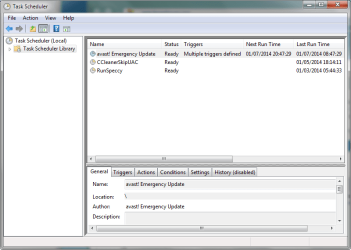
  • Also please post a screen shot of your scheduled tasks
TaskSchedlr.png

Good morning, I believe I mentioned previously I do not have the subkey Google or the subkey Chrome in the Policies folder.

Yes, having another look at the reinstalled Chrome, the message This extension is managed and cannot be removed or disabled. is still there.
 

My Computer

Computer type
Laptop
Computer Manufacturer/Model Number
HP Pavilion dv6-6c10us
OS
x64 (6.3.9600) Win8.1 Pro & soon dual boot x64 (6.1.7601) Win7_SP1 HomePrem
CPU
AMD A6-3420M APU with Radeon(tm) HD Graphics
Motherboard
Hewlett-Packard 1805
Memory
6.00 GB
Graphics Card(s)
AMD Radeon(TM) HD 6520G
Sound Card
(1) AMD High Definition Audio Device (2) IDT High Definiti
Monitor(s) Displays
HP W2072a 20" LCD (1600 x 900) @ 60 Hz
Screen Resolution
1366 x 768 x 32 bits (4294967296 colors) @ 60 Hz
Hard Drives
ST640LM0 00 HM641JI SATA Disk Device
Keyboard
Logitech k520 wireless KB
Mouse
Logitech m320 wireless mouse (bundled with KB)
Internet Speed
15/5 | 54 MB Wireless 'n'
Antivirus
Realtime: Defender or Avast | On-demand: Malwarebytes, ESET
Browser
IE 11 on Win8, IE 10 on win 7
Other Info
Media: [Gimp, Audacity, VLC] || Comm: [WEmail 2012, Skype] || Productivity: [OpenOffice,| Textpad] || Utils: [Sysinternals, cCleaner, Speccy, Defraggler]
I have reinstalled Chrome from the Google Site and ran ProcMan as instructed above. I found all these lines related to Chrome

"10:50:00.7875461 a.m. chrome.exe 9616 FASTIO_UNLOCK_SINGLE E:\Users\My Username\AppData\Local\Google\Chrome\User Data\Default\Local Storage\chrome-extension_gpccbgnnmhlpdilognneiahbojndgchh_0.localstorage FAST IO DISALLOWED Offset: 1,073,741,825, Length: 1",

the magnifying icon has a red cross, now what happens?
 

My Computer

Computer type
Laptop
Computer Manufacturer/Model Number
Toshiba Qosimo
OS
Windows 7 32bit Home
Would this be a better site to get Chrome?
https://www.google.com/intl/en/chro..._source=en-hpp&utm_medium=hpp&utm_campaign=en
3rd party sites are notorious for adding payloads to free downloads. Just a thought, I don't/won't use Chrome.

And a scary part of the Chrome EULA.


4.2 Google is constantly innovating in order to provide the best possible
experience for its users. You acknowledge and agree that the form and nature of
the Services which Google provides may change from time to
time without prior notice to you.
Sadly, that website asks you to download a file...
...which starts a .NET process
...that downloads another file
...which downloads still another file.
And the mess that it runs during the setup is too hard to trace.

chrome.png
There are actually more files involved...
...I just did not capture all of them in one screenshot :-(

I've never seen Filehippo change a file. As far as I know, they just host the EXE so that they get ad revenue. According to some authors, Filehippo is very picky about what they will host. Perfectly good apps cannot get in because they are not big enough players :-(

The Chrome file on Filehippo is a single file that contains the full install - nothing more to download. I've used that particular link many times and watched what it does during the install. But you are correct, it is often best to go to the author's website to get installation files.


I hear ya about the EULA. That is why I only use Chrome for certain things.
 

My Computer

Computer type
Laptop
Computer Manufacturer/Model Number
Employer provided Dell Latitude
OS
W7 Pro SP1 64bit
CPU
i7
Memory
8GB
Graphics Card(s)
Intel HD Graphics
Hard Drives
crappy SSD
Antivirus
Employer mandated Symantec Endpoint Protection
Browser
Pale Moon 64bit, IE11 64bit & Chrome 64bit
I have reinstalled Chrome from the Google Site and ran ProcMan as instructed above. I found all these lines related to Chrome

"10:50:00.7875461 a.m. chrome.exe 9616 FASTIO_UNLOCK_SINGLE E:\Users\My Username\AppData\Local\Google\Chrome\User Data\Default\Local Storage\chrome-extension_gpccbgnnmhlpdilognneiahbojndgchh_0.localstorage FAST IO DISALLOWED Offset: 1,073,741,825, Length: 1",

the magnifying icon has a red cross, now what happens?
Were there any lines that had those ID letters (gpccbgnnmhlpdilognneiahbojndgchh) in the Path but were not related to Chrome.exe? In other words, is there some app that is adding the extension? (and maybe the lines that you found related to Chrome just show Chrome reading the extension after it has been installed)

If it turns out that the app just tells Chrome to install this extension, then it is going to be harder to find in the Process Monitor data.

It might be easier to download the Chrome installed from the Filehippo link.
(http://www.filehippo.com/download_google_chrome/54482/)
Save it to your desktop (or anywhere you like).
Upload it to virustotal.com to see if it is clean.
Post the virustotal link for us to see.
(Here is mine.)

Once you have the installer file, you can uninstall and re-install Chrome a few hundred more times while we sort this out :-(


It is odd that Chrome can show the extension as managed and yet there are no registry keys in the area that Slartybart mentioned.
Autoruns might help and/or a clean boot.
Or you might even try the safe mode.
 

My Computer

Computer type
Laptop
Computer Manufacturer/Model Number
Employer provided Dell Latitude
OS
W7 Pro SP1 64bit
CPU
i7
Memory
8GB
Graphics Card(s)
Intel HD Graphics
Hard Drives
crappy SSD
Antivirus
Employer mandated Symantec Endpoint Protection
Browser
Pale Moon 64bit, IE11 64bit & Chrome 64bit

My Computer

Computer type
PC/Desktop
Computer Manufacturer/Model Number
Home Built Desktop By DataTech
OS
Windows 7 Ultimate X64 SP1
CPU
Intel i5-2550K, Differing ~4.4-4.8GHz No built in GPU
Motherboard
ASUS P8Z68-V PRO/GEN3
Memory
16GB G.Skill Sniper 1866MHz @ 2133MHz 2x8GB
Graphics Card(s)
ASUS GTX650TIB-DC2OC-2GD5, (650TI Boost)
Sound Card
Onboard Realtek 5-1
Monitor(s) Displays
Samsung P2570HD
Screen Resolution
1920x1080
Hard Drives
Samsung 840 Pro 256GB SSD for OS, 500GB Seagate Constellation (Enterprise drive) for Data
PSU
Corsair HX650W
Case
Inwin Dragon Rider
Cooling
Hyper 212 EVO w/two Noctua fans, push-pull, @1300 RPM
Keyboard
E-Z Eyes, bright yellow keys with large characters
Mouse
steelseries SENSEI Laser Pro Gaming
Internet Speed
48-51Mbs Mbs down, 11 Mbs up Xfinity Cable
Antivirus
Norton Internet Security 2013
Browser
IE 10, Opera, Pale Moon if needed
Other Info
4 case fans, LG BluRay-RE, ASUS DVD-RW, Mr. Fusion power supply, 1.21 gigawatts.
When you get the chance, please run a full scan
ESET: Online Scanner
:info: Overview | Help


I also recently came across a multi-engine scanner. I tried it, but my system is protected and scanned once a week with Malwarebytes so noting turned up. I uninstalled herdProtect after testing.

herdProtect is currently in Beta, so that might be reason enough NOT to try it
Download herdProtect - Free Anti-Malware Platform
herdProtect said:
herdProtect Anti-Malware Scanner is a fast and free Windows desktop program which detects malicious threats, spyware and adware by utilizing 68 industry anti-malware scanners. It has no impact on your system resources and uses the herdProtect cloud-based scanning engine. Best of all, like all herdProtect products, the scanner is a second line of defense and is designed to work perfectly with your existing antivirus software.
 

My Computer

Computer type
Laptop
Computer Manufacturer/Model Number
HP Pavilion dv6-6c10us
OS
x64 (6.3.9600) Win8.1 Pro & soon dual boot x64 (6.1.7601) Win7_SP1 HomePrem
CPU
AMD A6-3420M APU with Radeon(tm) HD Graphics
Motherboard
Hewlett-Packard 1805
Memory
6.00 GB
Graphics Card(s)
AMD Radeon(TM) HD 6520G
Sound Card
(1) AMD High Definition Audio Device (2) IDT High Definiti
Monitor(s) Displays
HP W2072a 20" LCD (1600 x 900) @ 60 Hz
Screen Resolution
1366 x 768 x 32 bits (4294967296 colors) @ 60 Hz
Hard Drives
ST640LM0 00 HM641JI SATA Disk Device
Keyboard
Logitech k520 wireless KB
Mouse
Logitech m320 wireless mouse (bundled with KB)
Internet Speed
15/5 | 54 MB Wireless 'n'
Antivirus
Realtime: Defender or Avast | On-demand: Malwarebytes, ESET
Browser
IE 11 on Win8, IE 10 on win 7
Other Info
Media: [Gimp, Audacity, VLC] || Comm: [WEmail 2012, Skype] || Productivity: [OpenOffice,| Textpad] || Utils: [Sysinternals, cCleaner, Speccy, Defraggler]
Hi, after some disappointment with Chrome and this app, I have re-installed chrome to find the "Instant Savings App" is gone. I lost the count of attempts trying to locate the problem however, and I would like to thank all of you who have assisted me. I take heed to all of your advise and would like to offer this link Remove "Installed by enterprise policy" extension from Chrome to anyone else who has a similar problem. Thank you.
 

My Computer

Computer type
Laptop
Computer Manufacturer/Model Number
Toshiba Qosimo
OS
Windows 7 32bit Home
Back
Top