EST free firewall for win 7 home

oxdie23

New member
Member
Local time
11:37 PM
Messages
7
Location
London, uk
I guys. I've looked around the net but only to read contradictory info. Some sites swearing on win firewall, others really not!

Any suggestions for a free, decent firewall for win 7 home (sp1)

Thanks
 

My Computer My Computer

Computer type
PC/Desktop
Computer Manufacturer/Model Number
custom
OS
Windows 7, 64bit
CPU
i5 4670 overclocked
Motherboard
gigabytes z97x
Memory
16 GB 2400mhz
Graphics Card(s)
2x Asus gtx760
Hard Drives
500GB Samsung evolution 840

WD 2000gb
Antivirus
Nero 2014
Browser
firefox
Win 7 has an excellent firewall already and I recommend most users to stick with it. I used to recommend Zone Alarm Free to people who would know which transmissions to allow and which to block but I had a problem with a recent update so I'm waiting to see if that gets ironed out.
 

My Computer My Computer

Computer type
PC/Desktop
Computer Manufacturer/Model Number
Custom Build
OS
Win 7 Ultimate 64 bit
CPU
Intel i7-3930K
Motherboard
ASUS P9X79 WS
Memory
Kingston HyperX Genesis 32GB Kit (8x4GB Modules) 1600MHz DDR
Graphics Card(s)
MSI R7850 Twin Frozr 2GD5/OC Radeon HD 7850 2GB 256-bit GDDR
Sound Card
Asus Xonar Essence STX
Monitor(s) Displays
3x Asus VG248QE 24", Vizio 32" TV
Screen Resolution
1920 x 1080, ?
Hard Drives
Samsung 128GB 840 Pro SSD (1),
Samsung 4TB 850 EVO SSDs (4)
Samsung 4TB 850 EVO SSDs (16) external backup drives used in 2.5" hot swap bays in the computer.
PSU
Corsair HX750w
Case
Antec Two Hundred v2 (modified)
Cooling
Cooler Master GeminII S524 120mm (fan replaced with a 140mm)
Keyboard
Logitech G510s
Mouse
Logitech M525 (two in use)
Internet Speed
=< 32Mbps down, 8Mbps up
Antivirus
AVAST!, MBAM, SAS, Spybot S&D (all but MBAM free) Glary Util
Browser
IE11
Other Info
LSI 9211-8i HBA card (8 SATA III ports), 2.5" & 3.5" Hot Swap Bays, HooToo HT-CR001 PCI-E to USB 3.0 Internal Hub + 6 Slot Card Reader, and LG Model CH12LS28 BD-ROM Optical Drive. Also, ScanSnap S1500 ADF duplexing scanner, Canon 9000F flat bed scanner, Corsair SP2500 2.1 speakers, Samsung CLP 415nw laser color printer, Cyberpower PP2200SW UPS
I would vote for the Windows Firewall myself too. Despite its disastrous default configuration, it's very capable once you learn how to use it. Just give it a try, go directly for "firewall with advanced security" control panel and investigate a bit about its rules and learn how to block and allow specific programs/ports/protocols, etc.

Its most important drawback is the lacking of outgoing block notifications, which makes troubleshooting network problems a bit harder. A few third party programs attempt (without great results) to give those notifications.

But other than that, I find it to be a surprisingly good piece of software, so far it hasn't turned me down.


to people who would know which transmissions to allow and which to block

If people don't know even basic network management, it's better not to have a firewall at all. It's a good tool and all, but without proper knowledge it will just get in the way and will fail to give any protection.
 

My Computer My Computer

Computer type
Laptop
Computer Manufacturer/Model Number
Toshiba Sattelite A665-S6092
OS
Windows 7 Ultimate x64
CPU
Intel Core i7-740QM
Memory
8 GB DDR3
Graphics Card(s)
NVIDIA GeForce 330GT
Screen Resolution
1366x768
Hard Drives
Samsung 840 SSD 500GB
1TB USB3 external HD
Cooling
Coolermaster Notepal U3 notebook cooling pad
Internet Speed
3mbps ASDL
Antivirus
ClamWin 0.98.7
Browser
Opera 12.17 x86 (main), Firefox 38 (sec), IE11 (last resort)
Many have referred to Windows 'firewall' as being more of a 'wide open door'...

I never had a Windows Firewall warning....one wonders just what sort of things it will actually block by default.

Personal Firewall 7.0, on the other hand, has a learning period after it's intial install, but, seems quite adept at initially blocking almost everything 'new', but, prompts you for permission (block/allow), with ability to trust assorted signed publishers. I don't mind the occasional 'block/allow' popup, I'd rather have that than 99.99% of malicious stuff allowed through by default!
 

My Computer My Computer

Computer type
PC/Desktop
Computer Manufacturer/Model Number
HP
OS
Windows 7 Home Premium 64 bit
CPU
AMD A4
Memory
5 GB
Graphics Card(s)
Integrated Radeon
Hard Drives
500 gb WD
Antivirus
360 TS
Browser
IE
Thanks for the replies guys. Back in the day it was almost standard to install zonealarm, (that is, the 32 bit days) but I'm quite surprised-at least on a net search- that more peeps are OK with win 7's own firewall. Got decent enough antivirus so probably gonna stick with what I've got for now.

Cheers :)
 

My Computer My Computer

Computer type
PC/Desktop
Computer Manufacturer/Model Number
custom
OS
Windows 7, 64bit
CPU
i5 4670 overclocked
Motherboard
gigabytes z97x
Memory
16 GB 2400mhz
Graphics Card(s)
2x Asus gtx760
Hard Drives
500GB Samsung evolution 840

WD 2000gb
Antivirus
Nero 2014
Browser
firefox
Few complain about the WIndows Firewall, as it never mistakenly blocks anything....; sometimes I wonder if it blocks anything at all, good or bad, by default.
 

My Computer My Computer

Computer type
PC/Desktop
Computer Manufacturer/Model Number
HP
OS
Windows 7 Home Premium 64 bit
CPU
AMD A4
Memory
5 GB
Graphics Card(s)
Integrated Radeon
Hard Drives
500 gb WD
Antivirus
360 TS
Browser
IE
Few complain about the WIndows Firewall, as it never mistakenly blocks anything....; sometimes I wonder if it blocks anything at all, good or bad, by default.


What firewall are you using? How is that going for you?
 

My Computer My Computer

Computer type
PC/Desktop
Computer Manufacturer/Model Number
custom
OS
Windows 7, 64bit
CPU
i5 4670 overclocked
Motherboard
gigabytes z97x
Memory
16 GB 2400mhz
Graphics Card(s)
2x Asus gtx760
Hard Drives
500GB Samsung evolution 840

WD 2000gb
Antivirus
Nero 2014
Browser
firefox
Private Firewall (7.0)...

privacyware dot com

It will ask permission at almost anything new/unknown, so, if you are an active downloader of new applications, and dislike the occasional security popup, this is NOT your product. On the other hand, if you accidentally install something, then it is indeed your fault, as the Firewall feature will indeed ask "Block/Allow" for pretty much everything new..
 

My Computer My Computer

Computer type
PC/Desktop
Computer Manufacturer/Model Number
HP
OS
Windows 7 Home Premium 64 bit
CPU
AMD A4
Memory
5 GB
Graphics Card(s)
Integrated Radeon
Hard Drives
500 gb WD
Antivirus
360 TS
Browser
IE
The default setting for Windows Firewall is to block inbound connections, but allow ALL outbound connections.

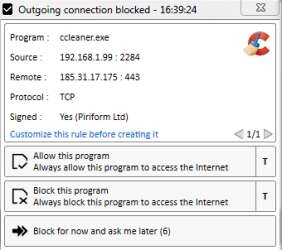
I use a third-party GUI app for Windows Firewall and have changed settings so it blocks outbound by default. This is what happens when I for example start CCleaner and I haven't allowed that app:
outbound alert.png

This is a good example why I don't allow all outbound connections. I've configured CCleaner to not check for updates, but it still wants to create connections every time I run it and I have no idea what it sends or receives as it's encrypted (port 443).
 

My Computer My Computer

Computer type
Laptop
Computer Manufacturer/Model Number
HP Elitebook 8540p
OS
Windows 7 Pro 32
CPU
Intel(R) Core(TM) i5 CPU M 540 @ 2.53GHz
Motherboard
Hewlett-Packard 1521
Memory
4,00 GB (Usable 2,98)
Graphics Card(s)
NVIDIA NVS 5100M
Sound Card
NVIDIA High Definition Audio
Screen Resolution
1600x900
Hard Drives
INTEL SSDSA2CW120G3
Antivirus
F-Secure Internet Security
Browser
IE, Firefox, Opera
Other Info
Sandboxie,
SRP (Software Restriction Policy),
EMET (Enhanced Mitigation Experience Toolkit),
WFC (Windows Firewall Control by BiniSoft),
Malwarebytes Premium
The default setting for Windows Firewall is to block inbound connections, but allow ALL outbound connections.

I use a third-party GUI app for Windows Firewall and have changed settings so it blocks outbound by default. This is what happens when I for example start CCleaner and I haven't allowed that app:
View attachment 344261

This is a good example why I don't allow all outbound connections. I've configured CCleaner to not check for updates, but it still wants to create connections every time I run it and I have no idea what it sends or receives as it's encrypted (port 443).

I'm intrigued by Windows Firewall Control. How does it work? I'm using Zone Alarm's free firewall right now but ran into an issue with a recent update and I'm considering switching. Does Windows Firewall Control "train" itself by, every time an application tried to send or receive a transmission, posting a popup that asks you if it is to allow or disallow a transmission either permanently or this time only?
 

My Computer My Computer

Computer type
PC/Desktop
Computer Manufacturer/Model Number
Custom Build
OS
Win 7 Ultimate 64 bit
CPU
Intel i7-3930K
Motherboard
ASUS P9X79 WS
Memory
Kingston HyperX Genesis 32GB Kit (8x4GB Modules) 1600MHz DDR
Graphics Card(s)
MSI R7850 Twin Frozr 2GD5/OC Radeon HD 7850 2GB 256-bit GDDR
Sound Card
Asus Xonar Essence STX
Monitor(s) Displays
3x Asus VG248QE 24", Vizio 32" TV
Screen Resolution
1920 x 1080, ?
Hard Drives
Samsung 128GB 840 Pro SSD (1),
Samsung 4TB 850 EVO SSDs (4)
Samsung 4TB 850 EVO SSDs (16) external backup drives used in 2.5" hot swap bays in the computer.
PSU
Corsair HX750w
Case
Antec Two Hundred v2 (modified)
Cooling
Cooler Master GeminII S524 120mm (fan replaced with a 140mm)
Keyboard
Logitech G510s
Mouse
Logitech M525 (two in use)
Internet Speed
=< 32Mbps down, 8Mbps up
Antivirus
AVAST!, MBAM, SAS, Spybot S&D (all but MBAM free) Glary Util
Browser
IE11
Other Info
LSI 9211-8i HBA card (8 SATA III ports), 2.5" & 3.5" Hot Swap Bays, HooToo HT-CR001 PCI-E to USB 3.0 Internal Hub + 6 Slot Card Reader, and LG Model CH12LS28 BD-ROM Optical Drive. Also, ScanSnap S1500 ADF duplexing scanner, Canon 9000F flat bed scanner, Corsair SP2500 2.1 speakers, Samsung CLP 415nw laser color printer, Cyberpower PP2200SW UPS
I'm intrigued by Windows Firewall Control. How does it work? I'm using Zone Alarm's free firewall right now but ran into an issue with a recent update and I'm considering switching. Does Windows Firewall Control "train" itself by, every time an application tried to send or receive a transmission, posting a popup that asks you if it is to allow or disallow a transmission either permanently or this time only?
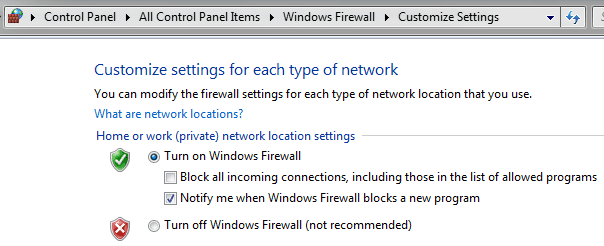
Windows Firewall itself can notify when a program is blocked, but only for inbound connections. If you're behind a NAT router then you'll probably only see alerts from other local devices.
wf_notify.png

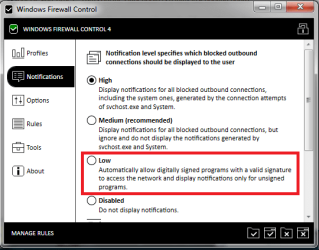
With WFC the alerts are for outbound connections. There's no learning mode but there are other useful modes, for example Notifications = Low, that will allow signed programs.
wfc_note.png

If you use the recommended Medium you need to check the logs for any svchost and System blocked connections. Or set Notifications = High. Besides that you need basic understanding of local and remote ports and protocol so you can configure the rules properly, for example that the local port will change between connections but not the remote one, that many programs uses not one but many remote IP's so it might be easier to allow all remote IP's.

You can allow temporarily for X no of minutes, or permanently. But it's not as "user-friendly" as some other products. There's a demo here: Windows Firewall Control 4 - YouTube
At 05:00 the product is activated so the notifications will show. But watching all you'll get to see the different windows, alerts, rules, logs. And different ways to allow a program.
 

My Computer My Computer

Computer type
Laptop
Computer Manufacturer/Model Number
HP Elitebook 8540p
OS
Windows 7 Pro 32
CPU
Intel(R) Core(TM) i5 CPU M 540 @ 2.53GHz
Motherboard
Hewlett-Packard 1521
Memory
4,00 GB (Usable 2,98)
Graphics Card(s)
NVIDIA NVS 5100M
Sound Card
NVIDIA High Definition Audio
Screen Resolution
1600x900
Hard Drives
INTEL SSDSA2CW120G3
Antivirus
F-Secure Internet Security
Browser
IE, Firefox, Opera
Other Info
Sandboxie,
SRP (Software Restriction Policy),
EMET (Enhanced Mitigation Experience Toolkit),
WFC (Windows Firewall Control by BiniSoft),
Malwarebytes Premium
Back
Top