
You are using an out of date browser. It may not display this or other websites correctly.
You should upgrade or use an alternative browser.
You should upgrade or use an alternative browser.
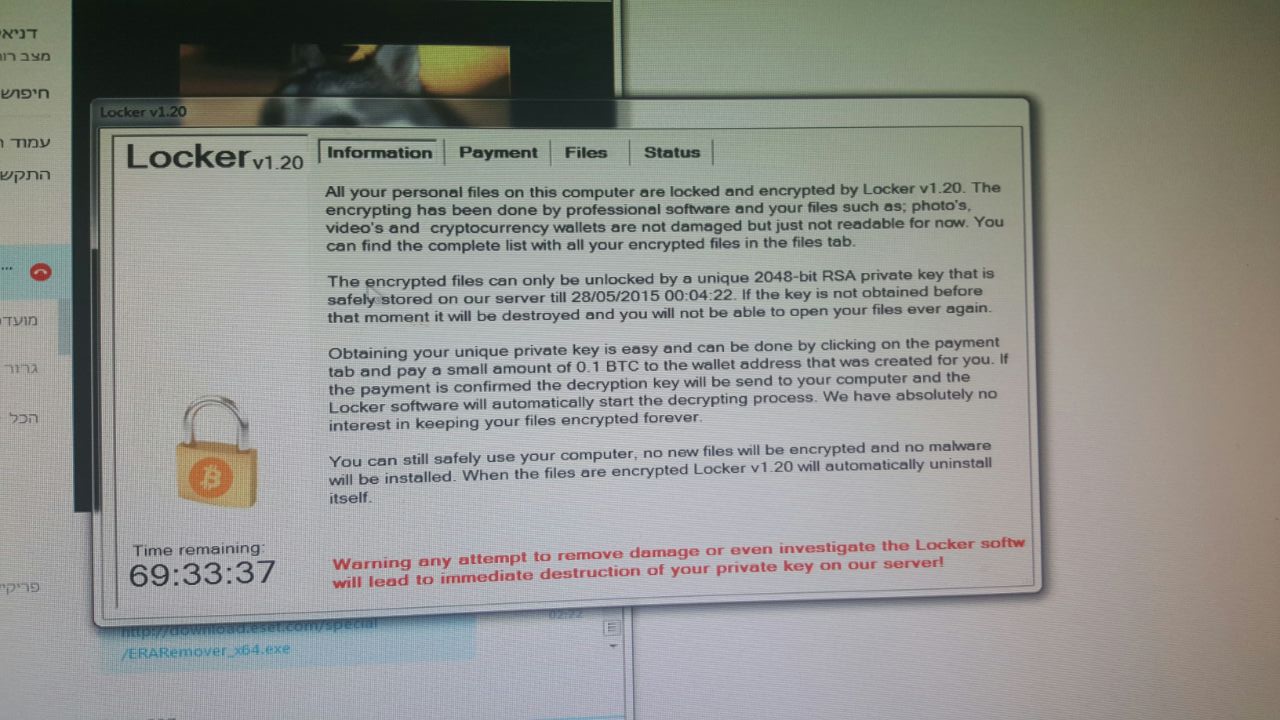
Locker 1.2 Virus. Help 70 hours left! Encryption virus.
- Thread starter yupp8
- Start date

yupp8,
Not aware that there is anyone in this forum who is a crypto malware expert. If there is one, the person may come and help.
Lockerv1.20 (and there are other versions used, but it is all the same ransomware) appears to encrypt files using an RSA encryption algorithm. This is very difficult to decrypt. Also,
if you pay the ransom, there is no guarantee that you will get your files back!
Do you have a backup of your files?
It appears that the malicious executables are found in %ProgramData%\rkcl
Before running any AntiMalware software or trying to restore your files, copy the encrypted files, the Bitcoin wallet address, and the C:\ProgramData\rkcl folder to an external hard drive, or a USB pen drive. If a decryption tool becomes available, you may have a chance at regaining your files.
The C:\ProgramData\rkcl folder contains several files such as data.aa0, data.aaX (X=a number)...
data.aa0 lists infected files
data.aa6 has the bitcoin payment address key
The rkcl folder also contains ldr.exe and rkcl.exe
There may also be folders in your system, like the following, running like services:
C:\ProgramData\steg\steg.exe
C:\ProgramData\tor\tor.exe
The ransomware you have appears to be related to CryptoLocker. Try uploading encrypted files to the following website and see if you can get them back. No harm in trying.
https://www.decryptcryptolocker.com/
More info: How to restore files encrypted by CryptoLocker using Shadow Volume Copies
CryptoLocker Ransomware Information Guide and FAQ
If no joy, follow this thread:
Infected with Locker v1.7 How can i recover files? ransomware - Am I infected? What do I do?
Also, please give Malwarebytes Anti-Malware a whirl.
Download > https://www.malwarebytes.org/products/
Select the FREE version!
Save to the Desktop.
On the Desktop. double-click mbam-setup-2.X.X.XXXX.exe to install (X's = current version)
Allow the file to run.
Follow the setup wizard to Install.
Place a checkmark next to Launch Malwarebytes Anti-Malware, then click: Finish
However, please make sure to uncheck the PREMIUM version Trial checkmark, if it appears near the end of the installation.
Once MBAM opens, click the Settings tab at the top, and, in the left column, select Detections and Protections
If not already checked, select: Scan for rootkits
Click the Scan tab at the top of the program window, and select: Threat Scan
Next, click: Scan Now
If you receive a message that updates are available, click: Update Now
At this point, the update is downloaded, installed, and the scan starts.
The scan may take some time to finish, so please be patient.
If potential threats are detected, select Quarantine All as the Action for all the listed items.
Next, click: Apply Actions
While still on the Scan tab, click the link for View detailed log
In the window that opens, click the Export button, select Text file (*.txt), and save the log to the Desktop.
:ar: Please post the MBAM report in your reply.
Notes:
1. The log is automatically saved by MBAM and is also viewed by clicking:
History tab > Application Logs.
2, If MBAM encounters a file that is difficult to remove...
Click OK and allow MBAM to proceed with the disinfection process.
If asked to restart the computer, please do so immediately.
Not aware that there is anyone in this forum who is a crypto malware expert. If there is one, the person may come and help.
Lockerv1.20 (and there are other versions used, but it is all the same ransomware) appears to encrypt files using an RSA encryption algorithm. This is very difficult to decrypt. Also,
if you pay the ransom, there is no guarantee that you will get your files back!
Do you have a backup of your files?
It appears that the malicious executables are found in %ProgramData%\rkcl
Before running any AntiMalware software or trying to restore your files, copy the encrypted files, the Bitcoin wallet address, and the C:\ProgramData\rkcl folder to an external hard drive, or a USB pen drive. If a decryption tool becomes available, you may have a chance at regaining your files.
The C:\ProgramData\rkcl folder contains several files such as data.aa0, data.aaX (X=a number)...
data.aa0 lists infected files
data.aa6 has the bitcoin payment address key
The rkcl folder also contains ldr.exe and rkcl.exe
There may also be folders in your system, like the following, running like services:
C:\ProgramData\steg\steg.exe
C:\ProgramData\tor\tor.exe
The ransomware you have appears to be related to CryptoLocker. Try uploading encrypted files to the following website and see if you can get them back. No harm in trying.
https://www.decryptcryptolocker.com/
More info: How to restore files encrypted by CryptoLocker using Shadow Volume Copies
CryptoLocker Ransomware Information Guide and FAQ
If no joy, follow this thread:
Infected with Locker v1.7 How can i recover files? ransomware - Am I infected? What do I do?
Also, please give Malwarebytes Anti-Malware a whirl.
Download > https://www.malwarebytes.org/products/
Select the FREE version!
Save to the Desktop.
On the Desktop. double-click mbam-setup-2.X.X.XXXX.exe to install (X's = current version)
Allow the file to run.
Follow the setup wizard to Install.
Place a checkmark next to Launch Malwarebytes Anti-Malware, then click: Finish
However, please make sure to uncheck the PREMIUM version Trial checkmark, if it appears near the end of the installation.
Once MBAM opens, click the Settings tab at the top, and, in the left column, select Detections and Protections
If not already checked, select: Scan for rootkits
Click the Scan tab at the top of the program window, and select: Threat Scan
Next, click: Scan Now
If you receive a message that updates are available, click: Update Now
At this point, the update is downloaded, installed, and the scan starts.
The scan may take some time to finish, so please be patient.
If potential threats are detected, select Quarantine All as the Action for all the listed items.
Next, click: Apply Actions
While still on the Scan tab, click the link for View detailed log
In the window that opens, click the Export button, select Text file (*.txt), and save the log to the Desktop.
:ar: Please post the MBAM report in your reply.
Notes:
1. The log is automatically saved by MBAM and is also viewed by clicking:
History tab > Application Logs.
2, If MBAM encounters a file that is difficult to remove...
Click OK and allow MBAM to proceed with the disinfection process.
If asked to restart the computer, please do so immediately.
My Computer
- Computer type
- PC/Desktop
- Computer Manufacturer/Model Number
- An ol' eMachines
- OS
- Windows 7 Home Premium
- Internet Speed
- Fine for me...I'm retired!
dear cottonball, Thank you so much for your assistance! I hope together we can resovle this issue since I have only 58 hours left.
I actually do not care about the files, It would be nice if I could decrypt them, but I have backups for the important files.
Should I try and delete the files you mentioned ?
Is this some kind of a new virus?
right now I'm running the MBAM I'll post the logs soon.
P.S.
tried https://www.decryptcryptolocker.com/
"The file does not seem to be infected by CryptoLocker. Please submit a CryptoLocker infected file."
I actually do not care about the files, It would be nice if I could decrypt them, but I have backups for the important files.
Should I try and delete the files you mentioned ?
Is this some kind of a new virus?
right now I'm running the MBAM I'll post the logs soon.
P.S.
tried https://www.decryptcryptolocker.com/
"The file does not seem to be infected by CryptoLocker. Please submit a CryptoLocker infected file."
My Computer
- OS
- Windows 7
as of right now I took these steps:
and I think everything is gone now.
Only do this if you know you don't need to pay the ransom as many cryptolockers destroy the private key it uses to encrypt if you clean it.
Open Task Manager and end process for any of these processes: rkcl.exe, steg.exe, tor.exe, ldr.exe
Go to %programdata% folder and delete the following folders as listed earlier: "rkcl, steg, tor, Digger"
Download and run Malwarebytes. Do this again in a few days in case newer definitions find any more of the infection.
To be really safe, format and re-install, but the above should get rid of the bulk of the infection.
For future prevention: Backup backup backups. Install CryptoPrevent. Practice safe-browsing, use Ad Block on suspcious websites.
and I think everything is gone now.
Malwarebytes Anti-Malware
Malwarebytes | Free Anti-Malware & Internet Security Software
Scan Date: 25/05/2015
Scan Time: 13:20:22
Logfile: lgg2.txt
Administrator: Yes
Version: 2.01.6.1022
Malware Database: v2015.05.25.03
Rootkit Database: v2015.05.24.01
License: Free
Malware Protection: Disabled
Malicious Website Protection: Disabled
Self-protection: Disabled
OS: Windows 7 Service Pack 1
CPU: x64
File System: NTFS
User: Daniel
Scan Type: Threat Scan
Result: Completed
Objects Scanned: 682084
Time Elapsed: 20 min, 57 sec
Memory: Enabled
Startup: Enabled
Filesystem: Enabled
Archives: Enabled
Rootkits: Enabled
Heuristics: Enabled
PUP: Enabled
PUM: Enabled
Processes: 1
Backdoor.MSIL.PGen, C:\Windows\SysWOW64\surrasiltshawks.exe, 1804, Delete-on-Reboot, [f5e2781f830758de46cab09cac5615eb]
Modules: 0
(No malicious items detected)
Registry Keys: 4
Backdoor.MSIL.PGen, HKLM\SYSTEM\CURRENTCONTROLSET\SERVICES\ConkAuralQuoth, Quarantined, [f5e2781f830758de46cab09cac5615eb],
PUP.Optional.DefaultSearch.A, HKLM\SOFTWARE\MICROSOFT\INTERNET EXPLORER\SEARCHSCOPES\{9BB47C17-9C68-4BB3-B188-DD9AF0FD2492}, Quarantined, [3c9bbed9f694e452eb99670842c3c937],
PUP.Optional.DefaultSearch.A, HKLM\SOFTWARE\WOW6432NODE\MICROSOFT\INTERNET EXPLORER\SEARCHSCOPES\{9BB47C17-9C68-4BB3-B188-DD9AF0FD2492}, Quarantined, [2aad5e3981091d19a7dd4e21bc49649c],
PUP.Optional.DefaultSearch.A, HKU\S-1-5-21-2583720070-748624027-3842895589-1000\SOFTWARE\MICROSOFT\INTERNET EXPLORER\SEARCHSCOPES\{9BB47C17-9C68-4BB3-B188-DD9AF0FD2492}, Quarantined, [8d4a30673d4de5517b08abc4c144af51],
Registry Values: 10
PUP.Optional.DefaultSearch.A, HKLM\SOFTWARE\MICROSOFT\INTERNET EXPLORER\SEARCHSCOPES\{9BB47C17-9C68-4BB3-B188-DD9AF0FD2492}|DisplayName, default-search.net, Quarantined, [3c9bbed9f694e452eb99670842c3c937]
PUP.Optional.DefaultSearch.A, HKLM\SOFTWARE\MICROSOFT\INTERNET EXPLORER\SEARCHSCOPES\{9BB47C17-9C68-4BB3-B188-DD9AF0FD2492}|URL, http://www.default-search.net/search?sid=492&aid=199&itype=n&ver=12565&tm=386&src=ds&p={searchTerms}, Quarantined, [0dcae7b0aedc53e36321c0afbc4906fa]
PUP.Optional.DefaultSearch.A, HKLM\SOFTWARE\MICROSOFT\INTERNET EXPLORER\SEARCHSCOPES\{9BB47C17-9C68-4BB3-B188-DD9AF0FD2492}|SuggestionsURL_JSON, http://www.default-search.net?sid=492&aid=199&itype=n&ver=12565&tm=386&src=ds&p={searchTerms}&ft=json, Quarantined, [d007dcbb2e5cca6c81030c63b84dfc04]
PUP.Optional.DefaultSearch.A, HKLM\SOFTWARE\WOW6432NODE\MICROSOFT\INTERNET EXPLORER\SEARCHSCOPES\{9BB47C17-9C68-4BB3-B188-DD9AF0FD2492}|DisplayName, default-search.net, Quarantined, [2aad5e3981091d19a7dd4e21bc49649c]
PUP.Optional.DefaultSearch.A, HKLM\SOFTWARE\WOW6432NODE\MICROSOFT\INTERNET EXPLORER\SEARCHSCOPES\{9BB47C17-9C68-4BB3-B188-DD9AF0FD2492}|URL, http://www.default-search.net/search?sid=492&aid=199&itype=n&ver=12565&tm=386&src=ds&p={searchTerms}, Quarantined, [9f3870277614c1754e3674fbfd0851af]
PUP.Optional.DefaultSearch.A, HKLM\SOFTWARE\WOW6432NODE\MICROSOFT\INTERNET EXPLORER\SEARCHSCOPES\{9BB47C17-9C68-4BB3-B188-DD9AF0FD2492}|SuggestionsURL_JSON, http://www.default-search.net?sid=492&aid=199&itype=n&ver=12565&tm=386&src=ds&p={searchTerms}&ft=json, Quarantined, [795e98ff90faec4a265e77f838cd58a8]
PUP.Optional.MySearchResults.A, HKU\S-1-5-21-2583720070-748624027-3842895589-1000\SOFTWARE\MICROSOFT\INTERNET EXPLORER\SEARCHSCOPES\{90FFB6C9-B59E-4620-88B6-5450D860C7EA}|URL, http://www.mysearchresults.com/search?c=3513&t=07&q={searchTerms}, Quarantined, [14c37c1b6129ab8bb23a0dcfb94a6c94]
PUP.Optional.DefaultSearch.A, HKU\S-1-5-21-2583720070-748624027-3842895589-1000\SOFTWARE\MICROSOFT\INTERNET EXPLORER\SEARCHSCOPES\{9BB47C17-9C68-4BB3-B188-DD9AF0FD2492}|DisplayName, default-search.net, Quarantined, [8d4a30673d4de5517b08abc4c144af51]
PUP.Optional.DefaultSearch.A, HKU\S-1-5-21-2583720070-748624027-3842895589-1000\SOFTWARE\MICROSOFT\INTERNET EXPLORER\SEARCHSCOPES\{9BB47C17-9C68-4BB3-B188-DD9AF0FD2492}|URL, http://www.default-search.net/search?sid=492&aid=199&itype=n&ver=12565&tm=386&src=ds&p={searchTerms}, Quarantined, [a334a8efc5c5a096f58eeb8455b0f010]
PUP.Optional.DefaultSearch.A, HKU\S-1-5-21-2583720070-748624027-3842895589-1000\SOFTWARE\MICROSOFT\INTERNET EXPLORER\SEARCHSCOPES\{9BB47C17-9C68-4BB3-B188-DD9AF0FD2492}|SuggestionsURL_JSON, http://www.default-search.net?sid=492&aid=199&itype=n&ver=12565&tm=386&src=ds&p={searchTerms}&ft=json, Quarantined, [3b9cdcbbe2a862d49be8e08fd92c08f8]
Registry Data: 0
(No malicious items detected)
Folders: 0
(No malicious items detected)
Files: 1
Backdoor.MSIL.PGen, C:\Windows\SysWOW64\surrasiltshawks.exe, Delete-on-Reboot, [f5e2781f830758de46cab09cac5615eb],
Physical Sectors: 0
(No malicious items detected)
(end)
My Computer
- OS
- Windows 7
yupp8,
If you backed up your files using an external hard drive or other media, you are good.
The rest we should be able to take care of.
Did you reboot after running MBAM?
Please open MBAM, and go to History tab > Application Logs
See if there is a recent Scan log there and post it in your reply.
The one posted appears to be a second run, but, I could be wrong.
Are you still getting the ransomware notice with the time remaining rubbish? Hopefully not.
MBAM detected Backdoor.MSIL.PGen, and deleted on reboot. However, there are other files associated with the ransomware that are not showing.
Please, use the herdProtect Anti-Malware Scanner and let's see what it shows...
Download > Download herdProtect - Free Anti-Malware Platform
Select the Portable Version (green button on the right), and save to the Desktop
Double-click the herdProtectScan_Portable file to run the setup.
On the last prompt, make sure Launch herdProtect is checked, and press: Finish
Next, when presented with the Scanner window, press the green Scan button. (An Internet connection needs to be available.)
OK the next prompt.
The scan goes through various stages, and, when done, the scan Results are presented (Files scanned: xxx, Processes scanned: xxxx, etc.
Press (at the top): Save Results
:ar: Please do not remove any entries, and attach the herdProtect Scan_2015-(date) in your reply.
Also, please use the Farbar Recovery Scan Tool to look for suspicious files or folders.
Download: > Farbar Recovery Scan Tool Download
Select the version that applies to your system (64-bit?).
Save it to your Desktop.
Double-click the downloaded file to run it.
When the tool opens, click Yes to the disclaimer.
Press the Scan button.
When done, the tool makes a log, FRST.txt, in the same directory from which the tool is run (Desktop).
:ar: Please provide the FRST.txt in your reply.
The first time the tool is run, it also creates another log: Addition.txt
:ar: Also post the Addition.txt in your reply.
If you backed up your files using an external hard drive or other media, you are good.
The rest we should be able to take care of.
Did you reboot after running MBAM?
Please open MBAM, and go to History tab > Application Logs
See if there is a recent Scan log there and post it in your reply.
The one posted appears to be a second run, but, I could be wrong.
Are you still getting the ransomware notice with the time remaining rubbish? Hopefully not.
MBAM detected Backdoor.MSIL.PGen, and deleted on reboot. However, there are other files associated with the ransomware that are not showing.
Please, use the herdProtect Anti-Malware Scanner and let's see what it shows...
Download > Download herdProtect - Free Anti-Malware Platform
Select the Portable Version (green button on the right), and save to the Desktop
Double-click the herdProtectScan_Portable file to run the setup.
On the last prompt, make sure Launch herdProtect is checked, and press: Finish
Next, when presented with the Scanner window, press the green Scan button. (An Internet connection needs to be available.)
OK the next prompt.
The scan goes through various stages, and, when done, the scan Results are presented (Files scanned: xxx, Processes scanned: xxxx, etc.
Press (at the top): Save Results
:ar: Please do not remove any entries, and attach the herdProtect Scan_2015-(date) in your reply.
Also, please use the Farbar Recovery Scan Tool to look for suspicious files or folders.
Download: > Farbar Recovery Scan Tool Download
Select the version that applies to your system (64-bit?).
Save it to your Desktop.
Double-click the downloaded file to run it.
When the tool opens, click Yes to the disclaimer.
Press the Scan button.
When done, the tool makes a log, FRST.txt, in the same directory from which the tool is run (Desktop).
:ar: Please provide the FRST.txt in your reply.
The first time the tool is run, it also creates another log: Addition.txt
:ar: Also post the Addition.txt in your reply.
Last edited:
My Computer
- Computer type
- PC/Desktop
- Computer Manufacturer/Model Number
- An ol' eMachines
- OS
- Windows 7 Home Premium
- Internet Speed
- Fine for me...I'm retired!
May 25, 2015
I got this same notice when I booted up my computer this morning only mine was Locker v2.53. It shows I have a little over 64 hours to pay them and they will then decrypt my photos. Thousands of my jpegs are now unreadable so will not open and since my external hard drive was plugged in when I booted up, it even got all the backup jpegs I had on that drive too. The gifs and pngs are still fine as well as thousands of movies & text files are also fine. I thought all I needed to do was restore my system to a date from a day or two ago and it would take care of this but now Im leery of doing that.
HOW DID YOU MAKE OUT yupp8, I MEAN AFTER GETTING RID OF THE LOCKER, WERE YOUR PHOTOS BACK VIEWABLE?
I got this same notice when I booted up my computer this morning only mine was Locker v2.53. It shows I have a little over 64 hours to pay them and they will then decrypt my photos. Thousands of my jpegs are now unreadable so will not open and since my external hard drive was plugged in when I booted up, it even got all the backup jpegs I had on that drive too. The gifs and pngs are still fine as well as thousands of movies & text files are also fine. I thought all I needed to do was restore my system to a date from a day or two ago and it would take care of this but now Im leery of doing that.
HOW DID YOU MAKE OUT yupp8, I MEAN AFTER GETTING RID OF THE LOCKER, WERE YOUR PHOTOS BACK VIEWABLE?
My Computer
- Computer Manufacturer/Model Number
- custom
- OS
- Windows 7 Ultimate x64 bit
- CPU
- QuadCore Intel Core i7-960, 3466 MHz (26 x 133)
- Motherboard
- MSI 'Big Bang' XPower X58 (MS-7666) SATA 3
- Memory
- 12 GB DDR3-1333 SDRAM Triple Chaannel
- Graphics Card(s)
- AMD Radeon HD 6800 Series (1024 MB)
- Sound Card
- Realtek ALC889 @ Intel 82801JB ICH10 - High Def
- Monitor(s) Displays
- HP w2408 [24" LCD] Display 1920 x 1200
- Screen Resolution
- 1920 x 1200
- Hard Drives
- 1TB Western Digital 'BLACK' 7200 RPM SATA III 64mb
WDC WD1002FAEX-00Y9A0
- PSU
- Thermaltake 750 watt
- Case
- Thermaltake V9 BLACX EDITION USB3 w\double hotdocs
- Cooling
- 3 oversized case fans
- Keyboard
- Internet Keyboard
- Mouse
- Microsoft Optical
- Internet Speed
- Slow (dialup)
- Other Info
- Computer is about 1 month old.
Sher,
The version of Locker means nothing. The criminals are using all sorts of versions, guess they plan on keeping us confused.
Would take action to safekeep the files that are still fine, and keep a copy of those that are not.
As far as I am aware, using System Restore to a previous date has not worked. Neither has using the CryptoLocker decryptor. The Locker Vx.xx may be related to CryptoLocker, but it is a new method of operation.
yupp8 has an issue somewhat different from yours, since he backed up some important files and the backup device was not connected to the computer.
My suggestion to you is to start your own topic on this forum, and we can take it from there:
http://www.sevenforums.com/system-security/
The version of Locker means nothing. The criminals are using all sorts of versions, guess they plan on keeping us confused.
Would take action to safekeep the files that are still fine, and keep a copy of those that are not.
As far as I am aware, using System Restore to a previous date has not worked. Neither has using the CryptoLocker decryptor. The Locker Vx.xx may be related to CryptoLocker, but it is a new method of operation.
yupp8 has an issue somewhat different from yours, since he backed up some important files and the backup device was not connected to the computer.
My suggestion to you is to start your own topic on this forum, and we can take it from there:
http://www.sevenforums.com/system-security/
My Computer
- Computer type
- PC/Desktop
- Computer Manufacturer/Model Number
- An ol' eMachines
- OS
- Windows 7 Home Premium
- Internet Speed
- Fine for me...I'm retired!

I'm curious about what AV you guys are using.
My Computer
- Computer type
- PC/Desktop
- Computer Manufacturer/Model Number
- Built 2/11/2011
- OS
- Windows 7 Pro-x64
- CPU
- i7-2600 3.4GHz - 3.8GHz Turbo
- Motherboard
- Intel DH67BL-B3
- Memory
- 8Gb - 2x4GB, Muskin 991770 PC3-1333
- Graphics Card(s)
- Integrated Intel HD 2000
- Sound Card
- Integrated Intel 10.1 HD, RealTek ALC892
- Monitor(s) Displays
- Asus LCD VH222H, Haier HL24XSL2a
- Screen Resolution
- 1920x1080, 1920x1080
- Hard Drives
- Crucial SSD C300-128Gb,
Western Digital WD5002AALX - 500Gb,
Western Digital WD7501AALS - 750Gb
- PSU
- Seasonic 650W 80+ Gold Modular
- Case
- Rosewill Defender
- Cooling
- Stock CPU, Four 120mm case fans, PCH fan added
- Keyboard
- Logitech EX100 Y-RBH94 Wireless
- Mouse
- Logitech EX100 M-RCE95 Wireless
- Internet Speed
- 3.0/1.5 Mbs
- Antivirus
- Microsoft Security Essentials
- Browser
- Microsoft Internet Explorer 11
- Other Info
- Antec Veris Premier-Multimedia IR Station,
Cyber Accoustics-3602 Speakers,
AFT XM-5U Card Reader,
Hauppauge TV-HVR-2250,
Sony LX300 USB Turntable
@carwiz,
This monster has been able to fool all sorts of antivirus programs.
There are lots of people posting about it at forums all over the web!
Info:
If you lost photos, a possibility is to restore them using Shadow Volume Copies, particularly if the files were not in the C:\ drive.
Tutorial by Brink > How to Restore Files and Folders in Windows 7 with Previous Versions
http://www.sevenforums.com/tutorials/85679-previous-versions-restore-files-folders.html
Recuva may be another option, running a Deep Scan.
Download > Recuva - Undelete, Unerase, File and Disk Recovery - Free Download
There is also PhotoRec.
PhotoRec - Digital Picture and File Recovery
Tutorial by Jumanji > Guide to Using PhotoRec Recovery Software
http://www.sevenforums.com/software/193467-guide-using-photorec-recovery-software.html#post1628300
This monster has been able to fool all sorts of antivirus programs.
There are lots of people posting about it at forums all over the web!
Info:
If you lost photos, a possibility is to restore them using Shadow Volume Copies, particularly if the files were not in the C:\ drive.
Tutorial by Brink > How to Restore Files and Folders in Windows 7 with Previous Versions
http://www.sevenforums.com/tutorials/85679-previous-versions-restore-files-folders.html
Recuva may be another option, running a Deep Scan.
Download > Recuva - Undelete, Unerase, File and Disk Recovery - Free Download
There is also PhotoRec.
PhotoRec - Digital Picture and File Recovery
Tutorial by Jumanji > Guide to Using PhotoRec Recovery Software
http://www.sevenforums.com/software/193467-guide-using-photorec-recovery-software.html#post1628300
My Computer
- Computer type
- PC/Desktop
- Computer Manufacturer/Model Number
- An ol' eMachines
- OS
- Windows 7 Home Premium
- Internet Speed
- Fine for me...I'm retired!
Important!
From Locker expert at BC:
From Locker expert at BC:
Grinler, on 24 May 2015 - 6:32 PM, said:
If you do decide to pay the ransom, which should be avoided if at all possible, once payment has been confirmed the ransomware will download the private key and automatically decrypt your files.
If you plan on paying the ransom, though, you will need to keep the ransomware malware running on your computer
My Computer
- Computer type
- PC/Desktop
- Computer Manufacturer/Model Number
- An ol' eMachines
- OS
- Windows 7 Home Premium
- Internet Speed
- Fine for me...I'm retired!
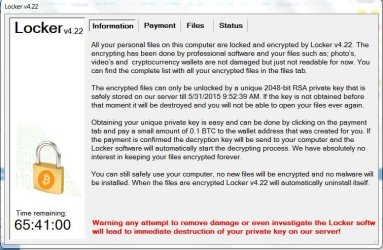
Dude I have the same problem like yours. I don't know how to solve this. I don't have backup and all the files encrypted there are important 
My Computer
- Computer type
- PC/Desktop
- OS
- Windows 7 Ultimate x64
- CPU
- AMD A8 5600K
- Motherboard
- Asrock FM2A55M-VG3
Jayvee24,
You are not under a deadline, that is a scare tactic.
Once the timer goes down to zero, it is reset. However, the ransom goes up in cost.
There are no additional files encrypted, though.
Since you have no Backups, you can make an attempt to restore files using File Recovery Software such as:
R-Studio > Disk Recovery Software and Hard Drive Recovery tool for Windows, Mac, and Linux
Recuva > Recuva - Undelete, Unerase, File and Disk Recovery - Free Download
PhotoRec > PhotoRec - Digital Picture and File Recovery
http://www.sevenforums.com/software/193467-guide-using-photorec-recovery-software.html#post1628300
Also, you can use Shadow Volume Copies:
http://www.sevenforums.com/tutorials/85679-previous-versions-restore-files-folders.html
You are not under a deadline, that is a scare tactic.
Once the timer goes down to zero, it is reset. However, the ransom goes up in cost.
There are no additional files encrypted, though.
Since you have no Backups, you can make an attempt to restore files using File Recovery Software such as:
R-Studio > Disk Recovery Software and Hard Drive Recovery tool for Windows, Mac, and Linux
Recuva > Recuva - Undelete, Unerase, File and Disk Recovery - Free Download
PhotoRec > PhotoRec - Digital Picture and File Recovery
http://www.sevenforums.com/software/193467-guide-using-photorec-recovery-software.html#post1628300
Also, you can use Shadow Volume Copies:
http://www.sevenforums.com/tutorials/85679-previous-versions-restore-files-folders.html
My Computer
- Computer type
- PC/Desktop
- Computer Manufacturer/Model Number
- An ol' eMachines
- OS
- Windows 7 Home Premium
- Internet Speed
- Fine for me...I'm retired!

Windowsdeal is offering a 100% discount on MiniTool Power Data Recovery Personal 6.8 at the moment. Maybe it will help the OP.
MiniTool Power Data Recovery Personal 6.8 (100% Discount)
9 hours 50 minutes left on deal at the time of writing.
MiniTool Power Data Recovery Personal 6.8 (100% Discount)
9 hours 50 minutes left on deal at the time of writing.
My Computer
- Computer type
- PC/Desktop
- Computer Manufacturer/Model Number
- Custom Build
- OS
- Windows 7 Ultimate x64 SP1
- CPU
- AMD Phenom 2 1090T
- Motherboard
- Gigabyte GA-890FXA-UD5
- Memory
- 2x8GB Kingston HyperX Fury Black 1600Mhz Unganged
- Graphics Card(s)
- MSI GTX 970 Gaming 4G
- Sound Card
- Realtek On-Board HD 7.1 Audio / Logitech G35
- Monitor(s) Displays
- 3xAcer GD245HQ
- Screen Resolution
- 1920x1080
- Hard Drives
- Samsung 850 Pro 512GB SSD - OS /
WD Caviar Black SATA 3 - 1 TBx2 - Dynamic RAID 0 /
WD Caviar Green SATA 2 - 640GBx2 - Dynamic RAID 0 /
WD Caviar Green SATA 2 - 640GB - Internal Backup /
Seagate Barracude SATA 3 - 3TB - External Backup/ Sync
- PSU
- HighPower 1000W
- Case
- Cooler Master HAF 932
- Cooling
- Noctua NH-D14
- Keyboard
- Logitech G19
- Mouse
- Logitech G500
- Internet Speed
- 100/4 Mbit Cable (100GB quota)
- Antivirus
- ZoneAlarm Extreme Security / MBAM Pro / MBAE Free / SAS Free
- Browser
- IE 11 - Firefox - Chrome
- Other Info
- Logitech F710/ G27/ G940/ Z5500 // TrackIR 5 // Nvidia 3D Surround Vision

Unfortunately lots of people are getting hit by this & although I understand the need to pay to get important files back, this can be a bad situation. Not only are people perpetuating this kind of behavior, but there is no guarantee you will receive the decryption key.
Your best option, now & in the future, is to make & maintain, on a regular basis, a system image. Best to keep it on an external drive that is not regularly connected to the PC/Laptop.
http://www.sevenforums.com/tutorials/663-backup-complete-computer-create-image-backup.html
I found this article which may help you recover some of the files:
How to Remove Locker Virus and Restore Encrypted Files
However, in the end, it always comes down to one word: Backup. If you have valuable files then don't keep them in one place.
Your best option, now & in the future, is to make & maintain, on a regular basis, a system image. Best to keep it on an external drive that is not regularly connected to the PC/Laptop.
http://www.sevenforums.com/tutorials/663-backup-complete-computer-create-image-backup.html
I found this article which may help you recover some of the files:
How to Remove Locker Virus and Restore Encrypted Files
However, in the end, it always comes down to one word: Backup. If you have valuable files then don't keep them in one place.
My Computer
- Computer type
- PC/Desktop
- Computer Manufacturer/Model Number
- Dell Hell oh Well
- OS
- Win 7 32 Home Premium, Win 7 64 Pro, Win 8.1, Win 10
- CPU
- Intel Core 2 Duo 2.93GHz
- Memory
- Not much with my ADHD
- Graphics Card(s)
- ATI Radeon HD 4350
- Monitor(s) Displays
- 24" HDTV/Monitor
- Screen Resolution
- Blurry after a Scotch or 2
- Hard Drives
- 1 HDD 250 GB, 1 HDD 1 TB, 3 - 1 TB Externals
- Case
- Don't get on my case...man :D
- Cooling
- I have an Air Conditioner & Diet Pepsi
- Keyboard
- Saitek Cyborg
- Mouse
- 10 yr old MS optical mouse that still works
- Internet Speed
- Never fast enough
- Antivirus
- Various
- Browser
- Various
Similar threads
- Replies
- 5
- Views
- 4K
- Replies
- 1
- Views
- 930

