Need help in repairing MBR on M.2 drive

Matt621

New member
Local time
1:39 PM
Messages
9
Location
A house
Hello All,

I have an M.2 drive as my main drive.
I use external SSD drives for my backups.
I used EZGig to clone from the M.2 internal to an SSD external drive with their special cable (Apricorn)

This works great and has been for over a decade.

If I ever have an issue, all I do is plug the external drive into one of the SATA cables, change the boot order, and I boot from the external drive (which is now an internal drive) and just copy over what I need to the M.2 drive, power down, unhook the SSD drive and reboot to the M.2 drive.

However, I had a BAD SSD drive on my last backup, it did something really weird and would not finish the backup. I've had this happen before and it's always a bad SSD drive. So after waiting 4 hours (it normally only takes 1 hour to do a full backup) I rebooted the machine. When I did that I wiped out the MBR on the backup drive. Okay, no problem. I'll just go into the Drive manager and fix it. But I didn't fix it. I accidently made the messed up backup drive the active drive. I instantly realized what I did and made the old internal M.2 drive the active drive. I thought I was okay. But that did not work. When I pull all drives but the M.2 it will not boot. I think it says missing MBR or something to that effect.

So I tried to rebuilt/restore it using the original Windows installation disk. That did not work because it said I had a newer version of windows 7 than what the disk was, which I know is 100% wrong. I know for sure that's the disk I did use to originally install Windows 7 many, many, many years ago. I think the issue there is I did some sort of update (Service Pack) and that's why it no longer recognizes it. OR there is a slight complication to this. I used to use Acronis backup (which I hate) but it put some sort of boot partition on the drive. I tried deleting it and made the system unusable. I think that might be where I messed up. I think I was supposed to make that Acronis partition the active one, but I'm not sure about that. That might be what the Windows CD is seeing as the OS. I'm not sure. I've never had this issue before.

So then I put in another OLDER back drive, and it boots fine. (I have a few backups of my system).

All is good, but all the data is pretty old (this is from about a month ago)

The system now sees the M.2 as D and the backup (OLD) as Drive C and all is good.

I just need to know how to repair the MBR on the M.2 (now drive D) from the backup SSD (now Drive C)

Anyone know how to do that?


Thanks
 

My Computers My Computers

  • At a glance

    windows 7 64bitAMD A1216gigbuilt in
    Computer type
    PC/Desktop
    Computer Manufacturer/Model Number
    custom
    OS
    windows 7 64bit
    CPU
    AMD A12
    Motherboard
    Gigabyte AB350MD3H
    Memory
    16gig
    Graphics Card(s)
    built in
    Sound Card
    built in
    Monitor(s) Displays
    Asus
    Screen Resolution
    2560x1440
    Hard Drives
    Samsung 980 Pro NVMe
    Various other Samsung SSD drives
  • Computer type
    PC/Desktop
    Antivirus
    Yes
you havent bothered to fill in your specs.

what do you mean by "m.2 drive" is it sata or nvme ?

are you certain you are booting in bios mode using mbr partition style?

if the problem really is damaged mbr on one of the disks, it can be rewritten with bootsect.exe command line tool, or any number of 3rd party partition programs.
 

My Computers My Computers

  • At a glance

    7 X64i5 84002x8gb 3200mhz
    Computer type
    PC/Desktop
    OS
    7 X64
    CPU
    i5 8400
    Motherboard
    gigabyte b365m ds3h
    Memory
    2x8gb 3200mhz
    Hard Drives
    various
    PSU
    pure power 11 400w cm
    Case
    Coolermaster
    Cooling
    cryorig m9i
  • At a glance

    7x64g54008gb ddr4 2400
    Computer type
    PC/Desktop
    OS
    7x64
    CPU
    g5400
    Motherboard
    ga b365m ds3h
    Memory
    8gb ddr4 2400
    PSU
    xfx pro 450w
you havent bothered to fill in your specs.
what do you mean by "m.2 drive" is it sata or nvme ?
are you certain you are booting in bios mode using mbr partition style?
if the problem really is damaged mbr on one of the disks, it can be rewritten with bootsect.exe command line tool, or any number of 3rd party partition programs.

Not sure what you mean by "filling in the specs."
The M.2 drive is NVME. If it was SSD I don't think I'd have the problem with the repair. (I have a recovery usb drive but w/o the NVME drivers.)
I don't know the syntax for bootsect.exe I don't want to make things worse by using a utility I don't know the syntax for.

Since bootsect is a command line command I can't just take the chance of running it w/o the parameters.

If you know how to rebuild the mbr from c: to d: using bootsect, the syntax/parameters would be great.

Thanks
 

My Computers My Computers

  • At a glance

    windows 7 64bitAMD A1216gigbuilt in
    Computer type
    PC/Desktop
    Computer Manufacturer/Model Number
    custom
    OS
    windows 7 64bit
    CPU
    AMD A12
    Motherboard
    Gigabyte AB350MD3H
    Memory
    16gig
    Graphics Card(s)
    built in
    Sound Card
    built in
    Monitor(s) Displays
    Asus
    Screen Resolution
    2560x1440
    Hard Drives
    Samsung 980 Pro NVMe
    Various other Samsung SSD drives
  • Computer type
    PC/Desktop
    Antivirus
    Yes
Not sure what you mean by "filling in the specs."

The M.2 drive is NVME. If it was SSD I don't think I'd have the problem with the repair. (I have a recovery usb drive but w/o the NVME drivers.)
There are three types of SSD's in common use. They are 2.5-inch SATA, M.2 SATA, and M.2 NVMe. Here are examples of ones that I have:
Samsung 870 EVO (1TB) - 2.5-inch SATA SSD
ADATA SU800 (1TB) - M.2 SATA SSD
Samsung 980 (1TB) - M.2 NVMe SSD

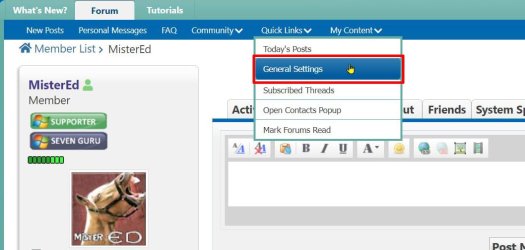
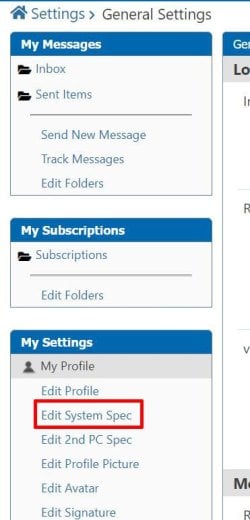
Your System Specs are shown when you click on My Computers below your post. You fill in this information in your profile as shown below. There is also an option to add System Specs for a 2nd computer.
 

Attachments

  • specs2.jpg
    specs2.jpg
    73.8 KB · Views: 0
  • specs3.jpg
    specs3.jpg
    56.3 KB · Views: 0

My Computers My Computers

  • At a glance

    Windows 7 Home Premium 64-bitsAMD FX-8350GSKILL Ripjaw-X PC3 12800 8GB (2x4GB)ASUS ROG STRIX GTX 1060 6GB
    Computer type
    PC/Desktop
    Computer Manufacturer/Model Number
    Custom build
    OS
    Windows 7 Home Premium 64-bits
    CPU
    AMD FX-8350
    Motherboard
    Gigabyte GA-990FXA-UD3 (AM3+)
    Memory
    GSKILL Ripjaw-X PC3 12800 8GB (2x4GB)
    Graphics Card(s)
    ASUS ROG STRIX GTX 1060 6GB
    Sound Card
    Integrated
    Monitor(s) Displays
    Asus VE228H (21.5-in)
    Screen Resolution
    1920x1080 60Hz
    Hard Drives
    SAMSUNG 870 EVO 2.5 Inch SATA SSD (1TB)
    SAMSUNG 870 EVO 2.5 Inch SATA SSD (1TB)
    SAMSUNG 870 EVO 2.5 Inch SATA SSD (1TB)
    PSU
    Corsair RM750x (750 watts)
    Case
    Corsair Carbide Series 200R
    Cooling
    Corsair Hydro Series H60 (CWCH60)
    Keyboard
    Logitech Elite
    Mouse
    Logitech M510 Wireless Mouse
    Internet Speed
    Comcast Gigabit Extra (1200Mbps down / 35Mbps up)
    Antivirus
    Malwarebytes
    Browser
    Firefox, Edge, Chrome
    Other Info
    ASUS DRW-24B1ST DVD-RW (24X) optical drive
    Seagate Expansion Desk (5TB) external SATA/USB HDD
    Comcast XB8 Internet Gateway
  • At a glance

    Windows 7 Pro (64-bit)AMD Phenom II 960T X4Corsair XMS2 DDR2-800 8GB (4x2GB)ASUS ENGTX560 DCII OC/2DI/1GD5 1GB
    Computer type
    PC/Desktop
    System Manufacturer/Model Number
    Custom
    OS
    Windows 7 Pro (64-bit)
    CPU
    AMD Phenom II 960T X4
    Motherboard
    ASUS M4N82 Deluxe
    Memory
    Corsair XMS2 DDR2-800 8GB (4x2GB)
    Graphics Card(s)
    ASUS ENGTX560 DCII OC/2DI/1GD5 1GB
    Monitor(s) Displays
    Samsung 930B 19-inch LCD
    Screen Resolution
    1280x1024
    Hard Drives
    Samsung SSD 870 EVO 1000 GB (Windows 10)
    Seagate ST1000DM003 1000 GB (Windows 7)
    PSU
    Antec TruePower (new) TP-650
    Case
    Antec Three Hundred
    Cooling
    AMD stock cooler from FX8350
    Mouse
    Logitech M100
    Internet Speed
    Xfinity Gigabit Extra 1200/35 Mbps
Thank you for the help. I went thru the system specs but there really isn't anything in there that would apply to the question. It's a general Windows 7 question. How to write / repair a MBR from a known good drive to another drive. In the old days you'd just use the sys command. You write or rewrite any drive with sys x: and then the drive letter. When I go into Device Manager it's showing my backup as the primary drive (NOW) and it's showing it's a boot drive because that's my backup and I just clone my main drive to a back. But the main drive no long shows boot on it. So that is that I'm trying to fix.

Reading the net either bcdboot or bcdedit seems to be the program I need to resolve the problem but that I can find, none address how to do it on a drive other than drive 0.

Okay right after I wrote the above I found this: bcdboot c:\windows /s d:
So just so I understand correctly that will copy othe MBR from C: to D:

Right?

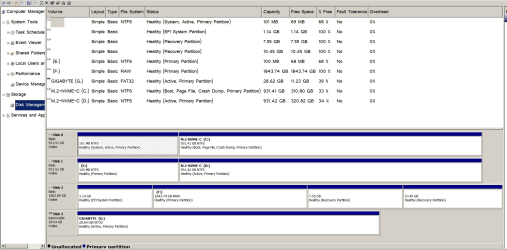
Here is what I have in diskpart

DISKPART> list volume


Volume ### Ltr Label Fs Type Size Status Info
---------- --- ----------- ----- ---------- ------- --------- --------
Volume 0 NTFS Partition 100 MB Healthy System
Volume 1 C M.2-NVME-C NTFS Partition 931 GB Healthy Boot
Volume 2 E NTFS Partition 100 MB Healthy
Volume 3 D M.2-NVME-C NTFS Partition 931 GB Healthy
Volume 4 F RAW Partition 1843 GB Healthy
Volume 5 NTFS Partition 1170 MB Healthy Hidden
Volume 6 WINRETOOLS NTFS Partition 7736 MB Healthy Hidden
Volume 7 DELLSUPPORT NTFS Partition 10 GB Healthy Hidden
Volume 8 G GIGABYTE FAT32 Removable 28 GB Healthy


DISKPART>

Drive E and F are my 2Tb backup drive. I was trying to clone my oldest BU drive to it. And it failed. But it's still plugged in. I just need to wipe that clean.
Drive G is my recover thumb drive but w/o the NVMe drivers :-(
I have no idea what/where the Winretools partition came from.
The Dell probably came from my old, old, old laptop which is what I started with, or it come have come from one of my install disks, but I though those were MS disks not Dell. The didn't say Dell on them. But that should not matter.

image.png
 
Last edited:

My Computers My Computers

  • At a glance

    windows 7 64bitAMD A1216gigbuilt in
    Computer type
    PC/Desktop
    Computer Manufacturer/Model Number
    custom
    OS
    windows 7 64bit
    CPU
    AMD A12
    Motherboard
    Gigabyte AB350MD3H
    Memory
    16gig
    Graphics Card(s)
    built in
    Sound Card
    built in
    Monitor(s) Displays
    Asus
    Screen Resolution
    2560x1440
    Hard Drives
    Samsung 980 Pro NVMe
    Various other Samsung SSD drives
  • Computer type
    PC/Desktop
    Antivirus
    Yes
No. bcdboot copies the boot critical files to the system partition and creates a bcd entry.

it does not rewrite the mbr code if that is indeed your problem.

It is unusual to have an nvme disk in mbr style. We ask for your specs because they can help identifying problems in many cases.

If a query has anything to do with disks, it is also useful to post a screenshot of disk management window.,
 

My Computers My Computers

  • At a glance

    7 X64i5 84002x8gb 3200mhz
    Computer type
    PC/Desktop
    OS
    7 X64
    CPU
    i5 8400
    Motherboard
    gigabyte b365m ds3h
    Memory
    2x8gb 3200mhz
    Hard Drives
    various
    PSU
    pure power 11 400w cm
    Case
    Coolermaster
    Cooling
    cryorig m9i
  • At a glance

    7x64g54008gb ddr4 2400
    Computer type
    PC/Desktop
    OS
    7x64
    CPU
    g5400
    Motherboard
    ga b365m ds3h
    Memory
    8gb ddr4 2400
    PSU
    xfx pro 450w
Recovering the Windows Bootloader


M.2 is the drive connector for an NVMe drive. The drive its self is called an NVMe drive (Non Volatile Memory Express). Other connector types you may come across are U.2 and U.3.

Now you know... and knowing is half the battle...
 

My Computer My Computer

At a glance

Windows 7 Ultimate x64
Computer type
PC/Desktop
OS
Windows 7 Ultimate x64
No. bcdboot copies the boot critical files to the system partition and creates a bcd entry.

it does not rewrite the mbr code if that is indeed your problem.

Okay that's part of my problem. I thought "boot critical files" WERE the MBR.

What is the difference here?
And do I use fixmbr? bootrec? fixboot? The more I read the more I'm confused as to what each does and when to use what..
Thank you all for the replies.
 

My Computers My Computers

  • At a glance

    windows 7 64bitAMD A1216gigbuilt in
    Computer type
    PC/Desktop
    Computer Manufacturer/Model Number
    custom
    OS
    windows 7 64bit
    CPU
    AMD A12
    Motherboard
    Gigabyte AB350MD3H
    Memory
    16gig
    Graphics Card(s)
    built in
    Sound Card
    built in
    Monitor(s) Displays
    Asus
    Screen Resolution
    2560x1440
    Hard Drives
    Samsung 980 Pro NVMe
    Various other Samsung SSD drives
  • Computer type
    PC/Desktop
    Antivirus
    Yes
Back
Top