Rhaxia
New member
- Local time
- 2:40 AM
- Messages
- 28
Hello Everyone!
I was advised to post my issue here after posting it on the General discussion page. I'm hoping that someone here can help me out! Please bear with me, as this post might be a bit long!
Summary:
I've been having an issue the last few days where a folder is automatically created whenever I have USB device, in this case, my external HDD is connected. I've tried numerous times to delete the folder, but it keeps being automatically created on it's own after its been deleted. It's been creating itself at random intervals (anywhere from a few mins to a few hours) while the external HDD is plugged in, and it will sometimes automatically be created as soon as the external HDD is unlocked (my external HDD Is password-protected).
Some background info:
I know that last week, I connected my niece's USB flash drive to my computer, as she wanted me to put some files on her USB flash drive for her. I know that once I connected her USB flash drive, I created a folder, named it, and started to move some files over to the folder I created. During that process, I noticed that empty My Docs/Pictures/Videos subfolders were being created automatically in the folder I had originally made on my niece's USB flash drive. I would delete the folder I created, but the folder would automatically create itself once again, with all subfolders intact. I ignored the issue, moved the files over to my niece's USB flash drive, and disconnected her USB flash drive from my computer.
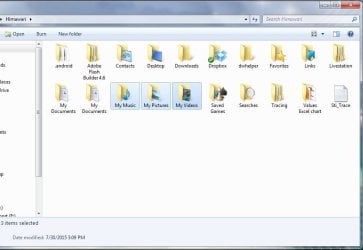
A few days ago, I connected my external HDD via USB, and at the time I had a folder with a similar name as the folder I created on my niece's USB flash drive, and just like what happened on my niece's USB flash drive, I was getting these empty My docs/pictures/video folders automatically created. I ended up moving all the files I had in that folder to my D/Data drive, and deleted the folder that was causing me problems. After I deleted it, the folder recreated itself automatically, with all the My docs/pics/videos subfolders intact.
It doesn't matter how many times I delete the folder or rename it, it keeps coming back. I know that sometimes if I just leave it alone, it will continue to create an empty Saved Games and Downloads subfolders as well.
Other issues, possibly related:
I've also noticed that my external HDD has been acting up a bit more. I was getting messages saying that my external HDD was disconnected, and when I would reconnect via the USB device software, it would tell me it was already connected/working fine. I was also getting a "please format disk" message when I was already viewing the files/folders saved on my external HDD. Lately, those particular issues haven't occurred since 2-3 days ago. Though I did have an issue today where I deleted the problematic folder, disconnected my external HDD, reconnected it via the USB, and Win7 couldn't recognize the device, as it wasn't showing up on Computer. It look a restart for it to be recognized again.
I've ran antivirus scan and a Malwarebytes scan, on both my C/OS drive and on the external HDD itself, and nothing was detected. I've also tried a clean startup as well, and have had no success with that either.
Unrelated note: I did install a 2nd new hard drive last week on my laptop for personal files/folders, replacing/deleting the D/Data drive partition I had been using previously. Not sure if any of this would come into play, but I thought I'd mention it.
I am literally quite stumped on what to do to solve my issue, and am looking for any kind of help and solutions to help me solve it. I appreciate everyone who reads my entire post, and I hope that someone can help me!
I appreciate all the help I can get! Thanks!
I was advised to post my issue here after posting it on the General discussion page. I'm hoping that someone here can help me out! Please bear with me, as this post might be a bit long!
Summary:
I've been having an issue the last few days where a folder is automatically created whenever I have USB device, in this case, my external HDD is connected. I've tried numerous times to delete the folder, but it keeps being automatically created on it's own after its been deleted. It's been creating itself at random intervals (anywhere from a few mins to a few hours) while the external HDD is plugged in, and it will sometimes automatically be created as soon as the external HDD is unlocked (my external HDD Is password-protected).
Some background info:
I know that last week, I connected my niece's USB flash drive to my computer, as she wanted me to put some files on her USB flash drive for her. I know that once I connected her USB flash drive, I created a folder, named it, and started to move some files over to the folder I created. During that process, I noticed that empty My Docs/Pictures/Videos subfolders were being created automatically in the folder I had originally made on my niece's USB flash drive. I would delete the folder I created, but the folder would automatically create itself once again, with all subfolders intact. I ignored the issue, moved the files over to my niece's USB flash drive, and disconnected her USB flash drive from my computer.
A few days ago, I connected my external HDD via USB, and at the time I had a folder with a similar name as the folder I created on my niece's USB flash drive, and just like what happened on my niece's USB flash drive, I was getting these empty My docs/pictures/video folders automatically created. I ended up moving all the files I had in that folder to my D/Data drive, and deleted the folder that was causing me problems. After I deleted it, the folder recreated itself automatically, with all the My docs/pics/videos subfolders intact.
It doesn't matter how many times I delete the folder or rename it, it keeps coming back. I know that sometimes if I just leave it alone, it will continue to create an empty Saved Games and Downloads subfolders as well.
Other issues, possibly related:
I've also noticed that my external HDD has been acting up a bit more. I was getting messages saying that my external HDD was disconnected, and when I would reconnect via the USB device software, it would tell me it was already connected/working fine. I was also getting a "please format disk" message when I was already viewing the files/folders saved on my external HDD. Lately, those particular issues haven't occurred since 2-3 days ago. Though I did have an issue today where I deleted the problematic folder, disconnected my external HDD, reconnected it via the USB, and Win7 couldn't recognize the device, as it wasn't showing up on Computer. It look a restart for it to be recognized again.
I've ran antivirus scan and a Malwarebytes scan, on both my C/OS drive and on the external HDD itself, and nothing was detected. I've also tried a clean startup as well, and have had no success with that either.
Unrelated note: I did install a 2nd new hard drive last week on my laptop for personal files/folders, replacing/deleting the D/Data drive partition I had been using previously. Not sure if any of this would come into play, but I thought I'd mention it.
I am literally quite stumped on what to do to solve my issue, and am looking for any kind of help and solutions to help me solve it. I appreciate everyone who reads my entire post, and I hope that someone can help me!
I appreciate all the help I can get! Thanks!
My Computer
- Computer type
- Laptop
- Computer Manufacturer/Model Number
- ASUS N73JQ
- OS
- Windows 7 Home Premium 64bit - SP1
- CPU
- Intel i7 Q740 @1.73GHz
- Memory
- 6 GB
- Graphics Card(s)
- Nvidia GeForce GT 425M
- Screen Resolution
- 1600x900
- Hard Drives
- Seagate 500GB (OS)
Seagate 1TB (DATA)
- Mouse
- Logitech G500
- Antivirus
- Avast Free Antivirus 2015
- Browser
- Firefox, Chrome, Opera