
Solved About REGSVR32.exe errors and how to use it.

jagman55

New member
Member
VIP
Local time
10:49 AM
Messages
115
I ran Malwarebytes and it found several DLL as malware and it deleted them. But the downside is, now REGSVR32 is complaining the DLL's are MISSING.
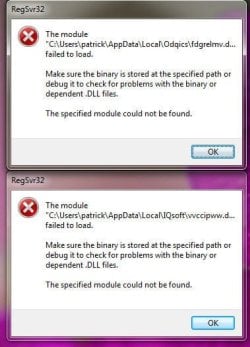
But at the first boot, I get 2 errors from REGSVR32 that it can not find "C:/User/xxx/AppData/Local/IQsoft/vvccipww.d.............. and that is all Windows listed in the window so I dont know the TOTAL name.
I see a DLL can be "unregistered" by using REGSVR32.EXE but since Windows 7 will not give me the entire name, and Malwarebytes has deleted the DLL, I dont how how.
Anyone know I can it get rid of these TWO error messages at every Boot?
error windows attached.

PS: Tried CCLEANER as suggested from 2014 post but did not work.


167615
 

Attachments
  • regsvr erros.jpg
    regsvr erros.jpg
    33.2 KB · Views: 22

My Computer My Computer

At a glance

windows 7 ultimate2 quads @ 2.43gb
Computer Manufacturer/Model Number
HP pavilion
OS
windows 7 ultimate
CPU
2 quads @ 2.4
Memory
3gb
Monitor(s) Displays
tv
Hard Drives
many vendors
The files pointed in the dialogs are obviously the virus files that Malwarebytes deleted, but it's evident that something else is still there and your computer is still infected.

RegSvr32 doesn't popups out of nowhere, something is calling it and asking to register the now-missing libraries. If it happens at startup, look up at the startup location to find out where the virus is hidden. You may try another antivirus too.

The full file name doesn't matters at all. Something else is still trying to run the virus file, and the file being missing triggers that error.

Of course, since your computer has a confirmed infection and has been already breached, the only safe choice is a clean install.
 

My Computer My Computer

At a glance

Windows 7 Ultimate x64Intel Core i7-740QM8 GB DDR3NVIDIA GeForce 330GT
Computer type
Laptop
Computer Manufacturer/Model Number
Toshiba Sattelite A665-S6092
OS
Windows 7 Ultimate x64
CPU
Intel Core i7-740QM
Memory
8 GB DDR3
Graphics Card(s)
NVIDIA GeForce 330GT
Screen Resolution
1366x768
Hard Drives
Samsung 840 SSD 500GB
1TB USB3 external HD
Cooling
Coolermaster Notepal U3 notebook cooling pad
Internet Speed
3mbps ASDL
Antivirus
ClamWin 0.98.7
Browser
Opera 12.17 x86 (main), Firefox 38 (sec), IE11 (last resort)
Regsvr32.exe IS NOT a genuine MS file regsvr32 IS

IQsoft is the offending file.

Try running ESET on-line, Dissable any other AV you have.

Roy
 

My Computer My Computer

At a glance

W7 home premium 32bit/W7HP 64bit/w10 tp insid...E5300 dual core3gbNvidia Geforce 7100 Nforce 630i
Computer type
PC/Desktop
Computer Manufacturer/Model Number
medionl/Aspire 6930G/acer x55a
OS
W7 home premium 32bit/W7HP 64bit/w10 tp insider ring
CPU
E5300 dual core
Motherboard
medion MS7366
Memory
3gb
Graphics Card(s)
Nvidia Geforce 7100 Nforce 630i
Monitor(s) Displays
avixc
Internet Speed
n (isp resticted to 72)
Antivirus
mse/pands
Browser
palemoon
Other Info
Belkin Fd7050 n USB using Railink RT2870 drivers, more upto date
Regsvr32.exe IS NOT a genuine MS file regsvr32 IS

The file has .exe extension, the file is the original one that comes in Windows. The file it's trying to load is not.
 

My Computer My Computer

At a glance

Windows 7 Ultimate x64Intel Core i7-740QM8 GB DDR3NVIDIA GeForce 330GT
Computer type
Laptop
Computer Manufacturer/Model Number
Toshiba Sattelite A665-S6092
OS
Windows 7 Ultimate x64
CPU
Intel Core i7-740QM
Memory
8 GB DDR3
Graphics Card(s)
NVIDIA GeForce 330GT
Screen Resolution
1366x768
Hard Drives
Samsung 840 SSD 500GB
1TB USB3 external HD
Cooling
Coolermaster Notepal U3 notebook cooling pad
Internet Speed
3mbps ASDL
Antivirus
ClamWin 0.98.7
Browser
Opera 12.17 x86 (main), Firefox 38 (sec), IE11 (last resort)
I think I had this correct but lets clarify.

First, THANKS Alejandro85 and Roy for responding.

Here is what I understood:
Malwarebytes REMOVED "IQSOFTxxxxxx" as a virus or malware file.
REGSVR32 THINKS "IQSOFTxxxxx" it needed but can not find it for Startup.

other posts says to "unregisted" the DLL "IQSOFTxxxx.DLL" FROM REGSVR32 by using REGSVR32.exe. but that is impossible as the entire name is not giving my MS.

I understood the C;/User/xxxx/IQsoft yyyyyyyy IS the offending file REGSVR32 is trying to register and is missing because Malwarebytes did delete for GOOD reason.

torchwood / ROY I do not understand the statement you made:

Regsvr32.exe IS NOT a genuine MS file regsvr32 IS

I dont see the different between "REGSVR32.exe AND REGSVR32?" Can you clarify please?

SO is REGSVR32.exe a MS file, valid, or NOT?

I will try to use ESET and see if it can REMOVE IQSoftxxxxxxxxxxxx from REGSVR32.exe but suspect it CAN NOT. AND see if there are more Malware/Virus.

But, it seems to me Malwarebyres removed a file "IQSoftxxxx.DLL" from C:/Users/xxxx/IQSOFTxxx.DLL, and at Startup, REGSVR32 HAD registered it but now can not find it and needs to be REMOVED or UNREGISTERED from REGSVR32 and REGSVR32 is just saying it can not find the missing file.


141
 

My Computer My Computer

At a glance

windows 7 ultimate2 quads @ 2.43gb
Computer Manufacturer/Model Number
HP pavilion
OS
windows 7 ultimate
CPU
2 quads @ 2.4
Memory
3gb
Monitor(s) Displays
tv
Hard Drives
many vendors
REGSVR32 THINKS "IQSOFTxxxxx" it needed but can not find it for Startup.

No! Regsvr32 doesn't thinks at all, it just respond to being invoked explictly.
"Something" is calling it to attempt to run a virus file at startup. It's pretty obvious that there is a startup entry where a virus is still there, and that is calling regsvr32. You're still infected. You don't know exactly where a virus could be hidding, thus a clean install is the only safe action at this point.


other posts says to "unregisted" the DLL "IQSOFTxxxx.DLL" FROM REGSVR32 by using REGSVR32.exe. but that is impossible as the entire name is not giving my MS.

Don't do that! For one, the file no longer exists (the antivirus deleted it), but most important, you know it's a virus, so you don't want to run it, no matter what. It was deleted for good, so forget about it. The full name doesn't matters either (but to satisfy your curiosity, you can search the logs on the antivirus)


I understood the C;/User/xxxx/IQsoft yyyyyyyy IS the offending file REGSVR32 is trying to register and is missing because Malwarebytes did delete for GOOD reason.

Not this time. The deleted file was a virus and it was deleted, that's good. But the thing triggering the message is something else that is still on your computer. A deleted file can't simply do anything at all :p


Regsvr32.exe IS NOT a genuine MS file regsvr32 IS

This statement is completely wrong. The real built-in file is "regsvr32.exe" (you'll find it in your windows\system32 folder). "regsvr32" as a file doesn't even exists, althoug Windows will allow to type that command to invoke it (it always allow to omit the .exe extension).
 

My Computer My Computer

At a glance

Windows 7 Ultimate x64Intel Core i7-740QM8 GB DDR3NVIDIA GeForce 330GT
Computer type
Laptop
Computer Manufacturer/Model Number
Toshiba Sattelite A665-S6092
OS
Windows 7 Ultimate x64
CPU
Intel Core i7-740QM
Memory
8 GB DDR3
Graphics Card(s)
NVIDIA GeForce 330GT
Screen Resolution
1366x768
Hard Drives
Samsung 840 SSD 500GB
1TB USB3 external HD
Cooling
Coolermaster Notepal U3 notebook cooling pad
Internet Speed
3mbps ASDL
Antivirus
ClamWin 0.98.7
Browser
Opera 12.17 x86 (main), Firefox 38 (sec), IE11 (last resort)
Resolution of Error messages from REGSVC32.exe

I ran several Virus Scanners and it did not stop the STARTUP of the Regsvc32 error notification.
I then ran a REGEDT and did a FIND on IQSoft and in the Register, I did find IN the :

HKEY_CURRENT_USER/Software/Microsoft/Windows/CurrentVersion/Run/

the TWO software apps that were listed in the REGSVC32 Error messages at startup.
I deleted them in the:

HKEY_CURRENT_USER/Software/Microsoft/Windows/CurrentVersion/Run/


and I assume the "RUN" implies they are to be "RUN" startup.

After the next BOOT, they no longer came up.

Closed, Thanks
24
 

My Computer My Computer

At a glance

windows 7 ultimate2 quads @ 2.43gb
Computer Manufacturer/Model Number
HP pavilion
OS
windows 7 ultimate
CPU
2 quads @ 2.4
Memory
3gb
Monitor(s) Displays
tv
Hard Drives
many vendors
Back
Top