0x80070241 install Windows 7 to computer with Windows 8 preinstalled.

JoeAlker

New member
Local time
12:37 PM
Messages
6
Location
Manchester, England
I have an Asus M11BB computer that is 5 months old that came with Windows 8 pre-installed. However, I would like to install Windows 7 on this computer as a Dual Boot, and I have the ISO burnt to a USB Stick. I can run the setup program both on startup by booting from the USB or while Windows 8 is already running. Both return the 0x80070241 error at 63% of copying Windows files.

BEFORE I start asking for help, is it possible to use the activation key from the bottom of my laptop on this install? I tried with a Virtual Machine and it works fine? If not, just leave it there as I'm not buying a new copy of Windows 7 just for this.

Presuming the answer was yes, I have split the D:\ partition (The C:\ contains the OS, the D:\ was blank on purchase) into a new B:\ partiton that is 100GB. When installing to the partition I get a message saying "Not in recommended order, for more info about installing to GPT disks please go to Microsoft.com". That is when I don't get an error saying it can't install to a GPT partition. I have reformatted that partition a number of times using both the Disk Management tool and the EaseUS program, no luck. So if I click OK, it goes to the copying Windows files and then throws up 0x80070241. That's the furthest I've got so far.

Regards,

Joe.
 

My Computer My Computer

At a glance

Windows 7 Home Premium 64-bit/Windows 8 64-bit3.7GHz AMD A44GB
Computer type
PC/Desktop
Computer Manufacturer/Model Number
Asus M11BB
OS
Windows 7 Home Premium 64-bit/Windows 8 64-bit
CPU
3.7GHz AMD A4
Memory
4GB
Antivirus
Panda
Browser
Firefox
You cannot use an OEM Key that came with another computer -
OEM Licenses are tied to the computer on which they shipped.
If the license is a Full Retail one, then it can be moved - so long as it's only on one machine at a time.
 

My Computer My Computer

At a glance

Win 7 x64 Home Premium (and x86 VirtualBox VM...i3 370M/i7 6500U8GB - finally :)/8GBit's an i3, dude!/dual Intel&nVidia
Computer type
Laptop
Computer Manufacturer/Model Number
Asus K52F or Lenovo B51-80
OS
Win 7 x64 Home Premium (and x86 VirtualBox VM)/Win10
CPU
i3 370M/i7 6500U
Motherboard
Asus/Lenovo
Memory
8GB - finally :)/8GB
Graphics Card(s)
it's an i3, dude!/dual Intel&nVidia
Sound Card
onboard
Monitor(s) Displays
15.6" built-in
Screen Resolution
1366x768/1920x1080
Hard Drives
750GB Seagate internal
Sundry external drives attached to other computers on the local network
1TB SSD on the Lenovo
PSU
n/a
Internet Speed
as much as I can get - usually on a dongle/phone, so <1MB/s
Antivirus
MSE/Defender
Browser
IE11/12/Edge/Chrome/FF(if I must)
I have an Asus M11BB computer that is 5 months old that came with Windows 8 pre-installed. However, I would like to install Windows 7 on this computer as a Dual Boot,

YES & NO, down to your UEFI/BIOS firmware setting.

1) Downgrade to Windows 7.
Downgrade Windows 8 to Windows 7
Warning you must have the UEFI/BIOS firmware setting in Step Three set.

Make sure you read the NOTE at Step three.

2) If Using a USB Pen drive on a PC with a UEFI BIOS.
USB Pen drive need to be formatted to FAT32 as in
UEFI Bootable USB Flash Drive - Create in Windows
Take note of Step 11 for Windows 7.
Also you will need to use a USB 2.0 port, as there are no USB 3.0 drivers in Windows 7.


You will need to buy Windows 7.
 

My Computer My Computer

At a glance

ME/XP/Vista/Win7
OS
ME/XP/Vista/Win7
You will need to buy Windows 7.
Oh, er, right. That's a problem.

The method detailed in the second post describes a complete downgrade. I don't want to do that, I need both for the time being.

OEM Licenses are tied to the computer on which they shipped.
So how do you explain the Virtual PC working then? The laptop containing Windows 7 is a Toshiba C660 Satellite bought from Argos in 2010, if that's any help.

EDIT: Booted up Virtual PC, "Copy of Windows not genuine." and a message "You may be a victim of software counterfeiting, to get updates and all that please validate it". So presumably doesn't work then?
 

My Computer My Computer

At a glance

Windows 7 Home Premium 64-bit/Windows 8 64-bit3.7GHz AMD A44GB
Computer type
PC/Desktop
Computer Manufacturer/Model Number
Asus M11BB
OS
Windows 7 Home Premium 64-bit/Windows 8 64-bit
CPU
3.7GHz AMD A4
Memory
4GB
Antivirus
Panda
Browser
Firefox
I have always been able to adjust BIOS settings for Legacy, CSM and turn off Secure Boot in order to Dual Boot Win7/8 with 7 installed to UEFI to space shrunk from C.

Some BIOS however will not boot 8 without Secure Boot.
 
Any machine supplied with Windows 8 installed is **required** to be able to switch off Secure Boot (except for Windows 8.x RT ) - by the terms of their license with Microsoft.
 

My Computer My Computer

At a glance

Win 7 x64 Home Premium (and x86 VirtualBox VM...i3 370M/i7 6500U8GB - finally :)/8GBit's an i3, dude!/dual Intel&nVidia
Computer type
Laptop
Computer Manufacturer/Model Number
Asus K52F or Lenovo B51-80
OS
Win 7 x64 Home Premium (and x86 VirtualBox VM)/Win10
CPU
i3 370M/i7 6500U
Motherboard
Asus/Lenovo
Memory
8GB - finally :)/8GB
Graphics Card(s)
it's an i3, dude!/dual Intel&nVidia
Sound Card
onboard
Monitor(s) Displays
15.6" built-in
Screen Resolution
1366x768/1920x1080
Hard Drives
750GB Seagate internal
Sundry external drives attached to other computers on the local network
1TB SSD on the Lenovo
PSU
n/a
Internet Speed
as much as I can get - usually on a dongle/phone, so <1MB/s
Antivirus
MSE/Defender
Browser
IE11/12/Edge/Chrome/FF(if I must)
So, for the benefit of other users, how exactly do you install Windows 7? Secure Boot is off, and Fast Startup off as well.

The methods detailed require deletion of data on the hard disk, which neither I nor most other users would be prepared to do.
 

My Computer My Computer

At a glance

Windows 7 Home Premium 64-bit/Windows 8 64-bit3.7GHz AMD A44GB
Computer type
PC/Desktop
Computer Manufacturer/Model Number
Asus M11BB
OS
Windows 7 Home Premium 64-bit/Windows 8 64-bit
CPU
3.7GHz AMD A4
Memory
4GB
Antivirus
Panda
Browser
Firefox
This is hard to answer because every BIOS is different. Just because I was able to find a configuration to install Win7 in Dual Boot on a half dozen Windows 8 laptops also doesn't mean it can always be done without first wiping the HD. One could save Recovery Disks then wipe the HD first if it comes to that.

One must find the exact settings configuration in BIOS setup to allow Win7 to install in UEFI mode, make absolutely sure you have good media, i.e. flash stick is written only with Option One in http://www.eightforums.com/tutorials/15458-uefi-bootable-usb-flash-drive-create-windows.html

Then follow installation steps in http://www.sevenforums.com/tutorial...e-firmware-interface-install-windows-7-a.html.

To assure settings in BIOS are correct consult the manual on the Support Downloads webpage for the mobo or PC model, google the model number for information on installing Win7 to UEFI, try every CSM and'or Legacy setting after disabling Secure Boot, try running the Win7 installation media from Windows 8.

If you post back the BIOS settings choices and results of each attempt we can help you adjust them.
 
Last edited:
Ok, that's really as far as I can go now, as I have no intentions of buying another Win7 license at this point until I have a bit more money, so an installation is a bit pointless at the moment. I just wanted the info there really for others to refer too :)

Thanks for the help everyone though :)
 

My Computer My Computer

At a glance

Windows 7 Home Premium 64-bit/Windows 8 64-bit3.7GHz AMD A44GB
Computer type
PC/Desktop
Computer Manufacturer/Model Number
Asus M11BB
OS
Windows 7 Home Premium 64-bit/Windows 8 64-bit
CPU
3.7GHz AMD A4
Memory
4GB
Antivirus
Panda
Browser
Firefox
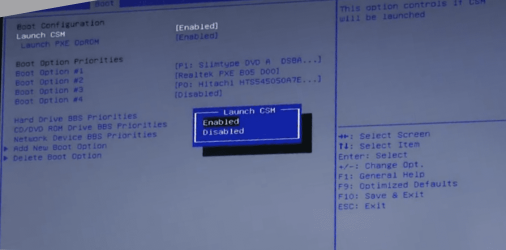
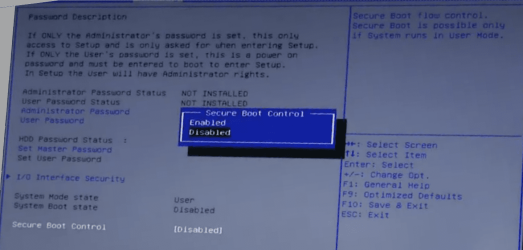
Asus K55N, screenshots.

ENABLE CSM
ENABLE PXE OpROM
ENABLE Secure Boot

Asus003-3.png

Asus005-5.png
 

My Computer My Computer

At a glance

ME/XP/Vista/Win7
OS
ME/XP/Vista/Win7
Back
Top