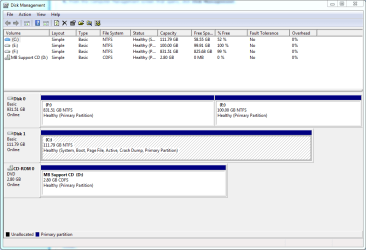
I am writing this on another computer. I can assure you, that I have never found myself in this kind of frustration when it comes to computers. I have a computer which has Windows 7 installed on it. I have some old games and applications I've always wanted to use, but couldn't because of compatibility issues. I decided to follow a tutorial here on this forum to install Windows XP using dual boot. Now, my computer has two internal drives. An SSD of 120GB with Windows 7 on it, and a 1TB drive which I split into two partitions in order to be able to install Windows XP. I have also supposedly slipstreamed the drivers into the installation. All went fine in the setup, until it had to restart. It restarted and I was greeted by the Windows XP Pro loading screen. I was proud of myself that I had managed to do it.... oh wait... only 3 seconds passed, and this beast BSOD pops up. Error code 0x07B. I tried to restart again, and noticed I am stuck on Windows XP now, something that has to do with the bootloader from what I've read. I tried inserting the Windows 7 OEM disk and performed a repair, used the bootrec commands (Kept saying no element found), made the partition active using diskpart, searched for COUNTLESS hours on the internet, maybe something on some forum could be of some help, nothing. And finally, MY WORST MISTAKE, was deleting the partition I "installed" Windows XP on. When I try to boot, I'm now stuck with: Windows could not start because of a computer disk hardware configuration problem. Could not read from the selected boot disk. Check boot path and disk hardware. Please check the Windows documentation about hardware disk configuration and your hardware reference manuals for addition information.
I tried using diskpart to change the drive letters back to the original ones, nothing. I think that this message I'm getting is coming from XP. I need some REAL help with this. How to get back to Windows 7? Are my files safe?? Will using an adapter to connect the harddrive as a USB to another computer get me back my files? I've done a backup, but I forgot that some more up to date files are in my 120GB SSD drive. I am in some real trouble and need some help ASAP. I know how to format, but I would like to keep that as a LAST resort.
Thanks
I tried using diskpart to change the drive letters back to the original ones, nothing. I think that this message I'm getting is coming from XP. I need some REAL help with this. How to get back to Windows 7? Are my files safe?? Will using an adapter to connect the harddrive as a USB to another computer get me back my files? I've done a backup, but I forgot that some more up to date files are in my 120GB SSD drive. I am in some real trouble and need some help ASAP. I know how to format, but I would like to keep that as a LAST resort.
Thanks
My Computer
- Computer type
- PC/Desktop
- Computer Manufacturer/Model Number
- Custom Build
- OS
- Windows 7 64 bit
- CPU
- Interl Core i7-3770K CPU @ 3.50GHz
- Motherboard
- Asus P8 Z77-V X
- Memory
- Corsair 4GB x 4 (16GB)
- Graphics Card(s)
- EVGA GTX 680 SuperClocked 2GB
- Hard Drives
- 1TB Hitachi Retail
- Antivirus
- avast! Antivirus 8 Free Edition
- Browser
- Google Chrome