
0x80070241

Marshall0211

New member
Local time
5:37 AM
Messages
3
Location
Cornwall UK
Hi all,
Just joined up here as I'm having a lot of trouble installing windows 7. I have recentley built a new system, not very high spec but I don't really use it for much.

When I try and install windows 7 it gets to around 13% through expanding files then comes up with an error saying
Windows cannot copy files required for installation. The files may be corrupt or missing. Make sure all files required for installation are available, and restart the installation. Error code: 0x80070241

So far I have tried
- Re burning the DVD at a slower speed
- Removing all expansion cards and all but one stick of RAM
- Installing from USB stick
- Installing vista then mounting the ISO using daemon tools
- Downloading multiple different ISO's from different torrent sites

I am trying to Install Windows 7 Professional 32-bit and I do have a legit license but I downloaded it from MSDN so I have no media.

I have installed vista:sick: as a temporary measure and it went through with no problems at all. I have also ran Memtest86 and the hard drive diags for my hard drive and they have both come up fine.

I am out of idea so does anyone have any idea how to sort this?

Thanks in advance
Chris
 

My Computer

Computer Manufacturer/Model Number
Self Built
OS
None at the moment
CPU
AMD Athlon II X2 260 3.2 GHz Socket AM3 2MB Cache
Motherboard
ASUS M4A78L-M LE
Memory
2GB DDR2 667Mhz
Graphics Card(s)
On Board
Sound Card
On Board
Monitor(s) Displays
BenQ G2220HD 22" TFT Monitor
Screen Resolution
1600x1200
Hard Drives
Western Digital WD3200AAKS 320GB SATAII 7200rpm 16MB Cache
PSU
450W 24pin SATA PSU
Case
Casecom 7720 Black Mid Tower Case
Cooling
Xilence High Density Surface AM2 754 939 940 CPU Cooler
Hi all,
Just joined up here as I'm having a lot of trouble installing windows 7. I have recentley built a new system, not very high spec but I don't really use it for much.

When I try and install windows 7 it gets to around 13% through expanding files then comes up with an error saying
Windows cannot copy files required for installation. The files may be corrupt or missing. Make sure all files required for installation are available, and restart the installation. Error code: 0x80070241

So far I have tried
- Re burning the DVD at a slower speed
- Removing all expansion cards and all but one stick of RAM
- Installing from USB stick
- Installing vista then mounting the ISO using daemon tools
- Downloading multiple different ISO's from different torrent sites

I am trying to Install Windows 7 Professional 32-bit and I do have a legit license but I downloaded it from MSDN so I have no media.

I have installed vista:sick: as a temporary measure and it went through with no problems at all. I have also ran Memtest86 and the hard drive diags for my hard drive and they have both come up fine.

I am out of idea so does anyone have any idea how to sort this?

Thanks in advance
Chris


Hi Cris and welcome


Failed install can be traced to bad images. What app are you burning it with? Have you tried downloading another image?


Ken j
 

My Computer

Computer Manufacturer/Model Number
HP Pavillion dv-7 1005 Tx
OS
Win 8 Release candidate 8400
CPU
[email protected]
Memory
4 gigs
Graphics Card(s)
Nvidia 9600M
Sound Card
HD built-in
Monitor(s) Displays
17" Wxga
Screen Resolution
1440x900
Cooling
none
Internet Speed
45Mb down 5Mb up
Hi Ken J

I've tried burning using ImgBurn and CDBurnerXP and I have tried re downloading the original image from MSDN and tried using other images from torrent sites. I have also tried 3 different CD drives to burn the image but it still won't work.

Cheers
Chris
 

My Computer

Computer Manufacturer/Model Number
Self Built
OS
None at the moment
CPU
AMD Athlon II X2 260 3.2 GHz Socket AM3 2MB Cache
Motherboard
ASUS M4A78L-M LE
Memory
2GB DDR2 667Mhz
Graphics Card(s)
On Board
Sound Card
On Board
Monitor(s) Displays
BenQ G2220HD 22" TFT Monitor
Screen Resolution
1600x1200
Hard Drives
Western Digital WD3200AAKS 320GB SATAII 7200rpm 16MB Cache
PSU
450W 24pin SATA PSU
Case
Casecom 7720 Black Mid Tower Case
Cooling
Xilence High Density Surface AM2 754 939 940 CPU Cooler
Hello Marshall0211, welcome to Seven Forums!


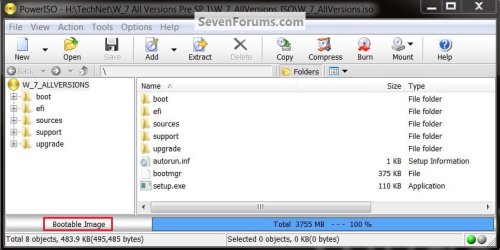
It makes no sense that Vista (the toughest of all) will install and Windows 7 will not, are you sure you have a bootable image, that's the next thing I would check.

Then use ImgBurn to burn another at a speed of now more than 4x and select to let the program to verify the disk before it finishes.


Boot.jpg
 

My Computer

Computer Manufacturer/Model Number
* BFK Customs *
OS
W 7 64-bit Ultimate
CPU
Intel Q9550 Yorkfield
Motherboard
ASUS P5Q Pro
Memory
8GB Dominator 8500C5D
Graphics Card(s)
ATI : XFX 5870
Sound Card
Realtek HD Audio 7-1
Monitor(s) Displays
1x 47" LCD HDMI & 3x 26" LCD HDMI
Screen Resolution
1920x1080P & 1920x1200
Hard Drives
1x 80GB Intel X25-M G2 SSD : 1x 500GB & 1x 640GB WD Caviar Black(s)
PSU
Corsair 620HX
Case
Cooler Master RC-690
Cooling
Tuniq Tower 120, 2x 140mm and 3x 120mm case fans
Keyboard
Microsoft 500
Mouse
Razer Diamondback 3G
Internet Speed
14 Mb/s
Other Info
1x Koutech 3Gb/s SATA HDD Hot Swap Rack
Hello Marshall0211, welcome to Seven Forums!


It makes no sense that Vista (the toughest of all) will install and Windows 7 will not, are you sure you have a bootable image, that's the next thing I would check.

Then use ImgBurn to burn another at a speed of now more than 4x and select to let the program to verify the disk before it finishes.

Thanks for the help, I extracted my image then pulled the files into power iso and it said Non-Bootable image. Is this the correct way to test?
If it is that would mean that my images are Non-bootable. Do you have a link to an image that is non-activated.

Thanks
Chris
 

My Computer

Computer Manufacturer/Model Number
Self Built
OS
None at the moment
CPU
AMD Athlon II X2 260 3.2 GHz Socket AM3 2MB Cache
Motherboard
ASUS M4A78L-M LE
Memory
2GB DDR2 667Mhz
Graphics Card(s)
On Board
Sound Card
On Board
Monitor(s) Displays
BenQ G2220HD 22" TFT Monitor
Screen Resolution
1600x1200
Hard Drives
Western Digital WD3200AAKS 320GB SATAII 7200rpm 16MB Cache
PSU
450W 24pin SATA PSU
Case
Casecom 7720 Black Mid Tower Case
Cooling
Xilence High Density Surface AM2 754 939 940 CPU Cooler
Hello again.


This forum does not condone the posting of links to intellectual property software, I don't have a link anyway.

Can you not make the image you have bootable with PowerISO?
 

My Computer

Computer Manufacturer/Model Number
* BFK Customs *
OS
W 7 64-bit Ultimate
CPU
Intel Q9550 Yorkfield
Motherboard
ASUS P5Q Pro
Memory
8GB Dominator 8500C5D
Graphics Card(s)
ATI : XFX 5870
Sound Card
Realtek HD Audio 7-1
Monitor(s) Displays
1x 47" LCD HDMI & 3x 26" LCD HDMI
Screen Resolution
1920x1080P & 1920x1200
Hard Drives
1x 80GB Intel X25-M G2 SSD : 1x 500GB & 1x 640GB WD Caviar Black(s)
PSU
Corsair 620HX
Case
Cooler Master RC-690
Cooling
Tuniq Tower 120, 2x 140mm and 3x 120mm case fans
Keyboard
Microsoft 500
Mouse
Razer Diamondback 3G
Internet Speed
14 Mb/s
Other Info
1x Koutech 3Gb/s SATA HDD Hot Swap Rack
Back
Top