
0x8078012D & 0x8077045D errors while trying to image my internal HDD
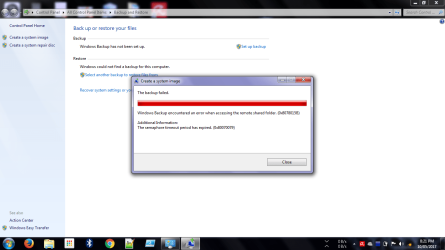
So recently I wanted to completely backup my HDD and decided to system image it. But an error (attached image) kept cropping up. I tried looking up the hex code of the error but the issues were in a different context compared to mine. This has happened two times already now and hence I have come here after the third time. The error has not been the same each time though as you can see.
So recently I wanted to completely backup my HDD and decided to system image it. But an error (attached image) kept cropping up. I tried looking up the hex code of the error but the issues were in a different context compared to mine. This has happened two times already now and hence I have come here after the third time. The error has not been the same each time though as you can see.
Attachments

My Computer
At a glance
Windows 7 Ultimate x32 SP1Intel Core i3-2350M CPU@ 2.3GHz2.0 GBIntel HD Graphics 3000
- Computer type
- Laptop
- Computer Manufacturer/Model Number
- Dell Inspiron N5050
- OS
- Windows 7 Ultimate x32 SP1
- CPU
- Intel Core i3-2350M CPU@ 2.3GHz
- Memory
- 2.0 GB
- Graphics Card(s)
- Intel HD Graphics 3000
- Screen Resolution
- 1080p
- Hard Drives
- ~465 GB
- Antivirus
- Avira
- Browser
- Chrome


