0xc000000e boot manager error

Kevinnngo

New member
Local time
6:49 PM
Messages
5
Getting an error when i to load windows 7 ultimate installer on to my new computer.

Error message :
Windows failed to start. A recent hardware or software change moghy be the cause.

Status : 0xc000000e
Info : The boot selection failed because a required device is inaccessable.

Ive tried using the command prompt in windows installer for the following:
bootrec /fixmbr
bootrec /fixboot

When I use system repair on the windows 7 installer, it says there are no issues.

Computer Specifications
CPU - Intel i5-6600k
MOBO - MSI Z170a M5
SSD - Samsung Evo 840
RAM - Kingston Fury 16GB DDR 2400
GPU - Gigabyte GeForce GTX980ti
 

My Computer

Computer type
PC/Desktop
Computer Manufacturer/Model Number
Custom build
OS
Windows 7 Ultimate x64
CPU
Intel i5-6600k
Motherboard
MSI Z170a M5
Memory
Kingston Fury 16GB DDR4 2400
Graphics Card(s)
Gigabyte GeForce GTX980ti Xtreme gaming
Hard Drives
Samsung Evo 840 250gb
SSD - Samsung Evo 840
Any other disks are there attached with the computer? If so, let us know about them in details.

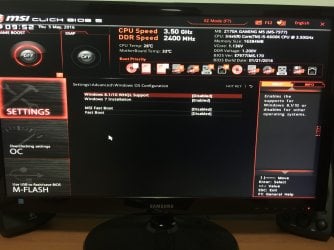
Also, Boot into the BIOS. Get into the Advanced BIOS settings (F7), and let us see two things there:

  1. Windows OS Configuration > Windows 8.1/ 10 WHQL Support ==> Enabled or Disabled? Let us see a camera snap.
  2. Get to the "Boot" tab. There is an option "Boot Mode Select" ... let us see which mode is selected by providing a camera snap.
 

My Computer

Computer type
PC/Desktop
Computer Manufacturer/Model Number
Self Assembled
OS
Microsoft Windows 10 Pro Insider Preview 64-bit
CPU
Intel(R) Core(TM) i3-4130 CPU @ 3.40GHz
Motherboard
Gigabyte Technology Co., Ltd. B85M-D3H
Memory
Corsair Vengence 4GB x2 (8.00GB Dual-Channel DDR3 @ 798MHz)
Graphics Card(s)
2047MB GeForce GTS 450 (ZOTAC International)
Sound Card
Onboard (Realtek High Definition Audio)
Monitor(s) Displays
LG Flatron E2040T
Screen Resolution
1600x900
Hard Drives
Western Digital 1 TB
Seagate 500 GB
PSU
Corsair VS550
Case
Cooler Master K380
Cooling
Cooler Master Seidon 120V Plus
Keyboard
Logitech MK260r
Mouse
Logitech MK260r
Internet Speed
PMPL Broadband
Antivirus
Windows Defender + MBAM
Browser
Firefox
Other Info
Dell Studio 15" Laptop
I also have a Western digital 500gb HDD connected. The BIOS has it down as WDC WD5002ABYS-02B1B0.
 

Attachments

  • image.jpeg
    image.jpeg
    534.5 KB · Views: 1
  • image.jpg
    image.jpg
    640.5 KB · Views: 2

My Computer

Computer type
PC/Desktop
Computer Manufacturer/Model Number
Custom build
OS
Windows 7 Ultimate x64
CPU
Intel i5-6600k
Motherboard
MSI Z170a M5
Memory
Kingston Fury 16GB DDR4 2400
Graphics Card(s)
Gigabyte GeForce GTX980ti Xtreme gaming
Hard Drives
Samsung Evo 840 250gb
The Western digital 500gb HDD is the main concern here, apparently.

Convert it to GPT. The conventional method of conversion will erase all the data on that disk. To avoid the data loss, do the conversion using Partition wizard bootable CD.

Download it using any other computer. Boot from it, and convert it to GPT. There will be no data loss.


Then Set the Boot mode to UEFI. Do a clean install on the SSD. Everything will go normal.

Report us the result.
 

My Computer

Computer type
PC/Desktop
Computer Manufacturer/Model Number
Self Assembled
OS
Microsoft Windows 10 Pro Insider Preview 64-bit
CPU
Intel(R) Core(TM) i3-4130 CPU @ 3.40GHz
Motherboard
Gigabyte Technology Co., Ltd. B85M-D3H
Memory
Corsair Vengence 4GB x2 (8.00GB Dual-Channel DDR3 @ 798MHz)
Graphics Card(s)
2047MB GeForce GTS 450 (ZOTAC International)
Sound Card
Onboard (Realtek High Definition Audio)
Monitor(s) Displays
LG Flatron E2040T
Screen Resolution
1600x900
Hard Drives
Western Digital 1 TB
Seagate 500 GB
PSU
Corsair VS550
Case
Cooler Master K380
Cooling
Cooler Master Seidon 120V Plus
Keyboard
Logitech MK260r
Mouse
Logitech MK260r
Internet Speed
PMPL Broadband
Antivirus
Windows Defender + MBAM
Browser
Firefox
Other Info
Dell Studio 15" Laptop
The Western digital 500gb HDD is the main concern here, apparently.

Convert it to GPT. The conventional method of conversion will erase all the data on that disk. To avoid the data loss, do the conversion using Partition wizard bootable CD.

Download it using any other computer. Boot from it, and convert it to GPT. There will be no data loss.


Then Set the Boot mode to UEFI. Do a clean install on the SSD. Everything will go normal.

Report us the result.

Do i just move the partition wizard to a clean usb and boot it first on my computer? Will try this after work, thanks!
 

My Computer

Computer type
PC/Desktop
Computer Manufacturer/Model Number
Custom build
OS
Windows 7 Ultimate x64
CPU
Intel i5-6600k
Motherboard
MSI Z170a M5
Memory
Kingston Fury 16GB DDR4 2400
Graphics Card(s)
Gigabyte GeForce GTX980ti Xtreme gaming
Hard Drives
Samsung Evo 840 250gb
You can put PW in a USB, or you can burn a CD/DVD .... whichever you like.
 

My Computer

Computer type
PC/Desktop
Computer Manufacturer/Model Number
Self Assembled
OS
Microsoft Windows 10 Pro Insider Preview 64-bit
CPU
Intel(R) Core(TM) i3-4130 CPU @ 3.40GHz
Motherboard
Gigabyte Technology Co., Ltd. B85M-D3H
Memory
Corsair Vengence 4GB x2 (8.00GB Dual-Channel DDR3 @ 798MHz)
Graphics Card(s)
2047MB GeForce GTS 450 (ZOTAC International)
Sound Card
Onboard (Realtek High Definition Audio)
Monitor(s) Displays
LG Flatron E2040T
Screen Resolution
1600x900
Hard Drives
Western Digital 1 TB
Seagate 500 GB
PSU
Corsair VS550
Case
Cooler Master K380
Cooling
Cooler Master Seidon 120V Plus
Keyboard
Logitech MK260r
Mouse
Logitech MK260r
Internet Speed
PMPL Broadband
Antivirus
Windows Defender + MBAM
Browser
Firefox
Other Info
Dell Studio 15" Laptop
Back
Top