0xc000000f the boot selection failed because... Error.

aria

New member
Local time
10:01 AM
Messages
4
Hey guys,

I've been looking at a PC for a friend and it's proving to be a bit of a nightmare. Here's the issue and a description of what I've tried to far.

0xc000000f the boot selection failed because a required device is inaccessible.

I tried a number of things first, such as ensuring every device unplugged bar keyboard and mouse etc. I then attempted to repair windows by putting a windows install on a bootable USB. After selecting the country, it would hang on the setup is starting screen and do nothing. I tried doing repair windows, and nothing would happen. From there, I installed it onto a disc instead (just incase) and got the same result.

After that failed I tried resetting the CMOS, flashing the BIOS etc and still the same error.

I'd basically come to the conclusion that the HDD is faulty and needs to be replaced. However, my concern is that as the setup isn't even loading from the disc when the HDD isn't involved then there could be a different issue.

I can't use the built in acer erecovery because it just hangs on please wait, I cant boot into safe mode, I can't access windows at all. I've tried almost every suggestion from a dozen different threads. Before I purchase a new HDD, I need to be certain that's the issue.

Sorry if that's a bit long winded, but any suggestions? I've tried quite a few things so will reply if I've already done any suggestions posted.

Thanks,
 

My Computer

Computer type
PC/Desktop
OS
windows 7 64 Bit
Hello and welcome aria mate try this http://www.sevenforums.com/tutorials/219487-clean-reinstall-factory-oem-windows-7-a.html#post1839164

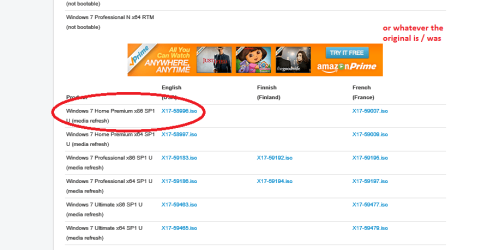
Read it thoroughly first and then make sure you pick the original version of Windows and don't do what some daft people do think they can put on Pro or Ultimate when the original version is Home.
See my pic for picking the right version I use a disk but a stick is ok for the ISO.

PS Meant to mention this will also get rid of all the Acer bloatware but do backup any dtat if you can.
 

Attachments

  • ISO.PNG
    ISO.PNG
    88 KB · Views: 2

My Computer

Computer type
PC/Desktop
Computer Manufacturer/Model Number
Own build (new) Desk1 / Asus ROG Win 7 / Desk2 1st build
OS
Desk1 7 Home Prem / Desk2 10 Pro / Main lap Asus ROG 10 Pro 2 laptop Toshiba 7 Pro Asus P2520 7 & 10
CPU
Desk1 i5 3750K / Laptop i7 GTX 860M / Desk2 i5 2500
Motherboard
Desk1 Asus P877-V / Desk2 Gigabyte H67 UD3H / Laptop ?
Memory
Desk1 8GB (1866) / Desk2 16GB (1333) / Laptop 8Gb DDR3
Graphics Card(s)
Desk 1& 2NVidia GTX 650 & Laptops on board Intel
Sound Card
Desk 1 & 2 -XONAR DG Realtek High Def audio Laptop
Monitor(s) Displays
Desk 1 Benq HD 2450 / Desk2 Philips 24" / Laptop 17.5"
Screen Resolution
1920x1080 D1 & D2 & Laptop 1
Hard Drives
Desk1 Samsung 120GB 830 SSD
Asus ROG 256GB 850 Pro SSD
Desk2 Samsung 840 256 SSD
Toshiba 120GB EVO
PSU
Desk 1 Corsair HX 1050/ Laptop ? / Desk 2 Corsair HX 650
Case
Desk 1 Cooler HAF XM ? Toshiba laptop / Desk2 Coolermaster
Cooling
Fans on all Desk1 -2 Desk2 - all Coolermasters 5 Laptop ?
Keyboard
Desk 1 MS Sidewinder X6 Desk 2 MS Sidewinder X 4
Mouse
Desk 1&2 - Gigabyte MS 900 gamer - laptop - Logitec wireless
Internet Speed
ADSL2+
Other Info
One other Desktop (tester) and spare Toshba laptop both with SSD's
Running Kaspersky 2016 ISS on all machines config'd identically
Logitec audio stereo systems on each machine (x3)
Canon MG5250MFC
Router/modem TP-Link running WPA2SK
Hi,

I have discs with all versions of windows on, and I've been using my Home Premium ones for this with no joy.

Thanks
 

My Computer

Computer type
PC/Desktop
OS
windows 7 64 Bit
Sorry late repy aria mate is the problem machine a prebuilt or a home build? If it is a prebuilt -store machine when they mad it they would have stuck the OEM (or retail) sticker on the bottom that has the version activation code on it

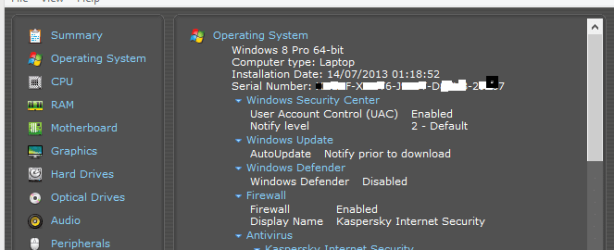
However if it has been built by the owner or someone will like me a lot of people omit to add that sticker. So you are stuck trying to find out what that is one method that might work is to run Speccy Speccy - Download download from piriform and if you open out Operating system it should give yu the original version and activation code se my pic of my readout for my laptop.

Give this a try if you can and swat it was original - tied to that motherboard.
 

Attachments

  • ACTO.PNG
    ACTO.PNG
    31.8 KB · Views: 19

My Computer

Computer type
PC/Desktop
Computer Manufacturer/Model Number
Own build (new) Desk1 / Asus ROG Win 7 / Desk2 1st build
OS
Desk1 7 Home Prem / Desk2 10 Pro / Main lap Asus ROG 10 Pro 2 laptop Toshiba 7 Pro Asus P2520 7 & 10
CPU
Desk1 i5 3750K / Laptop i7 GTX 860M / Desk2 i5 2500
Motherboard
Desk1 Asus P877-V / Desk2 Gigabyte H67 UD3H / Laptop ?
Memory
Desk1 8GB (1866) / Desk2 16GB (1333) / Laptop 8Gb DDR3
Graphics Card(s)
Desk 1& 2NVidia GTX 650 & Laptops on board Intel
Sound Card
Desk 1 & 2 -XONAR DG Realtek High Def audio Laptop
Monitor(s) Displays
Desk 1 Benq HD 2450 / Desk2 Philips 24" / Laptop 17.5"
Screen Resolution
1920x1080 D1 & D2 & Laptop 1
Hard Drives
Desk1 Samsung 120GB 830 SSD
Asus ROG 256GB 850 Pro SSD
Desk2 Samsung 840 256 SSD
Toshiba 120GB EVO
PSU
Desk 1 Corsair HX 1050/ Laptop ? / Desk 2 Corsair HX 650
Case
Desk 1 Cooler HAF XM ? Toshiba laptop / Desk2 Coolermaster
Cooling
Fans on all Desk1 -2 Desk2 - all Coolermasters 5 Laptop ?
Keyboard
Desk 1 MS Sidewinder X6 Desk 2 MS Sidewinder X 4
Mouse
Desk 1&2 - Gigabyte MS 900 gamer - laptop - Logitec wireless
Internet Speed
ADSL2+
Other Info
One other Desktop (tester) and spare Toshba laptop both with SSD's
Running Kaspersky 2016 ISS on all machines config'd identically
Logitec audio stereo systems on each machine (x3)
Canon MG5250MFC
Router/modem TP-Link running WPA2SK
Hey, sorry for the slow reply myself I've been away on holiday.

Its one of those all in one computers, prebuilt by Acer. The issue is, when attempting to reinstall Windows I can't even get it to the drive selection let alone activation.

Thanks
 

My Computer

Computer type
PC/Desktop
OS
windows 7 64 Bit
What type of storage are you trying to install too? HDD or SSD? Is it recognised in the BIOS?
 

My Computer

Computer type
PC/Desktop
Computer Manufacturer/Model Number
Golden Mk. I.4
OS
Windows 10 Pro x64 ; Xubuntu x64
CPU
Intel i7 860 @ 2.80 GHz O/C'ed to 4.0GHz
Motherboard
Gigabyte P55A-UD3R Rev.1. Award BIOS F13
Memory
16GB Corsair Vengance DDR3 @ 661 MHz Dual Channel (9-9-9-24)
Graphics Card(s)
EVGA NVidia GTX 560 1024MB
Sound Card
Realtek Integrated
Monitor(s) Displays
Dual Samsung SyncMaster 2494HS
Screen Resolution
1920*1080 and 1920*1080
Hard Drives
1*Samsung 840 EVO 120GB SSD;
1*OCZ Vertex 2 60GB SSD;
2*Samsung F3 SpinPoint 1TB in RAID0;
1*Samsung F1 SpinPoint 1TB;
2*Western Digital 1TB External USB 3.0
1*Western Digital 500GB External USB 3.0
1*Seagate 500GB External USB 2.0
PSU
Thermaltake ToughPower QFan 750W
Case
Thermaltake Element S VK60001W2Z
Cooling
Corsair H60 Water Cooling, 2*230mm and 2*80mm case fans
Keyboard
Logitech G110
Mouse
Logitech MX518
It's just a standard HDD. It's recognised in the BIOS. I forgot to mention that the error I get is before Windows even starts. That error occurs after the boot screen appears.
 

My Computer

Computer type
PC/Desktop
OS
windows 7 64 Bit
Try the following:

1. Boot from the installation DVD/USB as if you were going to install Windows
2. At the Languages screen, press SHIFT+F10
3. A cmd window will open
4. Now type the following, hitting enter after each command:

diskpart
list disk


Please report back what appears on the screen. It should look similar to what is shown below:

Code:
Microsoft DiskPart version 6.1.7601
Copyright (C) 1999-2008 Microsoft Corporation.
On computer: COLIN-PC

DISKPART> list disk

  Disk ###  Status         Size     Free     Dyn  Gpt
  --------  -------------  -------  -------  ---  ---
  Disk 0    Online          931 GB    12 MB
  Disk 1    Online          931 GB    12 MB
  Disk 2    Online           55 GB      0 B
  Disk 3    Online          465 GB      0 B
  Disk 4    Online          931 GB      0 B
  Disk 5    Online          465 GB  1024 KB

DISKPART>
 

My Computer

Computer type
PC/Desktop
Computer Manufacturer/Model Number
Golden Mk. I.4
OS
Windows 10 Pro x64 ; Xubuntu x64
CPU
Intel i7 860 @ 2.80 GHz O/C'ed to 4.0GHz
Motherboard
Gigabyte P55A-UD3R Rev.1. Award BIOS F13
Memory
16GB Corsair Vengance DDR3 @ 661 MHz Dual Channel (9-9-9-24)
Graphics Card(s)
EVGA NVidia GTX 560 1024MB
Sound Card
Realtek Integrated
Monitor(s) Displays
Dual Samsung SyncMaster 2494HS
Screen Resolution
1920*1080 and 1920*1080
Hard Drives
1*Samsung 840 EVO 120GB SSD;
1*OCZ Vertex 2 60GB SSD;
2*Samsung F3 SpinPoint 1TB in RAID0;
1*Samsung F1 SpinPoint 1TB;
2*Western Digital 1TB External USB 3.0
1*Western Digital 500GB External USB 3.0
1*Seagate 500GB External USB 2.0
PSU
Thermaltake ToughPower QFan 750W
Case
Thermaltake Element S VK60001W2Z
Cooling
Corsair H60 Water Cooling, 2*230mm and 2*80mm case fans
Keyboard
Logitech G110
Mouse
Logitech MX518
In the boot.ini of the bootable usb, is possible are this:

multi(0)disk(0)cdrom(0)

How is a USB, change to:

multi(0)disk(0)rdisk(0)partition(1)

I not understand how this solution not is write in nothing site, and are many topics in forums about this error in bootable usb's...
 

My Computer

Computer type
PC/Desktop
OS
xp
Back
Top