Solved 1 partition NOT showing in My Computer

Porthiir

New member
Local time
11:04 AM
Messages
3
Location
Ontario, Canada
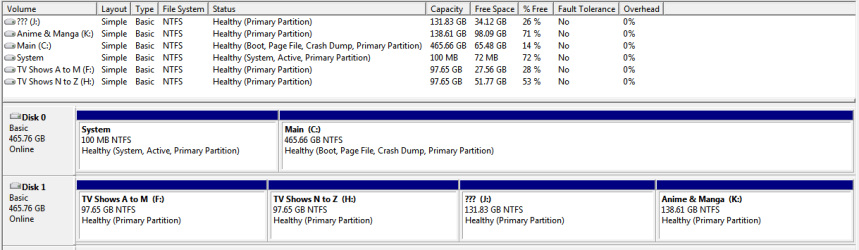
I have an external hard drive partitioned into 4 drives (F,H,J,K - I know drive letters not sequential - due possibly in part to 2 DVD drives & Alcohol, etc...).

In My Computer Drive F not showing: See attached

In Disk Manager ALL Drives showing: See attached

I have checked permissions & everything else I can think of. Every partition has the exact same settings/permissions.

Why is just the one partition not showing up?
 

Attachments

  • my_computer.png
    my_computer.png
    10.8 KB · Views: 3
  • disk_manager.png
    disk_manager.png
    13.3 KB · Views: 4

My Computer My Computer

Computer type
PC/Desktop
Computer Manufacturer/Model Number
MDG Computers
OS
Windows 7 Home Premium 64-bit
CPU
Dual Core E5800 @ 3.20GHz
Motherboard
Intel DG41TY
Memory
DDR2 4.00 GB
Graphics Card(s)
Radeon X1300/X1550 Series
Hard Drives
Hitachi HDS721050CLA362
WDC WD5000AAKX-001CA0
Antivirus
Microsoft Security Essentials
Browser
Chrome
In Disk Management, assign it a different drive letter, say P:

Does it show now?
 

My Computer My Computer

Computer type
PC/Desktop
Computer Manufacturer/Model Number
Golden Mk. I.4
OS
Windows 10 Pro x64 ; Xubuntu x64
CPU
Intel i7 860 @ 2.80 GHz O/C'ed to 4.0GHz
Motherboard
Gigabyte P55A-UD3R Rev.1. Award BIOS F13
Memory
16GB Corsair Vengance DDR3 @ 661 MHz Dual Channel (9-9-9-24)
Graphics Card(s)
EVGA NVidia GTX 560 1024MB
Sound Card
Realtek Integrated
Monitor(s) Displays
Dual Samsung SyncMaster 2494HS
Screen Resolution
1920*1080 and 1920*1080
Hard Drives
1*Samsung 840 EVO 120GB SSD;
1*OCZ Vertex 2 60GB SSD;
2*Samsung F3 SpinPoint 1TB in RAID0;
1*Samsung F1 SpinPoint 1TB;
2*Western Digital 1TB External USB 3.0
1*Western Digital 500GB External USB 3.0
1*Seagate 500GB External USB 2.0
PSU
Thermaltake ToughPower QFan 750W
Case
Thermaltake Element S VK60001W2Z
Cooling
Corsair H60 Water Cooling, 2*230mm and 2*80mm case fans
Keyboard
Logitech G110
Mouse
Logitech MX518
Tried changing the drive letter twice & even rebooted computer... still not showing in My Computer.
 

My Computer My Computer

Computer type
PC/Desktop
Computer Manufacturer/Model Number
MDG Computers
OS
Windows 7 Home Premium 64-bit
CPU
Dual Core E5800 @ 3.20GHz
Motherboard
Intel DG41TY
Memory
DDR2 4.00 GB
Graphics Card(s)
Radeon X1300/X1550 Series
Hard Drives
Hitachi HDS721050CLA362
WDC WD5000AAKX-001CA0
Antivirus
Microsoft Security Essentials
Browser
Chrome
Not sure why, but tried renaming all the drive letters (putting them into sequence & removing F from the list entirely) & now it's fine. All Partitions (drives) are showing just fine in My Computer.
 

My Computer My Computer

Computer type
PC/Desktop
Computer Manufacturer/Model Number
MDG Computers
OS
Windows 7 Home Premium 64-bit
CPU
Dual Core E5800 @ 3.20GHz
Motherboard
Intel DG41TY
Memory
DDR2 4.00 GB
Graphics Card(s)
Radeon X1300/X1550 Series
Hard Drives
Hitachi HDS721050CLA362
WDC WD5000AAKX-001CA0
Antivirus
Microsoft Security Essentials
Browser
Chrome
It is quite likely that the drive letter F - as well as some other drive letters - got locked on to other drives that you used earlier and were not released by Windows when those were removed.

It is a distinct possibility since you also have alcohol installed.

To pre-empt such problems, do a drive cleanup periodically.

This will release the drive letters that get locked to non-present devices.

Disable creation of Virtual drives in alcohol settings. ( you can enable as many drives as you want later after the drive cleanup)

Download v 0.8.1 of the drivecleanup.zip from Drive Tools for Windows.

Unzip it to a folder, say drivecleanup.

You will have two folders Win32 and x64 each containing DriveCleanup.exe for 32 bit and 64 bit respectively.

Remove all USB storage devices from your system (except your Keyboard and mouse) and reboot.

Right click on the DriveCleanup.exe and run as administrator. (Use the *.exe file appropriate for your bit version of Windows.).

This will release all the drive letters and registry entries associated with non-present devices.

Once this process is over, assign drive letters in sequence to all your partitions.( For physical optical drives I always give letters at the end like X, Y,Z. That will leave all partitions to take drive letters starting from D in sequence.)

Thereafter your Virtual drives when enabled will only take on drive letters after your partition drive letters and you will never again encounter this problem.

You may still get into a problem of some USB drives not getting drive letters. A periodic drive cleanup will release the locked drive letters.
 

My Computer My Computer

OS
Windows 7 Home Premium 32 bit
Back
Top