10+ year old HDD

mos effed

New member
Local time
10:23 AM
Messages
14
My mom's 10+ year old computer died the other day. The light indicator for the PSU lights up but the computer doesn't do anything. When I took a look inside I saw the processor fan was just caked with gunk, dust, etc. It looked like somebody threw mud at it.

Anyways, she has this stuff on her HDD that she was wanting to retrieve. I thought I could just take the HDD out of her computer and hook it into mine and get whatever data she wanted that way and burn it to disc. Is that possible? Or is there another way? My computer is a year old, btw, and runs Windows 7 Home Premium. Her computer was running windows xp sp2.

I don't know what other information to provide for a response right now.

Thanks.
 

My Computer My Computer

At a glance

windows 7 Home Premium 64bit (6.1, 7600)i7 9206G DDR3Nvidia GTS 250 1G
Computer Manufacturer/Model Number
Custom
OS
windows 7 Home Premium 64bit (6.1, 7600)
CPU
i7 920
Motherboard
ASUS
Memory
6G DDR3
Graphics Card(s)
Nvidia GTS 250 1G
Sound Card
RealTek
Monitor(s) Displays
17" LCD
Hard Drives
1 x 700G
PSU
700 watt
Case
Guardian 921
Cooling
3 x fans
Internet Speed
Dial-up (LOL)
It would be a fairly simple thing to do. Due to the age, I assume it is a PATA drive, or IDE connection as it is referred te.

Do you have an external HDD enclosure?
 

My Computer My Computer

At a glance

W7 Professional x64AMD Athlon II X3 445 Rana 3.10 GHzPNY XLR DDR3 1600 4x2GBNVIDIA GeForce GTS 450 (fermi) 1GB GDDR5
Computer Manufacturer/Model Number
Pugh Technologies
OS
W7 Professional x64
CPU
AMD Athlon II X3 445 Rana 3.10 GHz
Motherboard
MSI 870A-G54
Memory
PNY XLR DDR3 1600 4x2GB
Graphics Card(s)
NVIDIA GeForce GTS 450 (fermi) 1GB GDDR5
Sound Card
Realtek ALC892 onboard
Monitor(s) Displays
ASUS VE205t, Viewsonic VX2035WM
Screen Resolution
1600x900, 1600x1050
Hard Drives
977GB Hitachi Hitachi HDS721010CLA332
244GB Western Digital WDC WD2500AAJS-65B4A0
488GB Western Digital WDC WD5000AAJS-00A8B0
488GB Western Digital WDC WD5000AAKS-00UU3A0
PSU
Antec EarthWatts EA650 650W
Case
ThermalTake Armor A90 Mid Tower
Cooling
3x 120mm in, 1x 120mm & 200mm out, self built hydro-cooler
Keyboard
Logitec 55
Mouse
Razer Deathadder
Internet Speed
20 Mbps D/L, 9 Mbps U/L
I thought I could just take the HDD out of her computer and hook it into mine and get whatever data she wanted that way and burn it to disc. Is that possible?

Yes, that's what I would do.... provided you can connect the hard drive to your system as LiquidSnak has suggested.

Also, If you hook up the drive, check to see that it has no viruses lurking ;)
 

My Computer My Computer

At a glance

Windows 10 ProIntel Core i7-4770K (3.5Ghz)32 gig Corsair Dominator Platinum (4x8Gig)Sapphire Tri-X R9 Fury
Computer type
PC/Desktop
Computer Manufacturer/Model Number
Custom built by me.
OS
Windows 10 Pro
CPU
Intel Core i7-4770K (3.5Ghz)
Motherboard
Gigabyte G1 Sniper 5 (F10 Bios)
Memory
32 gig Corsair Dominator Platinum (4x8Gig)
Graphics Card(s)
Sapphire Tri-X R9 Fury
Sound Card
Soundblaster ZXR
Monitor(s) Displays
NEC PA242W 24" LCD Monitor
Screen Resolution
1920 x 1200
Hard Drives
Primary - Samsung 850 Pro (512gig), Samsung 840 Pro (256gig), 2TB WD Caviar Black.
PSU
EVGA Supernova 1000 G2
Case
Cooler Master HAF X
Cooling
Corsair H100i with Corsair Air Series SP120 Quiet Fans
Keyboard
Logitech Wireless Wave
Mouse
Logitech Performance MX
Internet Speed
High Speed Cable
Antivirus
Norton Security
Browser
IE11
Other Info
Memory Timings - 1866MHz @ 9-9-9-27-1T @ 1.5 volts
It would be a fairly simple thing to do. Due to the age, I assume it is a PATA drive, or IDE connection as it is referred te.

Do you have an external HDD enclosure?

I don't have an external HDD enclosure. I guess I should find a spot to lock it down in my tower. My tower is a NZXT guardian 921. I only have one HDD in it now so I'm assuming there's room for another.
 

My Computer My Computer

At a glance

windows 7 Home Premium 64bit (6.1, 7600)i7 9206G DDR3Nvidia GTS 250 1G
Computer Manufacturer/Model Number
Custom
OS
windows 7 Home Premium 64bit (6.1, 7600)
CPU
i7 920
Motherboard
ASUS
Memory
6G DDR3
Graphics Card(s)
Nvidia GTS 250 1G
Sound Card
RealTek
Monitor(s) Displays
17" LCD
Hard Drives
1 x 700G
PSU
700 watt
Case
Guardian 921
Cooling
3 x fans
Internet Speed
Dial-up (LOL)
I thought I could just take the HDD out of her computer and hook it into mine and get whatever data she wanted that way and burn it to disc. Is that possible?

Yes, that's what I would do.... provided you can connect the hard drive to your system as LiquidSnak has suggested.

Also, If you hook up the drive, check to see that it has no viruses lurking ;)

Good advice, Sygnus. I usually overlook the small details in my quest to get to the final end. http://www.sevenforums.com/images/smilies/nerd.png
 

My Computer My Computer

At a glance

windows 7 Home Premium 64bit (6.1, 7600)i7 9206G DDR3Nvidia GTS 250 1G
Computer Manufacturer/Model Number
Custom
OS
windows 7 Home Premium 64bit (6.1, 7600)
CPU
i7 920
Motherboard
ASUS
Memory
6G DDR3
Graphics Card(s)
Nvidia GTS 250 1G
Sound Card
RealTek
Monitor(s) Displays
17" LCD
Hard Drives
1 x 700G
PSU
700 watt
Case
Guardian 921
Cooling
3 x fans
Internet Speed
Dial-up (LOL)
If you don't have an external enclosure, you will likely have to tack it onto your MoBo. Do you have an available IDE cable? Plug it in, but make sure that it's set to slave on the jumper settings :)
 

My Computer My Computer

At a glance

W7 Professional x64AMD Athlon II X3 445 Rana 3.10 GHzPNY XLR DDR3 1600 4x2GBNVIDIA GeForce GTS 450 (fermi) 1GB GDDR5
Computer Manufacturer/Model Number
Pugh Technologies
OS
W7 Professional x64
CPU
AMD Athlon II X3 445 Rana 3.10 GHz
Motherboard
MSI 870A-G54
Memory
PNY XLR DDR3 1600 4x2GB
Graphics Card(s)
NVIDIA GeForce GTS 450 (fermi) 1GB GDDR5
Sound Card
Realtek ALC892 onboard
Monitor(s) Displays
ASUS VE205t, Viewsonic VX2035WM
Screen Resolution
1600x900, 1600x1050
Hard Drives
977GB Hitachi Hitachi HDS721010CLA332
244GB Western Digital WDC WD2500AAJS-65B4A0
488GB Western Digital WDC WD5000AAJS-00A8B0
488GB Western Digital WDC WD5000AAKS-00UU3A0
PSU
Antec EarthWatts EA650 650W
Case
ThermalTake Armor A90 Mid Tower
Cooling
3x 120mm in, 1x 120mm & 200mm out, self built hydro-cooler
Keyboard
Logitec 55
Mouse
Razer Deathadder
Internet Speed
20 Mbps D/L, 9 Mbps U/L
what mobo are you running?
 

My Computer My Computer

At a glance

Windows 7 64-bit HomeIntel Core i7-870 Lynnfield 2.93 Ghz8GB 4x2 A-Data 1333 MhzHIS Radeon HD 5850 1GB
Computer type
PC/Desktop
Computer Manufacturer/Model Number
My First Build
OS
Windows 7 64-bit Home
CPU
Intel Core i7-870 Lynnfield 2.93 Ghz
Motherboard
Asus P7P55D-E Pro
Memory
8GB 4x2 A-Data 1333 Mhz
Graphics Card(s)
HIS Radeon HD 5850 1GB
Sound Card
Onboard
Monitor(s) Displays
Dell S2440L 24"
Screen Resolution
1080p
Hard Drives
120 GB Intel X25-M SATA Solid State Drive ///
1 TB Western Digital Caviar Black SATA 6gb/s 7200rpm Drive
PSU
Corsair 650TX 650 Watt
Case
Antec Three Hundred
Cooling
Stock Intel /// 4 Antec Case Fans /// NZXT Sentry-2
Keyboard
Logitech LX 710
Mouse
Logitech LX 710
Other Info
LG Blu-Ray Drive
After you get it all hooked up, you will need to take ownership of the drive. The attached .zip file will help you out with that.

Then you are going to have to edit permissions:

Open the properties of the drive you want to change your permissions on, and go into advanced security settings, then change permissions. Check the circled box, and apply. Don't forget to add/edit yourself to the permissions list as having full control using the add or edit button.

103441d1286665121-external-drive-locked-after-comp-swap-permissions.png
 

Attachments

My Computer My Computer

At a glance

W7 Professional x64AMD Athlon II X3 445 Rana 3.10 GHzPNY XLR DDR3 1600 4x2GBNVIDIA GeForce GTS 450 (fermi) 1GB GDDR5
Computer Manufacturer/Model Number
Pugh Technologies
OS
W7 Professional x64
CPU
AMD Athlon II X3 445 Rana 3.10 GHz
Motherboard
MSI 870A-G54
Memory
PNY XLR DDR3 1600 4x2GB
Graphics Card(s)
NVIDIA GeForce GTS 450 (fermi) 1GB GDDR5
Sound Card
Realtek ALC892 onboard
Monitor(s) Displays
ASUS VE205t, Viewsonic VX2035WM
Screen Resolution
1600x900, 1600x1050
Hard Drives
977GB Hitachi Hitachi HDS721010CLA332
244GB Western Digital WDC WD2500AAJS-65B4A0
488GB Western Digital WDC WD5000AAJS-00A8B0
488GB Western Digital WDC WD5000AAKS-00UU3A0
PSU
Antec EarthWatts EA650 650W
Case
ThermalTake Armor A90 Mid Tower
Cooling
3x 120mm in, 1x 120mm & 200mm out, self built hydro-cooler
Keyboard
Logitec 55
Mouse
Razer Deathadder
Internet Speed
20 Mbps D/L, 9 Mbps U/L
If you don't have an external enclosure, you will likely have to tack it onto your MoBo. Do you have an available IDE cable? Plug it in, but make sure that it's set to slave on the jumper settings :)

Ok, on the HDD it gives me a diagram for the settings, but they're for lower 32g and upper 32g and 32g clip? It's a samsung spinpoint sv4002H.

update: it's currently set for uppper 32g cable select. so I've changed that to the slave settings.
 

My Computer My Computer

At a glance

windows 7 Home Premium 64bit (6.1, 7600)i7 9206G DDR3Nvidia GTS 250 1G
Computer Manufacturer/Model Number
Custom
OS
windows 7 Home Premium 64bit (6.1, 7600)
CPU
i7 920
Motherboard
ASUS
Memory
6G DDR3
Graphics Card(s)
Nvidia GTS 250 1G
Sound Card
RealTek
Monitor(s) Displays
17" LCD
Hard Drives
1 x 700G
PSU
700 watt
Case
Guardian 921
Cooling
3 x fans
Internet Speed
Dial-up (LOL)
@Dirty Elf, my mobo is an asus p6t se
 

My Computer My Computer

At a glance

windows 7 Home Premium 64bit (6.1, 7600)i7 9206G DDR3Nvidia GTS 250 1G
Computer Manufacturer/Model Number
Custom
OS
windows 7 Home Premium 64bit (6.1, 7600)
CPU
i7 920
Motherboard
ASUS
Memory
6G DDR3
Graphics Card(s)
Nvidia GTS 250 1G
Sound Card
RealTek
Monitor(s) Displays
17" LCD
Hard Drives
1 x 700G
PSU
700 watt
Case
Guardian 921
Cooling
3 x fans
Internet Speed
Dial-up (LOL)
Can you get a picture of the drive label? I can't find a good one on the internet.
 

My Computer My Computer

At a glance

W7 Professional x64AMD Athlon II X3 445 Rana 3.10 GHzPNY XLR DDR3 1600 4x2GBNVIDIA GeForce GTS 450 (fermi) 1GB GDDR5
Computer Manufacturer/Model Number
Pugh Technologies
OS
W7 Professional x64
CPU
AMD Athlon II X3 445 Rana 3.10 GHz
Motherboard
MSI 870A-G54
Memory
PNY XLR DDR3 1600 4x2GB
Graphics Card(s)
NVIDIA GeForce GTS 450 (fermi) 1GB GDDR5
Sound Card
Realtek ALC892 onboard
Monitor(s) Displays
ASUS VE205t, Viewsonic VX2035WM
Screen Resolution
1600x900, 1600x1050
Hard Drives
977GB Hitachi Hitachi HDS721010CLA332
244GB Western Digital WDC WD2500AAJS-65B4A0
488GB Western Digital WDC WD5000AAJS-00A8B0
488GB Western Digital WDC WD5000AAKS-00UU3A0
PSU
Antec EarthWatts EA650 650W
Case
ThermalTake Armor A90 Mid Tower
Cooling
3x 120mm in, 1x 120mm & 200mm out, self built hydro-cooler
Keyboard
Logitec 55
Mouse
Razer Deathadder
Internet Speed
20 Mbps D/L, 9 Mbps U/L
I wouldn't go through the "take ownershp" step unless you find you need it. The simple approach is to hook up the drive, run a virus scan, move the files you need. Simple.

Not saying LiquidSnak's approach isn't good, it's just that you may not need it.
 

My Computer My Computer

At a glance

Windows 10 ProIntel Core i7-4770K (3.5Ghz)32 gig Corsair Dominator Platinum (4x8Gig)Sapphire Tri-X R9 Fury
Computer type
PC/Desktop
Computer Manufacturer/Model Number
Custom built by me.
OS
Windows 10 Pro
CPU
Intel Core i7-4770K (3.5Ghz)
Motherboard
Gigabyte G1 Sniper 5 (F10 Bios)
Memory
32 gig Corsair Dominator Platinum (4x8Gig)
Graphics Card(s)
Sapphire Tri-X R9 Fury
Sound Card
Soundblaster ZXR
Monitor(s) Displays
NEC PA242W 24" LCD Monitor
Screen Resolution
1920 x 1200
Hard Drives
Primary - Samsung 850 Pro (512gig), Samsung 840 Pro (256gig), 2TB WD Caviar Black.
PSU
EVGA Supernova 1000 G2
Case
Cooler Master HAF X
Cooling
Corsair H100i with Corsair Air Series SP120 Quiet Fans
Keyboard
Logitech Wireless Wave
Mouse
Logitech Performance MX
Internet Speed
High Speed Cable
Antivirus
Norton Security
Browser
IE11
Other Info
Memory Timings - 1866MHz @ 9-9-9-27-1T @ 1.5 volts
i WOULD JUST HOOK THE HDD UP WITH OUT THE JUMPER AS A FREE DRIVE THEM SKIM THROUGH IT VIRUS CHECK INCLUDED NO NEED TO BE FUMBLING AROUND WITH SETTINGS BECAUSE YOU WILL DOOM YOU'RE MACHINE AS WELL IF THERE IS SOMETHING ON THERE BAD


BASIC STEPS IS TO REMOVE JUMPER USE IDE CABLE USE IT AS A FREE DRIVE BOOT WINDOWS THEN REQUEST A EXPLORE LOOK INTO THE DRIVE YOU SHOULD BE ABLE TO FIND EVERYTHING YOU NEED THUS I DID THIS WITH MY OLD SYSTEM HOOKING UP A OLD HDD THEN REFORMATTING IT FOR USE WITH THE NEW SYSTEM

AFTER THOSE STEPS YOU SHOULD BE GOOD AND IT WILL MAKE SURE SOMETHING DOESNT HOP ON YOUR SYSTEM AND THATS IT DONE DEAL YOU AND MOM ARE HAPPY :cool:
 

My Computer My Computer

At a glance

Windows 10 Home Premium 64bit sp1Intel I7-6700K @ 4.6 Ghz 1.344 volts everyday OC32GB G-Skill TridentZ 3200mhz 16-18-18-38 DDR4Sli Gigabyte Windforce GTX 980 G1
Computer type
PC/Desktop
Computer Manufacturer/Model Number
CoreI7-6700K MrFingerIII Special Builds
OS
Windows 10 Home Premium 64bit sp1
CPU
Intel I7-6700K @ 4.6 Ghz 1.344 volts everyday OC
Motherboard
Asrock Fatality K6 Z170 Socket 1151
Memory
32GB G-Skill TridentZ 3200mhz 16-18-18-38 DDR4
Graphics Card(s)
Sli Gigabyte Windforce GTX 980 G1
Sound Card
AC97 Creative Rage Tactic 3D Headphones Bluetooth
Monitor(s) Displays
27" Asus ROG Swift PG278Q G-Sync 48" Vizio Smart HD TV
Screen Resolution
2560x1440p 27"- 48" Currently Gaming at 2560x1440p Res 2K
Hard Drives
250GB Samsung Evo840SSD Seagate baracuda 500 GB WD Mybook 500Gb 1TB Seagate Barracuda
PSU
HX1050w Corsair Silver 80plus certified crosfire/sli
Case
Enthod Pro Full Tower
Cooling
Corsair H110i GT 280 mm High Performance WaterBlock
Keyboard
Logitech wireless keyboard
Mouse
Logitech wireless mouse
Internet Speed
Cox Cable 100+ mb
Antivirus
WebRoot Spysweeper with Antivirus
Browser
IE-10, Chrome, Opera
Other Info
My Other Rig is a AMD FX8320E @4.6Ghz 16GB Ballistic Sport Ram
Mobo Asrock Fatality 990FX 120GB OCZ SSD 1TB Seagate Barracuda Corsair H75 Cooling PSU Corsair CX750
GPU GTX Gigabyte 970G1
I wouldn't go through the "take ownershp" step unless you find you need it. The simple approach is to hook up the drive, run a virus scan, move the files you need. Simple.

Not saying LiquidSnak's approach isn't good, it's just that you may not need it.

Oh, so I can still get the stuff off the HDD just by plugging it in and screwing it down in my computer? But if I wanted to use the HDD for maybe running another OS or something then I can use LiquidSnak's method, right? Because that's what I had in mind once I finished getting the data off the HDD for my mom.
 

My Computer My Computer

At a glance

windows 7 Home Premium 64bit (6.1, 7600)i7 9206G DDR3Nvidia GTS 250 1G
Computer Manufacturer/Model Number
Custom
OS
windows 7 Home Premium 64bit (6.1, 7600)
CPU
i7 920
Motherboard
ASUS
Memory
6G DDR3
Graphics Card(s)
Nvidia GTS 250 1G
Sound Card
RealTek
Monitor(s) Displays
17" LCD
Hard Drives
1 x 700G
PSU
700 watt
Case
Guardian 921
Cooling
3 x fans
Internet Speed
Dial-up (LOL)
Again, if you find you need to take ownership, i.e you get messages about permissions, than use LiquidSnak's solution, but If you get no messages, no need to do it.

As for wanting to use the drive as an external drive, that has nothing to do with it. And if you're going to put another OS on it, again, those permission wouldn't apply since you're wipping the drive anyway :)

It's really rather simple, remove the drive, hook to your machine, scan for virus, copy files. If you want use the drive for something else, wipe it, or keep it in tact.

Simple :)

Hope this clears things up.
 

My Computer My Computer

At a glance

Windows 10 ProIntel Core i7-4770K (3.5Ghz)32 gig Corsair Dominator Platinum (4x8Gig)Sapphire Tri-X R9 Fury
Computer type
PC/Desktop
Computer Manufacturer/Model Number
Custom built by me.
OS
Windows 10 Pro
CPU
Intel Core i7-4770K (3.5Ghz)
Motherboard
Gigabyte G1 Sniper 5 (F10 Bios)
Memory
32 gig Corsair Dominator Platinum (4x8Gig)
Graphics Card(s)
Sapphire Tri-X R9 Fury
Sound Card
Soundblaster ZXR
Monitor(s) Displays
NEC PA242W 24" LCD Monitor
Screen Resolution
1920 x 1200
Hard Drives
Primary - Samsung 850 Pro (512gig), Samsung 840 Pro (256gig), 2TB WD Caviar Black.
PSU
EVGA Supernova 1000 G2
Case
Cooler Master HAF X
Cooling
Corsair H100i with Corsair Air Series SP120 Quiet Fans
Keyboard
Logitech Wireless Wave
Mouse
Logitech Performance MX
Internet Speed
High Speed Cable
Antivirus
Norton Security
Browser
IE11
Other Info
Memory Timings - 1866MHz @ 9-9-9-27-1T @ 1.5 volts
Can you get a picture of the drive label? I can't find a good one on the internet.

Here's a pic, Liquid. I think you'll be able to see the diagram ok.
 

Attachments

  • samsung-jumper-diag.png
    samsung-jumper-diag.png
    263.8 KB · Views: 8

My Computer My Computer

At a glance

windows 7 Home Premium 64bit (6.1, 7600)i7 9206G DDR3Nvidia GTS 250 1G
Computer Manufacturer/Model Number
Custom
OS
windows 7 Home Premium 64bit (6.1, 7600)
CPU
i7 920
Motherboard
ASUS
Memory
6G DDR3
Graphics Card(s)
Nvidia GTS 250 1G
Sound Card
RealTek
Monitor(s) Displays
17" LCD
Hard Drives
1 x 700G
PSU
700 watt
Case
Guardian 921
Cooling
3 x fans
Internet Speed
Dial-up (LOL)
If you don't have an external enclosure, you will likely have to tack it onto your MoBo. Do you have an available IDE cable? Plug it in, but make sure that it's set to slave on the jumper settings :)
He can do you one better...he has a totaled computer full of spare parts.
In case his HDD is SATA (as I expect) he probably doesn't have to change any jumpers.
but it was good to remind the TS of the chance it could be necessary.
Such details are easily overlooked.

i WOULD JUST HOOK THE HDD UP WITH OUT THE JUMPER AS A FREE DRIVE
That largely depends on the drive in question...10 years ago you had to jumper correctly or it's a no go.

TS: connect the drive to the ide port and boot into BIOS if it's not being recognized, shut down and switch the jumper to the other setting depending on the position on the bus. If it's alone CS (cable select) might be a possibility as well.

-DG
Edit: now that the pic is up, go for the settings on the first (top) diagram
 

My Computer My Computer

At a glance

Windows 7 Ultimate x86DualCore AMD Athlon 64 X2, 2600 MHz 5200+Samsung 2GB DDR2Onboard NVIDIA GeForce 6150SE nForce 430
Computer Manufacturer/Model Number
HP m8000n
OS
Windows 7 Ultimate x86
CPU
DualCore AMD Athlon 64 X2, 2600 MHz 5200+
Motherboard
Asus M2N68-LA (Narra)
Memory
Samsung 2GB DDR2
Graphics Card(s)
Onboard NVIDIA GeForce 6150SE nForce 430
Sound Card
Onboard nVIDIA nForce 6100-430 (MCP61P)
Monitor(s) Displays
Westinghouse 19" LED
Screen Resolution
1280x1024
Hard Drives
SATA II Seagate Barracuda 500GB
USB II WD Elements 500GB
USB II WD My Book 1TB
USB II WD My Book 2TB
PSU
Stock (HP)
Case
Stock (HP)
Cooling
Stock
Keyboard
Logitech Classic KB 200
Mouse
Standard HP opticle USB mouse
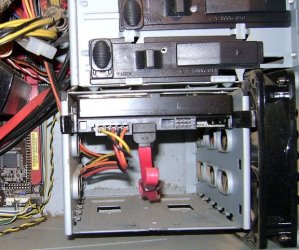
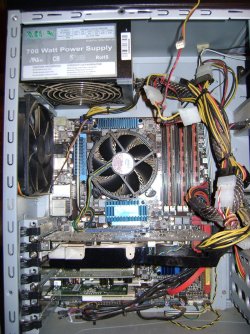
Well, i I read my mobo manual (p6t se) and I got the impression I had an IDE cable, but after looking inside the tower I can't find one. My HDD is sata, as some others suggested. I guess I wasted everybody's time. I took some pictures in case I'm missing something. One is my mom's HDD, and then mine and then the wiring harness in my computer.
 

Attachments

  • mycomp-hdd.jpg
    mycomp-hdd.jpg
    58.4 KB · Views: 3
  • moms-hdd.jpg
    moms-hdd.jpg
    28.8 KB · Views: 4
  • mycomp-inside1.jpg
    mycomp-inside1.jpg
    185.2 KB · Views: 11

My Computer My Computer

At a glance

windows 7 Home Premium 64bit (6.1, 7600)i7 9206G DDR3Nvidia GTS 250 1G
Computer Manufacturer/Model Number
Custom
OS
windows 7 Home Premium 64bit (6.1, 7600)
CPU
i7 920
Motherboard
ASUS
Memory
6G DDR3
Graphics Card(s)
Nvidia GTS 250 1G
Sound Card
RealTek
Monitor(s) Displays
17" LCD
Hard Drives
1 x 700G
PSU
700 watt
Case
Guardian 921
Cooling
3 x fans
Internet Speed
Dial-up (LOL)
You have a slot for it, but you just need the cable. The first picture, of the drive, on the left of jumper settings is the one you should use. (as a slave drive, it will not try to boot from it) Nice cable management, btw.

On your last attached picture (of the motherboard), your IDE slot is on the bottom, near the expansion slots.

Newegg.com - OKGEAR 18" IDE round cable,dual device,Clear Silver Model RC18IDES - Cables

You might not have to take ownership, as Sygnus said, but if you do, refer to my other post ;)
 

My Computer My Computer

At a glance

W7 Professional x64AMD Athlon II X3 445 Rana 3.10 GHzPNY XLR DDR3 1600 4x2GBNVIDIA GeForce GTS 450 (fermi) 1GB GDDR5
Computer Manufacturer/Model Number
Pugh Technologies
OS
W7 Professional x64
CPU
AMD Athlon II X3 445 Rana 3.10 GHz
Motherboard
MSI 870A-G54
Memory
PNY XLR DDR3 1600 4x2GB
Graphics Card(s)
NVIDIA GeForce GTS 450 (fermi) 1GB GDDR5
Sound Card
Realtek ALC892 onboard
Monitor(s) Displays
ASUS VE205t, Viewsonic VX2035WM
Screen Resolution
1600x900, 1600x1050
Hard Drives
977GB Hitachi Hitachi HDS721010CLA332
244GB Western Digital WDC WD2500AAJS-65B4A0
488GB Western Digital WDC WD5000AAJS-00A8B0
488GB Western Digital WDC WD5000AAKS-00UU3A0
PSU
Antec EarthWatts EA650 650W
Case
ThermalTake Armor A90 Mid Tower
Cooling
3x 120mm in, 1x 120mm & 200mm out, self built hydro-cooler
Keyboard
Logitec 55
Mouse
Razer Deathadder
Internet Speed
20 Mbps D/L, 9 Mbps U/L

My Computer My Computer

At a glance

Windows 7 UltimatePentium D 2.80GHz4.00 GB1.00 GB nVidia GeForce 9500GT
Computer Manufacturer/Model Number
Dell Optiplex GX620
OS
Windows 7 Ultimate
CPU
Pentium D 2.80GHz
Memory
4.00 GB
Graphics Card(s)
1.00 GB nVidia GeForce 9500GT
Monitor(s) Displays
Dual - 23" Samsung P2370 & 22" Samsung 2232GW
Hard Drives
c: 250 GB
d: 320 GB
USB External 1.0 TB
Keyboard
Logitech Illuminated \ Logitech DiNovo Edge
Mouse
Logitech Trackman
Internet Speed
DSL
Back
Top