
Solved 15r 5520 Win 7 reinstallation Disk can I use in on my E4300

jjr

New member
Member
VIP
Local time
11:35 AM
Messages
315
I have a new 15R 5520 that came with the Dell Win 7 64 bit reinstallation disc. My other laptop E4300 is running Win7 32 bit. It has corrupted registry ("Windows firewall can't change some of your settings Error code 0x80070422". ) and will need to be reformatted. There are registry files missing Dell tech said it was probably due to some type of Java virus. He said if I has my Win 7 32 bit disc I could try and run a repair but the disk is gone.

Since my E4300 is running Win7 that I installed and lost the disk Dell will not replace it cause it did not come w/ the machine. It Originally came w/ Vista Business (which you could not pay me to put on anything) so Dell offered to send me a new reinstallation disc XP Media Center .

My question is could I just do a fresh install on the E4300 using the disk that came with my newer 5520? I do have the serial numbers from my old Win7 32 bit disc but I think there useless w/o a disc. Dropping $100 or so for another Win7 disc is out of the question.

Bottom line could this be done?
 

My Computer My Computer

At a glance

Microsoft Windows 7 Professional 64-bitIntel(R) Core(TM) i7-4790 CPU @ 3.60GHz16.00 GB Hynix/Hyundai HMT451U6BFR8A-PBNVIDIA GeForce GT 720 1920 x 1080 x 32 bits (...
Computer type
PC/Desktop
Computer Manufacturer/Model Number
DELL XPS 8700 DESKTOP
OS
Microsoft Windows 7 Professional 64-bit
CPU
Intel(R) Core(TM) i7-4790 CPU @ 3.60GHz
Motherboard
Dell Inc.Base Board 0KWVT8
Memory
16.00 GB Hynix/Hyundai HMT451U6BFR8A-PB
Graphics Card(s)
NVIDIA GeForce GT 720 1920 x 1080 x 32 bits (4294967296 colo
Sound Card
Broadcom Bluetooth Hands-free Audio
Screen Resolution
1920 x 1080 x 32 bits (4294967296 colors) @ 60 Hz
Hard Drives
ST1000DM ST1000DM003-1ER1 SCSI Disk Device

My Computer My Computer

At a glance

Win 7 Pro x64 / Win 10 ProIntel(R) Core(TM) i7-3630QM CPU @ 2.40GHz12 GB(1) Intel(R) HD Graphics 4000 (2) NVIDIA GeFo...
Computer type
Laptop
Computer Manufacturer/Model Number
Sager NP9170
OS
Win 7 Pro x64 / Win 10 Pro
CPU
Intel(R) Core(TM) i7-3630QM CPU @ 2.40GHz
Motherboard
CLEVO P170EM
Memory
12 GB
Graphics Card(s)
(1) Intel(R) HD Graphics 4000 (2) NVIDIA GeForce GTX 675M
Sound Card
(1) Realtek High Definition Audio (2) Intel(R) Display Aud
Monitor(s) Displays
17.3
Screen Resolution
1920x1080
Hard Drives
(1) Samsung 860 EVO 500GB(OS) (1) Samsung 860 EVO 500GB(Data)
Keyboard
Backlite
Antivirus
MSE, Malwarebytes Pro
Browser
Firefox
Other Info
DESKTOP: Custom-built.
OS: Win 10 Pro x64.
CASE: Rosewill R5.
CPU: Intel I5 4670K CPU @ 3.40GHz.
CPU COOLER: Cool Master Hyper 212 EVO.
MOTHERBOARD: Asus Z87-A.
MEMORY: Kingston HyperX 2x4 GB.
GPU: Nvidia Geforce 650 TI.
PSU: Corsair TX750.
DRIVES: (1) Samsung 840 120 GB SSD (2) Western Digital blue 500 GB 7200 RPM.
Bongo,
MY COA sticker is for Vista that shold work correct? So when I burn the ISO (I have Nero 10) not sure how to do that? Do I include my Win 7 sn on that? Or enter it after the installation?

This is file I want correct Windows 7 Ultimate (x86)* - X17-59463 for 32 bit?

Also as far as backing up files would I be able to back up my office 2007? Again no disc but I have the serial numbers.

Thanks!!!!!


Use this tutorial http://www.sevenforums.com/tutorials/219487-clean-reinstall-factory-oem-windows-7-a.html to download the .ISO and then burn it to a DVD and then use your serial number that you have then there'll be no confusion.

Jerry
 

My Computer My Computer

At a glance

Microsoft Windows 7 Professional 64-bitIntel(R) Core(TM) i7-4790 CPU @ 3.60GHz16.00 GB Hynix/Hyundai HMT451U6BFR8A-PBNVIDIA GeForce GT 720 1920 x 1080 x 32 bits (...
Computer type
PC/Desktop
Computer Manufacturer/Model Number
DELL XPS 8700 DESKTOP
OS
Microsoft Windows 7 Professional 64-bit
CPU
Intel(R) Core(TM) i7-4790 CPU @ 3.60GHz
Motherboard
Dell Inc.Base Board 0KWVT8
Memory
16.00 GB Hynix/Hyundai HMT451U6BFR8A-PB
Graphics Card(s)
NVIDIA GeForce GT 720 1920 x 1080 x 32 bits (4294967296 colo
Sound Card
Broadcom Bluetooth Hands-free Audio
Screen Resolution
1920 x 1080 x 32 bits (4294967296 colors) @ 60 Hz
Hard Drives
ST1000DM ST1000DM003-1ER1 SCSI Disk Device
I do have the serial numbers from my old Win7 32 bit disc but I think there useless w/o a disc. Dropping $100 or so for another Win7 disc is out of the question.

Bottom line could this be done?

Here you said you have the serial number for Windows 7

Bongo,
MY COA sticker is for Vista that shold work correct? So when I burn the ISO (I have Nero 10) not sure how to do that? Do I include my Win 7 sn on that? Or enter it after the installation?

This is file I want correct Windows 7 Ultimate (x86)* - X17-59463 for 32 bit?

Also as far as backing up files would I be able to back up my office 2007? Again no disc but I have the serial numbers.

Thanks!!!!!
You won't be able to use a Vista key for windows 7, that would be the right download if you have ultimate.

Follow the steps in the tutorial but it will tell you how to burn that to the DVD.

If you do not have a legal key for the E4300 then there's not much you can do.

Jerry
 

My Computer My Computer

At a glance

Win 7 Pro x64 / Win 10 ProIntel(R) Core(TM) i7-3630QM CPU @ 2.40GHz12 GB(1) Intel(R) HD Graphics 4000 (2) NVIDIA GeFo...
Computer type
Laptop
Computer Manufacturer/Model Number
Sager NP9170
OS
Win 7 Pro x64 / Win 10 Pro
CPU
Intel(R) Core(TM) i7-3630QM CPU @ 2.40GHz
Motherboard
CLEVO P170EM
Memory
12 GB
Graphics Card(s)
(1) Intel(R) HD Graphics 4000 (2) NVIDIA GeForce GTX 675M
Sound Card
(1) Realtek High Definition Audio (2) Intel(R) Display Aud
Monitor(s) Displays
17.3
Screen Resolution
1920x1080
Hard Drives
(1) Samsung 860 EVO 500GB(OS) (1) Samsung 860 EVO 500GB(Data)
Keyboard
Backlite
Antivirus
MSE, Malwarebytes Pro
Browser
Firefox
Other Info
DESKTOP: Custom-built.
OS: Win 10 Pro x64.
CASE: Rosewill R5.
CPU: Intel I5 4670K CPU @ 3.40GHz.
CPU COOLER: Cool Master Hyper 212 EVO.
MOTHERBOARD: Asus Z87-A.
MEMORY: Kingston HyperX 2x4 GB.
GPU: Nvidia Geforce 650 TI.
PSU: Corsair TX750.
DRIVES: (1) Samsung 840 120 GB SSD (2) Western Digital blue 500 GB 7200 RPM.
Jerry,
I think at this point I will just use what Dell is sending me and have them walk me through the installation. I do not understand a lot of this stuff.

I just thought that I could get away just using the Dell Win 7 64bit disc that came w/ my new laptop and put i on my older one I guess that is just not gonna fly.

Yes I do have the SN for the Win7 on the older laptop but it does have a Vista COA sticker on it, I bought this used but its stull under warranty from Dell and registered in my name. Perhaps the Win 7 is corrupt is that the PO may have a bootleg copy???

Dell tech went through it w/remote to try and fix it but as I mentioned there were registry files missing. After after a few hours we came to a agreement time to start fresh.

I do have the serial numbers from my old Win7 32 bit disc but I think there useless w/o a disc. Dropping $100 or so for another Win7 disc is out of the question.

Bottom line could this be done?

Here you said you have the serial number for Windows 7

Bongo,
MY COA sticker is for Vista that shold work correct? So when I burn the ISO (I have Nero 10) not sure how to do that? Do I include my Win 7 sn on that? Or enter it after the installation?

This is file I want correct Windows 7 Ultimate (x86)* - X17-59463 for 32 bit?

Also as far as backing up files would I be able to back up my office 2007? Again no disc but I have the serial numbers.

Thanks!!!!!
You won't be able to use a Vista key for windows 7, that would be the right download if you have ultimate.

Follow the steps in the tutorial but it will tell you how to burn that to the DVD.

If you do not have a legal key for the E4300 then there's not much you can do.

Jerry
 

My Computer My Computer

At a glance

Microsoft Windows 7 Professional 64-bitIntel(R) Core(TM) i7-4790 CPU @ 3.60GHz16.00 GB Hynix/Hyundai HMT451U6BFR8A-PBNVIDIA GeForce GT 720 1920 x 1080 x 32 bits (...
Computer type
PC/Desktop
Computer Manufacturer/Model Number
DELL XPS 8700 DESKTOP
OS
Microsoft Windows 7 Professional 64-bit
CPU
Intel(R) Core(TM) i7-4790 CPU @ 3.60GHz
Motherboard
Dell Inc.Base Board 0KWVT8
Memory
16.00 GB Hynix/Hyundai HMT451U6BFR8A-PB
Graphics Card(s)
NVIDIA GeForce GT 720 1920 x 1080 x 32 bits (4294967296 colo
Sound Card
Broadcom Bluetooth Hands-free Audio
Screen Resolution
1920 x 1080 x 32 bits (4294967296 colors) @ 60 Hz
Hard Drives
ST1000DM ST1000DM003-1ER1 SCSI Disk Device
You can find a legal iso download for Vista, it`s out there.
 

My Computer My Computer

At a glance

Windows 10 Pro x64Intel Core i7 6700KGSkill TridentZ RGB 16GB 3600 16-16-16-36EVGA GTX 980 Ti SC x2
Computer type
PC/Desktop
Computer Manufacturer/Model Number
Skylake Special #666
OS
Windows 10 Pro x64
CPU
Intel Core i7 6700K
Motherboard
Asus Sabertooth Z170 Mark 1
Memory
GSkill TridentZ RGB 16GB 3600 16-16-16-36
Graphics Card(s)
EVGA GTX 980 Ti SC x2
Sound Card
Realtek High Definition
Monitor(s) Displays
AOC G2460PG
Screen Resolution
1920 x 1080 144Hz
Hard Drives
Samsung 860 Pro 256GB, Seagate Barracuda 4TB x2
PSU
EVGA 1000 P2, EVGA White Custom Braided Cables
Case
Corsair Vengeance C70 Gunmetal Black
Cooling
Corsair H100i v2, Corsair ML120 x2, Thermal Grizzly Kryonaut
Keyboard
Logitech G910 Orion Spectrum
Mouse
Logitech G700s
Internet Speed
Verizon Fios Quantum Gateway 75/75
Antivirus
Windows Defender, Malwarebytes Free 3.8.3
Browser
Chrome
Other Info
Corsair SP120 x4, LG Blu-ray Drive, Durabrand HT-395 100 Watt Dolby Digital Amp, Corsair H2100 Wireless 7.1 Headset
I don't know why Dell would offer you XP media edition on a PC that came with Vista Business - sounds screwy. Did you tell them you have a retail Win7 product key? That trumps everything else and can install anywhere you want, anytime you want, as often as you want - unless it's OEM in which case only on that PC.

Why make this so hard? If you have a Win7 Product Key then reinstall the licensed version following the steps for Clean Reinstall - Factory OEM Windows 7.

Read the Special Note for Dell at the end about deleting all partitions during reinstall except Tools if Diagnostics will still run from F12. Otherwise delete them all and repartition as you want - advisable if you have more than 4gb RAM.
 
Last edited:
Good question, I told Dell tech that I had the Vista COa sticker on the laptop and he said that it originally sold w/ XP so he gave me the choice of either. I have no use for Vista period. I did not find the keys till today there were in a file left on the laptop from the PO..

When I call Dell back to have them walk me through the reinstallation I will ask all the questions them. Somone else posted that I could not install Win 7 unsing the Vista COA key on the unit. I may of misunderstood I could do so using the key for the Win7 I have now correct?

Again this stuff is a bit about my knowledge base ; hehehe


I don't know why Dell would offer you XP media edition on a PC that came with Vista Business - sounds screwy. Did you tell them you have a retail Win7 product key? That trumps everything else and can install anywhere you want, anytime you want, as often as you want - unless it's OEM in which case only on that PC.

Why make this so hard? If you have a Win7 Product Key then reinstall the licensed version following the steps for Clean Reinstall - Factory OEM Windows 7.

Read the Special Note for Dell at the end about deleting all partitions during reinstall except Tools if Diagnostics will still run from F12. Otherwise delete them all and repartition as you want.
 

My Computer My Computer

At a glance

Microsoft Windows 7 Professional 64-bitIntel(R) Core(TM) i7-4790 CPU @ 3.60GHz16.00 GB Hynix/Hyundai HMT451U6BFR8A-PBNVIDIA GeForce GT 720 1920 x 1080 x 32 bits (...
Computer type
PC/Desktop
Computer Manufacturer/Model Number
DELL XPS 8700 DESKTOP
OS
Microsoft Windows 7 Professional 64-bit
CPU
Intel(R) Core(TM) i7-4790 CPU @ 3.60GHz
Motherboard
Dell Inc.Base Board 0KWVT8
Memory
16.00 GB Hynix/Hyundai HMT451U6BFR8A-PB
Graphics Card(s)
NVIDIA GeForce GT 720 1920 x 1080 x 32 bits (4294967296 colo
Sound Card
Broadcom Bluetooth Hands-free Audio
Screen Resolution
1920 x 1080 x 32 bits (4294967296 colors) @ 60 Hz
Hard Drives
ST1000DM ST1000DM003-1ER1 SCSI Disk Device
Did you buy Win7 from Dell and have a 25-digit alphanumeric Product key referencing the licensed version? Check now and report back without giving the key.
 
Negatory, as I explained i bought the laptop used w/ it installed. The laptop is still under warranty from Dell. I just looked up the build sheet and it looks like it came w/ XP and Vista, Perhaps the XP was able to be downgraded to vista?? Again the service tech dig give me the option betwen Xp and Vista. I choose XP to hvae reinstalled.

At this point I iwll ask the tech when I call him back to help me with the reinstallation

M153K
0
SERVICE CHARGE..., OPERATING SYSTEM..., VISTA, SP1, Q955840

G945J
0
SERVICE CHARGE..., OPERATING SYSTEM..., WINDOWS XP..., XP TABLET..., X64, Q946927
J1680
0
Service Charge, Operating System, Windows XP, Date Stamp


Did you buy Win7 from Dell and have a 25-digit alphanumeric Product key referencing the licensed version? Check now and report back without giving the key.
 

My Computer My Computer

At a glance

Microsoft Windows 7 Professional 64-bitIntel(R) Core(TM) i7-4790 CPU @ 3.60GHz16.00 GB Hynix/Hyundai HMT451U6BFR8A-PBNVIDIA GeForce GT 720 1920 x 1080 x 32 bits (...
Computer type
PC/Desktop
Computer Manufacturer/Model Number
DELL XPS 8700 DESKTOP
OS
Microsoft Windows 7 Professional 64-bit
CPU
Intel(R) Core(TM) i7-4790 CPU @ 3.60GHz
Motherboard
Dell Inc.Base Board 0KWVT8
Memory
16.00 GB Hynix/Hyundai HMT451U6BFR8A-PB
Graphics Card(s)
NVIDIA GeForce GT 720 1920 x 1080 x 32 bits (4294967296 colo
Sound Card
Broadcom Bluetooth Hands-free Audio
Screen Resolution
1920 x 1080 x 32 bits (4294967296 colors) @ 60 Hz
Hard Drives
ST1000DM ST1000DM003-1ER1 SCSI Disk Device
I'm losing the story line here. Do you have a Win7 Product Key that came with the 32 bit disk?

If so then you can run either a Repair Install or Clean Reinstall using the 32 bit installer provided in either tutorial's blue link, or a Clean Reinstall with the 64 bit installer provided if you prefer that.
 
Yes I have the win 7 key, I found it in one of the files left on the laptop. I'm going to DL as you said and when I call Dell back I will see it they will walk me though this.

Again Dell gave me the choice Vista or xp I chose XP as I simply like it better. WHen I was on w/ the tech I had not discoveder the key that was saved on the laptop.
 

My Computer My Computer

At a glance

Microsoft Windows 7 Professional 64-bitIntel(R) Core(TM) i7-4790 CPU @ 3.60GHz16.00 GB Hynix/Hyundai HMT451U6BFR8A-PBNVIDIA GeForce GT 720 1920 x 1080 x 32 bits (...
Computer type
PC/Desktop
Computer Manufacturer/Model Number
DELL XPS 8700 DESKTOP
OS
Microsoft Windows 7 Professional 64-bit
CPU
Intel(R) Core(TM) i7-4790 CPU @ 3.60GHz
Motherboard
Dell Inc.Base Board 0KWVT8
Memory
16.00 GB Hynix/Hyundai HMT451U6BFR8A-PB
Graphics Card(s)
NVIDIA GeForce GT 720 1920 x 1080 x 32 bits (4294967296 colo
Sound Card
Broadcom Bluetooth Hands-free Audio
Screen Resolution
1920 x 1080 x 32 bits (4294967296 colors) @ 60 Hz
Hard Drives
ST1000DM ST1000DM003-1ER1 SCSI Disk Device
Why use Dell? This is the top tech support forums by all standards. Save Dell for hardware warranty RMA's.

If you follow the steps in Clean Reinstall - Factory OEM Windows 7 you will end up with a perfect instal which you can then save as a backup image to use for future reinstall, even apply to different hardware if needed.

You will get and keep a perfect install to the exact extent you stick with the tools and methods in tutorial.

I am still not sure you have a valid Win7 Product Key. Is it 25 alphnumeric characters, does it refer to the licensed edition? Under the law you were required to get a COA sticker with any retail or OEM Win7 OS sale.
 
The key was saved on the laptop, as I mentoned I bough this used w/o any discs. Talking w/ Dell on the phone and have them helping remotly is about my level of knowledge so far. I will DL the file and give it at try as at this time it cant hurt.

I tend to believe that this is legit as the laptop is still under full warranty but who knows at this point.

Why use Dell? This is the top tech support forums by all standards. Save Dell for hardware warranty RMA's.

If you follow the steps in Clean Reinstall - Factory OEM Windows 7 you will end up with a perfect instal which you can then save as a backup image to use for future reinstall, even apply to different hardware if needed.

You will get and keep a perfect install to the exact extent you stick with the tools and methods in tutorial.

I am still not sure you have a valid Win7 Product Key. Is it 25 alphnumeric characters, does it refer to the licensed edition? Under the law you were required to get a COA sticker with any retail or OEM Win7 OS sale.
 

My Computer My Computer

At a glance

Microsoft Windows 7 Professional 64-bitIntel(R) Core(TM) i7-4790 CPU @ 3.60GHz16.00 GB Hynix/Hyundai HMT451U6BFR8A-PBNVIDIA GeForce GT 720 1920 x 1080 x 32 bits (...
Computer type
PC/Desktop
Computer Manufacturer/Model Number
DELL XPS 8700 DESKTOP
OS
Microsoft Windows 7 Professional 64-bit
CPU
Intel(R) Core(TM) i7-4790 CPU @ 3.60GHz
Motherboard
Dell Inc.Base Board 0KWVT8
Memory
16.00 GB Hynix/Hyundai HMT451U6BFR8A-PB
Graphics Card(s)
NVIDIA GeForce GT 720 1920 x 1080 x 32 bits (4294967296 colo
Sound Card
Broadcom Bluetooth Hands-free Audio
Screen Resolution
1920 x 1080 x 32 bits (4294967296 colors) @ 60 Hz
Hard Drives
ST1000DM ST1000DM003-1ER1 SCSI Disk Device
This is something we can determine with certainty if we can get some information from you.

You've now revealed that the key was saved on laptop. Where? Did you audit it from HD using a Keyfinder program?

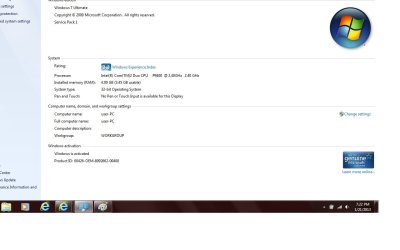
Now go to Control Panel>System and scroll down to Activation information. Is there an "OEM" in the Product ID string? If so then this is either retail Builder's OEM or and illegal copy if Win7 did not come preinstalled on the machine.

If there is no OEM in the string then it is a retail Full or Upgrade license and good for reinstaling with the key currently activated. To double-check you have the correct Product Key I would audit it with Belarc Advisor.

You can also call MS Customer Service to have them validate the Product Key which if they do and for any reason it will not activate, they will open a Support case to get it installed one way or another.
 
win7pix.jpg

Yes it ays activate an yes there is a OEM in the string? Ran Belaark an saw this:

Windows 7 WorkstationUser-pc (in WORKGROUP),
user-pc.domain_not_set.invalid10.xxx.75.xxx Routercisco07415, Cisco / IGD v1.0

That I do not understand (bear with me "d" key sticky)

Windows key also shown, so it looks good??
 
Last edited:

My Computer My Computer

At a glance

Microsoft Windows 7 Professional 64-bitIntel(R) Core(TM) i7-4790 CPU @ 3.60GHz16.00 GB Hynix/Hyundai HMT451U6BFR8A-PBNVIDIA GeForce GT 720 1920 x 1080 x 32 bits (...
Computer type
PC/Desktop
Computer Manufacturer/Model Number
DELL XPS 8700 DESKTOP
OS
Microsoft Windows 7 Professional 64-bit
CPU
Intel(R) Core(TM) i7-4790 CPU @ 3.60GHz
Motherboard
Dell Inc.Base Board 0KWVT8
Memory
16.00 GB Hynix/Hyundai HMT451U6BFR8A-PB
Graphics Card(s)
NVIDIA GeForce GT 720 1920 x 1080 x 32 bits (4294967296 colo
Sound Card
Broadcom Bluetooth Hands-free Audio
Screen Resolution
1920 x 1080 x 32 bits (4294967296 colors) @ 60 Hz
Hard Drives
ST1000DM ST1000DM003-1ER1 SCSI Disk Device
That OEM will appear if it's preinstalled at factory in which case it would have a COA sticker on teh PC, or a retail OEM System Builder license which is normally bought by those who build PC's to sell, or if it's been illegally cracked by a BIOS emulation piracy method. It would not appear with a retail copy of Win7.

There are two ways now to determine if its a legal Product Key:

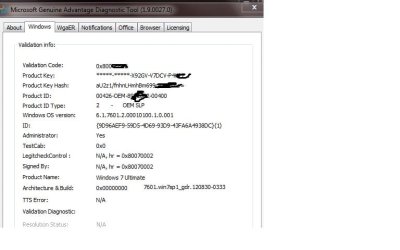
Run the MGADiag.exe, copy the results of it's report and post them back in the code box accessed by clicking on # in the toolbar in Reply box.

Call MS Customer Service to verify the Product Key against the Product ID.

At least you'll then know if you have a legal copy on board since if you Repair Install or Reinstall it will not reactivate using a bad Product key which has been used for cracktivation.

May I ask where you found the Product Key?
 
Key was on a document file on the laptop. Ran mag test does this look legit?
[/ATTACH]
 

Attachments

  • win7license2.jpg
    win7license2.jpg
    30.8 KB · Views: 5
Last edited:

My Computer My Computer

At a glance

Microsoft Windows 7 Professional 64-bitIntel(R) Core(TM) i7-4790 CPU @ 3.60GHz16.00 GB Hynix/Hyundai HMT451U6BFR8A-PBNVIDIA GeForce GT 720 1920 x 1080 x 32 bits (...
Computer type
PC/Desktop
Computer Manufacturer/Model Number
DELL XPS 8700 DESKTOP
OS
Microsoft Windows 7 Professional 64-bit
CPU
Intel(R) Core(TM) i7-4790 CPU @ 3.60GHz
Motherboard
Dell Inc.Base Board 0KWVT8
Memory
16.00 GB Hynix/Hyundai HMT451U6BFR8A-PB
Graphics Card(s)
NVIDIA GeForce GT 720 1920 x 1080 x 32 bits (4294967296 colo
Sound Card
Broadcom Bluetooth Hands-free Audio
Screen Resolution
1920 x 1080 x 32 bits (4294967296 colors) @ 60 Hz
Hard Drives
ST1000DM ST1000DM003-1ER1 SCSI Disk Device
If this is a good legit copy and I do burn the iso could I just try running it as a repair? My issue is w/ missing dll files I believe. If this would do it would I still have to screw with the serial numbers?

Many thanks!
 

My Computer My Computer

At a glance

Microsoft Windows 7 Professional 64-bitIntel(R) Core(TM) i7-4790 CPU @ 3.60GHz16.00 GB Hynix/Hyundai HMT451U6BFR8A-PBNVIDIA GeForce GT 720 1920 x 1080 x 32 bits (...
Computer type
PC/Desktop
Computer Manufacturer/Model Number
DELL XPS 8700 DESKTOP
OS
Microsoft Windows 7 Professional 64-bit
CPU
Intel(R) Core(TM) i7-4790 CPU @ 3.60GHz
Motherboard
Dell Inc.Base Board 0KWVT8
Memory
16.00 GB Hynix/Hyundai HMT451U6BFR8A-PB
Graphics Card(s)
NVIDIA GeForce GT 720 1920 x 1080 x 32 bits (4294967296 colo
Sound Card
Broadcom Bluetooth Hands-free Audio
Screen Resolution
1920 x 1080 x 32 bits (4294967296 colors) @ 60 Hz
Hard Drives
ST1000DM ST1000DM003-1ER1 SCSI Disk Device
If SFC /SCANNOW Command does not help, a Repair Install might. You'd have to reactivate at which time you can find out if the key is genuine if you don't want to know now using the steps I gave you earlier.

We can determine with certainty if its genuine when you post back the MGADiag.exe report in a code box.

If not genuine you can buy a new copy, follow these same steps to get a perfect Clean Reinstall - Factory OEM Windows 7, or you can install the licensed OS if a COA sticker is on your PC with a readable Product Key.
 
Back
Top