16GB NTFS USB stick in XP on Virtualbox

QuackPot

New member
Pro User
Local time
4:17 PM
Messages
396
I'm using Sun Virtualbox 2.2.4 and I can't get my 16GB USB3 USB stick to mount in XP. Is this because it's NTFS or is there an easy way to fix this?
 

My Computer My Computer

At a glance

Windows 7 Professional x64Intel i5-2500k @ 3.3Ghz4GB DDR3Nvidia GTS250 1GB
Computer Manufacturer/Model Number
Desktop
OS
Windows 7 Professional x64
CPU
Intel i5-2500k @ 3.3Ghz
Motherboard
Gigabyte GA-Z77X-UD5H
Memory
4GB DDR3
Graphics Card(s)
Nvidia GTS250 1GB
Monitor(s) Displays
Sony SDM S95A
Screen Resolution
1280x1024
Hard Drives
1x 1TB, 2x 250GB HDDs
PSU
Corsair HX850W
Case
Cooler Master 690 II
Cooling
Thermalright True Spirit 140mm & 3x 120mm & 3x 140mm Fans
Keyboard
Logitech Media Keyboard
Mouse
Microsoft Intellimouse
Internet Speed
8MB
Hi there
problem is more likely to be in the Virtual Box USB driver rather than in the XP virtual machine.

1) Does the USB stick mount on the HOST without problems.
2) USB3 mode not available in XP AFAIK so that could be a problem although USB devices can operate at USB2 or even basic legacy USB mode (older printers etc).

Can't say I've had probs with 16GB USB sticks (NTFS formatted) being attached to XP Virtual machines (although I'm using vmware).

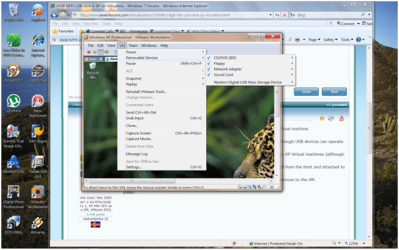
3) Check in the VM menu after XP is powered on if the USB device can be removed from the Host and attached to the VM.

I'm sure VBOX like VMWARE has a similar menu where you can attach / remove devices to the VM.

Here's the VMWARE menus I'm sure VBOX has almost the same.

Cheers
jimbo
 

Attachments

  • vmpic1.png
    vmpic1.png
    27.9 KB · Views: 23
  • vmpic2.png
    vmpic2.png
    80.4 KB · Views: 30

My Computer My Computer

At a glance

Linux CENTOS 7 / various Windows OS'es and se...Intel i7 Intel i58GB, 16GBOn Motherboard
Computer type
PC/Desktop
Computer Manufacturer/Model Number
Custom built, several laptops HP/ASUS
OS
Linux CENTOS 7 / various Windows OS'es and servers
CPU
Intel i7 Intel i5
Memory
8GB, 16GB
Graphics Card(s)
On Motherboard
Sound Card
Realtek HD audio
Monitor(s) Displays
Apple Cinema display, Samsung LCD
Screen Resolution
1920 X 1080
Hard Drives
4 X 1TB SATA
Mouse
Toshiba wireless laser
Internet Speed
> 20MB up
VirtualBox does not support USB3. VirtualBox 4.0.0 and above support USB2 when VirtualBox Extension Pack is installed. You can download the latest version of VirtualBox and Extension Pack here: Downloads - VirtualBox

Kari
 

My Computer My Computer

At a glance

Windows 10 Pro x64 EN-GB1.6 GHz Intel Core i7-720QM Processor6 GBATI Mobility Radeon HD 5850 Graphics
Computer type
Laptop
Computer Manufacturer/Model Number
HP ENVY 17-1150eg
OS
Windows 10 Pro x64 EN-GB
CPU
1.6 GHz Intel Core i7-720QM Processor
Memory
6 GB
Graphics Card(s)
ATI Mobility Radeon HD 5850 Graphics
Sound Card
Beats sound system with integrated subwoofer
Monitor(s) Displays
17" laptop display, 22" LED and 32" Full HD TV through HDMI
Screen Resolution
1600*900 (1), 1920*1080 (2&3)
Hard Drives
Internal: 2 x 500 GB SATA Hard Disk Drive 7200 rpm
External: 2TB for backups, 3TB USB3 network drive for media
Cooling
As Envy runs a bit warm, I have it on a Cooler Master pad
Keyboard
Logitech diNovo Media Desktop Laser (bluetooth)
Mouse
Logitech Performance Mouse MX
Internet Speed
50/10 Mbps VDSL
Antivirus
Windows Defender 4.3.9431.0
Browser
Maxthon 3.5.2., IE11
Back
Top