JavaScript is disabled. For a better experience, please enable JavaScript in your browser before proceeding.
You are using an out of date browser. It may not display this or other websites correctly.
You should upgrade or use an
alternative browser .
Solved 16gigabytes installed only 3.95 usable
so how do I up this to make it fully run 16 gigs?
Computer type PC/Desktop Computer Manufacturer/Model Number custom build OS Win 7 ultimate CPU AMD FX(tm)-4100 Quad-Core Processor Motherboard MSI 970A-G43 (MS-7693) Memory 16.00 GB 3.95 GB Graphics Card(s) NVIDIA GeForce GTX 980 Ti Sound Card (1) Webcam C110 (2) NVIDIA High Definition Audio (3) Rea
3 Brain Cells
Guru
Gold Member
VIP
Computer type PC/Desktop Computer Manufacturer/Model Number Home made Desktop OS Windows 10 Pro. 64/ version 1709 Windows 7 Pro/64 CPU Intel i7-6800K @ 4.3 Motherboard ASUS X-99 Deluxe II Memory Corsair Platinum 16 gig @2400 Graphics Card(s) EVGA GTX 1070 OC Monitor(s) Displays Asus 27" LED LCD/VE278Q Screen Resolution 1920-1080 or 1280-720 HDMI Hard Drives INTEL SSD 730-240 Gb Sata 3.0/ PSU EVGA Platium 1200W Case Phanteks Luxe Tempered Glass 8 fans/ one radiator Cooling XSPC/ Water Cooled CPU Keyboard Das 4 Professional Mouse Logitech M705/MX Anywhere 2-S Internet Speed 100 mbits Antivirus Microsoft Security Essentials/ Malwarebytes Premium 3.0/ SAS Browser I.E. 11 default/Firefox/ ISP Time Warner Cable/Spectrum Other Info LG BluRay Burner/
New member
Thread Starter
Computer type PC/Desktop Computer Manufacturer/Model Number custom build OS Win 7 ultimate CPU AMD FX(tm)-4100 Quad-Core Processor Motherboard MSI 970A-G43 (MS-7693) Memory 16.00 GB 3.95 GB Graphics Card(s) NVIDIA GeForce GTX 980 Ti Sound Card (1) Webcam C110 (2) NVIDIA High Definition Audio (3) Rea
3 Brain Cells
Guru
Gold Member
VIP
Some what but I'm looking for something.
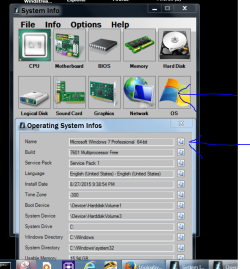
What I'm looking for is something that states Windows 7 Ultimate 64 bit. Here is a picture that should help you.
I'm trying to verify that you do or do not have a 64 bit Windows 7.
This tutorial by Brink will show you how to post a screen shot.
http://www.sevenforums.com/tutorials/9733-screenshots-files-upload-post-seven-forums.html
Or you could go to
Start Orb and type in
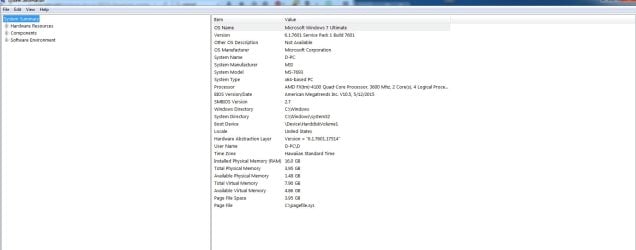
msinfo32, tick on it and post that picture.
Computer type PC/Desktop Computer Manufacturer/Model Number Home made Desktop OS Windows 10 Pro. 64/ version 1709 Windows 7 Pro/64 CPU Intel i7-6800K @ 4.3 Motherboard ASUS X-99 Deluxe II Memory Corsair Platinum 16 gig @2400 Graphics Card(s) EVGA GTX 1070 OC Monitor(s) Displays Asus 27" LED LCD/VE278Q Screen Resolution 1920-1080 or 1280-720 HDMI Hard Drives INTEL SSD 730-240 Gb Sata 3.0/ PSU EVGA Platium 1200W Case Phanteks Luxe Tempered Glass 8 fans/ one radiator Cooling XSPC/ Water Cooled CPU Keyboard Das 4 Professional Mouse Logitech M705/MX Anywhere 2-S Internet Speed 100 mbits Antivirus Microsoft Security Essentials/ Malwarebytes Premium 3.0/ SAS Browser I.E. 11 default/Firefox/ ISP Time Warner Cable/Spectrum Other Info LG BluRay Burner/
New member
Thread Starter
Computer type PC/Desktop Computer Manufacturer/Model Number custom build OS Win 7 ultimate CPU AMD FX(tm)-4100 Quad-Core Processor Motherboard MSI 970A-G43 (MS-7693) Memory 16.00 GB 3.95 GB Graphics Card(s) NVIDIA GeForce GTX 980 Ti Sound Card (1) Webcam C110 (2) NVIDIA High Definition Audio (3) Rea
3 Brain Cells
Guru
Gold Member
VIP
From what I see you do not have Windows 7 Ultimate 64 bit installed. You have a 32 bit installed.
Computer type PC/Desktop Computer Manufacturer/Model Number Home made Desktop OS Windows 10 Pro. 64/ version 1709 Windows 7 Pro/64 CPU Intel i7-6800K @ 4.3 Motherboard ASUS X-99 Deluxe II Memory Corsair Platinum 16 gig @2400 Graphics Card(s) EVGA GTX 1070 OC Monitor(s) Displays Asus 27" LED LCD/VE278Q Screen Resolution 1920-1080 or 1280-720 HDMI Hard Drives INTEL SSD 730-240 Gb Sata 3.0/ PSU EVGA Platium 1200W Case Phanteks Luxe Tempered Glass 8 fans/ one radiator Cooling XSPC/ Water Cooled CPU Keyboard Das 4 Professional Mouse Logitech M705/MX Anywhere 2-S Internet Speed 100 mbits Antivirus Microsoft Security Essentials/ Malwarebytes Premium 3.0/ SAS Browser I.E. 11 default/Firefox/ ISP Time Warner Cable/Spectrum Other Info LG BluRay Burner/
R.I.P. Britton30=Gary
Guru
VIP
Hi and welcome to SevenForums
Some thing is off for sure here's mine with 8gb of ram :/
View attachment 375304
Last edited: Oct 5, 2016
Computer type PC/Desktop Computer Manufacturer/Model Number Custom assembled by me :} OS Win-7-Pro64bit 7-H-Prem-64bit CPU i7-5930K 2nd i9-9940x both water blocked VRM's too Motherboard ASUS SABERTOOTH X99 2nd ASUS x299 Apex Memory Trident-z 3200C14 2nd Trident-z 3600C16 Graphics Card(s) EVGA 1080ti ftw3 2nd Titan Xp both water blocked Sound Card Built-in Realtek Monitor(s) Displays 1-AOC G2460PG 24"G-Sync 144Hz/ 2nd 1-ASUS VG248QE 24" 144Hz Screen Resolution 1920 x 1080 144Hz Hard Drives 2-Samsung M.2 Evo & Evo Plus PSU EVGA SuperNOVA 1000-P2 2nd 1200-P2 Case 2-Corsair Obsidian Series 450D Black ATX Mid Tower Cooling Custom water loops Keyboard Logitech G710+/ 2nd Logitech G910 Mouse 2-RedDragon M901 Perdition 16400 dpi Gaming mouse = wired Internet Speed Comcast Ping 19ms 89.31mbps download speed 6.12mbps upload Antivirus Malwarebytes Pro/ Superantispyware Pro Browser FireFox & Pale moon Other Info 2nd ASUS X299 Apex/Intel i9-9940x with Custom water loop/7H-Prem-x64/Corsair 450D case/Ram Trident-z 3600C16 4x8gb / Samsung970Evo plus 500gb SSD/Dual ssd EZ swap evo/PSU EVGA SuperNova 1200w-P2 80+Platinum/GPU Titan Xp /8-ML-140 on push-pull on 2-280GTX rads
R.I.P. Britton30=Gary
Guru
VIP
I can't tell where it states 32 bit from that screen shot
Click start and right click the Computer listing and click on Properties or Control panel and System
View attachment 375305
Last edited: Oct 5, 2016
Computer type PC/Desktop Computer Manufacturer/Model Number Custom assembled by me :} OS Win-7-Pro64bit 7-H-Prem-64bit CPU i7-5930K 2nd i9-9940x both water blocked VRM's too Motherboard ASUS SABERTOOTH X99 2nd ASUS x299 Apex Memory Trident-z 3200C14 2nd Trident-z 3600C16 Graphics Card(s) EVGA 1080ti ftw3 2nd Titan Xp both water blocked Sound Card Built-in Realtek Monitor(s) Displays 1-AOC G2460PG 24"G-Sync 144Hz/ 2nd 1-ASUS VG248QE 24" 144Hz Screen Resolution 1920 x 1080 144Hz Hard Drives 2-Samsung M.2 Evo & Evo Plus PSU EVGA SuperNOVA 1000-P2 2nd 1200-P2 Case 2-Corsair Obsidian Series 450D Black ATX Mid Tower Cooling Custom water loops Keyboard Logitech G710+/ 2nd Logitech G910 Mouse 2-RedDragon M901 Perdition 16400 dpi Gaming mouse = wired Internet Speed Comcast Ping 19ms 89.31mbps download speed 6.12mbps upload Antivirus Malwarebytes Pro/ Superantispyware Pro Browser FireFox & Pale moon Other Info 2nd ASUS X299 Apex/Intel i9-9940x with Custom water loop/7H-Prem-x64/Corsair 450D case/Ram Trident-z 3600C16 4x8gb / Samsung970Evo plus 500gb SSD/Dual ssd EZ swap evo/PSU EVGA SuperNova 1200w-P2 80+Platinum/GPU Titan Xp /8-ML-140 on push-pull on 2-280GTX rads
Beach Observer
Guru
Gold Member
VIP
This user asked the same question on the sister PC Help Forum.
Computer type PC/Desktop Computer Manufacturer/Model Number My Own Build OS Windows 10 64 bit CPU Intel i7 6700K Motherboard ASUS ROG Maximus VIII Hero Memory 16GB Corsair Dominator Graphics Card(s) Intel CPU Graphics Sound Card RealTek Monitor(s) Displays 27" Dell S2719dgf Screen Resolution 2560X1440 Hard Drives 1 TB Samsung 850 EVO SSD for Win 10 Pro PSU EVGA Supernova 750G2 Case BeQuiet Silent Base 600 Cooling Deepcool Captain 120EX Keyboard Microsoft Wireless 2000 Mouse Microsoft wireless Internet Speed 100 MB/sec (Cable) Antivirus Microsoft Defender and Malwarebytes Browser Edge/Firefox Other Info Cakewalk (Sonar) by BandLab and Studio One 4.1 Pro recording studio software. MOTU 896Mk3 Hybrid recording interface, Frontier Tranzport wireless control unit, Behringer X-Touch Control Surface.
New member
Thread Starter
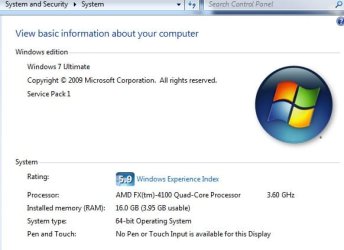
as another user said, in my system it states it's 64 bit.... so it is in fact a 32 bit?
Computer type PC/Desktop Computer Manufacturer/Model Number custom build OS Win 7 ultimate CPU AMD FX(tm)-4100 Quad-Core Processor Motherboard MSI 970A-G43 (MS-7693) Memory 16.00 GB 3.95 GB Graphics Card(s) NVIDIA GeForce GTX 980 Ti Sound Card (1) Webcam C110 (2) NVIDIA High Definition Audio (3) Rea
Aspiring Gnome
Guru
Gold Member
VIP
as another user said, in my system it states it's 64 bit.... so it is in fact a 32 bit?
We don't know yet.
Go to Control Panel.
Poke "system".
Post a screen shot of what you see.
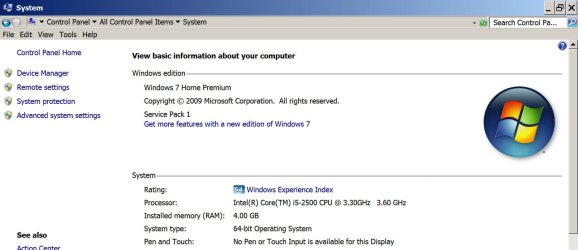
Here is mine, indicating 64 bit next to "system type". Do you see that?
Untitled-1.jpg
114.4 KB
· Views: 2
Computer type PC/Desktop Computer Manufacturer/Model Number Ignatz Special; 4 speed manual gearbox; factory air conditioning; one of one OS Windows 7 Home Premium SP1, 64-bit CPU Intel Skylake i5-6600K, not overclocked Motherboard AsRock Z170M Extreme 4, micro ATX Memory 8 GB HyperX DDR4-2666 (2 x 4 GB) Graphics Card(s) none; graphics are integrated on CPU Sound Card onboard: Realtek ALC1150; external: USB Behringer UF0-202 Monitor(s) Displays Dell S2340M 23 inch IPS Screen Resolution 1600 x 900 Hard Drives System: Crucial MX100 series SSD, 128 GB; PSU Rosewill SilentNight 500 watt fanless, semi-modular Case Antec Solo II Cooling Noctua NH-U12S; Noctua F12 intake, Noctua S12A exhaust Keyboard Microsoft 200 6JH-00001 USB Mouse Dell or Microsoft optical wired; USB Antivirus Microsoft Security Essentials and Malwarebytes Premium Browser Pale Moon Other Info All fans PWM; speeds at idle: CPU circa 500 rpm; intake circa 600 rpm; exhaust circa 600 rpm; CPU temps 27 idle and 47 C load in a warm room (27 C/81 F) when running Intel Extreme Tuning Utility stress test.
New member
Thread Starter
here you go.
ty.jpg
27.1 KB
· Views: 35
Computer type PC/Desktop Computer Manufacturer/Model Number custom build OS Win 7 ultimate CPU AMD FX(tm)-4100 Quad-Core Processor Motherboard MSI 970A-G43 (MS-7693) Memory 16.00 GB 3.95 GB Graphics Card(s) NVIDIA GeForce GTX 980 Ti Sound Card (1) Webcam C110 (2) NVIDIA High Definition Audio (3) Rea
3 Brain Cells
Guru
Gold Member
VIP
Verify that your memory meets the specs of your motherboard and cpu.
Then check your motherboard manual to verify the ram is installed properly.
Set your bios to default.
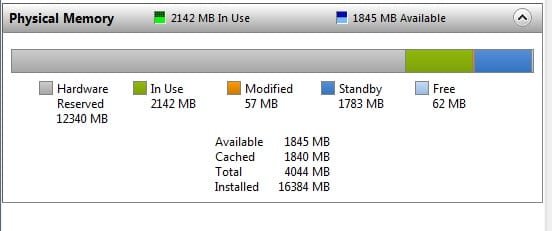
Again another picture I would like to see from your computer.
From Task Manager/Resource Monitor.
Computer type PC/Desktop Computer Manufacturer/Model Number Home made Desktop OS Windows 10 Pro. 64/ version 1709 Windows 7 Pro/64 CPU Intel i7-6800K @ 4.3 Motherboard ASUS X-99 Deluxe II Memory Corsair Platinum 16 gig @2400 Graphics Card(s) EVGA GTX 1070 OC Monitor(s) Displays Asus 27" LED LCD/VE278Q Screen Resolution 1920-1080 or 1280-720 HDMI Hard Drives INTEL SSD 730-240 Gb Sata 3.0/ PSU EVGA Platium 1200W Case Phanteks Luxe Tempered Glass 8 fans/ one radiator Cooling XSPC/ Water Cooled CPU Keyboard Das 4 Professional Mouse Logitech M705/MX Anywhere 2-S Internet Speed 100 mbits Antivirus Microsoft Security Essentials/ Malwarebytes Premium 3.0/ SAS Browser I.E. 11 default/Firefox/ ISP Time Warner Cable/Spectrum Other Info LG BluRay Burner/
New member
Thread Starter
fw.jpg
14.8 KB
· Views: 32
Computer type PC/Desktop Computer Manufacturer/Model Number custom build OS Win 7 ultimate CPU AMD FX(tm)-4100 Quad-Core Processor Motherboard MSI 970A-G43 (MS-7693) Memory 16.00 GB 3.95 GB Graphics Card(s) NVIDIA GeForce GTX 980 Ti Sound Card (1) Webcam C110 (2) NVIDIA High Definition Audio (3) Rea
3 Brain Cells
Guru
Gold Member
VIP
Damn look at that hardware Reserve, HUGE.
Computer type PC/Desktop Computer Manufacturer/Model Number Home made Desktop OS Windows 10 Pro. 64/ version 1709 Windows 7 Pro/64 CPU Intel i7-6800K @ 4.3 Motherboard ASUS X-99 Deluxe II Memory Corsair Platinum 16 gig @2400 Graphics Card(s) EVGA GTX 1070 OC Monitor(s) Displays Asus 27" LED LCD/VE278Q Screen Resolution 1920-1080 or 1280-720 HDMI Hard Drives INTEL SSD 730-240 Gb Sata 3.0/ PSU EVGA Platium 1200W Case Phanteks Luxe Tempered Glass 8 fans/ one radiator Cooling XSPC/ Water Cooled CPU Keyboard Das 4 Professional Mouse Logitech M705/MX Anywhere 2-S Internet Speed 100 mbits Antivirus Microsoft Security Essentials/ Malwarebytes Premium 3.0/ SAS Browser I.E. 11 default/Firefox/ ISP Time Warner Cable/Spectrum Other Info LG BluRay Burner/
R.I.P. Britton30=Gary
Guru
VIP
Okay that's even a more bazar screen shot = Hardware reserved is soaking up nearly all your ram
Computer type PC/Desktop Computer Manufacturer/Model Number Custom assembled by me :} OS Win-7-Pro64bit 7-H-Prem-64bit CPU i7-5930K 2nd i9-9940x both water blocked VRM's too Motherboard ASUS SABERTOOTH X99 2nd ASUS x299 Apex Memory Trident-z 3200C14 2nd Trident-z 3600C16 Graphics Card(s) EVGA 1080ti ftw3 2nd Titan Xp both water blocked Sound Card Built-in Realtek Monitor(s) Displays 1-AOC G2460PG 24"G-Sync 144Hz/ 2nd 1-ASUS VG248QE 24" 144Hz Screen Resolution 1920 x 1080 144Hz Hard Drives 2-Samsung M.2 Evo & Evo Plus PSU EVGA SuperNOVA 1000-P2 2nd 1200-P2 Case 2-Corsair Obsidian Series 450D Black ATX Mid Tower Cooling Custom water loops Keyboard Logitech G710+/ 2nd Logitech G910 Mouse 2-RedDragon M901 Perdition 16400 dpi Gaming mouse = wired Internet Speed Comcast Ping 19ms 89.31mbps download speed 6.12mbps upload Antivirus Malwarebytes Pro/ Superantispyware Pro Browser FireFox & Pale moon Other Info 2nd ASUS X299 Apex/Intel i9-9940x with Custom water loop/7H-Prem-x64/Corsair 450D case/Ram Trident-z 3600C16 4x8gb / Samsung970Evo plus 500gb SSD/Dual ssd EZ swap evo/PSU EVGA SuperNova 1200w-P2 80+Platinum/GPU Titan Xp /8-ML-140 on push-pull on 2-280GTX rads
R.I.P.
Guru
Gold Member
VIP
That is odd, my board only uses 63 MB for hardware reserved.
Computer type PC/Desktop Computer Manufacturer/Model Number Skylake Special #666 OS Windows 10 Pro x64 CPU Intel Core i7 6700K Motherboard Asus Sabertooth Z170 Mark 1 Memory GSkill TridentZ RGB 16GB 3600 16-16-16-36 Graphics Card(s) EVGA GTX 980 Ti SC x2 Sound Card Realtek High Definition Monitor(s) Displays AOC G2460PG Screen Resolution 1920 x 1080 144Hz Hard Drives Samsung 860 Pro 256GB, Seagate Barracuda 4TB x2 PSU EVGA 1000 P2, EVGA White Custom Braided Cables Case Corsair Vengeance C70 Gunmetal Black Cooling Corsair H100i v2, Corsair ML120 x2, Thermal Grizzly Kryonaut Keyboard Logitech G910 Orion Spectrum Mouse Logitech G700s Internet Speed Verizon Fios Quantum Gateway 75/75 Antivirus Windows Defender, Malwarebytes Free 3.8.3 Browser Chrome Other Info Corsair SP120 x4, LG Blu-ray Drive, Durabrand HT-395 100 Watt Dolby Digital Amp, Corsair H2100 Wireless 7.1 Headset
Computer type PC/Desktop Computer Manufacturer/Model Number Self Built OS Win 10 Pro x64 CPU Intel I5-2500K @3.3GHz Motherboard Asrock P67 Extreme4 Memory 16GB G.Skill Ripjaws X (4x4GB) Graphics Card(s) EVGA GeForce 750 Ti SC 2GB Sound Card ASUS Xonar DG 5.1 Channels 24-bit 96KHz PCI Interface Sound Monitor(s) Displays auria eq2367 Screen Resolution 1920 x 1080 Hard Drives 250GB Samsung 850 EVO SSD PSU SeaSonic X 650W 80 Plus Gold Case Corsair Obsidian 750D Cooling Corsair H60, Three 140mm case fans Keyboard Logitech Wireless Keyboard K520 Mouse Logitech Wireless Mouse M310 Internet Speed Wave Broadband ~ 100 dn 5 up Antivirus Windows Defender, Malwarebytes Premium Browser Edge, IE11, Chrome Other Info Laptop specs: HP g7-1365dx /
R.I.P. Britton30=Gary
Guru
VIP
Funny on my Acer it shows 1mb hardware reserved
Computer type PC/Desktop Computer Manufacturer/Model Number Custom assembled by me :} OS Win-7-Pro64bit 7-H-Prem-64bit CPU i7-5930K 2nd i9-9940x both water blocked VRM's too Motherboard ASUS SABERTOOTH X99 2nd ASUS x299 Apex Memory Trident-z 3200C14 2nd Trident-z 3600C16 Graphics Card(s) EVGA 1080ti ftw3 2nd Titan Xp both water blocked Sound Card Built-in Realtek Monitor(s) Displays 1-AOC G2460PG 24"G-Sync 144Hz/ 2nd 1-ASUS VG248QE 24" 144Hz Screen Resolution 1920 x 1080 144Hz Hard Drives 2-Samsung M.2 Evo & Evo Plus PSU EVGA SuperNOVA 1000-P2 2nd 1200-P2 Case 2-Corsair Obsidian Series 450D Black ATX Mid Tower Cooling Custom water loops Keyboard Logitech G710+/ 2nd Logitech G910 Mouse 2-RedDragon M901 Perdition 16400 dpi Gaming mouse = wired Internet Speed Comcast Ping 19ms 89.31mbps download speed 6.12mbps upload Antivirus Malwarebytes Pro/ Superantispyware Pro Browser FireFox & Pale moon Other Info 2nd ASUS X299 Apex/Intel i9-9940x with Custom water loop/7H-Prem-x64/Corsair 450D case/Ram Trident-z 3600C16 4x8gb / Samsung970Evo plus 500gb SSD/Dual ssd EZ swap evo/PSU EVGA SuperNova 1200w-P2 80+Platinum/GPU Titan Xp /8-ML-140 on push-pull on 2-280GTX rads
3 Brain Cells
Guru
Gold Member
VIP
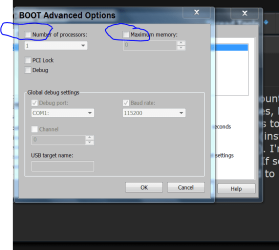
Dmasterman by chance have you been into Advance Boot Options?
Looks like this.
Computer type PC/Desktop Computer Manufacturer/Model Number Home made Desktop OS Windows 10 Pro. 64/ version 1709 Windows 7 Pro/64 CPU Intel i7-6800K @ 4.3 Motherboard ASUS X-99 Deluxe II Memory Corsair Platinum 16 gig @2400 Graphics Card(s) EVGA GTX 1070 OC Monitor(s) Displays Asus 27" LED LCD/VE278Q Screen Resolution 1920-1080 or 1280-720 HDMI Hard Drives INTEL SSD 730-240 Gb Sata 3.0/ PSU EVGA Platium 1200W Case Phanteks Luxe Tempered Glass 8 fans/ one radiator Cooling XSPC/ Water Cooled CPU Keyboard Das 4 Professional Mouse Logitech M705/MX Anywhere 2-S Internet Speed 100 mbits Antivirus Microsoft Security Essentials/ Malwarebytes Premium 3.0/ SAS Browser I.E. 11 default/Firefox/ ISP Time Warner Cable/Spectrum Other Info LG BluRay Burner/