1GB of Ram always being used

LilWhyWhy

New member
Local time
10:36 PM
Messages
2
Hello,

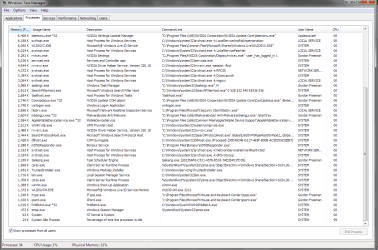
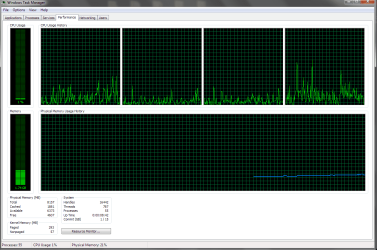
I'm having a strange problem. My computer is always using 1gb of RAM all the time. Even when there's nothing running. Obviously the problem lays in backround services and programs, I've checked to see whats running and I don't think it can all add up to 1GB. Attached are some pictures of my task manager showing what's running.

Thank you for your time.
 

Attachments

  • 1.png
    1.png
    54.7 KB · Views: 8
  • 2.png
    2.png
    56.4 KB · Views: 7
  • 3.png
    3.png
    23.7 KB · Views: 10

My Computer My Computer

At a glance

Windows 7 Home Premium x64Intel i5 2400k8GBNVIDIA GTX 670
Computer type
PC/Desktop
Computer Manufacturer/Model Number
Custom Build
OS
Windows 7 Home Premium x64
CPU
Intel i5 2400k
Motherboard
BIOSTAR Group TZ77B
Memory
8GB
Graphics Card(s)
NVIDIA GTX 670
Hard Drives
1TB
Antivirus
Malware Bytes Anti-Malware
Browser
Chrome/Firefox
Not a problem, the system uses memory, if it's required for other tasks it will be re-assigned.
The only time no memory is being used is when your 'puter is off.
 

My Computer My Computer

At a glance

Windows 7 home premium x64AMD FX-4100 AM3+ 3.6GHz 12MB Black EditionCrsair vengeance 12Gb DDR3 1600MHz CL9Asus GTX 560 1GB
Computer Manufacturer/Model Number
DIY
OS
Windows 7 home premium x64
CPU
AMD FX-4100 AM3+ 3.6GHz 12MB Black Edition
Motherboard
Asus M5A97 Pro
Memory
Crsair vengeance 12Gb DDR3 1600MHz CL9
Graphics Card(s)
Asus GTX 560 1GB
Sound Card
Realtek onboard
Monitor(s) Displays
Hanns G 1680x1050 native
Hard Drives
OCZ 128Gb Petrol ssd
2x500 Gb Samsung
PSU
OCZ StealthXstream II 500W
Internet Speed
8Mb or better
With having 8GB of RAM, sounds about right to me.
 

My Computer My Computer

At a glance

Windows 7 Ultimate x64 SP1Core i7 920 (D0) @ 4Ghz, *26c idle *65c full ...12GB DDR3 Corsair Dominator -CMD12GX3M6A1600C...Zotac Geforce GTX 770
Computer type
PC/Desktop
Computer Manufacturer/Model Number
Airbot 2.0
OS
Windows 7 Ultimate x64 SP1
CPU
Core i7 920 (D0) @ 4Ghz, *26c idle *65c full load on air
Motherboard
Asus P6X58D Premium - Sata 6Gb/s - USB 3.0
Memory
12GB DDR3 Corsair Dominator -CMD12GX3M6A1600C8 at 1600MHz
Graphics Card(s)
Zotac Geforce GTX 770
Sound Card
ASUS Xonar D2X
Monitor(s) Displays
1 LG 24" Flatron W2453V-PF 1 Samsung 24" P2450H both 2ms RT
Screen Resolution
1920x1080@60hz
Hard Drives
1 Samsung 250GB 840 Evo SSD
1 OCZ Vertex2 180GB SSD
1 TB Samsung Spinpoint F1 7200RPM 32MB cache
2 500GB WD Caviar Blacks 7200RPM 32MB cache (WD5001AALS)

Pioneer DVD Burner DVR-S18M
PSU
Corsair HX1000W
Case
Cooler Master HAF 932
Cooling
Case Fans *3 230mm, *1 140mm/CPU - *Tuniq Tower 120 Extreme
Keyboard
Logitech Wireless MK700
Mouse
Logitech Wireless MK700
Internet Speed
DL 15 Mbps UL 0.98 Mbps
Antivirus
None
Browser
Firefox Nightly
Other Info
Processor-7.7 *RAM- 7.9 *Graphics-7.9 *Gaming Graphics- 7.9 *SSD- 7.8 W.E.I final score= 7.7
*Phone- LG Nexus 5
Agree .... Looks completely normal to me. You have lots of RAM to spare - no problems.
 

My Computer My Computer

At a glance

Windows 10 Pro x64 ; Xubuntu x64Intel i7 860 @ 2.80 GHz O/C'ed to 4.0GHz16GB Corsair Vengance DDR3 @ 661 MHz Dual Cha...EVGA NVidia GTX 560 1024MB
Computer type
PC/Desktop
Computer Manufacturer/Model Number
Golden Mk. I.4
OS
Windows 10 Pro x64 ; Xubuntu x64
CPU
Intel i7 860 @ 2.80 GHz O/C'ed to 4.0GHz
Motherboard
Gigabyte P55A-UD3R Rev.1. Award BIOS F13
Memory
16GB Corsair Vengance DDR3 @ 661 MHz Dual Channel (9-9-9-24)
Graphics Card(s)
EVGA NVidia GTX 560 1024MB
Sound Card
Realtek Integrated
Monitor(s) Displays
Dual Samsung SyncMaster 2494HS
Screen Resolution
1920*1080 and 1920*1080
Hard Drives
1*Samsung 840 EVO 120GB SSD;
1*OCZ Vertex 2 60GB SSD;
2*Samsung F3 SpinPoint 1TB in RAID0;
1*Samsung F1 SpinPoint 1TB;
2*Western Digital 1TB External USB 3.0
1*Western Digital 500GB External USB 3.0
1*Seagate 500GB External USB 2.0
PSU
Thermaltake ToughPower QFan 750W
Case
Thermaltake Element S VK60001W2Z
Cooling
Corsair H60 Water Cooling, 2*230mm and 2*80mm case fans
Keyboard
Logitech G110
Mouse
Logitech MX518
Alright, thanks for the replies, it was just unusual to me because on other computers if nothing was running it wouldn't use any.
 

My Computer My Computer

At a glance

Windows 7 Home Premium x64Intel i5 2400k8GBNVIDIA GTX 670
Computer type
PC/Desktop
Computer Manufacturer/Model Number
Custom Build
OS
Windows 7 Home Premium x64
CPU
Intel i5 2400k
Motherboard
BIOSTAR Group TZ77B
Memory
8GB
Graphics Card(s)
NVIDIA GTX 670
Hard Drives
1TB
Antivirus
Malware Bytes Anti-Malware
Browser
Chrome/Firefox
I see nothing wrong either.
Adding up the memory sage of running processes rarely produces meaningful results. The numbers shown are not the full usage of the processes and there are major users of memory that are not processes.

Memory usage in Windows is highly dynamic and always under the control of the OS. The memory manager will always try to assign memory where it will do the most good to improve performance. As long as adequate memory is available the memory manager will allow system and other processes to use as much memory as they wish. This is a good thing and improves performance. But if memory is needed for new processes the usage of these processes will be trimmed back to meet the demand, drastically if necessary. This will impair performance so the memory manager will only do this when necessary.

The memory manager will always try to find some use for as much memory as possible, even if it is only of trivial value. The memory gauge does not show this. It was never meant to. The ideal would be zero free memory at all times but computer science has not reached that point yet.

Memory management in Windows is highly complex and follows principles that are poorly understood by most computer users. This often leads to confusion, sometimes even among computer professionals.
 

My Computer My Computer

At a glance

Windows 7 Pro 64 bitXeon W35208 GBNvidia Geforce 210
Computer type
PC/Desktop
Computer Manufacturer/Model Number
HP
OS
Windows 7 Pro 64 bit
CPU
Xeon W3520
Memory
8 GB
Graphics Card(s)
Nvidia Geforce 210
Back
Top