1TB external HDD not opening in Win 7, but its opening in Linux System

Diya

New member
Local time
11:38 AM
Messages
2
I have Seagate 1TB external HDD.It was working fine untill few days back when it suddenly stopped Responding.
Now whenever i try to plug it ino my windows 7 Laptop, It gets detected by the USB port but does not open up.
When ever i try to right click on the Drive shown in my computer , the explorer hangs and becomes not responding.
The HDD is shown in the Device manager, but not in the disk management. I tried to update the Driver through the Device manager , but it shows that the Driver is already updated and working properly.

Another thing is , It worked perfectly fine with the Linux system, where I was able to see all my Files and folders in there. The person owning the Linux system told me that the HDD is having virus, thats the reason its not opening up in WIN 7 .

What should i do? I dont want to Loose all my data on the HDD. How should i access it. Do i need to install Linux OS to make it work .I do not have much info about Linux. Please help
 

My Computer My Computer

At a glance

Windows 7
Computer type
PC/Desktop
OS
Windows 7
Can anybody please help me here !! ??
 

My Computer My Computer

At a glance

Windows 7
Computer type
PC/Desktop
OS
Windows 7
Hi

A corrupted NTFS file system can cause the issues you described. The corruption could be a result of bad sectors or removing the disk without properly ejecting it first.

I would suggest diagnose your HDD by running "Seagate Seatool" and verifying it's physical health before looking for logical issues.

SeaTools for Windows | Seagate

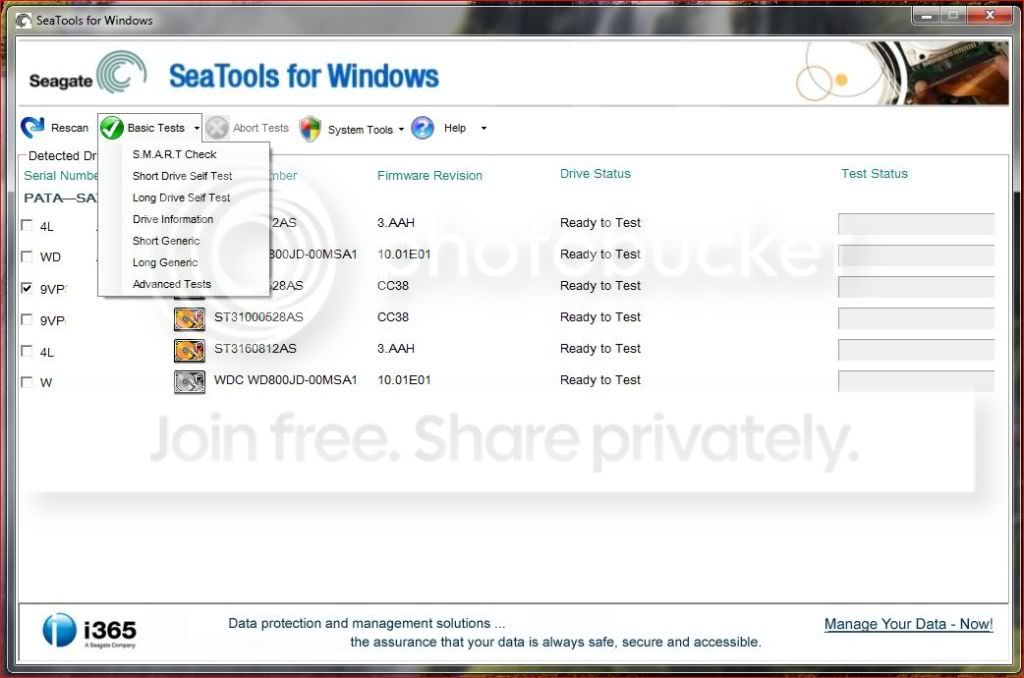
Run the tool and you will see both your external HDD and the internal one listed for testing. Make sure to select the external one and choose "Basic Tests --> Short Generic". If the test is a failure, post the result with next reply. otherwise choose "Basic Tests --> Long Generic".

Seatools.jpg
 

My Computer My Computer

At a glance

Windows 7 Ultimate x64
Computer type
PC/Desktop
OS
Windows 7 Ultimate x64
Turn off Autoplay.
http://www.sevenforums.com/tutorials/216706-autoplay-enable-disable.html

Then see if its detected. Dont doubleclick to open it. Right Click it and select open.

Also Try running CMD and use this command

attrib -h -s -d /d /s [drive path:] *.*

See if there are any unwanted exe files, shortcuts in it. Use your friend's Linux OS to backup data.
 

My Computer My Computer

At a glance

Windows 7 Home Premium 64bitIntel Core i7 2670QMSamsung 8GB 1333MhznVidia Geforce 540M GT 2GB
Computer type
Laptop
Computer Manufacturer/Model Number
Dell XPS L502x
OS
Windows 7 Home Premium 64bit
CPU
Intel Core i7 2670QM
Motherboard
Intel HM67 Mobile Express Chipset
Memory
Samsung 8GB 1333Mhz
Graphics Card(s)
nVidia Geforce 540M GT 2GB
Sound Card
Realtek High Definition Audio
Monitor(s) Displays
15.6" Dell Standard RGB-LED Backlit Display
Screen Resolution
1366x768
Hard Drives
Seagate Momentus 2.5" 750GB HDD 5400rpm
Internet Speed
3.1 Mbits/s
Antivirus
AVG Free, Kaspersky
Browser
Google chrome
First I shall go with Imrankhan to check whether there is any real virus infection.

But my approach is going to be different - using WinRAR to explore your drive.

You can download and install your Windows bit version of WinRAR - if you already do not have.

Keep Shift key pressed while you plugin your external drive to prevent auto run.

Explore your drive with WinRAR. You must now delete all files that are not your data files. But if you have any autorun file, you must open it in Notepad and find out where it points to. ( You must remove it from your PC to prevent reinfection)

(Download and install WinRAR 32bit or 64 bit as appropriate to your system. WinRAR archiver, a powerful tool to process RAR and ZIP files

Safely remove all external hard disks and pendrives.

Shut down your computer and reboot.

Plug-in only the problem drive while pressing the left Shift key so that autorun is disabled.

Run WinRAR, navigate to the afflicted drive, click/double click on it to explore.

It will show all the files including the hidden files present in that particular drive.

Search for the file autorun.inf and open it with Notepad. Look for any .exe file entry in the text. This is the culprit that gets executed. Take a note of this .exe file name and close it.

Now that you know the name of the .exe file, search, locate and delete it from your PC. Also delete the autorun.inf file in your USB drive. (Right click on it and delete file in WinRAR)

Close WinRAR.

Now restart your Computer. Your system should now be free from the shortcut virus.)


OK this is to check if you really have any virus.

You may also have a look at my post here http://www.sevenforums.com/hardware...n-but-can-partially-detected.html#post2356626
 

My Computer My Computer

At a glance

Windows 7 Home Premium 32 bit
OS
Windows 7 Home Premium 32 bit
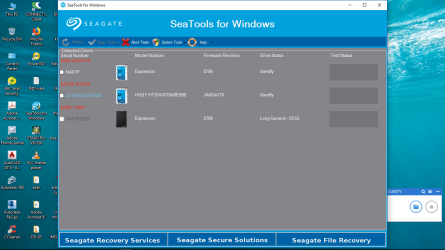
i did what anshad told. when i did test for short generic, it completed and the status bar remain blue for long time. then i abort the test and start long generic test and then seatool is like this
 

Attachments

  • Screenshot (2).png
    Screenshot (2).png
    109.9 KB · Views: 1

My Computer My Computer

At a glance

windows 10 pro 64bit
Computer type
Laptop
Computer Manufacturer/Model Number
hp
OS
windows 10 pro 64bit
You could use Linux to see the drive contents and to copy them to another external hard drive. Go to www.linuxmint.com and download the 32-bit version of xfce. Create a DVD from this, and then boot the computer to the DVD. (This won't write anything to your computer.) Now look at your files using Linux file explorer. Now copy every file you want to keep to an external hard drive.

Once you have copied off all of your files, you could format the questionable drive, then copy your files back to it, doing all of this while still in Linux.

After doing all of this, your files should be available in Windows.
 

My Computer My Computer

At a glance

Linux Mint 18.2 xfce 64-bit (VMWare host) / W...Haswell4 GB
Computer type
PC/Desktop
Computer Manufacturer/Model Number
Dell
OS
Linux Mint 18.2 xfce 64-bit (VMWare host) / Windows 8.1 Pro 32-bit (VMWare guest)
CPU
Haswell
Memory
4 GB
Monitor(s) Displays
Acer 23"
Screen Resolution
1920 x 1080
Hard Drives
Two hard drives, 1TB each: One for Linux, one for my data.
Keyboard
IBM Model M
Antivirus
Sophos (Linux), Trend Micro (Windows)
Browser
Firefox, Opera
Other Info
I use Samba to share my data drive with the other computers at my house and with my guest session in VMWare Workstation Player.
Welcome to the forum.

Did the disk had any accident like a impact?
Open Disk Management (C:\Windows\System32\diskmgmt.msc), Expand the columns so we can read them and with the Snipping Tool take a snapshot. Use the paper clip to upload the image. Don't use external links.
 

My Computers My Computers

  • At a glance

    Windows 7 HP 64i5 6600K - 800MHz to 4200MHz4+4G GSkill DDR4 3000IG - Intel 530
    Computer type
    PC/Desktop
    Computer Manufacturer/Model Number
    custom build
    OS
    Windows 7 HP 64
    CPU
    i5 6600K - 800MHz to 4200MHz
    Motherboard
    GA-Z170-HD3P
    Memory
    4+4G GSkill DDR4 3000
    Graphics Card(s)
    IG - Intel 530
    Monitor(s) Displays
    Samsung 226BW
    Screen Resolution
    1680x1050
    Hard Drives
    (1) -1 SM951 – 128GB M.2 AHCI PCIe SSD drive for Windows 7 and Lubuntu
    (2) -1 WD SATA 3 - 1T for Data
    (3) -1 WD SATA 3 - 1T for backup
    PSU
    Thermaltake 450W TR2 gold
    Keyboard
    Old and good Chicony mechanical keyboard
    Mouse
    Logitech mX performance - 9 buttons (had to disable some)
    Internet Speed
    500Mb/s
    Browser
    Firefox 64
    Other Info
    TinyWall firewall
  • At a glance

    Windows 7 Proi7-4500U 800MHz to 3.0GHz(4+4)G DDR3 1600IG intel 4400 + NVIDIA GeForce GT 745M
    Computer type
    Laptop
    System Manufacturer/Model Number
    Asus Q550LF
    OS
    Windows 7 Pro
    CPU
    i7-4500U 800MHz to 3.0GHz
    Motherboard
    Asus Q550LF
    Memory
    (4+4)G DDR3 1600
    Graphics Card(s)
    IG intel 4400 + NVIDIA GeForce GT 745M
    Sound Card
    Realtek
    Monitor(s) Displays
    LG Display LP156WF4-SPH1
    Screen Resolution
    1920 x 1080
    Hard Drives
    BX500 120G SSD for Windows and programs +
    1T HDD for data
    Internet Speed
    500 Mb/s
    Browser
    Firefox
    Other Info
    TinyWall firewall
Back
Top