2.4Ghz vs 5Ghz puzzle?

BomberAF

New member
Member
VIP
Local time
10:45 PM
Messages
491
Location
Liverpool
I thought that 5Ghz would always beat 2.4Ghz hands down on everything apart from distance. With this in mind I set my router to broadcast at 5Ghz and thought that my wifi would be much better as a result,but it wasn't.

I have my router and my PC in the same room a few meters from each other, and while I was using 2.4Ghz I would always get 90% signal strength,but when I changed to 5Ghz instead of my signal getting to 100% it went to 70%? My router is capable of both 2.4Ghz and 5Ghz so why is it that 2.4Ghz is better than 5Ghz when I have been told that it should be the other way around?

I was told that microwaves, cordless telephones and other electronic devices use the 2.4Ghz frequency range and this causes intereference and as such causes a loss of signal.

5Ghz I was told is free of other electronic noise so it is much better and you will always get a stronger signal. The one thing which I was told that made 2.4Ghz better than 5Ghz was the fact that legal restrictions on 5Ghz routers meant that the amount of power they could use to output a signal meant they were not so good over long distances, and in some countries it was even illegal to use 5Ghz frequency.
 

My Computer My Computer

At a glance

Windows 72.4 GHz Intel i3 cpu8GB
Computer Manufacturer/Model Number
Dell Inspiron
OS
Windows 7
CPU
2.4 GHz Intel i3 cpu
Memory
8GB
Mouse
MS Explorer Mouse
Internet Speed
100 Mb/s
The higher the frequency, the more power it takes to emit said frequency in comparison to lower frequencies. If you have a decent router, however, it shouldn't make a difference which band you transmit. Just because the router CAN use the 5GHz band doesn't mean it'll operate best on it.
 

My Computer My Computer

At a glance

Windows 7 Ultimate 64-bitAMD Phenom II X6 1090T 3.2GHZG.SKILL RipJaw 3x2GB DDR3-10662x HIS Radeon HD 6850 1 GB
OS
Windows 7 Ultimate 64-bit
CPU
AMD Phenom II X6 1090T 3.2GHZ
Motherboard
MSI 890FXA-GD70
Memory
G.SKILL RipJaw 3x2GB DDR3-1066
Graphics Card(s)
2x HIS Radeon HD 6850 1 GB
Sound Card
VIA 8-channel
Monitor(s) Displays
2x 20 inch Acer LCDs, 1x 32" Sony LCD TV
Screen Resolution
4480x900
Hard Drives
1x Crucial 64GB SSD
3x 1TB HDDs (WD, Seagate, Hitatchi)
1x 500GB Seagate External
PSU
Kingwin 1000W Modular
Case
Coolermaster HAF 932
Cooling
1x 120mm, 3x 200mm, CoolerMaster Hyper 212+
Keyboard
Microsoft Wireless Keyboard 1000
Mouse
Microsoft Wiresless Mouse 5000
Internet Speed
20mbps
Other Info
Samsung BD-ROM/DVD-RW
I thought that 5Ghz would always beat 2.4Ghz hands down on everything apart from distance. With this in mind I set my router to broadcast at 5Ghz and thought that my wifi would be much better as a result,but it wasn't.

I have my router and my PC in the same room a few meters from each other, and while I was using 2.4Ghz I would always get 90% signal strength,but when I changed to 5Ghz instead of my signal getting to 100% it went to 70%? My router is capable of both 2.4Ghz and 5Ghz so why is it that 2.4Ghz is better than 5Ghz when I have been told that it should be the other way around?

I was told that microwaves, cordless telephones and other electronic devices use the 2.4Ghz frequency range and this causes intereference and as such causes a loss of signal.

5Ghz I was told is free of other electronic noise so it is much better and you will always get a stronger signal. The one thing which I was told that made 2.4Ghz better than 5Ghz was the fact that legal restrictions on 5Ghz routers meant that the amount of power they could use to output a signal meant they were not so good over long distances, and in some countries it was even illegal to use 5Ghz frequency.

You really need to use channel bonding in order to get the most out of the 5Ghz frequency.

For the most part the 5Ghz frequency works best when there are no walls or obsticles in the way, and you choose channels that aren't overlapping each other in order the get the most bandwidth.

Choosing the 20-40Mhz setting on your router then choosing two clear channels that do not overlap is the best way to set it up.

This link from Intel explains what channel bonding is and how to set your router to use channel bonding.
Wireless Networking — What is channel bonding?
 

My Computer My Computer

At a glance

Windows 7 Ult, Windows 8.1 Pro,Q9650-4.275GHz, E8600 4.5GHz, E6750-3.8GHzG.Skill PC2 9600 1200Mhz 5 5 5 15 2TGTX480
Computer type
PC/Desktop
Computer Manufacturer/Model Number
Home built
OS
Windows 7 Ult, Windows 8.1 Pro,
CPU
Q9650-4.275GHz, E8600 4.5GHz, E6750-3.8GHz
Motherboard
Evga 780i FTW
Memory
G.Skill PC2 9600 1200Mhz 5 5 5 15 2T
Graphics Card(s)
GTX480
Sound Card
Asus Xonar D2
Monitor(s) Displays
HannsG
Screen Resolution
1680X1050
Hard Drives
GSkill Phoenix Pro 120GB SSD
PSU
ThermalTake Toughpower 1000Watt modular
Case
ThermalTake XaserV
Cooling
Xigmatek S1283
Keyboard
Logitech G15
Mouse
Logitech G9
Internet Speed
T1
Please can you help?, what is better a non overlapping channel (1,6,11) but with many neighbours using them or channel 8 being me only on it?


And a second doubt what if i use 40mh in the 2.4gh spectrum? being main channel number 8 (im alone on it) and channel 6 (wide, with other neighbours on it but at the end is not an overlapping channel).
 
Last edited:

My Computer My Computer

At a glance

Microsoft Windows 7 Ultimate 64 bits 7601 Mul...Intel(R) Core(TM) i7-3770K CPU @ 3.50GHz8.00 GBNVIDIA GeForce GTX 670
Computer type
PC/Desktop
Computer Manufacturer/Model Number
Custom Build
OS
Microsoft Windows 7 Ultimate 64 bits 7601 Multiprocessor Free Service Pack 1
CPU
Intel(R) Core(TM) i7-3770K CPU @ 3.50GHz
Motherboard
ASUSTeK Computer INC. P8Z68-V PRO GEN3
Memory
8.00 GB
Graphics Card(s)
NVIDIA GeForce GTX 670
Sound Card
Omega Striker
Monitor(s) Displays
Viewsonic vx2250wm
Screen Resolution
1920 x 1080 x 32 bits (4294967296 colors) @ 60 Hz
Hard Drives
V9CPETXT
Seagate 1TB.
PSU
Corsair Gold Series AX850
Case
nvidia 690 advanced II
Cooling
Air
Please can you help?, what is better a non overlapping channel (1,6,11) but with many neighbours using them or channel 8 being me only on it?


And a second doubt what if i use 40mh in the 2.4gh spectrum? being main channel number 8 (im alone on it) and channel 6 (wide, with other neighbours on it but at the end is not an overlapping channel).

Channel 8 will still be subject to a slight interference from channel 6. I would take a look at what channels are strongest and closest to you (most elevens and sixes are farther away, for example) And go with that.
 

My Computer My Computer

At a glance

Windows 7 Ultimate 64-bitAMD Phenom II X6 1090T 3.2GHZG.SKILL RipJaw 3x2GB DDR3-10662x HIS Radeon HD 6850 1 GB
OS
Windows 7 Ultimate 64-bit
CPU
AMD Phenom II X6 1090T 3.2GHZ
Motherboard
MSI 890FXA-GD70
Memory
G.SKILL RipJaw 3x2GB DDR3-1066
Graphics Card(s)
2x HIS Radeon HD 6850 1 GB
Sound Card
VIA 8-channel
Monitor(s) Displays
2x 20 inch Acer LCDs, 1x 32" Sony LCD TV
Screen Resolution
4480x900
Hard Drives
1x Crucial 64GB SSD
3x 1TB HDDs (WD, Seagate, Hitatchi)
1x 500GB Seagate External
PSU
Kingwin 1000W Modular
Case
Coolermaster HAF 932
Cooling
1x 120mm, 3x 200mm, CoolerMaster Hyper 212+
Keyboard
Microsoft Wireless Keyboard 1000
Mouse
Microsoft Wiresless Mouse 5000
Internet Speed
20mbps
Other Info
Samsung BD-ROM/DVD-RW
Please Johnathan take a look at my neighbourhood (im Chafiro2) which channel will you choose?


Would you recommend using the binding of channels? (N, double channel or a single one)?
 

My Computer My Computer

At a glance

Microsoft Windows 7 Ultimate 64 bits 7601 Mul...Intel(R) Core(TM) i7-3770K CPU @ 3.50GHz8.00 GBNVIDIA GeForce GTX 670
Computer type
PC/Desktop
Computer Manufacturer/Model Number
Custom Build
OS
Microsoft Windows 7 Ultimate 64 bits 7601 Multiprocessor Free Service Pack 1
CPU
Intel(R) Core(TM) i7-3770K CPU @ 3.50GHz
Motherboard
ASUSTeK Computer INC. P8Z68-V PRO GEN3
Memory
8.00 GB
Graphics Card(s)
NVIDIA GeForce GTX 670
Sound Card
Omega Striker
Monitor(s) Displays
Viewsonic vx2250wm
Screen Resolution
1920 x 1080 x 32 bits (4294967296 colors) @ 60 Hz
Hard Drives
V9CPETXT
Seagate 1TB.
PSU
Corsair Gold Series AX850
Case
nvidia 690 advanced II
Cooling
Air
Please Johnathan take a look at my neighbourhood (im Chafiro2) which channel will you choose?


Would you recommend using the binding of channels? (N, double channel or a single one)?

Yes. Bind G using 6 and 11. Since this is a G map, I can't speak for N.

But I did notice your Wireless adapter is G, so ANY N settings will serve you no purpose. Unless your router has dual-band capability, it will step down to serve the Gs on your network at 2.4ghz and the Ns as well on 2.4ghz.
 

My Computer My Computer

At a glance

Windows 7 Ultimate 64-bitAMD Phenom II X6 1090T 3.2GHZG.SKILL RipJaw 3x2GB DDR3-10662x HIS Radeon HD 6850 1 GB
OS
Windows 7 Ultimate 64-bit
CPU
AMD Phenom II X6 1090T 3.2GHZ
Motherboard
MSI 890FXA-GD70
Memory
G.SKILL RipJaw 3x2GB DDR3-1066
Graphics Card(s)
2x HIS Radeon HD 6850 1 GB
Sound Card
VIA 8-channel
Monitor(s) Displays
2x 20 inch Acer LCDs, 1x 32" Sony LCD TV
Screen Resolution
4480x900
Hard Drives
1x Crucial 64GB SSD
3x 1TB HDDs (WD, Seagate, Hitatchi)
1x 500GB Seagate External
PSU
Kingwin 1000W Modular
Case
Coolermaster HAF 932
Cooling
1x 120mm, 3x 200mm, CoolerMaster Hyper 212+
Keyboard
Microsoft Wireless Keyboard 1000
Mouse
Microsoft Wiresless Mouse 5000
Internet Speed
20mbps
Other Info
Samsung BD-ROM/DVD-RW
Please Johnathan take a look at my neighbourhood (im Chafiro2) which channel will you choose?


Would you recommend using the binding of channels? (N, double channel or a single one)?

Yes. Bind G using 6 and 11. Since this is a G map, I can't speak for N.

But I did notice your Wireless adapter is G, so ANY N settings will serve you no purpose. Unless your router has dual-band capability, it will step down to serve the Gs on your network at 2.4ghz and the Ns as well on 2.4ghz.


Hi mate but Chafiro2 is not my wireless adapter but my wireless router, so it's G??? i thought it was N cause has this:

however G technology reaches 54mb i know.... so it's a G router?

Which one do you prefer between 6 and 11 according to my graph?

BTW its impossible to bind 6 and 11, i could bind 8 with 6 or 4
and 11 with 9 or 7

you can not bind unless you have and N router...
 

My Computer My Computer

At a glance

Microsoft Windows 7 Ultimate 64 bits 7601 Mul...Intel(R) Core(TM) i7-3770K CPU @ 3.50GHz8.00 GBNVIDIA GeForce GTX 670
Computer type
PC/Desktop
Computer Manufacturer/Model Number
Custom Build
OS
Microsoft Windows 7 Ultimate 64 bits 7601 Multiprocessor Free Service Pack 1
CPU
Intel(R) Core(TM) i7-3770K CPU @ 3.50GHz
Motherboard
ASUSTeK Computer INC. P8Z68-V PRO GEN3
Memory
8.00 GB
Graphics Card(s)
NVIDIA GeForce GTX 670
Sound Card
Omega Striker
Monitor(s) Displays
Viewsonic vx2250wm
Screen Resolution
1920 x 1080 x 32 bits (4294967296 colors) @ 60 Hz
Hard Drives
V9CPETXT
Seagate 1TB.
PSU
Corsair Gold Series AX850
Case
nvidia 690 advanced II
Cooling
Air
Please Johnathan take a look at my neighbourhood (im Chafiro2) which channel will you choose?


Would you recommend using the binding of channels? (N, double channel or a single one)?

Yes. Bind G using 6 and 11. Since this is a G map, I can't speak for N.

But I did notice your Wireless adapter is G, so ANY N settings will serve you no purpose. Unless your router has dual-band capability, it will step down to serve the Gs on your network at 2.4ghz and the Ns as well on 2.4ghz.


Hi mate but Chafiro2 is not my wireless adapter but my wireless router, so it's G??? i thought it was N cause has this:

however G technology reaches 54mb i know.... so it's a G router?

Which one do you prefer between 6 and 11 according to my graph?

BTW its impossible to bind 6 and 11, i could bind 8 with 6 or 4
and 11 with 9 or 7

you can not bind unless you have and N router...

What I meant....

Look at the screenshot you provided from inSSIDer. The wireless adapter in your computer is Wireless-G. I wasn't talking about your router.

In short if you want to go completely N (which I recommend) You need to get an N adapter for your PC. Your router is already capable of N.

I would bond 11 with 9 OR 8 with 6.
 

My Computer My Computer

At a glance

Windows 7 Ultimate 64-bitAMD Phenom II X6 1090T 3.2GHZG.SKILL RipJaw 3x2GB DDR3-10662x HIS Radeon HD 6850 1 GB
OS
Windows 7 Ultimate 64-bit
CPU
AMD Phenom II X6 1090T 3.2GHZ
Motherboard
MSI 890FXA-GD70
Memory
G.SKILL RipJaw 3x2GB DDR3-1066
Graphics Card(s)
2x HIS Radeon HD 6850 1 GB
Sound Card
VIA 8-channel
Monitor(s) Displays
2x 20 inch Acer LCDs, 1x 32" Sony LCD TV
Screen Resolution
4480x900
Hard Drives
1x Crucial 64GB SSD
3x 1TB HDDs (WD, Seagate, Hitatchi)
1x 500GB Seagate External
PSU
Kingwin 1000W Modular
Case
Coolermaster HAF 932
Cooling
1x 120mm, 3x 200mm, CoolerMaster Hyper 212+
Keyboard
Microsoft Wireless Keyboard 1000
Mouse
Microsoft Wiresless Mouse 5000
Internet Speed
20mbps
Other Info
Samsung BD-ROM/DVD-RW
You beat me! How can you possibly know i have a wireless g adapter? In which part of the image did you see that?

My router appears to be n but its not giving me n speeds although i have a laptop and ipod touch 4g all n compatible...
 

My Computer My Computer

At a glance

Microsoft Windows 7 Ultimate 64 bits 7601 Mul...Intel(R) Core(TM) i7-3770K CPU @ 3.50GHz8.00 GBNVIDIA GeForce GTX 670
Computer type
PC/Desktop
Computer Manufacturer/Model Number
Custom Build
OS
Microsoft Windows 7 Ultimate 64 bits 7601 Multiprocessor Free Service Pack 1
CPU
Intel(R) Core(TM) i7-3770K CPU @ 3.50GHz
Motherboard
ASUSTeK Computer INC. P8Z68-V PRO GEN3
Memory
8.00 GB
Graphics Card(s)
NVIDIA GeForce GTX 670
Sound Card
Omega Striker
Monitor(s) Displays
Viewsonic vx2250wm
Screen Resolution
1920 x 1080 x 32 bits (4294967296 colors) @ 60 Hz
Hard Drives
V9CPETXT
Seagate 1TB.
PSU
Corsair Gold Series AX850
Case
nvidia 690 advanced II
Cooling
Air
You beat me! How can you possibly know i have a wireless g adapter? In which part of the image did you see that?

My router appears to be n but its not giving me n speeds although i have a laptop and ipod touch 4g all n compatible...

Top right corner, the app gives you the name of your adapter.

You will not get N speeds with a G adapter. In order to get N speeds, you have to have all N components.
 

My Computer My Computer

At a glance

Windows 7 Ultimate 64-bitAMD Phenom II X6 1090T 3.2GHZG.SKILL RipJaw 3x2GB DDR3-10662x HIS Radeon HD 6850 1 GB
OS
Windows 7 Ultimate 64-bit
CPU
AMD Phenom II X6 1090T 3.2GHZ
Motherboard
MSI 890FXA-GD70
Memory
G.SKILL RipJaw 3x2GB DDR3-1066
Graphics Card(s)
2x HIS Radeon HD 6850 1 GB
Sound Card
VIA 8-channel
Monitor(s) Displays
2x 20 inch Acer LCDs, 1x 32" Sony LCD TV
Screen Resolution
4480x900
Hard Drives
1x Crucial 64GB SSD
3x 1TB HDDs (WD, Seagate, Hitatchi)
1x 500GB Seagate External
PSU
Kingwin 1000W Modular
Case
Coolermaster HAF 932
Cooling
1x 120mm, 3x 200mm, CoolerMaster Hyper 212+
Keyboard
Microsoft Wireless Keyboard 1000
Mouse
Microsoft Wiresless Mouse 5000
Internet Speed
20mbps
Other Info
Samsung BD-ROM/DVD-RW
You beat me! How can you possibly know i have a wireless g adapter? In which part of the image did you see that?

My router appears to be n but its not giving me n speeds although i have a laptop and ipod touch 4g all n compatible...

Top right corner, the app gives you the name of your adapter.

You will not get N speeds with a G adapter. In order to get N speeds, you have to have all N components.

Oh yes! :D

But mate my ipad and my ipod 4G they are both N compatible and if i perform and speed test i only get 20mbit. (my internet connection using an ethernet cable gives me 45mbit).
 

My Computer My Computer

At a glance

Microsoft Windows 7 Ultimate 64 bits 7601 Mul...Intel(R) Core(TM) i7-3770K CPU @ 3.50GHz8.00 GBNVIDIA GeForce GTX 670
Computer type
PC/Desktop
Computer Manufacturer/Model Number
Custom Build
OS
Microsoft Windows 7 Ultimate 64 bits 7601 Multiprocessor Free Service Pack 1
CPU
Intel(R) Core(TM) i7-3770K CPU @ 3.50GHz
Motherboard
ASUSTeK Computer INC. P8Z68-V PRO GEN3
Memory
8.00 GB
Graphics Card(s)
NVIDIA GeForce GTX 670
Sound Card
Omega Striker
Monitor(s) Displays
Viewsonic vx2250wm
Screen Resolution
1920 x 1080 x 32 bits (4294967296 colors) @ 60 Hz
Hard Drives
V9CPETXT
Seagate 1TB.
PSU
Corsair Gold Series AX850
Case
nvidia 690 advanced II
Cooling
Air
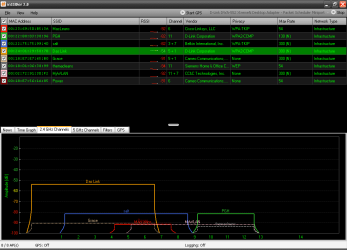
Running inSSIDer on a PC that only has a wireless G adapter doesn't strike me as a valid test. The best that adapter can ever do is G speeds of 54 MBps. Even if your router is N it won't display it. Here is my screen done on my XP PC with a D-Link DWA-552 extreme N PCI adapter. My Router is a D-Link DIR-655 extreme N.
SSID.PNG
My SSID is DAS Link and my router is set to auto 20/40MHz for band width and auto channel scan. Auto channel scan is supposed to let the router select the best channel(s) based on other wifi networks in range. My router and adapter won't do 5 GHz. I'd be very surprised it your G adapter will do the 5 Ghz band, you might want to check the specs. I've noticed that the longer I leave inSSIDer running the more networks that show up. I've seen up to 20 listed at times. My router is in my basement and the XP PC is 1 floor up. I've read that having even one G device on an N network will cause the N network to fall back to G speeds. I've never bothered to try and prove it one way or the other though.
 

My Computer My Computer

At a glance

Windows 10 Education 64 bitAMD Phenom II X4 980 Black Edition Deneb 3.7GHz8GB 4GBx2 Kingston PC10600 DDR3 1333 MemoryZotac NVIDIA Geforce GT640 2 Gig DDR3 PCIe
Computer type
PC/Desktop
Computer Manufacturer/Model Number
Home Built
OS
Windows 10 Education 64 bit
CPU
AMD Phenom II X4 980 Black Edition Deneb 3.7GHz
Motherboard
Asus M4N68T-M V2 µATX Motherboard
Memory
8GB 4GBx2 Kingston PC10600 DDR3 1333 Memory
Graphics Card(s)
Zotac NVIDIA Geforce GT640 2 Gig DDR3 PCIe
Sound Card
VIA VT1708s High Definition Audio 8-channel Onboard
Monitor(s) Displays
22" LG E2242 1080p and 2 19" I-INC AG191D
Screen Resolution
1280x1024 - 1920x1080 - 1280x1024
Hard Drives
Crucial M100 256 GB SSD and 500 GB WD Blue SATA
PSU
Thermaltake TR 620
Case
Power Up Black ATX Mid-Tower Case
Cooling
Stock heatsink and fan
Keyboard
Logitech Wireless K350 Wave
Mouse
Logitech Wireless M570 Trackman Wheel
Internet Speed
80 Mbps Down 30 Mbps Up
Antivirus
Windows Defender
Browser
Internet Explorer 11
Other Info
HP DVD1040e Lightscribe - External USB2
You beat me! How can you possibly know i have a wireless g adapter? In which part of the image did you see that?

My router appears to be n but its not giving me n speeds although i have a laptop and ipod touch 4g all n compatible...

Top right corner, the app gives you the name of your adapter.

You will not get N speeds with a G adapter. In order to get N speeds, you have to have all N components.

Oh yes! :D

But mate my ipad and my ipod 4G they are both N compatible and if i perform and speed test i only get 20mbit. (my internet connection using an ethernet cable gives me 45mbit).

You missed what I just said...

In order to get N speeds, you have to have all N components.

Running inSSIDer on a PC that only has a wireless G adapter doesn't strike me as a valid test. The best that adapter can ever do is G speeds of 54 MBps. Even if your router is N it won't display it. Here is my screen done on my XP PC with a D-Link DWA-552 extreme N PCI adapter. My Router is a D-Link DIR-655 extreme N.
View attachment 137113
My SSID is DAS Link and my router is set to auto 20/40MHz for band width and auto channel scan. Auto channel scan is supposed to let the router select the best channel(s) based on other wifi networks in range. My router and adapter won't do 5 GHz. I'd be very surprised it your G adapter will do the 5 Ghz band, you might want to check the specs. I've noticed that the longer I leave inSSIDer running the more networks that show up. I've seen up to 20 listed at times. My router is in my basement and the XP PC is 1 floor up. I've read that having even one G device on an N network will cause the N network to fall back to G speeds. I've never bothered to try and prove it one way or the other though.

You are right. Per spec, if an N router has a G device connected to it (and does not have dual band capabilities [be able to have independent G and N frequencies for both types of devices], it will step down)
 

My Computer My Computer

At a glance

Windows 7 Ultimate 64-bitAMD Phenom II X6 1090T 3.2GHZG.SKILL RipJaw 3x2GB DDR3-10662x HIS Radeon HD 6850 1 GB
OS
Windows 7 Ultimate 64-bit
CPU
AMD Phenom II X6 1090T 3.2GHZ
Motherboard
MSI 890FXA-GD70
Memory
G.SKILL RipJaw 3x2GB DDR3-1066
Graphics Card(s)
2x HIS Radeon HD 6850 1 GB
Sound Card
VIA 8-channel
Monitor(s) Displays
2x 20 inch Acer LCDs, 1x 32" Sony LCD TV
Screen Resolution
4480x900
Hard Drives
1x Crucial 64GB SSD
3x 1TB HDDs (WD, Seagate, Hitatchi)
1x 500GB Seagate External
PSU
Kingwin 1000W Modular
Case
Coolermaster HAF 932
Cooling
1x 120mm, 3x 200mm, CoolerMaster Hyper 212+
Keyboard
Microsoft Wireless Keyboard 1000
Mouse
Microsoft Wiresless Mouse 5000
Internet Speed
20mbps
Other Info
Samsung BD-ROM/DVD-RW
First of all thanks for your interest alphanumeric, this is a laptop with N speeds:


I've read that having even one G device on an N network will cause the N network to fall back to G speeds.

mmm interesting.


Top right corner, the app gives you the name of your adapter.

You will not get N speeds with a G adapter. In order to get N speeds, you have to have all N components.

Oh yes! :D

But mate my ipad and my ipod 4G they are both N compatible and if i perform and speed test i only get 20mbit. (my internet connection using an ethernet cable gives me 45mbit).

You missed what I just said...

In order to get N speeds, you have to have all N components.

Running inSSIDer on a PC that only has a wireless G adapter doesn't strike me as a valid test. The best that adapter can ever do is G speeds of 54 MBps. Even if your router is N it won't display it. Here is my screen done on my XP PC with a D-Link DWA-552 extreme N PCI adapter. My Router is a D-Link DIR-655 extreme N.
View attachment 137113
My SSID is DAS Link and my router is set to auto 20/40MHz for band width and auto channel scan. Auto channel scan is supposed to let the router select the best channel(s) based on other wifi networks in range. My router and adapter won't do 5 GHz. I'd be very surprised it your G adapter will do the 5 Ghz band, you might want to check the specs. I've noticed that the longer I leave inSSIDer running the more networks that show up. I've seen up to 20 listed at times. My router is in my basement and the XP PC is 1 floor up. I've read that having even one G device on an N network will cause the N network to fall back to G speeds. I've never bothered to try and prove it one way or the other though.

You are right. Per spec, if an N router has a G device connected to it (and does not have dual band capabilities [be able to have independent G and N frequencies for both types of devices], it will step down)

Nop i didn't miss what you said. Thanks now i know that i need to buy a dual router.

update: check this out mate a brand new screen take with only the laptop N, no G devices connected this time (router name changed and rebooted first of course).


It still gives me 54mb.
 
Last edited:

My Computer My Computer

At a glance

Microsoft Windows 7 Ultimate 64 bits 7601 Mul...Intel(R) Core(TM) i7-3770K CPU @ 3.50GHz8.00 GBNVIDIA GeForce GTX 670
Computer type
PC/Desktop
Computer Manufacturer/Model Number
Custom Build
OS
Microsoft Windows 7 Ultimate 64 bits 7601 Multiprocessor Free Service Pack 1
CPU
Intel(R) Core(TM) i7-3770K CPU @ 3.50GHz
Motherboard
ASUSTeK Computer INC. P8Z68-V PRO GEN3
Memory
8.00 GB
Graphics Card(s)
NVIDIA GeForce GTX 670
Sound Card
Omega Striker
Monitor(s) Displays
Viewsonic vx2250wm
Screen Resolution
1920 x 1080 x 32 bits (4294967296 colors) @ 60 Hz
Hard Drives
V9CPETXT
Seagate 1TB.
PSU
Corsair Gold Series AX850
Case
nvidia 690 advanced II
Cooling
Air
Because your N adapter can fall back to use older routers. You need to eliminate G from your router's broadcast (switch to N only).
 

My Computer My Computer

At a glance

Windows 7 Ultimate 64-bitAMD Phenom II X6 1090T 3.2GHZG.SKILL RipJaw 3x2GB DDR3-10662x HIS Radeon HD 6850 1 GB
OS
Windows 7 Ultimate 64-bit
CPU
AMD Phenom II X6 1090T 3.2GHZ
Motherboard
MSI 890FXA-GD70
Memory
G.SKILL RipJaw 3x2GB DDR3-1066
Graphics Card(s)
2x HIS Radeon HD 6850 1 GB
Sound Card
VIA 8-channel
Monitor(s) Displays
2x 20 inch Acer LCDs, 1x 32" Sony LCD TV
Screen Resolution
4480x900
Hard Drives
1x Crucial 64GB SSD
3x 1TB HDDs (WD, Seagate, Hitatchi)
1x 500GB Seagate External
PSU
Kingwin 1000W Modular
Case
Coolermaster HAF 932
Cooling
1x 120mm, 3x 200mm, CoolerMaster Hyper 212+
Keyboard
Microsoft Wireless Keyboard 1000
Mouse
Microsoft Wiresless Mouse 5000
Internet Speed
20mbps
Other Info
Samsung BD-ROM/DVD-RW
Looking at your screen shoot your router is only using one channel and inSSIDer is showing it as a G network. I'd say something isn't set up correctly in the router. If you look at my screen shoot you'll see that all the 300 N networks, including mine, are using two channels. My router is set to G and N, my daughters netbook only has a G network card. Mine isn't dual band, maybe yours is N on 5 GHz but only G on the 2.4 GHz band?
 

My Computer My Computer

At a glance

Windows 10 Education 64 bitAMD Phenom II X4 980 Black Edition Deneb 3.7GHz8GB 4GBx2 Kingston PC10600 DDR3 1333 MemoryZotac NVIDIA Geforce GT640 2 Gig DDR3 PCIe
Computer type
PC/Desktop
Computer Manufacturer/Model Number
Home Built
OS
Windows 10 Education 64 bit
CPU
AMD Phenom II X4 980 Black Edition Deneb 3.7GHz
Motherboard
Asus M4N68T-M V2 µATX Motherboard
Memory
8GB 4GBx2 Kingston PC10600 DDR3 1333 Memory
Graphics Card(s)
Zotac NVIDIA Geforce GT640 2 Gig DDR3 PCIe
Sound Card
VIA VT1708s High Definition Audio 8-channel Onboard
Monitor(s) Displays
22" LG E2242 1080p and 2 19" I-INC AG191D
Screen Resolution
1280x1024 - 1920x1080 - 1280x1024
Hard Drives
Crucial M100 256 GB SSD and 500 GB WD Blue SATA
PSU
Thermaltake TR 620
Case
Power Up Black ATX Mid-Tower Case
Cooling
Stock heatsink and fan
Keyboard
Logitech Wireless K350 Wave
Mouse
Logitech Wireless M570 Trackman Wheel
Internet Speed
80 Mbps Down 30 Mbps Up
Antivirus
Windows Defender
Browser
Internet Explorer 11
Other Info
HP DVD1040e Lightscribe - External USB2
Because your N adapter can fall back to use older routers. You need to eliminate G from your router's broadcast (switch to N only).

Thanks

But there's nothing i can do about it, my router ISP doesn't have that kind of option:
nuevaimagenu.png


Looking at your screen shoot your router is only using one channel and inSSIDer is showing it as a G network. I'd say something isn't set up correctly in the router. If you look at my screen shoot you'll see that all the 300 N networks, including mine, are using two channels. My router is set to G and N, my daughters netbook only has a G network card. Mine isn't dual band, maybe yours is N on 5 GHz but only G on the 2.4 GHz band?


Exactly, something is not right, what about my ISP having hacked my router's firmware?????, i mean wired i get 40mbits (that's what i paid for), but wireless only 20mbits... It appears to be an N router but it doesn't behave like that but like a G router..

No 5ghz here, the ipad is 5ghz compatible but i'm still with 20mb in 2.4ghz..
 

My Computer My Computer

At a glance

Microsoft Windows 7 Ultimate 64 bits 7601 Mul...Intel(R) Core(TM) i7-3770K CPU @ 3.50GHz8.00 GBNVIDIA GeForce GTX 670
Computer type
PC/Desktop
Computer Manufacturer/Model Number
Custom Build
OS
Microsoft Windows 7 Ultimate 64 bits 7601 Multiprocessor Free Service Pack 1
CPU
Intel(R) Core(TM) i7-3770K CPU @ 3.50GHz
Motherboard
ASUSTeK Computer INC. P8Z68-V PRO GEN3
Memory
8.00 GB
Graphics Card(s)
NVIDIA GeForce GTX 670
Sound Card
Omega Striker
Monitor(s) Displays
Viewsonic vx2250wm
Screen Resolution
1920 x 1080 x 32 bits (4294967296 colors) @ 60 Hz
Hard Drives
V9CPETXT
Seagate 1TB.
PSU
Corsair Gold Series AX850
Case
nvidia 690 advanced II
Cooling
Air
I'd say you need to look for a bandwidth setting, probably some where under advanced. If its set 20 MHz it will only use one channel. Set to Auto or 40MHz it should use two channels. Keep in mind that different hardware/firmware do different things. How my router works with certain settings may be different from what happens on yours because the firmware is different and reacts differently under certain conditions. You may want to turn off any wireless G clients you have and only do your testing from a wireless N capable PC. That way you can rule out a G device causing your network to revet to G instead of N. Once you actually have inSSIDer showing your network as 300 N you can fire up a wireless G client and see what happens.
 

My Computer My Computer

At a glance

Windows 10 Education 64 bitAMD Phenom II X4 980 Black Edition Deneb 3.7GHz8GB 4GBx2 Kingston PC10600 DDR3 1333 MemoryZotac NVIDIA Geforce GT640 2 Gig DDR3 PCIe
Computer type
PC/Desktop
Computer Manufacturer/Model Number
Home Built
OS
Windows 10 Education 64 bit
CPU
AMD Phenom II X4 980 Black Edition Deneb 3.7GHz
Motherboard
Asus M4N68T-M V2 µATX Motherboard
Memory
8GB 4GBx2 Kingston PC10600 DDR3 1333 Memory
Graphics Card(s)
Zotac NVIDIA Geforce GT640 2 Gig DDR3 PCIe
Sound Card
VIA VT1708s High Definition Audio 8-channel Onboard
Monitor(s) Displays
22" LG E2242 1080p and 2 19" I-INC AG191D
Screen Resolution
1280x1024 - 1920x1080 - 1280x1024
Hard Drives
Crucial M100 256 GB SSD and 500 GB WD Blue SATA
PSU
Thermaltake TR 620
Case
Power Up Black ATX Mid-Tower Case
Cooling
Stock heatsink and fan
Keyboard
Logitech Wireless K350 Wave
Mouse
Logitech Wireless M570 Trackman Wheel
Internet Speed
80 Mbps Down 30 Mbps Up
Antivirus
Windows Defender
Browser
Internet Explorer 11
Other Info
HP DVD1040e Lightscribe - External USB2
I'd say you need to look for a bandwidth setting, probably some where under advanced. If its set 20 MHz it will only use one channel. Set to Auto or 40MHz it should use two channels. Keep in mind that different hardware/firmware do different things. How my router works with certain settings may be different from what happens on yours because the firmware is different and reacts differently under certain conditions. You may want to turn off any wireless G clients you have and only do your testing from a wireless N capable PC. That way you can rule out a G device causing your network to revet to G instead of N. Once you actually have inSSIDer showing your network as 300 N you can fire up a wireless G client and see what happens.

I did that last night mate. Still g speeds.
 

My Computer My Computer

At a glance

Microsoft Windows 7 Ultimate 64 bits 7601 Mul...Intel(R) Core(TM) i7-3770K CPU @ 3.50GHz8.00 GBNVIDIA GeForce GTX 670
Computer type
PC/Desktop
Computer Manufacturer/Model Number
Custom Build
OS
Microsoft Windows 7 Ultimate 64 bits 7601 Multiprocessor Free Service Pack 1
CPU
Intel(R) Core(TM) i7-3770K CPU @ 3.50GHz
Motherboard
ASUSTeK Computer INC. P8Z68-V PRO GEN3
Memory
8.00 GB
Graphics Card(s)
NVIDIA GeForce GTX 670
Sound Card
Omega Striker
Monitor(s) Displays
Viewsonic vx2250wm
Screen Resolution
1920 x 1080 x 32 bits (4294967296 colors) @ 60 Hz
Hard Drives
V9CPETXT
Seagate 1TB.
PSU
Corsair Gold Series AX850
Case
nvidia 690 advanced II
Cooling
Air
Back
Top