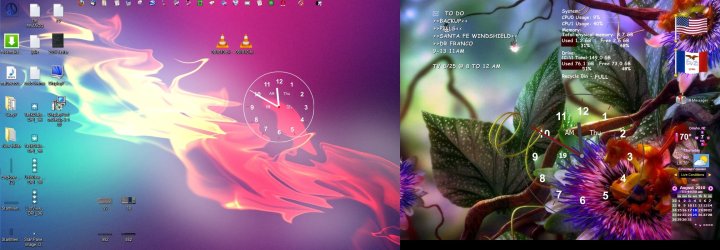
I have my laptop set up so that it uses the screen on the laptop and an additional LCD screen.
Is there a way to have 2 different background images, one on each screen??
Is there a way to have 2 different background images, one on each screen??
My Computer
- Computer Manufacturer/Model Number
- hp Pavilion dv7-6187cl
- OS
- Windows 7 Ultimate x64 Signature Edition
- CPU
- Intel Core i7 TurboBoost to 2.9Ghz
- Memory
- 8GB
- Graphics Card(s)
- ATI Radeon HD 6770M
- Sound Card
- BeatsAudio with subwoofer
- Monitor(s) Displays
- 17.3" 1080p Matte (upgraded)
- Screen Resolution
- 1080p
- Hard Drives
- 2x 640GB
- Keyboard
- Microsoft wireless keyboard 3000
- Mouse
- Microsoft wireless mouse 6000
- Internet Speed
- ~~~FAST~~~~~~~~`
- Other Info
- 1GB readyboost in my SD slot, fingerprint reader


 rb: key and 'P' together, select 'Duplicate'. I have not tried this before, but if you right click on one of the screens' desktop, and click on personalize, select your background there, then on another monitor, select a different background.