2 Hard Drives

Yes, after mjf helped me with the bootable CD, we changed the SSD drive to active and and the disk drive to inactive, applyand I then took the bootable CD out, unpluged the D drive after powering off and then put the Win 7 DVD in and ran the start up repair 3 times. Then I took the DVD out and then Windows booted up...powered off and hooked the SATA cable back to the D drive. I went back into the CMOS and changed the boot sequence like this:

1st Boot dev - SATA SSD Intel
2nd Boot dev - WDC disk drive
3rd Boot dev - CD/DVD
4th Boot dev - USB Epson styl
 

My Computer

Computer type
PC/Desktop
Computer Manufacturer/Model Number
Custom Build
OS
Windows 7 Home Premium
CPU
AMD Phenom II 955 Black Edition Quad Core
Motherboard
MSI 870-G45
Memory
Corsair XMS3 8GB
Graphics Card(s)
ATI Eyefinity HD 5770 5 mini display ports
Sound Card
Realtek High Definition 6.1
Monitor(s) Displays
2 DELL E207WFP 21.5" - 1 Acer 21.5"
Screen Resolution
2 Dells 1680x1050 - Acer 1920x1080
Hard Drives
Intel 40GB SSD
WD 500GB internal
WD 500Gb external
PSU
Cooler Master 500w
Case
Cooler Master 430 Black Elite
Keyboard
HP
Mouse
MIBRU
Internet Speed
10 mbs
Antivirus
Trend Micro
Browser
Chrome
Michael you did a great job! It was my fault for being ignorant about how to do it. Gregrocker, you rock! Now that I look back, it is not nearly as complicated as I was making it out to be LOL. Is there as way I can check it just to make sure everything is OK?
 

My Computer

Computer type
PC/Desktop
Computer Manufacturer/Model Number
Custom Build
OS
Windows 7 Home Premium
CPU
AMD Phenom II 955 Black Edition Quad Core
Motherboard
MSI 870-G45
Memory
Corsair XMS3 8GB
Graphics Card(s)
ATI Eyefinity HD 5770 5 mini display ports
Sound Card
Realtek High Definition 6.1
Monitor(s) Displays
2 DELL E207WFP 21.5" - 1 Acer 21.5"
Screen Resolution
2 Dells 1680x1050 - Acer 1920x1080
Hard Drives
Intel 40GB SSD
WD 500GB internal
WD 500Gb external
PSU
Cooler Master 500w
Case
Cooler Master 430 Black Elite
Keyboard
HP
Mouse
MIBRU
Internet Speed
10 mbs
Antivirus
Trend Micro
Browser
Chrome
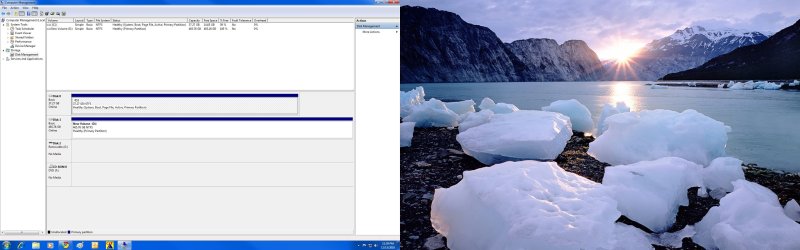
Is this how it should look?

Partition.jpg
 

My Computer

Computer type
PC/Desktop
Computer Manufacturer/Model Number
Custom Build
OS
Windows 7 Home Premium
CPU
AMD Phenom II 955 Black Edition Quad Core
Motherboard
MSI 870-G45
Memory
Corsair XMS3 8GB
Graphics Card(s)
ATI Eyefinity HD 5770 5 mini display ports
Sound Card
Realtek High Definition 6.1
Monitor(s) Displays
2 DELL E207WFP 21.5" - 1 Acer 21.5"
Screen Resolution
2 Dells 1680x1050 - Acer 1920x1080
Hard Drives
Intel 40GB SSD
WD 500GB internal
WD 500Gb external
PSU
Cooler Master 500w
Case
Cooler Master 430 Black Elite
Keyboard
HP
Mouse
MIBRU
Internet Speed
10 mbs
Antivirus
Trend Micro
Browser
Chrome
Looks like you're set to me.
 

My Computer

Computer type
PC/Desktop
Computer Manufacturer/Model Number
Own build
OS
Windows 7x64 Home Premium SP1
CPU
Intel i7 2600k
Motherboard
ASUS P8Z68 Deluxe
Memory
G.Skill Ripjaws (DDR3-1600) 2x4GB
Graphics Card(s)
Nvidia GeForce GTS 450; Intel HD Graphics 3000(GT2+)
Monitor(s) Displays
Dell Ultrasharp IPS panel U2311H, Samsung SyncMaster P2350
Screen Resolution
1920x1080
Hard Drives
Samsung 850 Pro SSD 256GB, Samsung SSD 840 120GB, Seagates 1TB Barracuda ST31000528AS x2
PSU
Seasonic M12II 520W
Case
Lian Li Lancool PC-K60
Cooling
Case: 1x120mm, 3x140mm CPU: Hyper 212+
Keyboard
Logitech MK520 (wireless)
Mouse
Logitech MK520
Internet Speed
6-7 Mbps
Antivirus
Norton Security Premium, Malwarebytes on 2 (MSE on 3rd PC)
Browser
FireFox
Other Info
Audio: Logitech Z523 2.1
It's exactly correct. Good work.

These are advanced operations.

You learned a lot tonight. Now you can help others. :geek:
 
Sometimes it takes me awhile but once I get it I get it. Your right Greg, now I can help others. By doing what we did , what was the purpose? Will it make things faster and more efficient? This was my first system build. What do y'all think of the parts I put together? I know it's not the new Intel i7, but is it descent in y'alls eyes?
 
Last edited:

My Computer

Computer type
PC/Desktop
Computer Manufacturer/Model Number
Custom Build
OS
Windows 7 Home Premium
CPU
AMD Phenom II 955 Black Edition Quad Core
Motherboard
MSI 870-G45
Memory
Corsair XMS3 8GB
Graphics Card(s)
ATI Eyefinity HD 5770 5 mini display ports
Sound Card
Realtek High Definition 6.1
Monitor(s) Displays
2 DELL E207WFP 21.5" - 1 Acer 21.5"
Screen Resolution
2 Dells 1680x1050 - Acer 1920x1080
Hard Drives
Intel 40GB SSD
WD 500GB internal
WD 500Gb external
PSU
Cooler Master 500w
Case
Cooler Master 430 Black Elite
Keyboard
HP
Mouse
MIBRU
Internet Speed
10 mbs
Antivirus
Trend Micro
Browser
Chrome
Looks good.

Whatl you did is configure the partitioning correctly. Having the System Active boot files on another random drive is trouble waiting to happen. Now your HD's can come and go as you please.
 
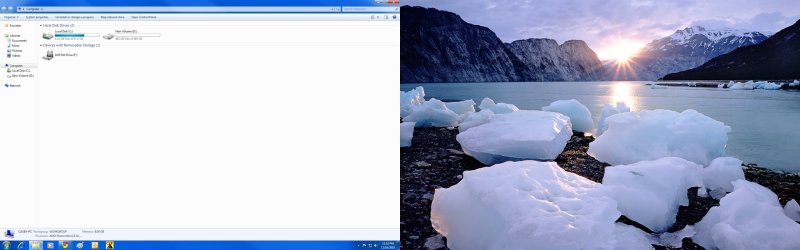
Ok I understand now. Greg, the reason I put an SSD drive was to run ONLY my operating system and my stock trading software. How can I keep things from going on the C; (SSD) drive? When I download something I send it to the D;disk drive but when I hit properties it looks like it is in the C; drive. Also, my free space yesterday was like 14 GB and today it is 12.8 GB. I am not manually puting anything on the SSD drive. Why am I losing free spcae on the SD drive? here is a picture of it.

Comp.jpg
 

My Computer

Computer type
PC/Desktop
Computer Manufacturer/Model Number
Custom Build
OS
Windows 7 Home Premium
CPU
AMD Phenom II 955 Black Edition Quad Core
Motherboard
MSI 870-G45
Memory
Corsair XMS3 8GB
Graphics Card(s)
ATI Eyefinity HD 5770 5 mini display ports
Sound Card
Realtek High Definition 6.1
Monitor(s) Displays
2 DELL E207WFP 21.5" - 1 Acer 21.5"
Screen Resolution
2 Dells 1680x1050 - Acer 1920x1080
Hard Drives
Intel 40GB SSD
WD 500GB internal
WD 500Gb external
PSU
Cooler Master 500w
Case
Cooler Master 430 Black Elite
Keyboard
HP
Mouse
MIBRU
Internet Speed
10 mbs
Antivirus
Trend Micro
Browser
Chrome
You should have control over where you install programs. If not, choose Custom install and find the option.

Your SysVolInfo restore points file may be growing. I like SysRestore to be configured so it uses up to 20% of the HD to make more Restore points and keep them longer. It can be an OS life-saver.
 
You should have control over where you install programs. If not, choose Custom install and find the option.

Your SysVolInfo restore points file may be growing. I like SysRestore to be configured so it uses up to 20% of the HD to make more Restore points and keep them longer. It can be an OS life-saver.

How do I know if that is the case and what to do to fix it...remember your dealing with a rookie here lol.

Casey
 

My Computer

Computer type
PC/Desktop
Computer Manufacturer/Model Number
Custom Build
OS
Windows 7 Home Premium
CPU
AMD Phenom II 955 Black Edition Quad Core
Motherboard
MSI 870-G45
Memory
Corsair XMS3 8GB
Graphics Card(s)
ATI Eyefinity HD 5770 5 mini display ports
Sound Card
Realtek High Definition 6.1
Monitor(s) Displays
2 DELL E207WFP 21.5" - 1 Acer 21.5"
Screen Resolution
2 Dells 1680x1050 - Acer 1920x1080
Hard Drives
Intel 40GB SSD
WD 500GB internal
WD 500Gb external
PSU
Cooler Master 500w
Case
Cooler Master 430 Black Elite
Keyboard
HP
Mouse
MIBRU
Internet Speed
10 mbs
Antivirus
Trend Micro
Browser
Chrome
I'd just monitor disk free space for a while. I have done numerous image recoveries and always found the disk usage is around 3-4GB less when first recovered than when the image was made. It creeps back then stabilizes.
I don't own an SSD but those who do will probably be "disk space misers" and you'll probably get a few tips by searching the forum.
Of course you will know to keep as much of your data files off the ssd. I understand defragmenting an ssd is not required and can be damaging.
 

My Computer

Computer type
PC/Desktop
Computer Manufacturer/Model Number
Own build
OS
Windows 7x64 Home Premium SP1
CPU
Intel i7 2600k
Motherboard
ASUS P8Z68 Deluxe
Memory
G.Skill Ripjaws (DDR3-1600) 2x4GB
Graphics Card(s)
Nvidia GeForce GTS 450; Intel HD Graphics 3000(GT2+)
Monitor(s) Displays
Dell Ultrasharp IPS panel U2311H, Samsung SyncMaster P2350
Screen Resolution
1920x1080
Hard Drives
Samsung 850 Pro SSD 256GB, Samsung SSD 840 120GB, Seagates 1TB Barracuda ST31000528AS x2
PSU
Seasonic M12II 520W
Case
Lian Li Lancool PC-K60
Cooling
Case: 1x120mm, 3x140mm CPU: Hyper 212+
Keyboard
Logitech MK520 (wireless)
Mouse
Logitech MK520
Internet Speed
6-7 Mbps
Antivirus
Norton Security Premium, Malwarebytes on 2 (MSE on 3rd PC)
Browser
FireFox
Other Info
Audio: Logitech Z523 2.1
"I have done numerous image recoveries and always found the disk usage is around 3-4GB less when first recovered than when the image was made. It creeps back then stabilize

So as long as I don't put things on the SSD the free space should stabalize?
 
Last edited:

My Computer

Computer type
PC/Desktop
Computer Manufacturer/Model Number
Custom Build
OS
Windows 7 Home Premium
CPU
AMD Phenom II 955 Black Edition Quad Core
Motherboard
MSI 870-G45
Memory
Corsair XMS3 8GB
Graphics Card(s)
ATI Eyefinity HD 5770 5 mini display ports
Sound Card
Realtek High Definition 6.1
Monitor(s) Displays
2 DELL E207WFP 21.5" - 1 Acer 21.5"
Screen Resolution
2 Dells 1680x1050 - Acer 1920x1080
Hard Drives
Intel 40GB SSD
WD 500GB internal
WD 500Gb external
PSU
Cooler Master 500w
Case
Cooler Master 430 Black Elite
Keyboard
HP
Mouse
MIBRU
Internet Speed
10 mbs
Antivirus
Trend Micro
Browser
Chrome
"I have done numerous image recoveries and always found the disk usage is around 3-4GB less when first recovered than when the image was made. It creeps back then stabilize

So as long as I don't put things on the SSD the free space should stabalize?
I'm not making any comment about what you put on your ssd. I'm saying that in my experience the system requirements will utilize a bit more space after a reimage, then stabilize unless you are specifically doing something like making lots of restore points.
 

My Computer

Computer type
PC/Desktop
Computer Manufacturer/Model Number
Own build
OS
Windows 7x64 Home Premium SP1
CPU
Intel i7 2600k
Motherboard
ASUS P8Z68 Deluxe
Memory
G.Skill Ripjaws (DDR3-1600) 2x4GB
Graphics Card(s)
Nvidia GeForce GTS 450; Intel HD Graphics 3000(GT2+)
Monitor(s) Displays
Dell Ultrasharp IPS panel U2311H, Samsung SyncMaster P2350
Screen Resolution
1920x1080
Hard Drives
Samsung 850 Pro SSD 256GB, Samsung SSD 840 120GB, Seagates 1TB Barracuda ST31000528AS x2
PSU
Seasonic M12II 520W
Case
Lian Li Lancool PC-K60
Cooling
Case: 1x120mm, 3x140mm CPU: Hyper 212+
Keyboard
Logitech MK520 (wireless)
Mouse
Logitech MK520
Internet Speed
6-7 Mbps
Antivirus
Norton Security Premium, Malwarebytes on 2 (MSE on 3rd PC)
Browser
FireFox
Other Info
Audio: Logitech Z523 2.1
Does Windows make restore points automatically and if so is that what could be taking up free space? Maybe there is a way to put the restore points on the disk drive or turn the restore points off some how.
 

My Computer

Computer type
PC/Desktop
Computer Manufacturer/Model Number
Custom Build
OS
Windows 7 Home Premium
CPU
AMD Phenom II 955 Black Edition Quad Core
Motherboard
MSI 870-G45
Memory
Corsair XMS3 8GB
Graphics Card(s)
ATI Eyefinity HD 5770 5 mini display ports
Sound Card
Realtek High Definition 6.1
Monitor(s) Displays
2 DELL E207WFP 21.5" - 1 Acer 21.5"
Screen Resolution
2 Dells 1680x1050 - Acer 1920x1080
Hard Drives
Intel 40GB SSD
WD 500GB internal
WD 500Gb external
PSU
Cooler Master 500w
Case
Cooler Master 430 Black Elite
Keyboard
HP
Mouse
MIBRU
Internet Speed
10 mbs
Antivirus
Trend Micro
Browser
Chrome
Back
Top