
2 Instances of Windows 7

TKoomen

New member
Local time
4:15 AM
Messages
9
Hello,
I upgraded to windows 7, i forgot why, but I had to do a system restore, but it did not restore all of the way, so I installed another windows 7. When I start up it looks like the attached image. How do i get rid of the bottom one? I'm running out of HDD space, and it is becoming an inconvenience

Thank You
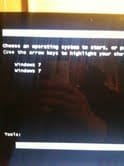
photo.jpg
 

My Computer My Computer

At a glance

Vista 32ATI Turion X2 Ultra 644gbATI Radeon HD3850
Computer Manufacturer/Model Number
MSI
OS
Vista 32
CPU
ATI Turion X2 Ultra 64
Memory
4gb
Graphics Card(s)
ATI Radeon HD3850
Hard Drives
400gb Hitatchi
If you attach a larger screenshot, we could get some info from it. I'm going to assume you just have one actual install, and two boot options, which is annoying and can be cleaned up...but it isn't actually taking up any space. If you aren't sure, and have had multiple issues leading to restores, a disk wipe and clean install is never a bad idea.
 

My Computer My Computer

At a glance

Windows 7 Ultimate x64 SP1Intel Core i7-260012 GB Patriot Extreme DDR3-1333Nvidia GTX 470
OS
Windows 7 Ultimate x64 SP1
CPU
Intel Core i7-2600
Motherboard
Gigabyte GA-P67A-UD3P-B3
Memory
12 GB Patriot Extreme DDR3-1333
Graphics Card(s)
Nvidia GTX 470
Monitor(s) Displays
Dell UltraSharp 2209WA
Hard Drives
OCZ Agility3 240 GB, WD5001AALS, WD7501AALS
PSU
OCZ ModStream 700W
Case
CoolerMaster HAF 912 Advanced
Cooling
CoolerMaster Hyper 212 Plus
I can boot to both, I just use this one that I am currently on. it basically just says "choose the operating system that you would like to boot too"
 

My Computer My Computer

At a glance

Vista 32ATI Turion X2 Ultra 644gbATI Radeon HD3850
Computer Manufacturer/Model Number
MSI
OS
Vista 32
CPU
ATI Turion X2 Ultra 64
Memory
4gb
Graphics Card(s)
ATI Radeon HD3850
Hard Drives
400gb Hitatchi
Are there actually distinct differences in both OS's? Or do both options lead to the same OS?
 

My Computer My Computer

At a glance

Windows 7 Ultimate (SP1)AMD Sempron 3600+ATI Radeon Xpress 1150
Computer Manufacturer/Model Number
Vostro
OS
Windows 7 Ultimate (SP1)
CPU
AMD Sempron 3600+
Graphics Card(s)
ATI Radeon Xpress 1150
Screen Resolution
1200 x 800
Hard Drives
WD Scorpio Blue 500 GB
Hello TKoomen.


Before we make any specific recommendations will you please post a snip/screen-shot of the entire disk management drive map with a full description as to which drive/partition is which, so we can see what you have going on as there may be a fairly simple way to resolve the situation.

In the Windows start menu right click computer and click manage, in the left pane of the "Computer Management" window that opens click disk management and post a snip of that.


How to Upload and Post a Screenshot and File in Seven Forums
 

My Computer My Computer

At a glance

W 7 64-bit UltimateIntel Q9550 Yorkfield8GB Dominator 8500C5DATI : XFX 5870
Computer Manufacturer/Model Number
* BFK Customs *
OS
W 7 64-bit Ultimate
CPU
Intel Q9550 Yorkfield
Motherboard
ASUS P5Q Pro
Memory
8GB Dominator 8500C5D
Graphics Card(s)
ATI : XFX 5870
Sound Card
Realtek HD Audio 7-1
Monitor(s) Displays
1x 47" LCD HDMI & 3x 26" LCD HDMI
Screen Resolution
1920x1080P & 1920x1200
Hard Drives
1x 80GB Intel X25-M G2 SSD : 1x 500GB & 1x 640GB WD Caviar Black(s)
PSU
Corsair 620HX
Case
Cooler Master RC-690
Cooling
Tuniq Tower 120, 2x 140mm and 3x 120mm case fans
Keyboard
Microsoft 500
Mouse
Razer Diamondback 3G
Internet Speed
14 Mb/s
Other Info
1x Koutech 3Gb/s SATA HDD Hot Swap Rack
Back
Top