2 problems with adapter: Ati radeon hd

Danielzxzx

New member
Member
VIP
Local time
4:06 AM
Messages
233
I have ATI Radeon HD 3200 and I found out that there are many newer versions of this ATI Radeon HD. So I downloaded the latest one. Not sure what it was. Something in the 5000s but not sure. I installed the latest ATI Radeon HD and restarted the computer. The problem is, I don't think it installed properly as it still said ATI Radeon HD 3200. I don't know if it because my computer can't support or if it can but the install did not go right. That is my first problem. Can anyone know how to fix it? My second problem is after I tried to install the latest ATI Radeon HD, everything started being wierd. There were graphic problems in games like one game now had a thick blue line at the top. Games now lag more and it is very annoying. Something must had happened with my attempt to installed the latest ATI Radeon and now that is my second problem. Does anyone know how to fix any of these problems?
 

My Computer

OS
Windows 7
I have ATI Radeon HD 3200 and I found out that there are many newer versions of this ATI Radeon HD. So I downloaded the latest one. Not sure what it was. Something in the 5000s but not sure. I installed the latest ATI Radeon HD and restarted the computer. The problem is, I don't think it installed properly as it still said ATI Radeon HD 3200. I don't know if it because my computer can't support or if it can but the install did not go right. That is my first problem. Can anyone know how to fix it? My second problem is after I tried to install the latest ATI Radeon HD, everything started being wierd. There were graphic problems in games like one game now had a thick blue line at the top. Games now lag more and it is very annoying. Something must had happened with my attempt to installed the latest ATI Radeon and now that is my second problem. Does anyone know how to fix any of these problems?


Uninstall the driver from device manager. Find a win 7 driver for your card and install it.

Ken
 

My Computer

Computer Manufacturer/Model Number
HP Pavillion dv-7 1005 Tx
OS
Win 8 Release candidate 8400
CPU
[email protected]
Memory
4 gigs
Graphics Card(s)
Nvidia 9600M
Sound Card
HD built-in
Monitor(s) Displays
17" Wxga
Screen Resolution
1440x900
Cooling
none
Internet Speed
45Mb down 5Mb up
So are you saying that my computer can support higher ATI but it won't work or install properly if an earlier one is installed?
 

My Computer

OS
Windows 7
Well, first off, your HD3200 is the series number of the hardware -- so you can't download an updated one. What you need, obviously, is the software for the HD3200, or what is called a driver.

I'm assuming you're using a 32-bit Windows 7, so follow this link to download the right driver for the HD3200. If you are using 64-bit Windows, then go to www.amd.com and look for the area "Download Drivers" and download the right driver for your version of windows. Download it only, meaning, when the box appears, click "Save" instead of "Run."

From your own words, it appears that you've installed the drivers for the 5xxx series of cards. You will need to uninstall that driver first.

>Click the Start Button
>Click Computer
>Double click your C drive
>Double click ATI folder
>Double click SUPPORT folder
>Double click 10-3_vista_win7_dd_ccc_wdm.... folder
>Double click the icon SETUP
>When the prompt appears, click YES
>Click NEXT on the Catalyst Install Manager
>Click UNINSTALL
>Click CUSTOM
>When the list appears, check ATI DISPLAY DRIVER AND CATALYST CONTROL CENTER.
>Click NEXT
>When it states that you need a reboot, click yes to reboot.
>After rebooting, go to your Downloads folder and find the driver you downloaded from AMD's site, double click and let it do its thing. When you get to the part of EXPRESS or CUSTOM, select EXPRESS.

Hope that helps.
 

My Computer

Computer Manufacturer/Model Number
Rig 1
OS
Windows 7 Ultimate x64
CPU
AMD Phenom II X4 940 Black Edition @ 3.4GHz (AM2+)
Motherboard
Gigabyte GA-MA790X-UD4P (AM2+)
Memory
Corsair CM2X4096-8500C5 (4 X 2GB)
Graphics Card(s)
XFX Radeon HD 5770 / Diamond Radeon HD 5770 CrossFireX
Sound Card
Asus Xonar DS (PCI)
Monitor(s) Displays
Samsung SyncMaster 932bw+ (3)
Screen Resolution
4320x900
Hard Drives
OCZ Vertex 2 80 GB - Windows 7 System --
WD Caviar Black 1TB - Music, Movies, Vids, Pics --
WD Caviar Black 640GB - User Profiles & Games --
WD My Book 320GB external
PSU
Corsair CMPSU-750TX
Case
Cooler Master HAF 932
Cooling
Corsair Hydro Series H50
Keyboard
Logitech Desktop Wave
Mouse
Logitech LX8 Laser
Internet Speed
20 down / 2 up
Other Info
LG GGC-H20L Blu-Ray / HDDVD combo --
Hauppauge HVR-1250 --
Silverstone MFP-51 --
Logitech Webcam C600
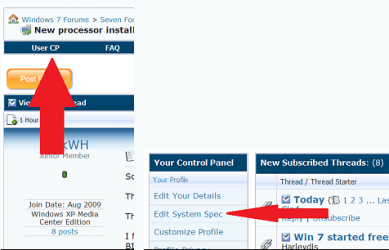
Welcome to Seven Forums. Also please fill in your system specs.Thanks. Fabe usercp 1.png
 

My Computer

Computer Manufacturer/Model Number
Self Built
OS
Windows 7 ultimate 64 bit / XP Home sp3
CPU
intel Core 2 Duo E8400 3.0ghz
Motherboard
Asus P5ND bios 1401
Memory
8 gigs 1066 OCZ Fata1ty
Graphics Card(s)
EVGA GTX 580 Call of Duty Black Ops Edition
Sound Card
Creative Soundblaster Audigy 2zs
Monitor(s) Displays
Asus 24in LCD's 2MS X2
Screen Resolution
1920x1080p @60Hz
Hard Drives
WD Caviar 500 Black/ WD Caviar 200 Blue
PSU
OCZ 700W GameXtreme
Case
NZXT Apollo
Cooling
Corsair H50 CPU/120mm x3 /60mm x2 /Corsair Dominator Ram
Keyboard
Logitech Bluetooth Wireless MX5000
Mouse
Logitech Bluetooth Wireless MX1000
Internet Speed
Download 19.83 Upload 0.97
Other Info
Logitech Z2300 Speakers/ Bose Noise Cancelling Headphones/Avermedia PCI-e Hybrid TV Bravo/Epson NX415 all in one/ 4 Port Powered USB Hub/ LG 10x Bluray Burner /TSST Corp DVDRW External
Back
Top