

Hi guys,
I have 2 questions.
Q1: I'm using a large 1080P TV as a monitor. I have to zoom in on the browser to be able to read any content online. With IE, the zoom that I have in place for my desktop environment is automatically taken into account in the browser. But, with FFox, it is not and I have to manually zoom in. Now, the problem is that I have to zoom in on every new page I land on and I have to zoom in every time the browser is restarted. How can I have FFox permanently zoomed in?
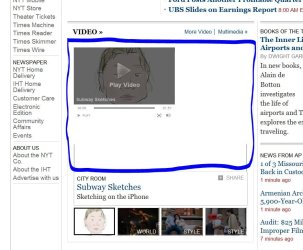
Q2: This applies to both IE and FFox. When zoomed in, certain plugins do not follow suit. Take, for example the flash player seen below on the NyTimes. How can I get this to resize along with the font and the images?
Thanks!
Best,
Eamon
I have 2 questions.
Q1: I'm using a large 1080P TV as a monitor. I have to zoom in on the browser to be able to read any content online. With IE, the zoom that I have in place for my desktop environment is automatically taken into account in the browser. But, with FFox, it is not and I have to manually zoom in. Now, the problem is that I have to zoom in on every new page I land on and I have to zoom in every time the browser is restarted. How can I have FFox permanently zoomed in?
Q2: This applies to both IE and FFox. When zoomed in, certain plugins do not follow suit. Take, for example the flash player seen below on the NyTimes. How can I get this to resize along with the font and the images?
Thanks!
Best,
Eamon
Attachments
My Computer
- OS
- Windows 7 Home Ultimate 64-Bit, Ubuntu 10.04 Lucid Lynx, Windows XP
- CPU
- Pentium i7 @fast
- Memory
- 6GB DDR3 @fast
- Graphics Card(s)
- ATI Radeon HD 4600 Series (512mb) / ATI TV Wonder 650PCIe
- Sound Card
- Integrated
- Monitor(s) Displays
- 32" VIZIO HDTV
- Screen Resolution
- 1080p @super sharp
- Hard Drives
- Internal 500GB @7200rpm and not big enough cache
External 500GB @7200rpm and not big enough cache
- Cooling
- My apartment's AC / Chicago Winters
- Keyboard
- LG Bluetooth
- Mouse
- LG Bluetooth
- Internet Speed
- ~21.50Mb/S Down, ~3.5Mb/S Up


