2 TB drive went from NTFS to RAW

KazeNoKoe23

Scruffy, the janitor
Pro User
VIP
Local time
6:47 AM
Messages
553
Location
Calgary
I had a pretty odd situation happen to me this morning. I had a 2 TB My Book Elite external HDD, which connected via USB. I noticed the USB cable that connected to the external was loose, so I powered off the computer and removed the cable from the drive, only to find the USB connector inside the drive had broken clean off. Knowing there was no way to fix that, I removed the HDD itself from the external enclosure, and plugged it into a spare SATA cable I had inside the tower. Computer booted fine, but now the drive is coming up as RAW, not NTFS. I know for a fact the drive itself is perfectly healthy, but for some reason going from an external USB connection to an internal SATA connection led to this problem. Does anyone have any suggestions as to how to fix it? I refuse to believe the data is just GONE, because aside from going from external to internal, nothing has changed. I downloaded a program called TestDisk and left it to run, but I had to leave my house before it could finish. In the event it doesn't work, what are some additional steps I should take?
 

My Computer My Computer

At a glance

Windows 7 Professional x64 SP1Intel Core i5-2500K8 GB Corsair Vengeance Blue DDR3-1600Sapphire Radeon HD 6870 1 GB GDDR5
OS
Windows 7 Professional x64 SP1
CPU
Intel Core i5-2500K
Motherboard
Gigabyte P67X-UD3-B3
Memory
8 GB Corsair Vengeance Blue DDR3-1600
Graphics Card(s)
Sapphire Radeon HD 6870 1 GB GDDR5
Monitor(s) Displays
Samsung SyncMaster T220HD
Screen Resolution
1680x1050
Hard Drives
120 GB Corsair Force SSD + 320 GB Seagate Barracuda SATA2 + 2 TB My Book Elite
PSU
Corsair 650W
Internet Speed
50 Mbps
Remove the Jumpers from the Hard Drive when using it with SATA
 

My Computer My Computer

At a glance

Windows 7 Ultimate SP1 (32-bit)Intel Core i3-2120 @ 3.30GHz (Stock)1x Kingston DDR3 SDRAM @ 1333MHz 4GB (Stock)PALIT NVIDIA GeForce 210 @ 1GB DDR3 (Stock)
Computer type
PC/Desktop
Computer Manufacturer/Model Number
UNDER CONSTRUCTION
OS
Windows 7 Ultimate SP1 (32-bit)
CPU
Intel Core i3-2120 @ 3.30GHz (Stock)
Motherboard
ASUS P8H61-M LX (Rev 3.0)
Memory
1x Kingston DDR3 SDRAM @ 1333MHz 4GB (Stock)
Graphics Card(s)
PALIT NVIDIA GeForce 210 @ 1GB DDR3 (Stock)
Sound Card
Realtek ALC887 (On-Board)
Monitor(s) Displays
LG Flatron L227WTG-PF 22" LCD Monitor
Screen Resolution
1680x1050 (Monitor) & 1176x664 (TV)
Hard Drives
Western Digital Caviar Blue @ 500GB (Internal) & Western Digital Elements @ 500GB (External)
PSU
Seasonic M12II Bronze Evo Edition @ 520W
Case
Cooler Master HAF X
Cooling
DEEPCOOL Gamma Archer CPU Cooler & 1x 120mm Side Intake Fan
Keyboard
Compaq KB-0133 PS/2 Keyboard
Mouse
Elephant Blade Runner GR WEM-1019 USB Laser Gaming Mouse
Internet Speed
PLDT Home DSL @ 3 Mbps ↓ & 0.75 Mbps ↑
Antivirus
Microsoft SE & Malwarebytes Anti-Malware (Premium)
Browser
Google Chrome
Other Info
Edifier 2.1 Speaker System + Bose SoundLink Mini | Samsung LN540520X/XAA LCD TV via HDMI | Epson L120
My WD external 1TB DID not have jumpers, being a sata connection. After a power outage, my drive would only show as raw,, tried every data retrieval (paid & free), but lost all my movie & Tv show collection, in the end it became an internal newly formatted drive. So I now only use externals as internals.
 

My Computer My Computer

At a glance

Windows 8.1 Proi5 3550 Ivy Bridge8gb 1600 GSkill 9-9-9-24 xmpGigabyte GTX 760 OC
Computer type
PC/Desktop
Computer Manufacturer/Model Number
Home Build
OS
Windows 8.1 Pro
CPU
i5 3550 Ivy Bridge
Motherboard
Gigabyte Z77MX-D3H
Memory
8gb 1600 GSkill 9-9-9-24 xmp
Graphics Card(s)
Gigabyte GTX 760 OC
Sound Card
VIA VT2021 onboard
Monitor(s) Displays
BenQ GL2760H 27inch hdmi; LG Flatron E2351 23inch dvi
Screen Resolution
1920x1080
Hard Drives
1x Samsung 850 Evo 120GB
1x 4TB WD Green HDD
1x 3TB WD Green HDD
2x 2TB Seagate HDD
1x 1TB Seagate External HDD
PSU
Cooler Master V750
Case
Coolermaster HAF 912 Advanced
Cooling
Standard
Keyboard
Logitech K120 USB
Mouse
Razor Abyssus USB
Internet Speed
Broadband
Antivirus
MSE + Malwarebytes
Browser
Palemoon
Other Info
It's been the worst day since yesterday (thanks Flogging Molly) so apt!
My WD external 1TB DID not have jumpers, being a sata connection. After a power outage, my drive would only show as raw,, tried every data retrieval (paid & free), but lost all my movie & Tv show collection, in the end it became an internal newly formatted drive. So I now only use externals as internals.

Interesting situation, but I never had a power outage to speak of. Just the switch from a USB external to a SATA internal led to my drive going from NTFS to RAW.
 

My Computer My Computer

At a glance

Windows 7 Professional x64 SP1Intel Core i5-2500K8 GB Corsair Vengeance Blue DDR3-1600Sapphire Radeon HD 6870 1 GB GDDR5
OS
Windows 7 Professional x64 SP1
CPU
Intel Core i5-2500K
Motherboard
Gigabyte P67X-UD3-B3
Memory
8 GB Corsair Vengeance Blue DDR3-1600
Graphics Card(s)
Sapphire Radeon HD 6870 1 GB GDDR5
Monitor(s) Displays
Samsung SyncMaster T220HD
Screen Resolution
1680x1050
Hard Drives
120 GB Corsair Force SSD + 320 GB Seagate Barracuda SATA2 + 2 TB My Book Elite
PSU
Corsair 650W
Internet Speed
50 Mbps
Try partition wizard. Home Edititon is free.

Run the partition recovery - quick scan on the whole drive. Tiack ALL partitions you want to keep
 

My Computers My Computers

  • At a glance

    7 X64i5 84002x8gb 3200mhz
    Computer type
    PC/Desktop
    OS
    7 X64
    CPU
    i5 8400
    Motherboard
    gigabyte b365m ds3h
    Memory
    2x8gb 3200mhz
    Hard Drives
    various
    PSU
    pure power 11 400w cm
    Case
    Coolermaster
    Cooling
    cryorig m9i
  • At a glance

    7x64g54008gb ddr4 2400
    Computer type
    PC/Desktop
    OS
    7x64
    CPU
    g5400
    Motherboard
    ga b365m ds3h
    Memory
    8gb ddr4 2400
    PSU
    xfx pro 450w

My Computers My Computers

  • At a glance

    7 X64i5 84002x8gb 3200mhz
    Computer type
    PC/Desktop
    OS
    7 X64
    CPU
    i5 8400
    Motherboard
    gigabyte b365m ds3h
    Memory
    2x8gb 3200mhz
    Hard Drives
    various
    PSU
    pure power 11 400w cm
    Case
    Coolermaster
    Cooling
    cryorig m9i
  • At a glance

    7x64g54008gb ddr4 2400
    Computer type
    PC/Desktop
    OS
    7x64
    CPU
    g5400
    Motherboard
    ga b365m ds3h
    Memory
    8gb ddr4 2400
    PSU
    xfx pro 450w
Partition Recovery was greyed out, although it was for every drive I clicked on, be it the RAW one or an NTFS one.
 

My Computer My Computer

At a glance

Windows 7 Professional x64 SP1Intel Core i5-2500K8 GB Corsair Vengeance Blue DDR3-1600Sapphire Radeon HD 6870 1 GB GDDR5
OS
Windows 7 Professional x64 SP1
CPU
Intel Core i5-2500K
Motherboard
Gigabyte P67X-UD3-B3
Memory
8 GB Corsair Vengeance Blue DDR3-1600
Graphics Card(s)
Sapphire Radeon HD 6870 1 GB GDDR5
Monitor(s) Displays
Samsung SyncMaster T220HD
Screen Resolution
1680x1050
Hard Drives
120 GB Corsair Force SSD + 320 GB Seagate Barracuda SATA2 + 2 TB My Book Elite
PSU
Corsair 650W
Internet Speed
50 Mbps
I had once a similar problem which was luckily solved.

Partition d: on my laptop HDD after some system crash was seen only as a RAW partition under Win7. Oddly enough partition C: was still recognized as NTFS.
I removed HDD from my laptop and connected it via SATA to my PC. Still no success under Win7 x64.
Then I tried with Windows XP which I keep on a separate HDD, just in case... And miraculously the "Win7 RAW partition" was recognized as NTFS under Win XP! So I could easily recover all my files.
So if you have Win XP, give it a try! And let us know if you have succeeded.
Good luck!
 

My Computer My Computer

At a glance

W7 Ultimate x64
OS
W7 Ultimate x64
I had once a similar problem which was luckily solved.

Partition d: on my laptop HDD after some system crash was seen only as a RAW partition under Win7. Oddly enough partition C: was still recognized as NTFS.
I removed HDD from my laptop and connected it via SATA to my PC. Still no success under Win7 x64.
Then I tried with Windows XP which I keep on a separate HDD, just in case... And miraculously the "Win7 RAW partition" was recognized as NTFS under Win XP! So I could easily recover all my files.
So if you have Win XP, give it a try! And let us know if you have succeeded.
Good luck!

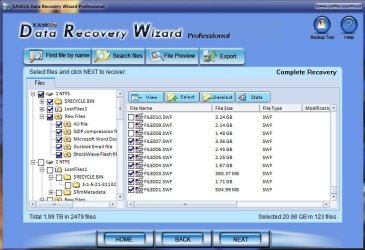
I wish I had tried this earlier. Nothing else was working so I just formatted the disk. Everything else I read was telling me that recovery programs need to be able to read from some sort of filesystem and that they won't work with RAW drives, so I formatted with NTFS and then tried recovery. I'm using Easeus Data Recovery Wizard. It did manage to "recover" a lot of data, but it's not exactly intuitive. It says things like FILE001.SWF, and it would be like 5 GB or something like that. I definitely didn't have any 5 GB Shockwave files on the drive. Countless examples like that. If anyone can make sense of this, I'd appreciate it.
 

Attachments

  • screenshot.jpg
    screenshot.jpg
    68.9 KB · Views: 22
Last edited:

My Computer My Computer

At a glance

Windows 7 Professional x64 SP1Intel Core i5-2500K8 GB Corsair Vengeance Blue DDR3-1600Sapphire Radeon HD 6870 1 GB GDDR5
OS
Windows 7 Professional x64 SP1
CPU
Intel Core i5-2500K
Motherboard
Gigabyte P67X-UD3-B3
Memory
8 GB Corsair Vengeance Blue DDR3-1600
Graphics Card(s)
Sapphire Radeon HD 6870 1 GB GDDR5
Monitor(s) Displays
Samsung SyncMaster T220HD
Screen Resolution
1680x1050
Hard Drives
120 GB Corsair Force SSD + 320 GB Seagate Barracuda SATA2 + 2 TB My Book Elite
PSU
Corsair 650W
Internet Speed
50 Mbps
Back
Top