2nd monitor added but goes black after a few seconds..

Spetz

New member
Local time
8:57 PM
Messages
5
I just added a 2nd monitor today to my comp, a Philips 109s. It turns on fine, displays the extended screen but after maybe 7 seconds, it goes black. If I change something within the screen res section(ie landscape to portrait), it fires back up, but goes black again in a few seconds. When the 2nd monitor is on, I can mouse over to it no probs.. The power lite always remains green (on).. Basically everything is set properly, but it just goes black again until I change a property..any ideas ?

My setup:
Win 7 Ultimate 64 bit - all updates
Main display Dell E248WFP
2nd Display Philips 109s
GTX 260 (main display DVI-DVI cable, 2nd display DVI-VGA cable) - newest drivers
Both displays set at their native resolution within the screen res section
2nd monitor to the left and "extend these displays" on.
 

My Computer My Computer

At a glance

Win 7 Ultimate x64x68504 GB MuskinGTX 260
OS
Win 7 Ultimate x64
CPU
x6850
Motherboard
Gigabyte Ep43-UDL3
Memory
4 GB Muskin
Graphics Card(s)
GTX 260
Sound Card
X-Fi something
Monitor(s) Displays
Main - Dell EP248FPW 2nd- Philips 109s
Screen Resolution
1920x1200 1280x1024
Hard Drives
3
PSU
PS Power and Cooling 750watt
Just out of curiousity is this a new monitor and how is it connected?
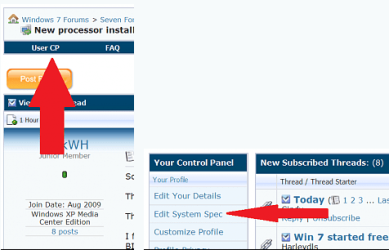
Please take the time also to fill in your entire system specs here
usercp 1.png

You can use this program to help with that Speccy - System Information - Free Download
Thanks. Fabe
 

My Computer My Computer

At a glance

Windows 7 ultimate 64 bit / XP Home sp3intel Core 2 Duo E8400 3.0ghz8 gigs 1066 OCZ Fata1tyEVGA GTX 580 Call of Duty Black Ops Edition
Computer Manufacturer/Model Number
Self Built
OS
Windows 7 ultimate 64 bit / XP Home sp3
CPU
intel Core 2 Duo E8400 3.0ghz
Motherboard
Asus P5ND bios 1401
Memory
8 gigs 1066 OCZ Fata1ty
Graphics Card(s)
EVGA GTX 580 Call of Duty Black Ops Edition
Sound Card
Creative Soundblaster Audigy 2zs
Monitor(s) Displays
Asus 24in LCD's 2MS X2
Screen Resolution
1920x1080p @60Hz
Hard Drives
WD Caviar 500 Black/ WD Caviar 200 Blue
PSU
OCZ 700W GameXtreme
Case
NZXT Apollo
Cooling
Corsair H50 CPU/120mm x3 /60mm x2 /Corsair Dominator Ram
Keyboard
Logitech Bluetooth Wireless MX5000
Mouse
Logitech Bluetooth Wireless MX1000
Internet Speed
Download 19.83 Upload 0.97
Other Info
Logitech Z2300 Speakers/ Bose Noise Cancelling Headphones/Avermedia PCI-e Hybrid TV Bravo/Epson NX415 all in one/ 4 Port Powered USB Hub/ LG 10x Bluray Burner /TSST Corp DVDRW External
I just got it today, used but free, so it's not a big deal if it's busted, but I was told it worked.
It's connects via 2nd DVI port with a DVI to VGA cable (no adapter)
 

My Computer My Computer

At a glance

Win 7 Ultimate x64x68504 GB MuskinGTX 260
OS
Win 7 Ultimate x64
CPU
x6850
Motherboard
Gigabyte Ep43-UDL3
Memory
4 GB Muskin
Graphics Card(s)
GTX 260
Sound Card
X-Fi something
Monitor(s) Displays
Main - Dell EP248FPW 2nd- Philips 109s
Screen Resolution
1920x1200 1280x1024
Hard Drives
3
PSU
PS Power and Cooling 750watt
I take it then it's a CRT? Just wondering if windows is having problems with the different refresh rates and resolutions.
Fabe
 

My Computer My Computer

At a glance

Windows 7 ultimate 64 bit / XP Home sp3intel Core 2 Duo E8400 3.0ghz8 gigs 1066 OCZ Fata1tyEVGA GTX 580 Call of Duty Black Ops Edition
Computer Manufacturer/Model Number
Self Built
OS
Windows 7 ultimate 64 bit / XP Home sp3
CPU
intel Core 2 Duo E8400 3.0ghz
Motherboard
Asus P5ND bios 1401
Memory
8 gigs 1066 OCZ Fata1ty
Graphics Card(s)
EVGA GTX 580 Call of Duty Black Ops Edition
Sound Card
Creative Soundblaster Audigy 2zs
Monitor(s) Displays
Asus 24in LCD's 2MS X2
Screen Resolution
1920x1080p @60Hz
Hard Drives
WD Caviar 500 Black/ WD Caviar 200 Blue
PSU
OCZ 700W GameXtreme
Case
NZXT Apollo
Cooling
Corsair H50 CPU/120mm x3 /60mm x2 /Corsair Dominator Ram
Keyboard
Logitech Bluetooth Wireless MX5000
Mouse
Logitech Bluetooth Wireless MX1000
Internet Speed
Download 19.83 Upload 0.97
Other Info
Logitech Z2300 Speakers/ Bose Noise Cancelling Headphones/Avermedia PCI-e Hybrid TV Bravo/Epson NX415 all in one/ 4 Port Powered USB Hub/ LG 10x Bluray Burner /TSST Corp DVDRW External
Sorry, should have said it's an LCD. They both are.
Should they be set at the same refresh rate ? I checked them out, the Dell was at 59 Mhz, the Philips was at 60Mhz. I set them both to 60.
 

My Computer My Computer

At a glance

Win 7 Ultimate x64x68504 GB MuskinGTX 260
OS
Win 7 Ultimate x64
CPU
x6850
Motherboard
Gigabyte Ep43-UDL3
Memory
4 GB Muskin
Graphics Card(s)
GTX 260
Sound Card
X-Fi something
Monitor(s) Displays
Main - Dell EP248FPW 2nd- Philips 109s
Screen Resolution
1920x1200 1280x1024
Hard Drives
3
PSU
PS Power and Cooling 750watt
Their basically the same, if the 59 will hold the 60 go and go ahead an set it to it. Usually it rounds it off.

Do both LCD's show up in device manager as what they are? If not then you might want to search for the driver (.inf file) for the other or both.
This way Windows will be able to recognize them for what they are and allow full access to the available resolutions especially the native of each LCD.

If you would Copy and Paste an expanded view of monitors in device manager we can see how they are listed if the new one is PNP then that's most likely where your problem is.
Fabe
 

My Computer My Computer

At a glance

Windows 7 ultimate 64 bit / XP Home sp3intel Core 2 Duo E8400 3.0ghz8 gigs 1066 OCZ Fata1tyEVGA GTX 580 Call of Duty Black Ops Edition
Computer Manufacturer/Model Number
Self Built
OS
Windows 7 ultimate 64 bit / XP Home sp3
CPU
intel Core 2 Duo E8400 3.0ghz
Motherboard
Asus P5ND bios 1401
Memory
8 gigs 1066 OCZ Fata1ty
Graphics Card(s)
EVGA GTX 580 Call of Duty Black Ops Edition
Sound Card
Creative Soundblaster Audigy 2zs
Monitor(s) Displays
Asus 24in LCD's 2MS X2
Screen Resolution
1920x1080p @60Hz
Hard Drives
WD Caviar 500 Black/ WD Caviar 200 Blue
PSU
OCZ 700W GameXtreme
Case
NZXT Apollo
Cooling
Corsair H50 CPU/120mm x3 /60mm x2 /Corsair Dominator Ram
Keyboard
Logitech Bluetooth Wireless MX5000
Mouse
Logitech Bluetooth Wireless MX1000
Internet Speed
Download 19.83 Upload 0.97
Other Info
Logitech Z2300 Speakers/ Bose Noise Cancelling Headphones/Avermedia PCI-e Hybrid TV Bravo/Epson NX415 all in one/ 4 Port Powered USB Hub/ LG 10x Bluray Burner /TSST Corp DVDRW External
There are default refresh rates for each monitor. I have a dual set up as well and same problem....both were set to 60mhz and change second one to 75mhz and problem solved. Play with the refresh rate of the second monitor. There is also a check box to force it to show all the refresh rates if you don't have any choices.
 

My Computer My Computer

At a glance

Windows 7 Ultimate 64 bitAMD Phenom II X4 965 Black EditionGSkill 4 X 2 GB PC 8500XFX Radeon HD 6790 D
Computer Manufacturer/Model Number
Custom built
OS
Windows 7 Ultimate 64 bit
CPU
AMD Phenom II X4 965 Black Edition
Motherboard
Gigabyte GA-MA790X-DS4
Memory
GSkill 4 X 2 GB PC 8500
Graphics Card(s)
XFX Radeon HD 6790 D
Sound Card
On board RealTek HD
Monitor(s) Displays
Dual monitors:Samsung SyncMaster S20B300
Screen Resolution
1600 X 900
Hard Drives
Seagate Barracuda 1TB (primary)
Seagate Barracuda 2 X 320 GB
PSU
Ultra X4 750 watt fully modular
Case
Thermaltake Overseer RX 1 full tower
Cooling
Core-Contact 92 mm CPU Cooler
Keyboard
Logitech G510
Mouse
Razor DeathAdder
Internet Speed
50/5 Mbps UL/DL
Other Info
Optical: Super Muliti DVD burner w/lightscribe, Hauppauge WinTV HVR-1800
There are default refresh rates for each monitor. I have a dual set up as well and same problem....both were set to 60mhz and change second one to 75mhz and problem solved. Play with the refresh rate of the second monitor. There is also a check box to force it to show all the refresh rates if you don't have any choices.
Hopefully once he logs back on we'll know if it's fixed.
Fabe
 

My Computer My Computer

At a glance

Windows 7 ultimate 64 bit / XP Home sp3intel Core 2 Duo E8400 3.0ghz8 gigs 1066 OCZ Fata1tyEVGA GTX 580 Call of Duty Black Ops Edition
Computer Manufacturer/Model Number
Self Built
OS
Windows 7 ultimate 64 bit / XP Home sp3
CPU
intel Core 2 Duo E8400 3.0ghz
Motherboard
Asus P5ND bios 1401
Memory
8 gigs 1066 OCZ Fata1ty
Graphics Card(s)
EVGA GTX 580 Call of Duty Black Ops Edition
Sound Card
Creative Soundblaster Audigy 2zs
Monitor(s) Displays
Asus 24in LCD's 2MS X2
Screen Resolution
1920x1080p @60Hz
Hard Drives
WD Caviar 500 Black/ WD Caviar 200 Blue
PSU
OCZ 700W GameXtreme
Case
NZXT Apollo
Cooling
Corsair H50 CPU/120mm x3 /60mm x2 /Corsair Dominator Ram
Keyboard
Logitech Bluetooth Wireless MX5000
Mouse
Logitech Bluetooth Wireless MX1000
Internet Speed
Download 19.83 Upload 0.97
Other Info
Logitech Z2300 Speakers/ Bose Noise Cancelling Headphones/Avermedia PCI-e Hybrid TV Bravo/Epson NX415 all in one/ 4 Port Powered USB Hub/ LG 10x Bluray Burner /TSST Corp DVDRW External
Here you go, I tried looking for drivers, but can't find any that actually work on Win7 x64. It always says my driver is up to date. Found the below kind of interesting tho..Regardless, the 2nd monitor still goes black after about 7 - 10 seconds. FURTHER..it's a Philips 190s6FB..made a mistake earlier
pic.jpg

But you go to "add device and printer" and you get this..

pic2.jpg


Last edited:

My Computer My Computer

At a glance

Win 7 Ultimate x64x68504 GB MuskinGTX 260
OS
Win 7 Ultimate x64
CPU
x6850
Motherboard
Gigabyte Ep43-UDL3
Memory
4 GB Muskin
Graphics Card(s)
GTX 260
Sound Card
X-Fi something
Monitor(s) Displays
Main - Dell EP248FPW 2nd- Philips 109s
Screen Resolution
1920x1200 1280x1024
Hard Drives
3
PSU
PS Power and Cooling 750watt
To check the 2nd monitor itself, disconnect first monitor and connect 2nd monitor as pirmary monitor. If it works then we know it's good if not it's a good chance it's bad. This will tell us it's a refresh rate or cable problem.

To check/change refresh rates.

1. right click anywhere on open area of desktop
2. select screen resolution
3. select display
4. click advance settings
5. select monitor tab
6. click screen refresh rate and select different rate from the drop down menu. Right below that is where you'll see the box to check/uncheck for different refresh rates or modes. If there is only one choice then uncheck box, this will give you more options.

Once you gone through this and it's not resolved the next step is to check cables. I see that you have a DVI to VGA connection. First try a VGA to VGA, then DVI to DVI. If you have to barrow some cables from a friend or buy some,there about $20 each.
 

My Computer My Computer

At a glance

Windows 7 Ultimate 64 bitAMD Phenom II X4 965 Black EditionGSkill 4 X 2 GB PC 8500XFX Radeon HD 6790 D
Computer Manufacturer/Model Number
Custom built
OS
Windows 7 Ultimate 64 bit
CPU
AMD Phenom II X4 965 Black Edition
Motherboard
Gigabyte GA-MA790X-DS4
Memory
GSkill 4 X 2 GB PC 8500
Graphics Card(s)
XFX Radeon HD 6790 D
Sound Card
On board RealTek HD
Monitor(s) Displays
Dual monitors:Samsung SyncMaster S20B300
Screen Resolution
1600 X 900
Hard Drives
Seagate Barracuda 1TB (primary)
Seagate Barracuda 2 X 320 GB
PSU
Ultra X4 750 watt fully modular
Case
Thermaltake Overseer RX 1 full tower
Cooling
Core-Contact 92 mm CPU Cooler
Keyboard
Logitech G510
Mouse
Razor DeathAdder
Internet Speed
50/5 Mbps UL/DL
Other Info
Optical: Super Muliti DVD burner w/lightscribe, Hauppauge WinTV HVR-1800
I swapped cables, same thing. I swapped ports, same thing. The only refresh rates are 59 and 60 Mhz..I tried all combinations.
I added my wives monitor to the 2nd port on my GPU, and it worked fine.
Perhaps the monitor isn't win7 compatible ? I couldn't find any drivers newer then Win XP..
 
Last edited:

My Computer My Computer

At a glance

Win 7 Ultimate x64x68504 GB MuskinGTX 260
OS
Win 7 Ultimate x64
CPU
x6850
Motherboard
Gigabyte Ep43-UDL3
Memory
4 GB Muskin
Graphics Card(s)
GTX 260
Sound Card
X-Fi something
Monitor(s) Displays
Main - Dell EP248FPW 2nd- Philips 109s
Screen Resolution
1920x1200 1280x1024
Hard Drives
3
PSU
PS Power and Cooling 750watt
Try hooking up the monitor in question up to onther system (say a freinds) and see if it works....I leaning towards the monitor itself is defaulty in some way. If you hook it up to another system and it works ( on a system w/XP and one w/7). Then there is an underlying problem on your system.
 

My Computer My Computer

At a glance

Windows 7 Ultimate 64 bitAMD Phenom II X4 965 Black EditionGSkill 4 X 2 GB PC 8500XFX Radeon HD 6790 D
Computer Manufacturer/Model Number
Custom built
OS
Windows 7 Ultimate 64 bit
CPU
AMD Phenom II X4 965 Black Edition
Motherboard
Gigabyte GA-MA790X-DS4
Memory
GSkill 4 X 2 GB PC 8500
Graphics Card(s)
XFX Radeon HD 6790 D
Sound Card
On board RealTek HD
Monitor(s) Displays
Dual monitors:Samsung SyncMaster S20B300
Screen Resolution
1600 X 900
Hard Drives
Seagate Barracuda 1TB (primary)
Seagate Barracuda 2 X 320 GB
PSU
Ultra X4 750 watt fully modular
Case
Thermaltake Overseer RX 1 full tower
Cooling
Core-Contact 92 mm CPU Cooler
Keyboard
Logitech G510
Mouse
Razor DeathAdder
Internet Speed
50/5 Mbps UL/DL
Other Info
Optical: Super Muliti DVD burner w/lightscribe, Hauppauge WinTV HVR-1800
windows 7 second monitor shuts down after a few seconds

I have exactely the same problem on Oerating system Windows 7 64bit , video card Ati Radeon 4500/5100 series on a laptop toshiba, i enter the second monitor witch is a CRT View Power TM 17" and it does all the thigs the topic starter said he had problems with :( it stops after a few seconds, when i press detect it is shown in monitors it is set to default settings bla bla.. changed resolution to lowest 800*600 changed a lot of ati catalist settings but still it shuts down after a few seconds after detection or pluged in or any method that detects a second monitor :( ANYONE found any soultion to this kind of problem ?
 

My Computer My Computer

At a glance

Windows 7 Professional x64
OS
Windows 7 Professional x64
It's a bios thing

I have a system that's been running fine for years. I had the motherboard replaced (god bless the seven year HP warranty) and now when I plug in monitor number 2 they both go dark. The tech said something about maybe needing to do that before he left, and at the time both monitors worked fine, but now when I plug in both, both go dark. So I'm guessing he was right. Anyway, I'll keep you posted.
 

My Computer My Computer

At a glance

Win 7 UltimateXeon64gbNVidia Quadro FX 4800 (x2)
Computer type
PC/Desktop
Computer Manufacturer/Model Number
Hp z800
OS
Win 7 Ultimate
CPU
Xeon
Motherboard
z800
Memory
64gb
Graphics Card(s)
NVidia Quadro FX 4800 (x2)
Hard Drives
Many
Antivirus
Norton
Browser
Chrome
I went into the bios and enabled monitor tracking. That seemed to fix it!
 

My Computer My Computer

At a glance

Win 7 UltimateXeon64gbNVidia Quadro FX 4800 (x2)
Computer type
PC/Desktop
Computer Manufacturer/Model Number
Hp z800
OS
Win 7 Ultimate
CPU
Xeon
Motherboard
z800
Memory
64gb
Graphics Card(s)
NVidia Quadro FX 4800 (x2)
Hard Drives
Many
Antivirus
Norton
Browser
Chrome
Back
Top