2nd monitor max resolution at 1024x768

j0ckinjz

New member
Local time
3:11 PM
Messages
7
So I recently just hooked up a 2nd monitor to my computer just to play with it. Unfortunately, it will not go above 1024x768. I would like to set it to 1280x1024. The monitor is a Digimate DGL20, it's an LCD that was made back in 2005. The screen's max resolution might be set to 1024x768, but if that's so its there anyway i can set it to 1280x1024?
 

My Computer My Computer

At a glance

Windows 7Pentium 4 3.2ghz2.75gbRadeon 9800 Pro
Computer Manufacturer/Model Number
Dell XPS
OS
Windows 7
CPU
Pentium 4 3.2ghz
Memory
2.75gb
Graphics Card(s)
Radeon 9800 Pro
Sound Card
Creative SB audigy 2
Monitor(s) Displays
Dell 1702Fp, Digimate DGL20
Hello,

Could you try hooking up the monitor as Primary? Do you know that the monitor can go above that resolution?

Thanks,
~Jonathan
 

My Computer My Computer

At a glance

Windows 7 Professional x64Intel i7 2600K OC'd @ 4620 MHz16GB GSkill Sniper 2133 Mhz (4x4GB)EVGA GeForce GTX 480 SuperClocked+
Computer Manufacturer/Model Number
Custom
OS
Windows 7 Professional x64
CPU
Intel i7 2600K OC'd @ 4620 MHz
Motherboard
Asus P8Z68-V Pro
Memory
16GB GSkill Sniper 2133 Mhz (4x4GB)
Graphics Card(s)
EVGA GeForce GTX 480 SuperClocked+
Sound Card
Realtek High Definition Audio
Monitor(s) Displays
2x Acer S273HLbmii 27"
Screen Resolution
2 x 1920x1080
Hard Drives
64GB Crucial M4 SSD

Storage: Hitachi 1TB 5400RPM, Samsung 1.5TB 5400RPM
PSU
Corsair HW Series 750w (modular)
Case
Cooler Master HAF 932 Advanced Blue Edition
Cooling
CM Hyper 212+ CPU cooler, 3x 230mm + 1x 140mm case fans
Keyboard
Logitech MK320 (wireless)
Mouse
Logitech MK320 (wireless)
Internet Speed
30 Mb/s : 2 Mb/s
Even if I hook it up as primary, the resolution won't go higher. I deselected the "hide modes" option and try to select a higher resolution but the only ones listed are 16:9 ratio and I get "input not supported" error. I'm thinking that this monitor can't go higher but was then wondering if there is a tweak to do it.
30246929.png
 

My Computer My Computer

At a glance

Windows 7Pentium 4 3.2ghz2.75gbRadeon 9800 Pro
Computer Manufacturer/Model Number
Dell XPS
OS
Windows 7
CPU
Pentium 4 3.2ghz
Memory
2.75gb
Graphics Card(s)
Radeon 9800 Pro
Sound Card
Creative SB audigy 2
Monitor(s) Displays
Dell 1702Fp, Digimate DGL20
Sorry buddy, I think you are stuck. The only other thing you can try is making sure you have the latest drivers. Check Device Manager under the graphics adapters and monitors sections, and right-click on them and click Update drivers. If that does not work, you can try visiting the card and monitor manufacturers' sites, and seeing if they have any newer drivers.
 

My Computer My Computer

At a glance

Windows 7 Professional x64Intel i7 2600K OC'd @ 4620 MHz16GB GSkill Sniper 2133 Mhz (4x4GB)EVGA GeForce GTX 480 SuperClocked+
Computer Manufacturer/Model Number
Custom
OS
Windows 7 Professional x64
CPU
Intel i7 2600K OC'd @ 4620 MHz
Motherboard
Asus P8Z68-V Pro
Memory
16GB GSkill Sniper 2133 Mhz (4x4GB)
Graphics Card(s)
EVGA GeForce GTX 480 SuperClocked+
Sound Card
Realtek High Definition Audio
Monitor(s) Displays
2x Acer S273HLbmii 27"
Screen Resolution
2 x 1920x1080
Hard Drives
64GB Crucial M4 SSD

Storage: Hitachi 1TB 5400RPM, Samsung 1.5TB 5400RPM
PSU
Corsair HW Series 750w (modular)
Case
Cooler Master HAF 932 Advanced Blue Edition
Cooling
CM Hyper 212+ CPU cooler, 3x 230mm + 1x 140mm case fans
Keyboard
Logitech MK320 (wireless)
Mouse
Logitech MK320 (wireless)
Internet Speed
30 Mb/s : 2 Mb/s
The monitor is a Digimate DGL20

You realize that is a TV and not a monitor?

Digitmate 20-inch TFT-LCD TV Brilliant in both design and performance, the Digitmate 20-inch TFT-LCD TV elevates viewing to an art form with its rich colors and captivating contrasts. This masterfully crafted television boasts 640 x 480 resolution, 0.63 dot pitch, 4:3 aspect ratio, 500:1 contrast and 450 nit brightness to create strikingly realistic images you will savor for years to come. The Digitmate DGL20 features built-in speakers, S-Video in, and full-function remote.

Digimate DGL20 20" LCD TV - DGL20 Review

Only reason I can see for it running at 1024x768 to begin with is that it isn't being detected properly, so 1280x1024 is out of the question. Might be a good idea to revisit the user's manual for it. If you don't have it any more a pdf version can be found here,

Digimate 20" LCD TV Model DGL20 User's Manual | ManualsOnline
 

My Computer My Computer

At a glance

Win 7 Ultimate x64FX-8350 @ 4.6 GHz so farADATA XPG V1 Series Black 8GB DDR3 1600Sapphire R9 270x Dual-X
Computer type
PC/Desktop
Computer Manufacturer/Model Number
Me
OS
Win 7 Ultimate x64
CPU
FX-8350 @ 4.6 GHz so far
Motherboard
Asus M5A97 EVO
Memory
ADATA XPG V1 Series Black 8GB DDR3 1600
Graphics Card(s)
Sapphire R9 270x Dual-X
Sound Card
Xonar DGX w/ Corsair Vengence 1300
Monitor(s) Displays
Acer S232HL Abid
Screen Resolution
1920x1080
Hard Drives
120 GB OCZ Vertex 3
500 GB Seagate 7200.12
PSU
Antec Earthwatts 650W Green
Case
Antec Three Hundred
Cooling
Cooler Master 212 EVO
Keyboard
Logitech G510
Mouse
Logitech G500s
Internet Speed
35000/3000
The monitor is a Digimate DGL20

You realize that is a TV and not a monitor?

Digitmate 20-inch TFT-LCD TV Brilliant in both design and performance, the Digitmate 20-inch TFT-LCD TV elevates viewing to an art form with its rich colors and captivating contrasts. This masterfully crafted television boasts 640 x 480 resolution, 0.63 dot pitch, 4:3 aspect ratio, 500:1 contrast and 450 nit brightness to create strikingly realistic images you will savor for years to come. The Digitmate DGL20 features built-in speakers, S-Video in, and full-function remote.
Digimate DGL20 20" LCD TV - DGL20 Review

Only reason I can see for it running at 1024x768 to begin with is that it isn't being detected properly, so 1280x1024 is out of the question. Might be a good idea to revisit the user's manual for it. If you don't have it any more a pdf version can be found here,

Digimate 20" LCD TV Model DGL20 User's Manual | ManualsOnline
It's a multi-function tv so it has a d-sub port.

I just thought that maybe there was a way to upscale the resolution so it would match my main monitor.
 

My Computer My Computer

At a glance

Windows 7Pentium 4 3.2ghz2.75gbRadeon 9800 Pro
Computer Manufacturer/Model Number
Dell XPS
OS
Windows 7
CPU
Pentium 4 3.2ghz
Memory
2.75gb
Graphics Card(s)
Radeon 9800 Pro
Sound Card
Creative SB audigy 2
Monitor(s) Displays
Dell 1702Fp, Digimate DGL20
It's a multi-function tv so it has a d-sub port.
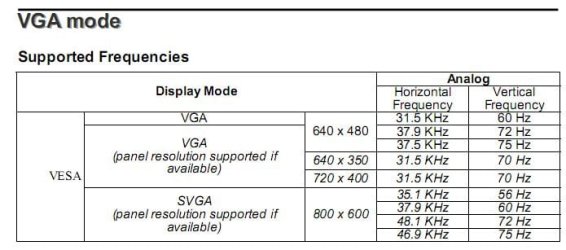
Doesn't mean much, more for ease of connectivity than anything. Also after reading that manual I'm surprised that it is running at 1024x768 (page 23),

dgl20.JPG

I just thought that maybe there was a way to upscale the resolution so it would match my main monitor.
No there isn't, not unless you like seeing nothing but "out of range" messages.
 

My Computer My Computer

At a glance

Win 7 Ultimate x64FX-8350 @ 4.6 GHz so farADATA XPG V1 Series Black 8GB DDR3 1600Sapphire R9 270x Dual-X
Computer type
PC/Desktop
Computer Manufacturer/Model Number
Me
OS
Win 7 Ultimate x64
CPU
FX-8350 @ 4.6 GHz so far
Motherboard
Asus M5A97 EVO
Memory
ADATA XPG V1 Series Black 8GB DDR3 1600
Graphics Card(s)
Sapphire R9 270x Dual-X
Sound Card
Xonar DGX w/ Corsair Vengence 1300
Monitor(s) Displays
Acer S232HL Abid
Screen Resolution
1920x1080
Hard Drives
120 GB OCZ Vertex 3
500 GB Seagate 7200.12
PSU
Antec Earthwatts 650W Green
Case
Antec Three Hundred
Cooling
Cooler Master 212 EVO
Keyboard
Logitech G510
Mouse
Logitech G500s
Internet Speed
35000/3000
Back
Top