2nd monitor not working NVIDIA GeForce 6600

petswiz

New member
Local time
1:26 PM
Messages
3
I have spent 7 days on this, please do help!

OS: windows 7 ultimate 64 bit

when i boot, I can see display on both monitors, only till after that small 'window' icon, then the monitor on DVI shows no input siganl. The monitor on VGA connection always work. I can see both monitors on NVIDIA control panel, I tried a lot on the control panel, but the 2nd monitor just won't work. The latest driver has been installed for NVIDIA graphic card.

So let me recap, both monitors work fine, and they both can display the booting info, but after entering Windows, the one on DVI lost input signal.

One interesting thing is, the monitor that works is identified as #2 monitor on Nvidia control panel.

Thanks in advance !
 

My Computer My Computer

At a glance

windows 7 ultimate 64 bitAMD Athlon(tm) 64 Processor3000+ 2.00 GHz8.00 GB (2.00GB usable)nvidia geforce 6600
OS
windows 7 ultimate 64 bit
CPU
AMD Athlon(tm) 64 Processor3000+ 2.00 GHz
Memory
8.00 GB (2.00GB usable)
Graphics Card(s)
nvidia geforce 6600
Sound Card
NVIDIA(R) NForce(TM) Audio Codec Interface
Monitor(s) Displays
DELL 1704FPT (1280X1024), GEM (1024X768)
Hard Drives
256GB
I have spent 7 days on this, please do help!

OS: windows 7 ultimate 64 bit

when i boot, I can see display on both monitors, only till after that small 'window' icon, then the monitor on DVI shows no input siganl. The monitor on VGA connection always work. I can see both monitors on NVIDIA control panel, I tried a lot on the control panel, but the 2nd monitor just won't work. The latest driver has been installed for NVIDIA graphic card.

So let me recap, both monitors work fine, and they both can display the booting info, but after entering Windows, the one on DVI lost input signal.

One interesting thing is, the monitor that works is identified as #2 monitor on Nvidia control panel.

Thanks in advance !
Have you tried rightclick desktop -> screen res -> detect. If it doesnt see the screen, are you sure your graphics card has it's AGP/PCI power connector connected (if you built it, or if it has one, in the right up corner of the card, a six or eight pin connector). If still no picture, try to press detect, take out one monitor, press detect, and put the monitor back, and press detect.
 

My Computer My Computer

At a glance

Win 7 pro 64-bit, Ubuntu 9.10 64-bitIntel Core 2 Duo 2.60 Ghz4 gb ddr2 667 MhzNVidia Geforce 9400 GS 1 gb ddr2 550 mhz GPU
Computer Manufacturer/Model Number
Acer Veriton m261 (modded)
OS
Win 7 pro 64-bit, Ubuntu 9.10 64-bit
CPU
Intel Core 2 Duo 2.60 Ghz
Motherboard
Whatever came with the system
Memory
4 gb ddr2 667 Mhz
Graphics Card(s)
NVidia Geforce 9400 GS 1 gb ddr2 550 mhz GPU
Sound Card
Intergrated
Monitor(s) Displays
samsung SyncMaster 2494 24"
Screen Resolution
1080p
Hard Drives
80gb - IDE
750gb - SATA II
PSU
whatever came with the system
Case
whatever came with the system
Cooling
whatever came with the system
Keyboard
Apple Aluminium (Awesome)
Mouse
Some awesome Dell mouse, really good.
Internet Speed
100mbps
Assuming the monitor connected via DVI is a LCD, check the refresh rate and make sure it isn't set above 60 Hz.

Also what resolutions are you running on the monitors, and are they set in clone or extended mode?
 

My Computer My Computer

At a glance

Win 7 Ultimate x64FX-8350 @ 4.6 GHz so farADATA XPG V1 Series Black 8GB DDR3 1600Sapphire R9 270x Dual-X
Computer type
PC/Desktop
Computer Manufacturer/Model Number
Me
OS
Win 7 Ultimate x64
CPU
FX-8350 @ 4.6 GHz so far
Motherboard
Asus M5A97 EVO
Memory
ADATA XPG V1 Series Black 8GB DDR3 1600
Graphics Card(s)
Sapphire R9 270x Dual-X
Sound Card
Xonar DGX w/ Corsair Vengence 1300
Monitor(s) Displays
Acer S232HL Abid
Screen Resolution
1920x1080
Hard Drives
120 GB OCZ Vertex 3
500 GB Seagate 7200.12
PSU
Antec Earthwatts 650W Green
Case
Antec Three Hundred
Cooling
Cooler Master 212 EVO
Keyboard
Logitech G510
Mouse
Logitech G500s
Internet Speed
35000/3000
Yes, it has power connector and it's connected. I tried "detect", and it is not working.
I set the refresh rate to 60, and change resolution from800x600 to 1024x768, bbut none of them works. it's a LCD。

this video card is killing me.
 

My Computer My Computer

At a glance

windows 7 ultimate 64 bitAMD Athlon(tm) 64 Processor3000+ 2.00 GHz8.00 GB (2.00GB usable)nvidia geforce 6600
OS
windows 7 ultimate 64 bit
CPU
AMD Athlon(tm) 64 Processor3000+ 2.00 GHz
Memory
8.00 GB (2.00GB usable)
Graphics Card(s)
nvidia geforce 6600
Sound Card
NVIDIA(R) NForce(TM) Audio Codec Interface
Monitor(s) Displays
DELL 1704FPT (1280X1024), GEM (1024X768)
Hard Drives
256GB
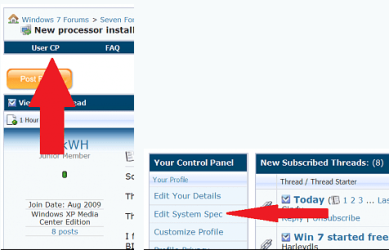
Welcome to seven forums. Can we get the rest of your system specs? Thanks Fabe usercp 1.png
 

My Computer My Computer

At a glance

Windows 7 ultimate 64 bit / XP Home sp3intel Core 2 Duo E8400 3.0ghz8 gigs 1066 OCZ Fata1tyEVGA GTX 580 Call of Duty Black Ops Edition
Computer Manufacturer/Model Number
Self Built
OS
Windows 7 ultimate 64 bit / XP Home sp3
CPU
intel Core 2 Duo E8400 3.0ghz
Motherboard
Asus P5ND bios 1401
Memory
8 gigs 1066 OCZ Fata1ty
Graphics Card(s)
EVGA GTX 580 Call of Duty Black Ops Edition
Sound Card
Creative Soundblaster Audigy 2zs
Monitor(s) Displays
Asus 24in LCD's 2MS X2
Screen Resolution
1920x1080p @60Hz
Hard Drives
WD Caviar 500 Black/ WD Caviar 200 Blue
PSU
OCZ 700W GameXtreme
Case
NZXT Apollo
Cooling
Corsair H50 CPU/120mm x3 /60mm x2 /Corsair Dominator Ram
Keyboard
Logitech Bluetooth Wireless MX5000
Mouse
Logitech Bluetooth Wireless MX1000
Internet Speed
Download 19.83 Upload 0.97
Other Info
Logitech Z2300 Speakers/ Bose Noise Cancelling Headphones/Avermedia PCI-e Hybrid TV Bravo/Epson NX415 all in one/ 4 Port Powered USB Hub/ LG 10x Bluray Burner /TSST Corp DVDRW External
the monitor on the DVI connection if you are using the DVI cable try going into the setup menu of the monitor and select DVI input

you may also try using a VGA cable with a VGA to DVI adapter at the card
 

My Computer My Computer

At a glance

Windows 7 Ultimate 32 bitAMD Athlon 64 X2 4200+ Overclocked to 3.0Ghz2 Gigs of G.Skill DDR2 800HIS ATI Radeon HD 2600 Pro With IceQ cooler
Computer Manufacturer/Model Number
Custom Built
OS
Windows 7 Ultimate 32 bit
CPU
AMD Athlon 64 X2 4200+ Overclocked to 3.0Ghz
Motherboard
Biostar TF560 A2+
Memory
2 Gigs of G.Skill DDR2 800
Graphics Card(s)
HIS ATI Radeon HD 2600 Pro With IceQ cooler
Sound Card
6.1 Channel Sound Blaster Live 24 Bit
Monitor(s) Displays
Dual 20.5 " LG Flatrons W2052TO
Screen Resolution
1152x864
Hard Drives
Dual 36 Gig 10,000 RPM Raptors
PSU
430 watt Seasonic 80%+ Dual 12v Rails 2x80mm fans
Case
CHIEFMAX YA-5X
Cooling
4-80mm case fans 1-140mm case fan freezer 64 Pro CPU cooler
Keyboard
Saitek Eclipse II
Mouse
A4Tech wireless battery free optical scroll mouse
Internet Speed
1.5 meg down 384 up
Other Info
Logisys LED fan/light controller and dual 16" LED sticks mounted inside top of case all fans are LED all lighting is blue
DVD RW and CD RW both and Memory card reader
System spec has been added. Please let me know if any question.

Yes, I'm using a dvi-vga adapter.
 

My Computer My Computer

At a glance

windows 7 ultimate 64 bitAMD Athlon(tm) 64 Processor3000+ 2.00 GHz8.00 GB (2.00GB usable)nvidia geforce 6600
OS
windows 7 ultimate 64 bit
CPU
AMD Athlon(tm) 64 Processor3000+ 2.00 GHz
Memory
8.00 GB (2.00GB usable)
Graphics Card(s)
nvidia geforce 6600
Sound Card
NVIDIA(R) NForce(TM) Audio Codec Interface
Monitor(s) Displays
DELL 1704FPT (1280X1024), GEM (1024X768)
Hard Drives
256GB
i just had the same trouble. you need analogue not digital output. So in the Nvidea control panel, go to set up multiple displays and select displays 2 and 3 , instead of 1 and 2. this will activate the vga and dvi outputs
 

My Computer My Computer

At a glance

Windows 7 Ultimate 32 bitpentium d2 gbnvidea 6600
Computer Manufacturer/Model Number
dell
OS
Windows 7 Ultimate 32 bit
CPU
pentium d
Motherboard
5150c
Memory
2 gb
Graphics Card(s)
nvidea 6600
Monitor(s) Displays
tagra visionary & belinea
Hard Drives
sata 160 gb
PSU
pentium p4 m- 300u
Case
hyunju
Back
Top