Solved 2tb internal drive unallocated

Is there a reasonable recover option that will keep the file names intact?
 

My Computer My Computer

Computer type
PC/Desktop
Computer Manufacturer/Model Number
Del XPS8500
OS
Windows 7 Pro 64bit
CPU
Intel(R) Core(TM) i7-3770 CPU @ 3.40GHz
Memory
12gb
Graphics Card(s)
AMD Radeon HD 7700 Series
Hard Drives
Seagate 2tb baracuda
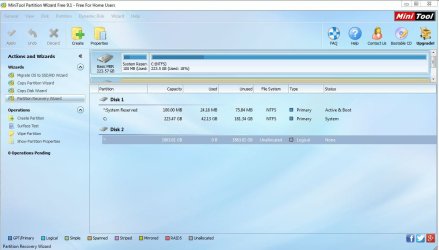
Here is the screen for MT 9.1
 

Attachments

  • seagate6.JPG
    seagate6.JPG
    84.8 KB · Views: 4

My Computer My Computer

Computer type
PC/Desktop
Computer Manufacturer/Model Number
Del XPS8500
OS
Windows 7 Pro 64bit
CPU
Intel(R) Core(TM) i7-3770 CPU @ 3.40GHz
Memory
12gb
Graphics Card(s)
AMD Radeon HD 7700 Series
Hard Drives
Seagate 2tb baracuda
OK.Let us get going. Past midnight here. So I shall just give you an exercise which you can do and report. I shall see the report card after another 10 hours from now my tomorrow morning.. And then we shall continue.

Download and install Getdataback Simple.. Let it scan your drive 2TB drive. Check whether it shows all your files with original folder structure. Post appropriate screenshots. The trial version can only show you the files if it can but you cannot copy without buying a license.( You can also preview the files and check their integrity) It will give us an idea whether it will be possible to recover the data in its original form. If results are positive we shall go ahead with a freeware - instead of buying a licence for $69 or 79...((And it is going to be a longer exercise. Patience and perseverance is the key in data recovery. There is no magic wand for instant results.I may keep changing the plans, you may have to repeat many times ..... If I am going to spend a day or two with it - taking into account our different time zones - you should also be prepared to run alongside with the breaks.))

https://www.runtime.org/data-recovery-software.htm ( Read all documentation on using Getdataback Simple in the webpage. )

Have a good day.
 

My Computer My Computer

OS
Windows 7 Home Premium 32 bit
Ok, downloaded. However the site offers no instruction.
 

My Computer My Computer

Computer type
PC/Desktop
Computer Manufacturer/Model Number
Del XPS8500
OS
Windows 7 Pro 64bit
CPU
Intel(R) Core(TM) i7-3770 CPU @ 3.40GHz
Memory
12gb
Graphics Card(s)
AMD Radeon HD 7700 Series
Hard Drives
Seagate 2tb baracuda
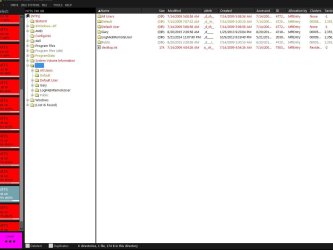
It's all there. In order and all.
 

Attachments

  • seagate9.JPG
    seagate9.JPG
    92.6 KB · Views: 3

My Computer My Computer

Computer type
PC/Desktop
Computer Manufacturer/Model Number
Del XPS8500
OS
Windows 7 Pro 64bit
CPU
Intel(R) Core(TM) i7-3770 CPU @ 3.40GHz
Memory
12gb
Graphics Card(s)
AMD Radeon HD 7700 Series
Hard Drives
Seagate 2tb baracuda
Ok, downloaded. However the site offers no instruction.

OK, for most part it is intuitive.( I also see that there has been many changes since I last downloaded it.) Mostly you will right click on both the panes to get the menu. Getdataback Simple does not write anything to the drive under recovery and so you can play around with it without fear and get a grip on it. Not a rocket science anyway.

You will now keep this as a backup - in case we are unable to recover the data with freeware.

It is now your sleep time. You can go to sleep. You will have your task cutout when you wake up.
 

My Computer My Computer

OS
Windows 7 Home Premium 32 bit
Download TestDisk 7.0. See my post #13 here External HD - Partition Unallocated

It will be a 11.8MB testdisk-7.0.win.zip file. Extract it to the root of your C drive. In the testdisk-7.0 folder you will find testdisk_win.exe which you will run

Note: a. Do not download beta version 7.1. b. Do not download Windows 64-bit version.(even if your system is 64 bit)

On the external disk to which you want to copy the files create a folder named Recovery. This will be your destination Disk and Destination Folder. This disk should be plugged in before you run TestDisk. (Please remove all other USB HDDs/Flash drives/ hubs/docks. )

Now run TestDisk. You will navigate/select/highlight by using Up/Down, Left/Right Arrow keys in the TestDisk Window.

(At any point of time you can quit TestDisk by repeatedly pressing Q or by clicking on the X in the top right in the Title bar.)

First let us check whether TestDisk can find the partitions.

First Screen: Move the hihhlight to [No Log] and press Enter key.

Second screen: Select your faulty 2TB disk. (Note down the drive letter of your Destination drive.You will require this to navigate to the Recovery Folder later.)[Proceed] is already highlighted. Press Enter

Third Screen: [Intel] Enter

Fourth Screen: [Analyse] Enter

Fifth Screen: Post a screenshot

Further instructions after I see the screenshot. If I do not respond within half an hour, close Test Disk. You can run it again afterwards.

( Your Getdataback screenshot is truncated a weebit on the left side but sufficient to hide some info. In future make sure that the screenshots are not truncated and one can see all the information in it.)
 
Last edited:

My Computer My Computer

OS
Windows 7 Home Premium 32 bit
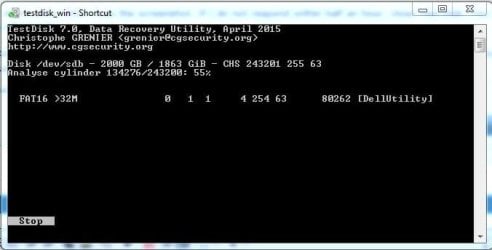
I have downloaded 7.0 and it has been running for quite a while. 55% at this point and lists nothing as of yet.
 

Attachments

  • seagate10.JPG
    seagate10.JPG
    28 KB · Views: 11

My Computer My Computer

Computer type
PC/Desktop
Computer Manufacturer/Model Number
Del XPS8500
OS
Windows 7 Pro 64bit
CPU
Intel(R) Core(TM) i7-3770 CPU @ 3.40GHz
Memory
12gb
Graphics Card(s)
AMD Radeon HD 7700 Series
Hard Drives
Seagate 2tb baracuda
This is after [Analyse] Enter. Right? Let it run and complete. After completion post that screenshot.
 

My Computer My Computer

OS
Windows 7 Home Premium 32 bit
Correct. I have followed your instruction carefully. I will post when it completes prior to any other action. 61% at the time of this post.
 

My Computer My Computer

Computer type
PC/Desktop
Computer Manufacturer/Model Number
Del XPS8500
OS
Windows 7 Pro 64bit
CPU
Intel(R) Core(TM) i7-3770 CPU @ 3.40GHz
Memory
12gb
Graphics Card(s)
AMD Radeon HD 7700 Series
Hard Drives
Seagate 2tb baracuda
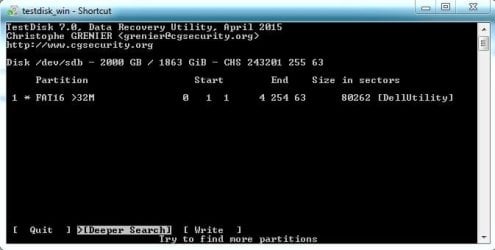
At this point I would conjecture that all partitions after the 32 MB Dell Utility FAT16 partition have been lost irrecoverably. If no partitions are found, then no recovery with TestDisk is possible.

However let me wait and see what brings. TestDisk is highly interactive and the screens will differ according to what TestDisk encounters. That is why beyond a point I have to see the screen that comes, analyse it and take a decision on the next step.

Beyond that, I am really wondering what actually happened to that drive.

We will still go through all the Text book procedures or should I say TestDisk procedures?.
 

My Computer My Computer

OS
Windows 7 Home Premium 32 bit
That makes 2 of us. 87% and no change.
 

My Computer My Computer

Computer type
PC/Desktop
Computer Manufacturer/Model Number
Del XPS8500
OS
Windows 7 Pro 64bit
CPU
Intel(R) Core(TM) i7-3770 CPU @ 3.40GHz
Memory
12gb
Graphics Card(s)
AMD Radeon HD 7700 Series
Hard Drives
Seagate 2tb baracuda
All done and no change.
 

Attachments

  • seagate11.JPG
    seagate11.JPG
    36.1 KB · Views: 12

My Computer My Computer

Computer type
PC/Desktop
Computer Manufacturer/Model Number
Del XPS8500
OS
Windows 7 Pro 64bit
CPU
Intel(R) Core(TM) i7-3770 CPU @ 3.40GHz
Memory
12gb
Graphics Card(s)
AMD Radeon HD 7700 Series
Hard Drives
Seagate 2tb baracuda
Looking back at the images I have posted, does it appear that other software seemed to find additional partitions?
 

My Computer My Computer

Computer type
PC/Desktop
Computer Manufacturer/Model Number
Del XPS8500
OS
Windows 7 Pro 64bit
CPU
Intel(R) Core(TM) i7-3770 CPU @ 3.40GHz
Memory
12gb
Graphics Card(s)
AMD Radeon HD 7700 Series
Hard Drives
Seagate 2tb baracuda
Press enter to continue and apprise me of the next screen.

No neither PW nor AOMEI could find even that single Dell Utility partition.( And oh, yes I just remember there was a FAT16 buried in that innumerable boots.)
 
Last edited:

My Computer My Computer

OS
Windows 7 Home Premium 32 bit
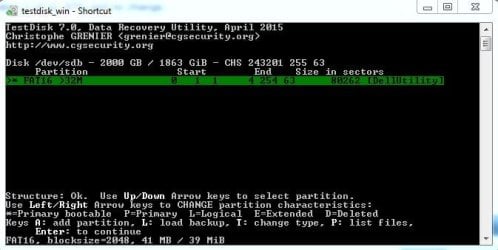
After enter:
 

Attachments

  • seagate12.JPG
    seagate12.JPG
    26.5 KB · Views: 11

My Computer My Computer

Computer type
PC/Desktop
Computer Manufacturer/Model Number
Del XPS8500
OS
Windows 7 Pro 64bit
CPU
Intel(R) Core(TM) i7-3770 CPU @ 3.40GHz
Memory
12gb
Graphics Card(s)
AMD Radeon HD 7700 Series
Hard Drives
Seagate 2tb baracuda
Press Enter again to do a deeper search. This of course will take a longer time. Let it. Let it run and keep me posted of the progress every half an hour till my midnight. On that position at midnight I shall leave further instructions before I retire for the day on the possibilities and action you should take.
 

My Computer My Computer

OS
Windows 7 Home Premium 32 bit
I pressed enter for a deeper search and it went back to the same screen. With options of Quit and Write.
 

My Computer My Computer

Computer type
PC/Desktop
Computer Manufacturer/Model Number
Del XPS8500
OS
Windows 7 Pro 64bit
CPU
Intel(R) Core(TM) i7-3770 CPU @ 3.40GHz
Memory
12gb
Graphics Card(s)
AMD Radeon HD 7700 Series
Hard Drives
Seagate 2tb baracuda
Then no use. We shall shift course. Wait for a few minutes till I gather /retrieve what is required.
 

My Computer My Computer

OS
Windows 7 Home Premium 32 bit
Have a look at my post#17 here. External HDD - K:/ is not accessible

Essentially you will select your 2TB faulty Internal drive, highlight [Advanced] instead of [Analyse] and press Enter. The next screen should show all your partitions.( If it shows all your partitions - fat hopes - we shall continue)

If instead it says No partition Found or finds only the Dell Utility partition, that is the end of the TestDisk story.

Close TestDisk, rerun, do this and report.

If No partitions are found, then your only option is Getdataback Simple to recover the data - one of the few cases where only this was the solution.
 

My Computer My Computer

OS
Windows 7 Home Premium 32 bit
Back
Top