
2x 4TB as RAID0, Unallocated space, GPT limits and initiliazing issues

sfwul

New member
Member
Local time
12:48 AM
Messages
54
Over the last couple of days I have been puzzling how to setup 2x4TB to 1 RAID0 partition.

Up front: I know.. about the 2TB limit, GPT and stuff and Windows having issues with that.

However, I could not figure out why all things are looking fine, i.e. RAIDs created,
Windows shows them but the next day, the RAID is gone and I have to re-initialize it.

Hardware configuration: 2x SSD, 2x 2TB (RAID0), 2x4TB (RAID0), Asus X99 DeLuxe/U3.1 - Windows 7 x64 SP1


1) When booting the RAID BIOS correctly shows the 2 SSD and 2 RAID-sets (one for 2TBs, one for 4TBs), so that looks alright. I have created the RAIDs over and over again, in an attempt to solve the issues.

2) The HDDs are all GPT

3) Windows Drive Management a large volume shows up as unallocated (about 1700GB..)
It cannot be removed/formatted/resized whatever, even not using Paragon's Harddisk Manager Suite

Except for this unallocated space, everything lookED fine.

Then again, today, the large RAID did not show up in Explorer.

Had to go into drivemanagement, got the GPT question, tagged and clicked OK, assigned a driveletter,and the RAID showed up.

Question: How to avoid this?
Do I have to set the unallocated space 'offline' ?

Thanks
-

Meanwhile... I have screenshots of all steps (10) but adding them here would result in a post of 5 feet.
I don't think there is a way to add them as thumbnail, neither to add a link to an album on OneDrive
I'll be happy to post the screenshots, but I don't want to get flames or get banned :)
 

My Computer My Computer

At a glance

Windows 7 Ultimate x64
OS
Windows 7 Ultimate x64
I don't think I have understood your problem correctly yet..

You have no problems with the RAID 0 2X2TB right? and you have problems only with the 2 x4TB drives with it showing only as a 6TB drive. Almost 2TB shows as unallocated.

Are those all internal drives? Are you using any dock? Describe the complete setup and all hardware associated with it including the make, model number of the 4 TB drives.

"Had to go into drivemanagement, got the GPT question, tagged and clicked OK ......." Please elaborate. What GPT question? tagged what?

Please post the following two screenshots:

1. Windows Disk Management showing all your drives with no truncation of any sort. http://www.sevenforums.com/tutorials/274797-disk-management-post-screen-capture-image.html

2. How all the disks appear in Minitools Partition Wizard Home Edition - the first screen when you launch the application. Best Free Partition Manager for Windows | MiniTool Partition Free
 

My Computer My Computer

At a glance

Windows 7 Home Premium 32 bit
OS
Windows 7 Home Premium 32 bit
They involve 2x 4TB internal HDDs in RAID getting a volume of 7.2TB.

Drivemanagent shows a unallocated space of 1700GB on top of the 7.2TB

Likely the only way getting around this is to set that partition offline..?

I have added screenshots below, hopefully nobody will start complaining.

=


==


My Computer My Computer

At a glance

Windows 7 Ultimate x64
OS
Windows 7 Ultimate x64
Why did you cover up the Disk Mgmt window? It clearly says in the tutorial for Disk Management - Post a Screen Capture Image to maximize the window and make sure every column is fully expanded so its readable. Instead you put other boxes on top of it? Hello?

What is the reason for wanting undesirable RAID which isn't even redundant (the first letter in its name!) because you lose all data if you lose one hard drive? The only possible reason to want this outdated failsure technology is if you work with huge files like video editing.
 
Since you won't be booting from it, why don't you create the RAID0 set within Disk Management (I don't know if you can RAID with GPT disks with Windows though, you will have to try). It should be similar performance as BIOS raid.
 

My Computer My Computer

At a glance

Windows 7 Ultimate x64 SP1AMD Phenom 2 1090T2x8GB Kingston HyperX Fury Black 1600Mhz Unga...MSI GTX 970 Gaming 4G
Computer type
PC/Desktop
Computer Manufacturer/Model Number
Custom Build
OS
Windows 7 Ultimate x64 SP1
CPU
AMD Phenom 2 1090T
Motherboard
Gigabyte GA-890FXA-UD5
Memory
2x8GB Kingston HyperX Fury Black 1600Mhz Unganged
Graphics Card(s)
MSI GTX 970 Gaming 4G
Sound Card
Realtek On-Board HD 7.1 Audio / Logitech G35
Monitor(s) Displays
3xAcer GD245HQ
Screen Resolution
1920x1080
Hard Drives
Samsung 850 Pro 512GB SSD - OS /
WD Caviar Black SATA 3 - 1 TBx2 - Dynamic RAID 0 /
WD Caviar Green SATA 2 - 640GBx2 - Dynamic RAID 0 /
WD Caviar Green SATA 2 - 640GB - Internal Backup /
Seagate Barracude SATA 3 - 3TB - External Backup/ Sync
PSU
HighPower 1000W
Case
Cooler Master HAF 932
Cooling
Noctua NH-D14
Keyboard
Logitech G19
Mouse
Logitech G500
Internet Speed
100/4 Mbit Cable (100GB quota)
Antivirus
ZoneAlarm Extreme Security / MBAM Pro / MBAE Free / SAS Free
Browser
IE 11 - Firefox - Chrome
Other Info
Logitech F710/ G27/ G940/ Z5500 // TrackIR 5 // Nvidia 3D Surround Vision
I don't think I have understood your problem correctly yet......

Are those all internal drives? Are you using any dock? Describe the complete setup and all hardware associated with it including the make, model number of the 4 TB drives......


Please post the following two screenshots:

1. Windows Disk Management showing all your drives with no truncation of any sort. http://www.sevenforums.com/tutorials/274797-disk-management-post-screen-capture-image.html

2. How all the disks appear in Minitools Partition Wizard Home Edition - the first screen when you launch the application. Best Free Partition Manager for Windows | MiniTool Partition Free

Are you even reading the posts in reply?

Keeping your own track does not help us to help you.

Please answer the queries still remaining unanswered.

Before posting the screenshots requested, read through http://www.sevenforums.com/tutorials/274797-disk-management-post-screen-capture-image.html from the start letter to the end letter. Your screenshots should comply with all the guidelines enumerated there on presenting all the information in it.

The crux of your problem seems to lie in the Unallocated space which appears as another drive. If the raid has been created properly the two 4TB raid 0 drives should only appear as one single drive of 8TB.

We can't take it further in the absence of the requested information.
 

My Computer My Computer

At a glance

Windows 7 Home Premium 32 bit
OS
Windows 7 Home Premium 32 bit
Sorry for the delay. Note that I am using another pc to reply on this thread so my feedback may come with a slight delay.


Will try to answer the questions as best possible.

a) @GokAy ".. why don't you create the RAID0 set within Disk Management .." : I created the RAID using ctrl-I at boot (Intel Rapid Storage Technology), don't know if creating RAID within Windows is possible at all. Could be, I don't know.

b) @gregrocker - " Why did you cover up the Disk Mgmt window?": The screenshots taken, they were in fact for my own purpose, I have now added one that shows more information.

c. @gregrocker - "What is the reason for wanting undesirable RAID..", well, that's the way I would like it, but actually, it has not really anything to do with the 'unallocated' space issue.

d. @ jumanji - "The crux of your problem seems to lie in the Unallocated space which appears as another drive. If the raid has been created properly the two 4TB raid 0 drives should only appear as one single drive of 8TB. " I honestly wouldn't know how else create a RAID.

e.@jumanji - ""Had to go into drivemanagement, got the GPT question, tagged and clicked OK ......." Please elaborate. What GPT question? tagged what?" If I do -not- change the unallocated to a 'offline' , each time I go into drivemanagement I get a popup window "You must initialize a disk before Logical Disk Manager can access it" (see 2nd/3rd screenshot in my earlier post)


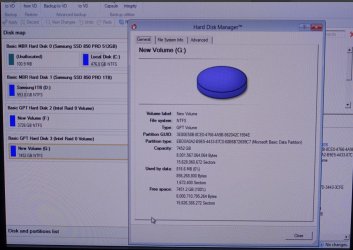
f.@jumanji - "2. How all the disks appear in Minitools Partition Wizard Home Edition" - I am using Paragon Harddisk Manager Suite (v15), attached a screenshot of a photo I made. The quality may be poor, I launched Paragon from a rescue CD, so, I could only create a screenshot of a photo. Here you can see the 2 RAIDs and the 2 SSD's. It all look okay, within Paragon and within ctrl-I at boot (Intel Rapid Storage Technology


-
 

Attachments

  • Capture-30052015 062544.png
    Capture-30052015 062544.png
    40 KB · Views: 5
  • Creating RAID-set-30052015 065659.png
    Creating RAID-set-30052015 065659.png
    248.4 KB · Views: 1
  • RAID at booting-30052015 063520.png
    RAID at booting-30052015 063520.png
    231 KB · Views: 1
  • Paragon HDM RAID-30-05-2015 07-09-24.jpg
    Paragon HDM RAID-30-05-2015 07-09-24.jpg
    121 KB · Views: 2

My Computer My Computer

At a glance

Windows 7 Ultimate x64
OS
Windows 7 Ultimate x64
You still did not install Partition Wizard Home Edition and post the screenshot of how your drives appear in Partition Wizard.

1. Are your drives connected to SATA ports 1-6 in the motherboard? Yes/no

2. Is the SATA Controller 1 Mode Selection set to RAID in the UEFI Bios? Yes /no

3. Have you installed Intel AHCI/Raid Driver path for Windows? (Since it seems to be a custom-built PC I presume you should be knowing)

4. Wherefrom did you install the Intel Rapid Storage Technology driver version 13.1.0. 2126? ( The one listed in ASUS motherboard support site is 13.1.0.1058 alongwith the driver at 3 above. The latest IRST driver version in Intel website is 13.6.0.1012 dated 12/10/2014 .)

OK, if all these questions confuse you, given below is the general guidelines to rebuild your RAID and check.

1. Delete the RAID volume on these two 4TB drives and reset these disks only, to non-RAID. You should now be able to see those as two seperate 4TB drives in Windows Disk Management. I see that you have not stored any data on this RAID so far and hence there will be no data loss. If you do have data on it , move it elsewhere before you deRAID.)

2. Run Western Digital DataLifeguard Diagnostic for Windows - both short and long tests to check that your drives are OK. If the tests pass, then using the same program write zeroes to all sectors. This will reinitialise both the disks to factory condition prior to formatting. ( This testing and writing zeros to all sectors on two 4TB drives will take a long time. Check and recheck that you do it on the correct drives.)

3. Now format both the drives as GPT drives using Windows Disk Management - no Paragon, no Partition Wizard or any other formatting utility.

4. Make your RAID with IRST.

Does it now show it as a single 8TB drive?

If it doesn't contact ASUS Tech Support. They should be knowing much better. I don't work for ASUS.:D

Good Luck.

Edit: There is no RAID 0 limitation on the number of drives or capacity of the drives that can be Raided as such. However consumer grade equipments/Sata Controllers /drivers may have limitations. Reason why you should contact ASUS Technical Support. You may also consider installing the latest IRST driver from Intel website and check whether it helps.
 
Last edited:

My Computer My Computer

At a glance

Windows 7 Home Premium 32 bit
OS
Windows 7 Home Premium 32 bit
Hey, it is quiet simple to create RAID0 inside Disk Management.

Here is a step-by-step tutorial. Just create the striped volume (RAID0) when you have to chose: How to Create a Software RAID Array in Windows 7

Here is a test I just made: a simple one that is (RAID0 are Windows RAIDs)
From my Samsung 850 Pro to other drives - 3.07 GB (3D Mark Folder)
- Single drive - 640GB WD Cavier Green - 1:05.19 s
- RAID 0 - 2x640GB WD Caviar Green - 24.76 s
- RAID 0 - 2x1TB WD Cavier Black - 18 s
 

My Computer My Computer

At a glance

Windows 7 Ultimate x64 SP1AMD Phenom 2 1090T2x8GB Kingston HyperX Fury Black 1600Mhz Unga...MSI GTX 970 Gaming 4G
Computer type
PC/Desktop
Computer Manufacturer/Model Number
Custom Build
OS
Windows 7 Ultimate x64 SP1
CPU
AMD Phenom 2 1090T
Motherboard
Gigabyte GA-890FXA-UD5
Memory
2x8GB Kingston HyperX Fury Black 1600Mhz Unganged
Graphics Card(s)
MSI GTX 970 Gaming 4G
Sound Card
Realtek On-Board HD 7.1 Audio / Logitech G35
Monitor(s) Displays
3xAcer GD245HQ
Screen Resolution
1920x1080
Hard Drives
Samsung 850 Pro 512GB SSD - OS /
WD Caviar Black SATA 3 - 1 TBx2 - Dynamic RAID 0 /
WD Caviar Green SATA 2 - 640GBx2 - Dynamic RAID 0 /
WD Caviar Green SATA 2 - 640GB - Internal Backup /
Seagate Barracude SATA 3 - 3TB - External Backup/ Sync
PSU
HighPower 1000W
Case
Cooler Master HAF 932
Cooling
Noctua NH-D14
Keyboard
Logitech G19
Mouse
Logitech G500
Internet Speed
100/4 Mbit Cable (100GB quota)
Antivirus
ZoneAlarm Extreme Security / MBAM Pro / MBAE Free / SAS Free
Browser
IE 11 - Firefox - Chrome
Other Info
Logitech F710/ G27/ G940/ Z5500 // TrackIR 5 // Nvidia 3D Surround Vision
Hi Gokay, with IRST in, I am not sure it is a good proposition to go with Windows striping. Further he already has one RAID array created with IRST.

ASUS in its support site says, for creating a RAID refer to the manual bundled in motherboard support DVD that comes along with it. The OP has to check on it and will be better off going with the manufacturer's recommendation. His motherboard UEFI BIOS is tied with IRST.
 

My Computer My Computer

At a glance

Windows 7 Home Premium 32 bit
OS
Windows 7 Home Premium 32 bit
Again, why exactly do you want RAID?

We see nothing but problems here with RAID - not one single good report in six years since Win7 beta, only one horror story after another.

It is not Redundant (the first letter of its name!) because most users lose all their data if they lose one drive. Why would anyone choose such a thing when there are now faster SSD drives?

So "because I want it" is not a good enough reason for deliberately choosing old dead technology which provides nothing but problems. The only reason I've heard that's understandable is working with huge files like video editing - but there are huge drives now.
 
Last edited:
Hi Gokay, with IRST in, I am not sure it is a good proposition to go with Windows striping. Further he already has one RAID array created with IRST.

ASUS in its support site says, for creating a RAID refer to the manual bundled in motherboard support DVD that comes along with it. The OP has to check on it and will be better off going with the manufacturer's recommendation. His motherboard UEFI BIOS is tied with IRST.

Hey Jumanji,

I believe it shouldn't cause any problems, and doesn't hurt to try. Which one is better (BIOS or Windows) is not a definitive argument. The 4TB drives will be seen by BIOS just as like his SSD drives.

Only difference will be the other RAID0 array (2x1.5TB) will be seen as 1 drive in Disk Management, whereas the 2x4GB array would still be 2 drives (set as dynamic volume).

To be honest, he might as well create both arrays from within Windows (would give the ability to move them to another Windows PC as well if so needed). With BIOS raid if you change motherboard the raid information is lost and requires a rebuild of the arrays. Now, if he had a proper hardware raid card, then of course it would have been better.

disk management_all_drives.jpg

"We see nothing but problems here with RAID - not one single good report in six years since Win7 beta, only one horror story after another." - this is only partially true, I have been using raid since XP times (BIOS). Losing data is no different if you have a single disk and it fails. I have only been active in these forums for 1 months and haven't seen any failed RAID posts yet, but seen enough failed single drives. You should be backing up your drives/system/data whatever anyway, regardless of tech you use. Keyword is backup and enjoy better performance as long as it works! (I post my primitive copy-paste test whenever I see Greg bash on RAID :D) Is a single disk even redundant in the first place? fail is a fail /discuss :geek:
 

My Computer My Computer

At a glance

Windows 7 Ultimate x64 SP1AMD Phenom 2 1090T2x8GB Kingston HyperX Fury Black 1600Mhz Unga...MSI GTX 970 Gaming 4G
Computer type
PC/Desktop
Computer Manufacturer/Model Number
Custom Build
OS
Windows 7 Ultimate x64 SP1
CPU
AMD Phenom 2 1090T
Motherboard
Gigabyte GA-890FXA-UD5
Memory
2x8GB Kingston HyperX Fury Black 1600Mhz Unganged
Graphics Card(s)
MSI GTX 970 Gaming 4G
Sound Card
Realtek On-Board HD 7.1 Audio / Logitech G35
Monitor(s) Displays
3xAcer GD245HQ
Screen Resolution
1920x1080
Hard Drives
Samsung 850 Pro 512GB SSD - OS /
WD Caviar Black SATA 3 - 1 TBx2 - Dynamic RAID 0 /
WD Caviar Green SATA 2 - 640GBx2 - Dynamic RAID 0 /
WD Caviar Green SATA 2 - 640GB - Internal Backup /
Seagate Barracude SATA 3 - 3TB - External Backup/ Sync
PSU
HighPower 1000W
Case
Cooler Master HAF 932
Cooling
Noctua NH-D14
Keyboard
Logitech G19
Mouse
Logitech G500
Internet Speed
100/4 Mbit Cable (100GB quota)
Antivirus
ZoneAlarm Extreme Security / MBAM Pro / MBAE Free / SAS Free
Browser
IE 11 - Firefox - Chrome
Other Info
Logitech F710/ G27/ G940/ Z5500 // TrackIR 5 // Nvidia 3D Surround Vision
I'm thinking that Greg and I are trying to understand is what the purpose of Raid 0 being used.

1. What reason does one want to use Raid 0?

2. Does one think it is some sort of data protection method and or some kind of proper backup?

3. Does one think Raid is some sort of giant advancement in computer speed?

Knowing the reasons and goals one expects once using Raid will help members give guidance.
I'm thinking this forums server uses Raid but their are reasons; they are needed as one can imagine.

Knowing what ones reasoning for using Raid 0 might give helping members suggestion on how to get the results one wants in a better fashion.

I have been reading post on this forum for a long time and don't don't remember reading any good results using Raid for what I call a normal user.
For years many used raid because hard drive were very small compared to todays hard drives. I'm talking about a long time ago, maybe 10 years ago and that is like forever in the computer world.

You can store on one of todays huge hard drives what years ago took a bank of hard drives. Raid had it's purpose for some users.
Now that we have UEIF and Bios also has changed things and has to be take into consideration.

Mixing UEIF and MBR Bios has got to be a bag of worms. Well it would be for me anyway.

Please don't think I have a huge amount of knowledge using Raid because I don't. What I have seen on forums is people wanting to use Raid for 10 year old reason.

We have many members that have or do work in Server Raid, Domain/network world that could give exact information and reasoning for Raid. Maybe one will drop by and give guidance.

Sfwul system specs tell us little to better understand thing.

OS Windows 7 Ultimate x64
 

My Computer My Computer

At a glance

Windows 10 Pro. 64/ version 1709 Windows 7 Pr...Intel i7-6800K @ 4.3Corsair Platinum 16 gig @2400EVGA GTX 1070 OC
Computer type
PC/Desktop
Computer Manufacturer/Model Number
Home made Desktop
OS
Windows 10 Pro. 64/ version 1709 Windows 7 Pro/64
CPU
Intel i7-6800K @ 4.3
Motherboard
ASUS X-99 Deluxe II
Memory
Corsair Platinum 16 gig @2400
Graphics Card(s)
EVGA GTX 1070 OC
Monitor(s) Displays
Asus 27" LED LCD/VE278Q
Screen Resolution
1920-1080 or 1280-720 HDMI
Hard Drives
INTEL SSD 730-240 Gb Sata 3.0/
PSU
EVGA Platium 1200W
Case
Phanteks Luxe Tempered Glass 8 fans/ one radiator
Cooling
XSPC/ Water Cooled CPU
Keyboard
Das 4 Professional
Mouse
Logitech M705/MX Anywhere 2-S
Internet Speed
100 mbits
Antivirus
Microsoft Security Essentials/ Malwarebytes Premium 3.0/ SAS
Browser
I.E. 11 default/Firefox/ ISP Time Warner Cable/Spectrum
Other Info
LG BluRay Burner/
Sound system-KLipsch-THX/
Icy Dock ssd Hot Swap bays.
Hey Bear, thanks for joining in. All experienced input is welcome.

The OP should answer those questions for his own case.

My answers would be:
1- Reason to use a RAID0 would be increased data read/write speed. Nothing else. With 2 disks the speed increase (in theory, as there are overhead cost in reality) would be 100%. This is how it works: You have 1GB of data to be written to the disk. The controller then splits them in two - writes one half to drive1 and the other half to drive2 simultaneously. The performance gain is increased if more disks are added to the RAID0 array.

2- One would need backups using RAID or not. Some RAID formats protect from service interruption in case of individual drive failures (but you need to replace failed ones ASAP) with some reduction in performance. How many failures you can afford depends on RAID implementation and number of drives. RAID0 would be lost when only one drive fails, regardless of number of drives used.

3- Nope, not a great increase in computer speed. Connected to answer 1, the catch is that access times may increase a bit with RAID so depending on the file size/sequential or random it may be slower with RAID0. Also, during such loading we are mostly waiting for data to be processed by CPU/RAM and hard disk activity is usually not that much.

I have a simple copy-paste test back in an earlier post. (I believe the single drive speed is problematic though, simple math shows it was 40-50 MB/s. It is a SATAII drive). All connected to same SATAIII controller, greens are SATAII, blacks are SATAIII drives).

To wrap it up, I believe RAID is not a monster to be avoided at all costs, it has it's uses and issues. One should consider them all.
 

My Computer My Computer

At a glance

Windows 7 Ultimate x64 SP1AMD Phenom 2 1090T2x8GB Kingston HyperX Fury Black 1600Mhz Unga...MSI GTX 970 Gaming 4G
Computer type
PC/Desktop
Computer Manufacturer/Model Number
Custom Build
OS
Windows 7 Ultimate x64 SP1
CPU
AMD Phenom 2 1090T
Motherboard
Gigabyte GA-890FXA-UD5
Memory
2x8GB Kingston HyperX Fury Black 1600Mhz Unganged
Graphics Card(s)
MSI GTX 970 Gaming 4G
Sound Card
Realtek On-Board HD 7.1 Audio / Logitech G35
Monitor(s) Displays
3xAcer GD245HQ
Screen Resolution
1920x1080
Hard Drives
Samsung 850 Pro 512GB SSD - OS /
WD Caviar Black SATA 3 - 1 TBx2 - Dynamic RAID 0 /
WD Caviar Green SATA 2 - 640GBx2 - Dynamic RAID 0 /
WD Caviar Green SATA 2 - 640GB - Internal Backup /
Seagate Barracude SATA 3 - 3TB - External Backup/ Sync
PSU
HighPower 1000W
Case
Cooler Master HAF 932
Cooling
Noctua NH-D14
Keyboard
Logitech G19
Mouse
Logitech G500
Internet Speed
100/4 Mbit Cable (100GB quota)
Antivirus
ZoneAlarm Extreme Security / MBAM Pro / MBAE Free / SAS Free
Browser
IE 11 - Firefox - Chrome
Other Info
Logitech F710/ G27/ G940/ Z5500 // TrackIR 5 // Nvidia 3D Surround Vision
To all - many many thanks for taking the time to get back on this so elaborately.
I will reply, however, please do allow me a bit of time as I will be out the rest of the day, so I will check on this tomorrow.
Please do note that the other RAID set (2x 2TB) results in a perfect 1 parition 3,6TB drive.
I assume that the unallocated space thing is the result of the 2x 4TB drives , resulting exactly twice as large 7,2TB
Guess it is a bit difficult for anybody out there to test this, i.e. almost no-one has 2 4TB drives 'available' for some testing.

Anyway, I'll get back on this.

In the meantime, pls see attached screenshot, fwiw.

Again thanks

-
 

Attachments

  • SnagIt-31052015 132413.png
    SnagIt-31052015 132413.png
    427.3 KB · Views: 3

My Computer My Computer

At a glance

Windows 7 Ultimate x64
OS
Windows 7 Ultimate x64
If you are asking about the reduced disk space, it is because manufacturers use 1000 as multiplier whereas in reality it should be 1024.

8TB -> 8.000/1024 GB -> 8.000.000/(1024x1024) MB -> 8.000.000.000/(1024x1024x1024) KB -> 8.000.000.000.000(1024x1024x1024x1024) Byte

The Byte calculation results in 7.27 TB. So the space is normal.

Maybe someone else can describe better. :)
 

My Computer My Computer

At a glance

Windows 7 Ultimate x64 SP1AMD Phenom 2 1090T2x8GB Kingston HyperX Fury Black 1600Mhz Unga...MSI GTX 970 Gaming 4G
Computer type
PC/Desktop
Computer Manufacturer/Model Number
Custom Build
OS
Windows 7 Ultimate x64 SP1
CPU
AMD Phenom 2 1090T
Motherboard
Gigabyte GA-890FXA-UD5
Memory
2x8GB Kingston HyperX Fury Black 1600Mhz Unganged
Graphics Card(s)
MSI GTX 970 Gaming 4G
Sound Card
Realtek On-Board HD 7.1 Audio / Logitech G35
Monitor(s) Displays
3xAcer GD245HQ
Screen Resolution
1920x1080
Hard Drives
Samsung 850 Pro 512GB SSD - OS /
WD Caviar Black SATA 3 - 1 TBx2 - Dynamic RAID 0 /
WD Caviar Green SATA 2 - 640GBx2 - Dynamic RAID 0 /
WD Caviar Green SATA 2 - 640GB - Internal Backup /
Seagate Barracude SATA 3 - 3TB - External Backup/ Sync
PSU
HighPower 1000W
Case
Cooler Master HAF 932
Cooling
Noctua NH-D14
Keyboard
Logitech G19
Mouse
Logitech G500
Internet Speed
100/4 Mbit Cable (100GB quota)
Antivirus
ZoneAlarm Extreme Security / MBAM Pro / MBAE Free / SAS Free
Browser
IE 11 - Firefox - Chrome
Other Info
Logitech F710/ G27/ G940/ Z5500 // TrackIR 5 // Nvidia 3D Surround Vision
Again, why exactly do you want RAID?

We see nothing but problems here with RAID - not one single good report in six years since Win7 beta, only one horror story after another.

It is not Redundant (the first letter of its name!) because most users lose all their data if they lose one drive. Why would anyone choose such a thing when there are now faster SSD drives?

So "because I want it" is not a good enough reason for deliberately choosing old dead technology which provides nothing but problems. The only reason I've heard that's understandable is working with huge files like video editing - but there are huge drives now.

Am not sure about the 'problems': have had RAID0 for I don't know how many years. Actually I wasted an 2005 pc just now, it is still standing here.. It had RAID,the pc before that one also had RAID. One needs to have a good backup. I selected RAID for its performance. That aside it is also to avoid using up driveletters. Actually, when all external drives+USB thumbdrives+cardreader attached and partitions and encrypted containers opened well, on my previous pc all drivers were used. Really. I definitely needed USBDLM to manage all the driveletters.

When I attached my (new) all in one printer to the USB-port, I noticed that it took 2 driveletters.

Yes, I agree with you: whilst using SSD HDD-RAIDs may not play a big role anymore.

=
 

My Computer My Computer

At a glance

Windows 7 Ultimate x64
OS
Windows 7 Ultimate x64
To bring clarity to your issue "3) Windows Drive Management a large volume shows up as unallocated (about 1700GB..) It cannot be removed/formatted/resized whatever, even not using Paragon's Harddisk Manager Suite"

Please do the following.

1. Disconnect from the internet.

2. Pull out all USB devices Printers/Card Readers/ pen drives/external drives/ USB Hubs/ docks etc., (Yes, all USB ports should be clear except your USB mouse and keyboard)

3. Shut down and reboot.

4. Post the screenshot of Windows Disk Management. Now only your internal drives. Let us see whether you still get that unallocated space.
 

My Computer My Computer

At a glance

Windows 7 Home Premium 32 bit
OS
Windows 7 Home Premium 32 bit
@jumanji - hang on pls - I have to reply to your earlier posts - have some backlog as I was out yesterday afternoon.:)
 

My Computer My Computer

At a glance

Windows 7 Ultimate x64
OS
Windows 7 Ultimate x64
In the light of what GokAy has stated in his post#16 - which is true, hats off to GoKay @GoKay, I shall offer you a Turkish coffee :) - you can put my post #8 on hold for the time being and do what is stated in post #18.

The unallocated space may be some other drive and you may have a drive letter collision. We have to check on it.
 

My Computer My Computer

At a glance

Windows 7 Home Premium 32 bit
OS
Windows 7 Home Premium 32 bit
Back
Top