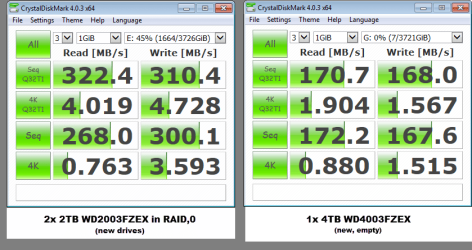
Below I will try to answer the questions in preceeding posts here.
=
I tried it twice, it got me confusing information, so I left.
(e.g. GPT drive is displayed as MBR and 7.2TB RAID is displayed as a 1678GB-volume)
Maybe this is a limitation of the free version, I don't know. Frankly I had no real interest to investigate this.
X99 has 10 SATA connectors.
IRST was installed, I did not pay extra attention to the AHCI/RAID Driver path.
On the CD-ROM this is 1 single item, in a different section.
This AHCI/RAID driver path - there is a small, separate PDF-manual on it and it used when creating a separate RAID driver disc. Then these files should be copied.
On the other hand, I guess... if the drivr hasn't been loaded/installed, I would not have been able to create RAIDs in the first place.
Done that, WinDLG reports no errors.
Done, but no luck...
==
Further to the above, I went on to do the following:
1) Removed the RAID, created two new volumes, formatted them: everything fine, I got 2 drives of 3,6TB, as expected.
2) Now.. next... (important)
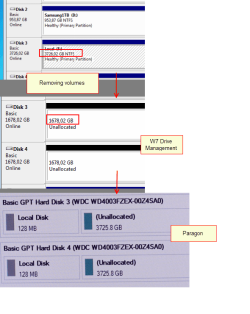
within Drive Management, I removed the volumes again.
This is because I wanted to give it a try again creating a RAID.
Once I removed the volumes the sizes immediately changed from 3.6TB into 1678GB (per drive, 2x 1678GB)
I.e. they weren't 3.6T unformatted, but 1678GB
3) I launched Paragon from CD-ROM - there the original size of 3725TB was displayed
together with a 128MB Microsoft Reserved Space partition.
(This partition has been discussed on this forum already).
4) Within Paragon I deleted that partition, created a new volume and formatted it, NTFS
Note: nowhere I found an option to format as GPT. Within Windows and within Paragon
only NTFS was offered. The drives (properties) show they are GPT though.
5) Within Drive Management I have not been able to create a RAID.
I could join the 2x 1678GB volumes. However, once the volumes were created as single drives/volumes (3.6TB) features of creating/expanding were greyed out.
6) On https://support.microsoft.com/en-us/kb/2581408
("Windows support for hard disks that are larger than 2 TB")
The 2nd screenshot shows a disksize of 2.7TB
I wonder why, in my case (drives being GPT and online) the drive shows 'overflow' capacity only, i.e. 2TB isn't displayed. Whatever I do.


=
On conclusion:
First of all, you were all very helpful here, trying to solve this 'mistery'.
Again - thank you so much.
Have spent many hours on this and in total 500+ photos and screenshots.
I started unpacking the pc 24th of may. Except for installing an AV-program, I have not been using the pc sofar.
Think I am going to let this matter rest, live with the 2 separate drives.
I believe maybe Windows has an issue with such large drives in RAID, or some there will be some patch or firmware update or whatever.
No doubt it can create RAID from many discs, but usually those drives are 1 or 2TB drives and likely there are no issues then.
=
(sorry for the delay and the long post)
=
=
I tried Partition Wizard. However, as I already have a license on Paragon HDM, which is a very good tool, I did not want to buy another license and used the free version of Partition Wizard.You still did not install Partition Wizard Home Edition and post the screenshot of how your drives appear in Partition Wizard.
I tried it twice, it got me confusing information, so I left.
(e.g. GPT drive is displayed as MBR and 7.2TB RAID is displayed as a 1678GB-volume)
Maybe this is a limitation of the free version, I don't know. Frankly I had no real interest to investigate this.
Yes, they are (see EUFI-screenshot)1. Are your drives connected to SATA ports 1-6 in the motherboard? Yes/no
X99 has 10 SATA connectors.
Yes it is.2. Is the SATA Controller 1 Mode Selection set to RAID in the UEFI Bios? Yes /no
eh ... you got me here.3. Have you installed Intel AHCI/Raid Driver path for Windows? (Since it seems to be a custom-built PC I presume you should be knowing)
IRST was installed, I did not pay extra attention to the AHCI/RAID Driver path.
On the CD-ROM this is 1 single item, in a different section.
This AHCI/RAID driver path - there is a small, separate PDF-manual on it and it used when creating a separate RAID driver disc. Then these files should be copied.
On the other hand, I guess... if the drivr hasn't been loaded/installed, I would not have been able to create RAIDs in the first place.
Asus CD-ROM4. Wherefrom did you install the Intel Rapid Storage Technology driver version 13.1.0. 2126? ( The one listed in ASUS motherboard support site is 13.1.0.1058 alongwith the driver at 3 above. The latest IRST driver version in Intel website is 13.6.0.1012 dated 12/10/2014 .)
OK, if all these questions confuse you, given below is the general guidelines to rebuild your RAID and check.
1. Delete the RAID volume on these two 4TB drives and reset these disks only, to non-RAID. You should now be able to see those as two seperate 4TB drives in Windows Disk Management. I see that you have not stored any data on this RAID so far and hence there will be no data loss. If you do have data on it , move it elsewhere before you deRAID.)
2. Run Western Digital DataLifeguard Diagnostic for Windows - both short and long tests to check that your drives are OK. If the tests pass, then using the same program write zeroes to all sectors. This will reinitialise both the disks to factory condition prior to formatting. ( This testing and writing zeros to all sectors on two 4TB drives will take a long time. Check and recheck that you do it on the correct drives.)
Done that, WinDLG reports no errors.
There is -no- way I could format as NTFS. The discs are GPT but the only option I get is formatting NTFS.3. Now format both the drives as GPT drives using Windows Disk Management - no Paragon, no Partition Wizard or any other formatting utility.
4. Make your RAID with IRST.
Does it now show it as a single 8TB drive?
Done, but no luck...
==
Further to the above, I went on to do the following:
1) Removed the RAID, created two new volumes, formatted them: everything fine, I got 2 drives of 3,6TB, as expected.
2) Now.. next... (important)
within Drive Management, I removed the volumes again.
This is because I wanted to give it a try again creating a RAID.
Once I removed the volumes the sizes immediately changed from 3.6TB into 1678GB (per drive, 2x 1678GB)
I.e. they weren't 3.6T unformatted, but 1678GB
3) I launched Paragon from CD-ROM - there the original size of 3725TB was displayed
together with a 128MB Microsoft Reserved Space partition.
(This partition has been discussed on this forum already).
4) Within Paragon I deleted that partition, created a new volume and formatted it, NTFS
Note: nowhere I found an option to format as GPT. Within Windows and within Paragon
only NTFS was offered. The drives (properties) show they are GPT though.
5) Within Drive Management I have not been able to create a RAID.
I could join the 2x 1678GB volumes. However, once the volumes were created as single drives/volumes (3.6TB) features of creating/expanding were greyed out.
6) On https://support.microsoft.com/en-us/kb/2581408
("Windows support for hard disks that are larger than 2 TB")
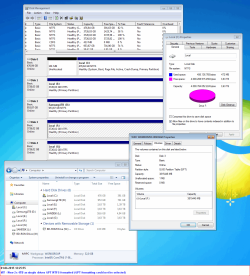
The 2nd screenshot shows a disksize of 2.7TB
I wonder why, in my case (drives being GPT and online) the drive shows 'overflow' capacity only, i.e. 2TB isn't displayed. Whatever I do.
=
On conclusion:
First of all, you were all very helpful here, trying to solve this 'mistery'.
Again - thank you so much.
Have spent many hours on this and in total 500+ photos and screenshots.
I started unpacking the pc 24th of may. Except for installing an AV-program, I have not been using the pc sofar.
Think I am going to let this matter rest, live with the 2 separate drives.
I believe maybe Windows has an issue with such large drives in RAID, or some there will be some patch or firmware update or whatever.
No doubt it can create RAID from many discs, but usually those drives are 1 or 2TB drives and likely there are no issues then.
=
(sorry for the delay and the long post)
=
Attachments
My Computer
At a glance
Windows 7 Ultimate x64
- OS
- Windows 7 Ultimate x64


 and this thread verifies again, Raid 0 just is not for most users and Windows 7 systems.