Solved 3/4GB of RAM being used while nothing is using it. Slow performance.

Trichomes

New member
Local time
3:21 PM
Messages
8
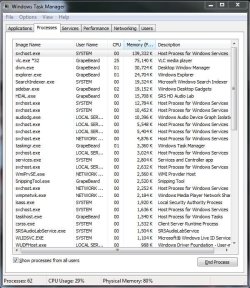
Normally my computer will use 1GB - 1.5GB on idle, then when I play a game like World of Warcraft it will go up to around 2.5 - 3.0 and when it closes it comes back down. The past 2 days it hasn't come back down after playing. If i restart it resets but comes back. I tried seeing if maybe it was happening because of a certain amount of time that had past so I restarted my computer, logged in, and just watched a movie or two to see if it still did it and it was at around 80% being used before the end of the 2nd movie.

The only thing i can think of that i installed recently is the Diablo III beta.

Any help is appreciated. Thanks.
 

Attachments
  • taskmgr.JPG
    taskmgr.JPG
    97.8 KB · Views: 86

My Computer My Computer

At a glance

Windows 7 Ultimate 64bitAMD Phenom II X4 925 Quad Core4096 MB DDR3 Dual ChannelNvidia GeForce GTX 560 1GB
Computer Manufacturer/Model Number
Custom from Cyberpowerpc.com
OS
Windows 7 Ultimate 64bit
CPU
AMD Phenom II X4 925 Quad Core
Motherboard
ASUS M4A77TD
Memory
4096 MB DDR3 Dual Channel
Graphics Card(s)
Nvidia GeForce GTX 560 1GB
Sound Card
N/A Onboard
Monitor(s) Displays
LG W2361V 23'
Screen Resolution
1920X1080
PSU
700W
Cooling
Fans
Keyboard
Merc Stealth
Mouse
Razor Deathadder
Internet Speed
DSL
Sometimes malware can affect svchost. Please download and run malwarebytes.

Did you download Diablo III beta from a torrent or reputable source?
 

My Computer My Computer

At a glance

Systems 1 and 2: Windows 7 Enterprise x64, Wi...System 1: i7 [email protected], System 2: AMD FX-41...System 1: 8GB System 2: 8GBSystem 1: ATI FirePro V4800 System 2: Radeon ...
Computer Manufacturer/Model Number
Dell and Custom
OS
Systems 1 and 2: Windows 7 Enterprise x64, Win 8 Developer
CPU
System 1: i7 [email protected], System 2: AMD FX-4100 Zambezi 3.6G
Motherboard
System 1:Dell 06NWYK System 2: ASUS M5A97 AM3+
Memory
System 1: 8GB System 2: 8GB
Graphics Card(s)
System 1: ATI FirePro V4800 System 2: Radeon HD 6850
Sound Card
System 1: onboard System 2: onboard
Monitor(s) Displays
System1: Viewsonic HDMI 24"
Screen Resolution
System 1: 1920x1080 System 2: 1920x1080
Hard Drives
System 1: Mirrored .5B drives System 2: Seagate Barracuda ST1000DM003 1TB 7200 RPM 64MB Cache SATA 6.0Gb/s
Case
System 1: Dell System 2: Cooler Master
Internet Speed
10 MBPS
I ran a full scan with Malwarebytes before posting and I downloaded it from the wow website, 100% legit.
 

My Computer My Computer

At a glance

Windows 7 Ultimate 64bitAMD Phenom II X4 925 Quad Core4096 MB DDR3 Dual ChannelNvidia GeForce GTX 560 1GB
Computer Manufacturer/Model Number
Custom from Cyberpowerpc.com
OS
Windows 7 Ultimate 64bit
CPU
AMD Phenom II X4 925 Quad Core
Motherboard
ASUS M4A77TD
Memory
4096 MB DDR3 Dual Channel
Graphics Card(s)
Nvidia GeForce GTX 560 1GB
Sound Card
N/A Onboard
Monitor(s) Displays
LG W2361V 23'
Screen Resolution
1920X1080
PSU
700W
Cooling
Fans
Keyboard
Merc Stealth
Mouse
Razor Deathadder
Internet Speed
DSL
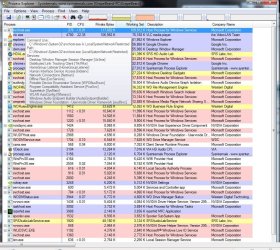
If you install process explorer and mouse over svchost, it will tell us which services are running under that instance of svchost.

Process Explorer

Please report back your finds.
 

My Computer My Computer

At a glance

Systems 1 and 2: Windows 7 Enterprise x64, Wi...System 1: i7 [email protected], System 2: AMD FX-41...System 1: 8GB System 2: 8GBSystem 1: ATI FirePro V4800 System 2: Radeon ...
Computer Manufacturer/Model Number
Dell and Custom
OS
Systems 1 and 2: Windows 7 Enterprise x64, Win 8 Developer
CPU
System 1: i7 [email protected], System 2: AMD FX-4100 Zambezi 3.6G
Motherboard
System 1:Dell 06NWYK System 2: ASUS M5A97 AM3+
Memory
System 1: 8GB System 2: 8GB
Graphics Card(s)
System 1: ATI FirePro V4800 System 2: Radeon HD 6850
Sound Card
System 1: onboard System 2: onboard
Monitor(s) Displays
System1: Viewsonic HDMI 24"
Screen Resolution
System 1: 1920x1080 System 2: 1920x1080
Hard Drives
System 1: Mirrored .5B drives System 2: Seagate Barracuda ST1000DM003 1TB 7200 RPM 64MB Cache SATA 6.0Gb/s
Case
System 1: Dell System 2: Cooler Master
Internet Speed
10 MBPS
I hope this is what you meant heh.
 

Attachments

  • svchost.JPG
    svchost.JPG
    198.9 KB · Views: 145

My Computer My Computer

At a glance

Windows 7 Ultimate 64bitAMD Phenom II X4 925 Quad Core4096 MB DDR3 Dual ChannelNvidia GeForce GTX 560 1GB
Computer Manufacturer/Model Number
Custom from Cyberpowerpc.com
OS
Windows 7 Ultimate 64bit
CPU
AMD Phenom II X4 925 Quad Core
Motherboard
ASUS M4A77TD
Memory
4096 MB DDR3 Dual Channel
Graphics Card(s)
Nvidia GeForce GTX 560 1GB
Sound Card
N/A Onboard
Monitor(s) Displays
LG W2361V 23'
Screen Resolution
1920X1080
PSU
700W
Cooling
Fans
Keyboard
Merc Stealth
Mouse
Razor Deathadder
Internet Speed
DSL
Anyone able to help?
 

My Computer My Computer

At a glance

Windows 7 Ultimate 64bitAMD Phenom II X4 925 Quad Core4096 MB DDR3 Dual ChannelNvidia GeForce GTX 560 1GB
Computer Manufacturer/Model Number
Custom from Cyberpowerpc.com
OS
Windows 7 Ultimate 64bit
CPU
AMD Phenom II X4 925 Quad Core
Motherboard
ASUS M4A77TD
Memory
4096 MB DDR3 Dual Channel
Graphics Card(s)
Nvidia GeForce GTX 560 1GB
Sound Card
N/A Onboard
Monitor(s) Displays
LG W2361V 23'
Screen Resolution
1920X1080
PSU
700W
Cooling
Fans
Keyboard
Merc Stealth
Mouse
Razor Deathadder
Internet Speed
DSL
Normally my computer will use 1GB - 1.5GB on idle, then when I play a game like World of Warcraft it will go up to around 2.5 - 3.0 and when it closes it comes back down. The past 2 days it hasn't come back down after playing. If i restart it resets but comes back. I tried seeing if maybe it was happening because of a certain amount of time that had past so I restarted my computer, logged in, and just watched a movie or two to see if it still did it and it was at around 80% being used before the end of the 2nd movie.

The only thing i can think of that i installed recently is the Diablo III beta.

Any help is appreciated. Thanks.

When I add up all of those memory commitments, it doesn't even come close to the "80%" of 4GB that it's reporting in use.

Is your system showing the proper amount of RAM installed?
 

My Computer My Computer

At a glance

XP / Win7 x64 ProIntel Quad-Core Q9450 @ 3.2GHz2x2GB GSkill DDR2NVIDIA GeForce 8600 GTS (EVGA)
OS
XP / Win7 x64 Pro
CPU
Intel Quad-Core Q9450 @ 3.2GHz
Motherboard
Asus P5-E
Memory
2x2GB GSkill DDR2
Graphics Card(s)
NVIDIA GeForce 8600 GTS (EVGA)
Monitor(s) Displays
Dell 2408WFP
Screen Resolution
1920x1200
Yea it says i have 4094 installed which is correct.
 

My Computer My Computer

At a glance

Windows 7 Ultimate 64bitAMD Phenom II X4 925 Quad Core4096 MB DDR3 Dual ChannelNvidia GeForce GTX 560 1GB
Computer Manufacturer/Model Number
Custom from Cyberpowerpc.com
OS
Windows 7 Ultimate 64bit
CPU
AMD Phenom II X4 925 Quad Core
Motherboard
ASUS M4A77TD
Memory
4096 MB DDR3 Dual Channel
Graphics Card(s)
Nvidia GeForce GTX 560 1GB
Sound Card
N/A Onboard
Monitor(s) Displays
LG W2361V 23'
Screen Resolution
1920X1080
PSU
700W
Cooling
Fans
Keyboard
Merc Stealth
Mouse
Razor Deathadder
Internet Speed
DSL
My only suggestions at this point would be to boot into safe mode and run an AV scan with whatever AV you're running as well as MalwareBytes to see if something is infected and has become a runaway process. You could also try running "sfc /scannow" from an elevated command prompt in case you've got a corrupted system file (not likely, but possible).
 

My Computer My Computer

At a glance

XP / Win7 x64 ProIntel Quad-Core Q9450 @ 3.2GHz2x2GB GSkill DDR2NVIDIA GeForce 8600 GTS (EVGA)
OS
XP / Win7 x64 Pro
CPU
Intel Quad-Core Q9450 @ 3.2GHz
Motherboard
Asus P5-E
Memory
2x2GB GSkill DDR2
Graphics Card(s)
NVIDIA GeForce 8600 GTS (EVGA)
Monitor(s) Displays
Dell 2408WFP
Screen Resolution
1920x1200
I actually rolled back my video drivers from Nvidia 295.51 to 290.36, both beta drivers, and the memory has been acting normal... so far.
 

My Computer My Computer

At a glance

Windows 7 Ultimate 64bitAMD Phenom II X4 925 Quad Core4096 MB DDR3 Dual ChannelNvidia GeForce GTX 560 1GB
Computer Manufacturer/Model Number
Custom from Cyberpowerpc.com
OS
Windows 7 Ultimate 64bit
CPU
AMD Phenom II X4 925 Quad Core
Motherboard
ASUS M4A77TD
Memory
4096 MB DDR3 Dual Channel
Graphics Card(s)
Nvidia GeForce GTX 560 1GB
Sound Card
N/A Onboard
Monitor(s) Displays
LG W2361V 23'
Screen Resolution
1920X1080
PSU
700W
Cooling
Fans
Keyboard
Merc Stealth
Mouse
Razor Deathadder
Internet Speed
DSL
There you go. You can also use System Restore to your advantage for this type of stuff as well. Keep reverting back to incrementally older dates until the issue disappears.
 

My Computer My Computer

At a glance

XP / Win7 x64 ProIntel Quad-Core Q9450 @ 3.2GHz2x2GB GSkill DDR2NVIDIA GeForce 8600 GTS (EVGA)
OS
XP / Win7 x64 Pro
CPU
Intel Quad-Core Q9450 @ 3.2GHz
Motherboard
Asus P5-E
Memory
2x2GB GSkill DDR2
Graphics Card(s)
NVIDIA GeForce 8600 GTS (EVGA)
Monitor(s) Displays
Dell 2408WFP
Screen Resolution
1920x1200
I decided to run sfc /scannow and it said "Windows Resource Protection found corrupt files but was unable to fix some of them. Details are included in the CBS.Log." Should i post that for you to look at?
 

My Computer My Computer

At a glance

Windows 7 Ultimate 64bitAMD Phenom II X4 925 Quad Core4096 MB DDR3 Dual ChannelNvidia GeForce GTX 560 1GB
Computer Manufacturer/Model Number
Custom from Cyberpowerpc.com
OS
Windows 7 Ultimate 64bit
CPU
AMD Phenom II X4 925 Quad Core
Motherboard
ASUS M4A77TD
Memory
4096 MB DDR3 Dual Channel
Graphics Card(s)
Nvidia GeForce GTX 560 1GB
Sound Card
N/A Onboard
Monitor(s) Displays
LG W2361V 23'
Screen Resolution
1920X1080
PSU
700W
Cooling
Fans
Keyboard
Merc Stealth
Mouse
Razor Deathadder
Internet Speed
DSL
Try running SFC again two more times to see if it will repair them. If not consider a Repair Install.

The VLC player running up CPU and RAM in Processes (was it playing a video?) is consistent with Display adapter problems which may be solved by reinstalling the driver, or eventually if necessary the card. But I would also try uninstalling VLC to run with WMP for awhile just to see the difference. It's not so bad. You can always revert.

Here are some other key troubleshooting steps to utilize the logs and system resources, hardware testing and other approaches leading up to Repair Install or Clean Reinstall with steps to get it perfect. Our installation forum is the top one in the world if needed.
 
Please reboot after every sfc /scannow.
 

My Computer My Computer

At a glance

Windows 10 Pro. 64/ version 1709 Windows 7 Pr...Intel i7-6800K @ 4.3Corsair Platinum 16 gig @2400EVGA GTX 1070 OC
Computer type
PC/Desktop
Computer Manufacturer/Model Number
Home made Desktop
OS
Windows 10 Pro. 64/ version 1709 Windows 7 Pro/64
CPU
Intel i7-6800K @ 4.3
Motherboard
ASUS X-99 Deluxe II
Memory
Corsair Platinum 16 gig @2400
Graphics Card(s)
EVGA GTX 1070 OC
Monitor(s) Displays
Asus 27" LED LCD/VE278Q
Screen Resolution
1920-1080 or 1280-720 HDMI
Hard Drives
INTEL SSD 730-240 Gb Sata 3.0/
PSU
EVGA Platium 1200W
Case
Phanteks Luxe Tempered Glass 8 fans/ one radiator
Cooling
XSPC/ Water Cooled CPU
Keyboard
Das 4 Professional
Mouse
Logitech M705/MX Anywhere 2-S
Internet Speed
100 mbits
Antivirus
Microsoft Security Essentials/ Malwarebytes Premium 3.0/ SAS
Browser
I.E. 11 default/Firefox/ ISP Time Warner Cable/Spectrum
Other Info
LG BluRay Burner/
Sound system-KLipsch-THX/
Icy Dock ssd Hot Swap bays.
Thanks for everyone trying to help me but downgrading my graphics driver did the trick. No unusual RAM usage since i switched them.
 

My Computer My Computer

At a glance

Windows 7 Ultimate 64bitAMD Phenom II X4 925 Quad Core4096 MB DDR3 Dual ChannelNvidia GeForce GTX 560 1GB
Computer Manufacturer/Model Number
Custom from Cyberpowerpc.com
OS
Windows 7 Ultimate 64bit
CPU
AMD Phenom II X4 925 Quad Core
Motherboard
ASUS M4A77TD
Memory
4096 MB DDR3 Dual Channel
Graphics Card(s)
Nvidia GeForce GTX 560 1GB
Sound Card
N/A Onboard
Monitor(s) Displays
LG W2361V 23'
Screen Resolution
1920X1080
PSU
700W
Cooling
Fans
Keyboard
Merc Stealth
Mouse
Razor Deathadder
Internet Speed
DSL
Good to hear things are working proper again. A little rule of the thumb I use is. Don't update drivers just because their is a new one. Do it to try to solve a problem. When it's not broke don't fix it.
 

My Computer My Computer

At a glance

Windows 10 Pro. 64/ version 1709 Windows 7 Pr...Intel i7-6800K @ 4.3Corsair Platinum 16 gig @2400EVGA GTX 1070 OC
Computer type
PC/Desktop
Computer Manufacturer/Model Number
Home made Desktop
OS
Windows 10 Pro. 64/ version 1709 Windows 7 Pro/64
CPU
Intel i7-6800K @ 4.3
Motherboard
ASUS X-99 Deluxe II
Memory
Corsair Platinum 16 gig @2400
Graphics Card(s)
EVGA GTX 1070 OC
Monitor(s) Displays
Asus 27" LED LCD/VE278Q
Screen Resolution
1920-1080 or 1280-720 HDMI
Hard Drives
INTEL SSD 730-240 Gb Sata 3.0/
PSU
EVGA Platium 1200W
Case
Phanteks Luxe Tempered Glass 8 fans/ one radiator
Cooling
XSPC/ Water Cooled CPU
Keyboard
Das 4 Professional
Mouse
Logitech M705/MX Anywhere 2-S
Internet Speed
100 mbits
Antivirus
Microsoft Security Essentials/ Malwarebytes Premium 3.0/ SAS
Browser
I.E. 11 default/Firefox/ ISP Time Warner Cable/Spectrum
Other Info
LG BluRay Burner/
Sound system-KLipsch-THX/
Icy Dock ssd Hot Swap bays.
Back
Top