3.5-inch Card Reader|Lian Li CR-25

muteki

New member
Local time
7:38 PM
Messages
4
I am having a hell of a time locating drivers for this card. It was working before I upgraded to Win 7 but now it just says "Unknown Device" did the normal uninstall it and reinstall with no luck. Any ideas?

Thanks!!

Windows 7 64Bit
 

My Computer My Computer

At a glance

Windows 7 64Bit
OS
Windows 7 64Bit
Check for up to date MOBO drivers.
 

My Computer My Computer

At a glance

ME/XP/Vista/Win7
OS
ME/XP/Vista/Win7
Use your old drivers that worked but install them in compatibility mode
 

My Computer My Computer

At a glance

Windows 10 Pro x64i7-4770K16Gig DDR3-2400Gigabyte GT740
Computer type
PC/Desktop
Computer Manufacturer/Model Number
Self Built Custom Computer.
OS
Windows 10 Pro x64
CPU
i7-4770K
Motherboard
Asus Z87 Sabertooth
Memory
16Gig DDR3-2400
Graphics Card(s)
Gigabyte GT740
Sound Card
Onboard
Monitor(s) Displays
Benq 27" - Dell 23' - Benq 22"
Screen Resolution
1680x1050
Hard Drives
Samsung 840 Pro 128g SSD
1xWestern Digital Caviar Green 1tb
2xWestern Digital Caviar Green 2 tb
PSU
Seasonic 760 watt Platinum
Case
Coolermaster Haf - X
Cooling
Noctua NH-C12P CPU Cooler
Keyboard
Logitech illuminated keyboard
Mouse
Logitech Perfomance MX
Internet Speed
Cable = speeds to 20Mbps downsteam and 512kbps upsteam
Antivirus
Avast Internet Security
Browser
Firefox
I do not have the old drivers lol never needed them for XP or Vista
 

My Computer My Computer

At a glance

Windows 7 64Bit
OS
Windows 7 64Bit
I am still having no luck here. :(

PS whats MOBO drivers I looked but cant fig that out. I have my Mother board all up to date and Flashed Bios. :)
 

My Computer My Computer

At a glance

Windows 7 64Bit
OS
Windows 7 64Bit
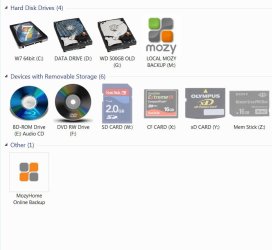
I have this Card Reader, and have installed it on multi machines. No Special Driver is required in W7. This is likely a Drive letter issue. First go to Control Panel>Admin Tools>Computer Management>Click on "Disk Manager" in the L hand Column> Your Card Reader Drives SHOULD show up individually as "Removable" with "No Media" listed For Each type of “Storage Device” on your machine.
* Here I always Change each of the types of card reader drives to say for example "W" "X" "Y" and "Z" This Helps you not have “drive letter interference” with other drives on your machine. (Remembering that your "C" drive is typically your OS,etc.)
Note* I have taken mine a step further. I go to "Computer" and R Click and Name Each one of the Card Reader Drives what it is, AND I change the icon to represent THAT kind of Card. Not only that, but what's nice in Win 7 is the fact that the card icons appear slightly transparent until a specific type of card is installed and then they are bold.
See Screen Shot.
Hope this helps!

 

Attachments

  • Drives.JPG
    Drives.JPG
    52 KB · Views: 28

My Computer My Computer

At a glance

Windows 7 64
Computer Manufacturer/Model Number
Custom RVPC
OS
Windows 7 64
Almost forgot!...I assume you have it plugged into the motherboard correctly?!
 

My Computer My Computer

At a glance

Windows 7 64
Computer Manufacturer/Model Number
Custom RVPC
OS
Windows 7 64
Yes it was installed right lol. Thanks. I looked into it and still nothing. I even got a new reader. Same problem :(
 

My Computer My Computer

At a glance

Windows 7 64Bit
OS
Windows 7 64Bit
Back
Top