3 GB visible of 4 GB Ram on 64-bit Windows

I always have my BIOS up to date.
BIOS update isn't risky if you do it right.
- Open the case and look on MB for the brand, model and even version.
- Go to the MB manufacture site and download the correct bios file for your MB.
- Don't trust windows to update the BIOS. Most MB has a BIOS application to update BIOS. If it doesn't, do on DOS.
- Never reset or shut down when flashing the EEprom. It won't take more than a minute.
- Once done, reconfigure your BIOS.

More memory is always better. 2+2G is better than 2+0 or 1+1 or 4+0
 

My Computers My Computers

  • At a glance

    Windows 7 HP 64i5 6600K - 800MHz to 4200MHz4+4G GSkill DDR4 3000IG - Intel 530
    Computer type
    PC/Desktop
    Computer Manufacturer/Model Number
    custom build
    OS
    Windows 7 HP 64
    CPU
    i5 6600K - 800MHz to 4200MHz
    Motherboard
    GA-Z170-HD3P
    Memory
    4+4G GSkill DDR4 3000
    Graphics Card(s)
    IG - Intel 530
    Monitor(s) Displays
    Samsung 226BW
    Screen Resolution
    1680x1050
    Hard Drives
    (1) -1 SM951 – 128GB M.2 AHCI PCIe SSD drive for Windows 7 and Lubuntu
    (2) -1 WD SATA 3 - 1T for Data
    (3) -1 WD SATA 3 - 1T for backup
    PSU
    Thermaltake 450W TR2 gold
    Keyboard
    Old and good Chicony mechanical keyboard
    Mouse
    Logitech mX performance - 9 buttons (had to disable some)
    Internet Speed
    500Mb/s
    Browser
    Firefox 64
    Other Info
    TinyWall firewall
  • At a glance

    Windows 7 Proi7-4500U 800MHz to 3.0GHz(4+4)G DDR3 1600IG intel 4400 + NVIDIA GeForce GT 745M
    Computer type
    Laptop
    System Manufacturer/Model Number
    Asus Q550LF
    OS
    Windows 7 Pro
    CPU
    i7-4500U 800MHz to 3.0GHz
    Motherboard
    Asus Q550LF
    Memory
    (4+4)G DDR3 1600
    Graphics Card(s)
    IG intel 4400 + NVIDIA GeForce GT 745M
    Sound Card
    Realtek
    Monitor(s) Displays
    LG Display LP156WF4-SPH1
    Screen Resolution
    1920 x 1080
    Hard Drives
    BX500 120G SSD for Windows and programs +
    1T HDD for data
    Internet Speed
    500 Mb/s
    Browser
    Firefox
    Other Info
    TinyWall firewall
I always have my BIOS up to date.
BIOS update isn't risky if you do it right.
- Open the case and look on MB for the brand, model and even version.
- Go to the MB manufacture site and download the correct bios file for your MB.
- Don't trust windows to update the BIOS. Most MB has a BIOS application to update BIOS. If it doesn't, do on DOS.
- Never reset or shut down when flashing the EEprom. It won't take more than a minute.
- Once done, reconfigure your BIOS.

More memory is always better. 2+2G is better than 2+0 or 1+1 or 4+0
Umm okay, thanks. I still think that there are risks involved because I'm a noob at this stuff but I'll give it a shot sometime.
 

My Computer My Computer

At a glance

windows 7 32bit
Computer type
PC/Desktop
OS
windows 7 32bit
Umm okay, thanks. I still think that there are risks involved because I'm a noob at this stuff but I'll give it a shot sometime.

Where it is especially risky is if the manufacturer's site gets hacked and bad code is hosted there. The only time it happened to me was flashing a USR external modem to V90. A perfectly working modem was brick-ified. USR made it good but it took them about 2 months to do so. By that time I bought another modem as it was twice as fast as the next fasted dial-up modem. Once you go fast you don't want to go back.

But on the point, I would find out if you can back off to older code before applying a new update. Especially if just doing it to be "current." When I comes to applying BIOS updates I never do it unless I have a problem addressed by the update. Also I have a feeling the update programs vary wildly by manufacturer. One BIOS maker may let you restore to an older version while another may not. Experimenting to find out is likely asking for trouble.

One thing that may save you some headaches, wait until the latest BIOS code has been out for at least a couple of weeks. Search for people complaining that it broke their systems. If there isn't a lot of squawking by then the code itself is probably OK. But of course if the site gets hacked that can happen at any time.
 

My Computer My Computer

At a glance

Windows 7 32 bitAMD 5200+ dual core2 GBNVidia GeForce 6150SE 128 MB
Computer Manufacturer/Model Number
HP Media Center
OS
Windows 7 32 bit
CPU
AMD 5200+ dual core
Memory
2 GB
Graphics Card(s)
NVidia GeForce 6150SE 128 MB
Monitor(s) Displays
CRT
Screen Resolution
1280x1024
Hard Drives
500 GB Sata internal :

SIIG USB 3.0 docking stations w/WD Caviar Black 6 Gb/s drives
Keyboard
PS/2
Mouse
PS/2 Wheel Mouse
Other Info
SIIG USB 3.0 PCIexpress card.
Umm okay, thanks. I still think that there are risks involved because I'm a noob at this stuff but I'll give it a shot sometime.

Where it is especially risky is if the manufacturer's site gets hacked and bad code is hosted there. The only time it happened to me was flashing a USR external modem to V90. A perfectly working modem was brick-ified. USR made it good but it took them about 2 months to do so. By that time I bought another modem as it was twice as fast as the next fasted dial-up modem. Once you go fast you don't want to go back.

But on the point, I would find out if you can back off to older code before applying a new update. Especially if just doing it to be "current." When I comes to applying BIOS updates I never do it unless I have a problem addressed by the update. Also I have a feeling the update programs vary wildly by manufacturer. One BIOS maker may let you restore to an older version while another may not. Experimenting to find out is likely asking for trouble.

One thing that may save you some headaches, wait until the latest BIOS code has been out for at least a couple of weeks. Search for people complaining that it broke their systems. If there isn't a lot of squawking by then the code itself is probably OK. But of course if the site gets hacked that can happen at any time.

Thanks for your insightful reply. :D
 

My Computer My Computer

At a glance

windows 7 32bit
Computer type
PC/Desktop
OS
windows 7 32bit
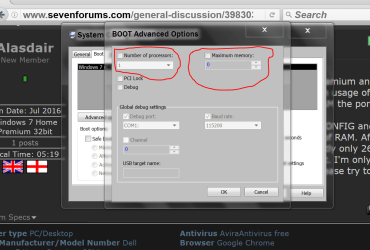
Just for verification.
Your computer should look like this.
Msconfig/Boot.

msconfig Boot advanced options.PNG
 

My Computer My Computer

At a glance

Windows 10 Pro. 64/ version 1709 Windows 7 Pr...Intel i7-6800K @ 4.3Corsair Platinum 16 gig @2400EVGA GTX 1070 OC
Computer type
PC/Desktop
Computer Manufacturer/Model Number
Home made Desktop
OS
Windows 10 Pro. 64/ version 1709 Windows 7 Pro/64
CPU
Intel i7-6800K @ 4.3
Motherboard
ASUS X-99 Deluxe II
Memory
Corsair Platinum 16 gig @2400
Graphics Card(s)
EVGA GTX 1070 OC
Monitor(s) Displays
Asus 27" LED LCD/VE278Q
Screen Resolution
1920-1080 or 1280-720 HDMI
Hard Drives
INTEL SSD 730-240 Gb Sata 3.0/
PSU
EVGA Platium 1200W
Case
Phanteks Luxe Tempered Glass 8 fans/ one radiator
Cooling
XSPC/ Water Cooled CPU
Keyboard
Das 4 Professional
Mouse
Logitech M705/MX Anywhere 2-S
Internet Speed
100 mbits
Antivirus
Microsoft Security Essentials/ Malwarebytes Premium 3.0/ SAS
Browser
I.E. 11 default/Firefox/ ISP Time Warner Cable/Spectrum
Other Info
LG BluRay Burner/
Sound system-KLipsch-THX/
Icy Dock ssd Hot Swap bays.
I always have my BIOS up to date.
BIOS update isn't risky if you do it right.
- Open the case and look on MB for the brand, model and even version.
- Go to the MB manufacture site and download the correct bios file for your MB.
- Don't trust windows to update the BIOS. Most MB has a BIOS application to update BIOS. If it doesn't, do on DOS.
- Never reset or shut down when flashing the EEprom. It won't take more than a minute.
- Once done, reconfigure your BIOS.

More memory is always better. 2+2G is better than 2+0 or 1+1 or 4+0
Umm okay, thanks. I still think that there are risks involved because I'm a noob at this stuff but I'll give it a shot sometime.


You are right not to play around, especially you are noob.

There is nothing wrong with your computer.

For your info.

1. Sony Vaio only use 3GB RAM, no matter if i insert 4GB RAM OR 6GB RAM or 8GB RAM.

2. When you remove the RAM, do use eraser to polish the gold contact and clear the bits.
Do it outside the computer.
Most of the time, this work well, which include any other adapter cards with gold contact.
 

My Computer My Computer

At a glance

Windows 7 x64
Computer type
Laptop
Computer Manufacturer/Model Number
Toshiba L630 and L735
OS
Windows 7 x64
Hard Drives
240 GB SSD
Ram allocation in Bios?
 

My Computer My Computer

At a glance

Windows 7 Ent. x64
Computer type
PC/Desktop
Computer Manufacturer/Model Number
Dell
OS
Windows 7 Ent. x64
Ram allocation in Bios?

No such option. I've also uploaded all of my BIOS screens in a post in this thread, so you can look if any other option might help.
 

My Computer My Computer

At a glance

windows 7 32bit
Computer type
PC/Desktop
OS
windows 7 32bit
Back
Top