Recently I have purchased a HP 4 GB RAM DDR3 1333MHz for my Laptop Samsung NP-RV509-A0CIN. After installing this RAM into my laptop. My laptop show the 4 GB on system BIOS but it is not booting windows or anything just a black screen. So I downloaded and ran MemTest86+ from my Ubuntu disk and every time it is scanning the memory for errors the system restart with some rainbow color effect after few seconds....
But with my old 2GB OEM RAM laptop running just fine. Any help here?
My Computer
At a glance
Windows 7 Ultimate x64 EditionAMD PHENOM II 5502x 4GB CORSAIR DDR3 1333MHZNVIDIA GEFORECE GTS 250 512MB
Computer Manufacturer/Model Number
CuSToMeD
OS
Windows 7 Ultimate x64 Edition
CPU
AMD PHENOM II 550
Motherboard
ASUS M4N68T-M LE V2
Memory
2x 4GB CORSAIR DDR3 1333MHZ
Graphics Card(s)
NVIDIA GEFORECE GTS 250 512MB
Sound Card
OnBoARD
Monitor(s) Displays
SAMSUNG SYNCMASTER 2033
Hard Drives
1x 1TB WDD GREEN
1x 500GB WDD GREEN
1x 320GB SEGATE BARACODA 7200RPM
Hello and welcome Jeet sorry for the wait now mate read this
MEMTEST
The memtest you will need to make a bootable disk / stick andset the BIOS to boot from the optical or USBand it will take a fair time torun- some leave it overnight.
This is the current download Memtest86+ - Advanced Memory Diagnostic Tool
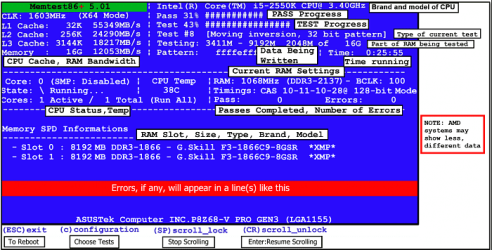
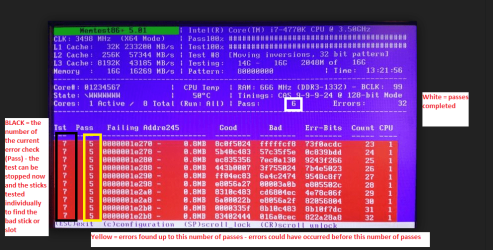
But one thing is very important you must let the test run for at least 8passes any less and the findings are no good. Now if errors come upstraight away then you can stop it - see my pics. Now if there are errors andyou have more than one stick of RAM in then you will need to test each stick ieremove the sticks and replace stick 1 in slot 1 and test no errors do thesame in slot 2 with stick 1 no errors then repeat the process with stick 2 -that will show up the faulty stick - the other thing is it could be a faultyslot but most unusual. With more than two sticks the process is even longer asone may realize.
It is a very lengthy and tedious process but worth it if youhave errors.
Having said that I would take out the original stick and put the new one in first on it's own as the issue has started since you put that new stick in, and if it tests out ok in slot one try it in slot 2 - tedious but you need to eliminate the slots as a problem cause..
Now while you have the sticks out I would do this
SLOT CLEANING
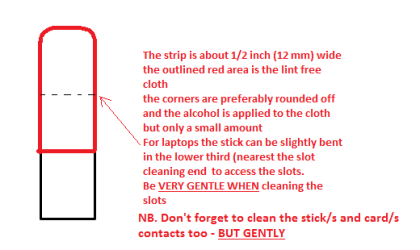
Now as for the slots toclean them use a strip of old credit card (or any card thin enough some arebetter than others ) about 1/2 inch wide nip the corners off one end - preferably round them offhold a piece of thin lint free cloth over theend dab on some form of alcohol - isopropyl alcohol (what we swab the skin withbefore an injection) is good and GENTLYswipe along the slots.
This can also be done for the GPU slot/s andalso the contacts of the sticks or cards - not the stick but some lint freecloth of course. See my pic for the sick but please be very gentle doing it ifyou are in any doubt - please ask before doing it but I use this all the timeand have yet to damage anything
Attachments
MEMTEST START UP SCREEN.PNG
57.2 KB
· Views: 8
MEMTEST X.PNG
185.4 KB
· Views: 0
STICK CLEANER.PNG
6.1 KB
· Views: 8
My Computer
At a glance
Desk1 7 Home Prem / Desk2 10 Pro / Main lap A...Desk1 i5 3750K / Laptop i7 GTX 860M / Desk2 i...Desk1 8GB (1866) / Desk2 16GB (1333) / Laptop...Desk 1& 2NVidia GTX 650 & Laptops on board Intel
Computer type
PC/Desktop
Computer Manufacturer/Model Number
Own build (new) Desk1 / Asus ROG Win 7 / Desk2 1st build
OS
Desk1 7 Home Prem / Desk2 10 Pro / Main lap Asus ROG 10 Pro 2 laptop Toshiba 7 Pro Asus P2520 7 & 10
One other Desktop (tester) and spare Toshba laptop both with SSD's
Running Kaspersky 2016 ISS on all machines config'd identically
Logitec audio stereo systems on each machine (x3)
Canon MG5250MFC
Router/modem TP-Link running WPA2SK
Now correct me if I am wrong but that machine is set to boot from the hard drive and booting to Ubuntu??
If you have made the memtest bootable disk (or stick) then you must set the BIOS to boot from that source (optical - I prefer a disk - or the USB option) the BIOS then boots firstly from that source - there should be no sign of the Ubuntu booting at all - if in doubt remove the C: drive.
I did see the memtest within that shot of the Ubuntu screen but the memtest we are wanting to do is the one I linked to as it is the only one to use. You have to download the memtest program from that link and save it and then burn it to a disk or stick using a suitable program making it bootable with the Windows feature or ImGburn The Official ImgBurn Website . If you cannot use this machine then get a friend to do that as it takes only a few minutes to make that bootable disk - or stick.
You then load the disk or stick into the machine and restart the machine and it should go straight into the memtest. The test should start straight away and again it takes a long time to do some leave it overnight but you MUST run it for at least 8 PASSESunless the errors come up straight away then you can stop it because you will have found the bad stick (or slot - most unusual for it to be a slot though)
My Computer
At a glance
Desk1 7 Home Prem / Desk2 10 Pro / Main lap A...Desk1 i5 3750K / Laptop i7 GTX 860M / Desk2 i...Desk1 8GB (1866) / Desk2 16GB (1333) / Laptop...Desk 1& 2NVidia GTX 650 & Laptops on board Intel
Computer type
PC/Desktop
Computer Manufacturer/Model Number
Own build (new) Desk1 / Asus ROG Win 7 / Desk2 1st build
OS
Desk1 7 Home Prem / Desk2 10 Pro / Main lap Asus ROG 10 Pro 2 laptop Toshiba 7 Pro Asus P2520 7 & 10
One other Desktop (tester) and spare Toshba laptop both with SSD's
Running Kaspersky 2016 ISS on all machines config'd identically
Logitec audio stereo systems on each machine (x3)
Canon MG5250MFC
Router/modem TP-Link running WPA2SK
Jeet mate do not boot from the Ubuntu disk boot from the memtest disk only - it will not work any other way.
I do not know of any other memory test Windows etc etc that does this test as the one I linked. Now it does take a long time to do and you must be patient and once again unless errors come up fairly quickly you have you run the test for at least 8 passes otherwise you may as well not bother.
If you do not want to do the memtest as I have laid it out then we cannot help you.
My Computer
At a glance
Desk1 7 Home Prem / Desk2 10 Pro / Main lap A...Desk1 i5 3750K / Laptop i7 GTX 860M / Desk2 i...Desk1 8GB (1866) / Desk2 16GB (1333) / Laptop...Desk 1& 2NVidia GTX 650 & Laptops on board Intel
Computer type
PC/Desktop
Computer Manufacturer/Model Number
Own build (new) Desk1 / Asus ROG Win 7 / Desk2 1st build
OS
Desk1 7 Home Prem / Desk2 10 Pro / Main lap Asus ROG 10 Pro 2 laptop Toshiba 7 Pro Asus P2520 7 & 10
One other Desktop (tester) and spare Toshba laptop both with SSD's
Running Kaspersky 2016 ISS on all machines config'd identically
Logitec audio stereo systems on each machine (x3)
Canon MG5250MFC
Router/modem TP-Link running WPA2SK
Hi... I have downloaded that program and burned it to USB drive using UltraISO... After running the test within 1-2 second the screen flicker and laptop shutdown. Same as before.
My Computer
At a glance
Windows 7 Ultimate x64 EditionAMD PHENOM II 5502x 4GB CORSAIR DDR3 1333MHZNVIDIA GEFORECE GTS 250 512MB
Computer Manufacturer/Model Number
CuSToMeD
OS
Windows 7 Ultimate x64 Edition
CPU
AMD PHENOM II 550
Motherboard
ASUS M4N68T-M LE V2
Memory
2x 4GB CORSAIR DDR3 1333MHZ
Graphics Card(s)
NVIDIA GEFORECE GTS 250 512MB
Sound Card
OnBoARD
Monitor(s) Displays
SAMSUNG SYNCMASTER 2033
Hard Drives
1x 1TB WDD GREEN
1x 500GB WDD GREEN
1x 320GB SEGATE BARACODA 7200RPM
I know this isn't strictly a BSOD problem but am curious.
Personally too I much prefer an optical disk as I am not a fan of booting from sticks so if you can try that method if it booted then there is something wrong with the USB slots or the drivers. Same process to burn a disk mate and so cheap and I find them easier to store in a folder I keep for such stuff.
Now something else too if you have a good friend let him try and boot the memtest if it starts up then the drive you are using will be ok if not then it probably is corrupt.
But again personally I much prefer a an optical disk as I am not a fan of booting from sticks. If that method doesn't work then either the optical is faulty or we shall have to look elsewhere in the machine because it involves graphics.
Just as by the by have you updated the BIOS recently too??
My Computer
At a glance
Desk1 7 Home Prem / Desk2 10 Pro / Main lap A...Desk1 i5 3750K / Laptop i7 GTX 860M / Desk2 i...Desk1 8GB (1866) / Desk2 16GB (1333) / Laptop...Desk 1& 2NVidia GTX 650 & Laptops on board Intel
Computer type
PC/Desktop
Computer Manufacturer/Model Number
Own build (new) Desk1 / Asus ROG Win 7 / Desk2 1st build
OS
Desk1 7 Home Prem / Desk2 10 Pro / Main lap Asus ROG 10 Pro 2 laptop Toshiba 7 Pro Asus P2520 7 & 10
One other Desktop (tester) and spare Toshba laptop both with SSD's
Running Kaspersky 2016 ISS on all machines config'd identically
Logitec audio stereo systems on each machine (x3)
Canon MG5250MFC
Router/modem TP-Link running WPA2SK