Hey guys,
Ok so I'm new here at SevenForums. So what I want to do is connect my Vista PC, and my Windows 7 laptop to my XP laptop which has a printer. I have two printers, one connected to the Vista Desktop and one to the XP laptop. I would also like to enable file sharing. All of these computers are connected to my wireless Internet network. The XP is connected with an Ethernet cable though. Could you guys please help me with this?
Thanks,
Mega99
Hello Mega99, and welcome to Windows Seven Forums.
In my home network, I have three Windows 7s, a couple of XPs, a couple of Ubuntus, and two printers happily co-existing.
Since the Vista and XP computers cannot use Windows 7's HomeGroup, you will have to add 7 to your Workgroup. In Windows 7 you might as well remove any traces of HomeGroup and disable IPV6: Start here by leaving and removing HomeGroup
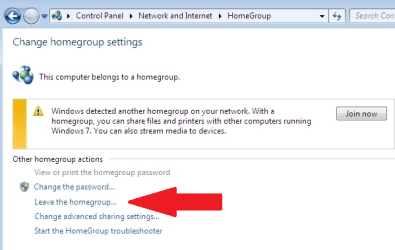
Then look at this MS link: if your computer does not have this reg entry, add it with the "dword 0xffffffff" as instructed to disable IPV6
How to disable certain Internet Protocol version 6 (IPv6) components in Windows Vista, Windows 7 and Windows Server 2008
Next have your Windows 7 computer join your Workgroup:

To share files between computers you will have to select or create folders, open their properties and "share" with "Everyone".
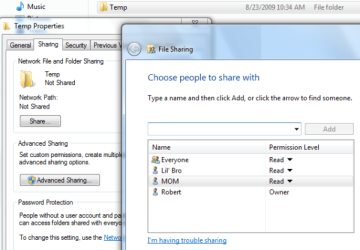
Also in the Advanced Network Sharing you might want to have setting like this: these are for a simple (not secured) home network
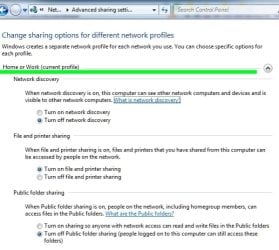

You will need at least one identical user account (with administrator privileges) on each computer to simplify access. You will only need to login once with this account to be given access.
Windows 7 will only be able to print to 7 compatible printers, ie those with drivers. To find out if your printers will work with 7, one way is to temporarily connect the printer directly to the 7 computer. If drivers are found and loaded and you can print, then you will be able to print via your home network. You can also check the printer manufacturer's web site for updated printer drivers. For example, both my printers are connected to my XP computer. 7 has no problem with my HP PSC 1610, although I have not been able to use the scanner yet. However, my Canon S600 is to old and Canon refused to write drivers for Vista or 7, so to use it I have to copy the file to my XP computer and print from there.
Windows 7 uses WPA or WPA2-Personal network security. If you are now using WEP you will have to change to WPA. It is better anyway.

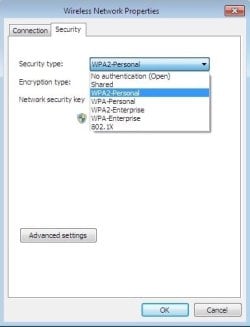
I hope this will get you started, I am sure I have forgotten a few things. No doubt you will have questions along the way. There are many skilled, knowledgeable Gurus here at Windows Seven Forums with networking experience to answer your questions. Feel Free.
Cheers!
Robert
