3 TB HD lost partition emergency

Plaxmol

New member
Local time
8:44 AM
Messages
4
Hi,

I bought a Western Digital 3 TB HD in june 2017 for transferring my .flac and .wav audio collection.
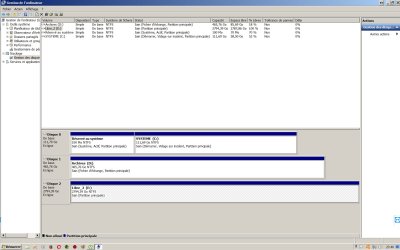
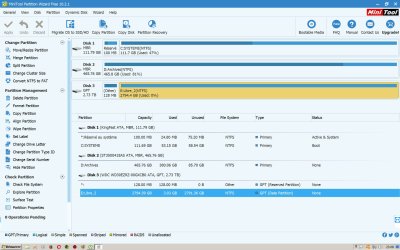
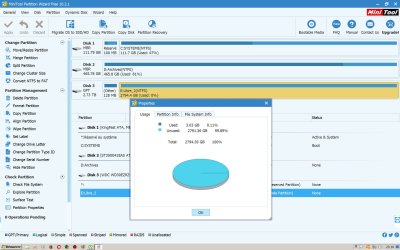
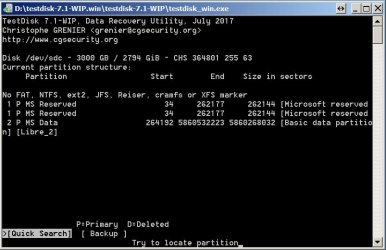
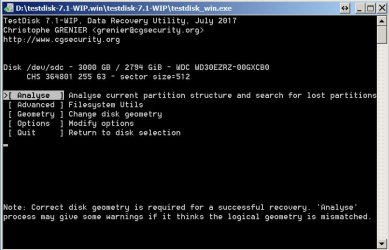
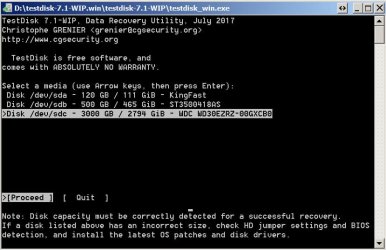
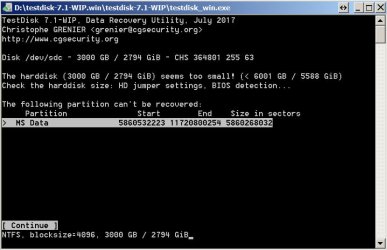
Those wav and flac are mostly from my LP collection digitalized. (almost 10 years of work) I was going to buy a new hard drive in a few days to make a backup of this collection. I was transferring new folders on the HD when stranges things append, the disk stopped and when i want to access it it was no longer accessible. So i tried to see what's going on with Minitool Partition Wizard + Windows HardDisk Tool + TestDisk but i'm just a little lost. In Minitool Partition Wizard when i explore the files it just see some of the files and it is on the folder i was transferring the last files (in the files explorer) it says around 3 gb.

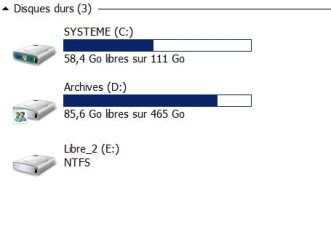
Here's some printscreens:
 

Attachments
  • 01.jpg
    01.jpg
    28.9 KB · Views: 60
  • 02.jpg
    02.jpg
    199.9 KB · Views: 12
  • 03.jpg
    03.jpg
    218.2 KB · Views: 1
  • 04.jpg
    04.jpg
    209.6 KB · Views: 2
  • 09.jpg
    09.jpg
    75.9 KB · Views: 0
  • 08.jpg
    08.jpg
    67.9 KB · Views: 0
  • 07.jpg
    07.jpg
    76 KB · Views: 1
  • 06.jpg
    06.jpg
    75 KB · Views: 0
  • 05.jpg
    05.jpg
    72.2 KB · Views: 1

My Computer My Computer

Computer type
PC/Desktop
OS
Windows 7 Ultimate x64
CPU
Intel i7
Motherboard
AsRock Z68 Extreme4
Memory
16 g
Graphics Card(s)
Nvidia GeForce GTX-750
Hard Drives
SSD 240 + Seagate 1.5 g + Seagate 1.5 g
Antivirus
Avast
Browser
Opera
I just forget to say that i had around 1.8tb on the 3tb disk... Now softwares says i have around 3 gb.
 

My Computer My Computer

Computer type
PC/Desktop
OS
Windows 7 Ultimate x64
CPU
Intel i7
Motherboard
AsRock Z68 Extreme4
Memory
16 g
Graphics Card(s)
Nvidia GeForce GTX-750
Hard Drives
SSD 240 + Seagate 1.5 g + Seagate 1.5 g
Antivirus
Avast
Browser
Opera
Are those the only existing files, on the original and on the 2nd media? There are no backups elsewhere?
Possibly, there are two tines on this fork in the road: Remotely possible is the receiving hard-drive is developing a physical problem or a logical problem, and, data recovery methods might be needed to get all your folders and files back to the original state of existence, being able to be read from and written to.
You are wise to ask for help here. There are many, unlike myself, who know from knowledge and experience exactly what problems your computer is having. I was leading up to suggesting making a clone of each hard-drive onto another external hard-drive (meaning having two external hard-drives), however, that might be neither doable or practical; let's see what others post.
 

My Computer My Computer

Computer type
PC/Desktop
Computer Manufacturer/Model Number
Antec desktop; Acer Aspire laptops
OS
Windows 7 Professional 64-bit
CPU
Desktop i5; Acers i5 & i7
Memory
desktop 16GB; 1 Acer 8GB & 1 Acer 16GB
Hard Drives
1TB split into 2 equal partitions [OS and data] usable by RJS
Internet Speed
AT&T DSL
Browser
FF, GChrome, msIE
Other Info
Windows 7 Firewall, Emsisoft AM/AV, MSE [scan-only], SpywareBlaster, Ruiware/BillP combine
Hi,

Thanks for the reply. Yes this is the only files softwares can read. On the original state of the hard disk i have more than 3500 folders and now it can read around 10 and it is on the last folder i was working on when the crash happended.

Also i don't have any backup (I was going to get a hard drive soon to make a backup). It is the only HD that is not backuped. (i have everything in double but not on this one)

Here's a list of the category i had on the disk (with WhereIsIt)
 

Attachments

  • 10.jpg
    10.jpg
    329.9 KB · Views: 4

My Computer My Computer

Computer type
PC/Desktop
OS
Windows 7 Ultimate x64
CPU
Intel i7
Motherboard
AsRock Z68 Extreme4
Memory
16 g
Graphics Card(s)
Nvidia GeForce GTX-750
Hard Drives
SSD 240 + Seagate 1.5 g + Seagate 1.5 g
Antivirus
Avast
Browser
Opera
After 3 days of analyse scan:
 

Attachments

  • 13_après 3 jours de scan.jpg
    13_après 3 jours de scan.jpg
    72 KB · Views: 1

My Computer My Computer

Computer type
PC/Desktop
OS
Windows 7 Ultimate x64
CPU
Intel i7
Motherboard
AsRock Z68 Extreme4
Memory
16 g
Graphics Card(s)
Nvidia GeForce GTX-750
Hard Drives
SSD 240 + Seagate 1.5 g + Seagate 1.5 g
Antivirus
Avast
Browser
Opera
Sorry, I didn't see this thread earlier for I generally do not peep into this sub-forum.

Where is your Disk labelled Libre 2 situated? Is it inside a dock?

I am still not clear about your problem description but I smell that you have used a 3TB drive on an incompatible dock. Originally it must have been a 3 TB MBR drive which the dock cannot handle (3TB). After passing 1.8 TB of data it wraps around and starts writing from the beginning. And it looks like it got formatted afresh as a GPT drive and started writing whatever you wrote last. That would mean that the original partition structure is lost, reason why you do not see the previous data. Most of your data may still be there but the original volume boot records have been destroyed by the fresh format/write from the beginning.

If you are still looking into this thread I would need the following information.

1. When did you buy that 3TB drive? If it was long ago, then it would/could have been an advance formatted MBR drive. Right now it is showing as a GPT drive. Do you know whether it was an MBR drive or GPT drive when you bought it?

2. Where exactly is it situated? If it is a dock post the manufacturer and Model Number of the dock to check its drive handling capacity.
 
Last edited:

My Computer My Computer

OS
Windows 7 Home Premium 32 bit
it seems that partition on the disk gets damaged. Usually it is $MFT that gets corrupted. You can load files in the disk with partitionguru (Tools - Load Current Partition Intelligently) and view your files directly. If partitions get lost, you can search for lost partitions and restore partition table.
 

My Computer My Computer

Computer type
PC/Desktop
Computer Manufacturer/Model Number
unknown
OS
windows 7 64
CPU
i3-2100
Back
Top