Recover partition after executing diskpart clean command

rbisawa

New member
Member
Local time
10:42 PM
Messages
44
Hi All,

Below is the summary of my problem:


  1. I installed new SSD on my Dell Inspiron 5480 laptop along with 1 TB hard disk to enhance performance of my laptop.
  2. I cloned windows 10 on the SSD from boot partition (C:) in hard disk using Macrium Reflect software by following all instructions mentioned in this Youtube video
  3. I was able to successfully boot windows 10 through newly installed SSD and things were fine, until I thought of removing windows partition from hard disk, since I no longer needed it to boot windows.
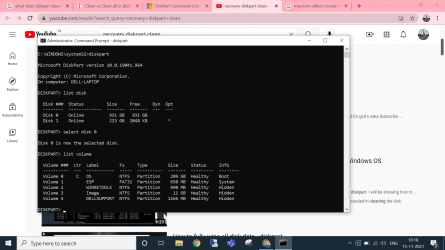
  4. I opened Diskpart from cmd and executed following commands:


  • [*=1]list disk
    [*=1]select disk 0
    [*=1]clean
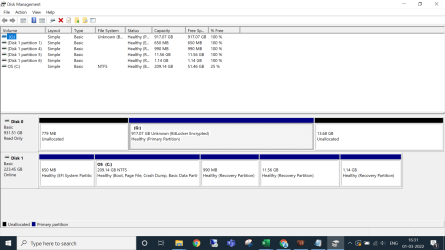
5. disk 0 was the hard disk, so in the process I ended up formatting my data partition (D:) which was a logical partition as well and lost all data. Below is the screenshot showing the unallocated drive below the SSD drive:

image.png

Now, I want to recover only the data part which should be around 50-60 GB from data partition (D:) which I accidently formatted. I have already tried minitool partition and minitool data recovery, however, both could not locate and recover data. Now I am trying photorec which is still running (found 740 files). Below is a screenshot of photorec for your reference:
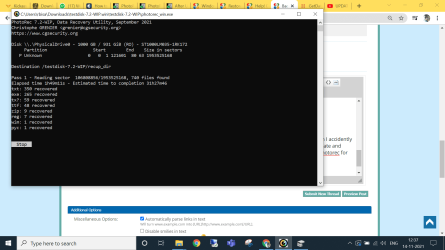
image.png

However, I am looking for a software which could help recover original files with folder structure. Please help!
 

My Computer

OS
Windows 7 Home Basic
Try partition recovery (rather than data recovery). jumanji might walk you through using testdisk.
 

My Computers

System One System Two

  • Computer type
    PC/Desktop
    OS
    7 X64
    CPU
    i5 8400
    Motherboard
    gigabyte b365m ds3h
    Memory
    2x8gb 3200mhz
    Hard Drives
    various
    PSU
    pure power 11 400w cm
    Case
    Coolermaster
    Cooling
    cryorig m9i
  • Computer type
    PC/Desktop
    OS
    7x64
    CPU
    g5400
    Motherboard
    ga b365m ds3h
    Memory
    8gb ddr4 2400
    PSU
    xfx pro 450w
Just an update, I have stopped Photorec mid-way and started scanning using GetDataBack Pro trial version (Level 4) to see if it can recover files from data partition. Please find below screenshot:

image.png

Awaiting for @jumanji to take over and advise further action.
 

Attachments

  • image.png
    image.png
    306.9 KB · Views: 3
Last edited:

My Computer

OS
Windows 7 Home Basic
If I remeber correctly, I think he said he was going away for a few days. That was a couple of days ago.

If you dont want to wait, you can probably find instructions on using test disk for partition recovery on tinternet.
 

My Computers

System One System Two

  • Computer type
    PC/Desktop
    OS
    7 X64
    CPU
    i5 8400
    Motherboard
    gigabyte b365m ds3h
    Memory
    2x8gb 3200mhz
    Hard Drives
    various
    PSU
    pure power 11 400w cm
    Case
    Coolermaster
    Cooling
    cryorig m9i
  • Computer type
    PC/Desktop
    OS
    7x64
    CPU
    g5400
    Motherboard
    ga b365m ds3h
    Memory
    8gb ddr4 2400
    PSU
    xfx pro 450w
Hi jumanji, could you please assist. Waiting for your revert eagerly.
 

My Computer

OS
Windows 7 Home Basic
Not sure if it'll work, but DiskGenius has built-in data and partition recovery.

You can also clone that formatted drive to another drive with HDDRawCopy in case you mess something up. HDDGURU: HDD Raw Copy Tool


There's also Roadkil's Raw Copy. Roadkil.Net - Roadkil's Raw Copy Program Download

I've had great success with HDDRawCopy. It'll copy an encrypted drive as well. Since it's portable I was able to use it in Hirens's Boot CD.

Many people think a standard format deletes data, that's not the case at all. I've successfully restored a deleted partition before.

Something else worth mentioning. You can mount a HDDRawCopy img file with ImDisk. It'll mount as a virtual disk shown under My Computer as a hard drive. Great for low level copying of problematic SD and USB flash media. ImDisk Toolkit download | SourceForge.net

Just right click the img file to mount. When you want to unmount the virtual hard drive right click it under My Computer or This Computer in Windows 10.
 

My Computer

Computer type
PC/Desktop
OS
Windows 7 Ultimate x64
Hi @rbisawa,

You were on the right track using GetDataBack Pro. You had initiated Level 4 scan. What happened?

Is your 1TB drive still shows as "unallocated"? is it an internal or external drive?

How many partitions were there in that Disk 0, before you ran diskpart clean command"?

Why was it a logical partition when you could have had four primary partitions in an MBR initialised disk??

Expect some delays in my response since I am still busy with many other personal work.
 
Last edited:

My Computer

OS
Windows 7 Home Premium 32 bit
Hi @jumanji,

Sorry for late reply.

1. Could not recover data using GetDataBack Pro.

2. 1 TB drive is internal hard disk included while purchasing laptop. Since it was a SATA drive dragging at slow speeds of 5400 RPM, I thought of adding an SSD (mentioned in my first post) and install OS in the newly added SSD, which I did and was working fine. However, in order to delete C partition which contained the OS in hard drive, I accidently deleted the entire hard disk which even had data drive partition (D drive).

3. Currently, my disk management looks like below:

image.png

4. There were multiple partitions in Disk 0, before I ran diskpart clean command, since it had couple of in-build partitions received while purchasing the laptop.

5. I did not make any changes to the partition type originally received while purchasing the laptop, so no idea why was it logical partition.

I have tried several data recovery tools, none of them seem to work. I have lost all hopes of data recovery. Would appreciate any help.

PS: The 917 GB partition is Bitlocker encrypted, does that mean I need to decrypt the partition before running data recovery software. If yes, then, please provide steps for the same.
 

My Computer

OS
Windows 7 Home Basic
Back
Top