
32-bit to 64-bit install

My Computer My Computer

Computer Manufacturer/Model Number
Gateway GT5692
OS
Windows 7 Ulti. x64
CPU
AMD Phenom 8450 triple-core 2.10 ghz
Memory
4GB
Graphics Card(s)
ATI Radion HD 3200
Monitor(s) Displays
Gateway FPD1775W
Screen Resolution
1280x720
Hard Drives
465.6613 Gibibytes
Okay, as I suspected, I downloaded the x32 RC from the MS site and I end up with Build7100 32-bit. I ran the WEI (haven't figured out out to paste it in here but I tadded it as an attachment) and it tells me my computer is 64-bit capable.

So, here's the mystery, why when I boot up to the "7100.0.090421-1700_x64fre_client_en-us_retail_ultimate-grc1culxfrer_en_dvd" DVD does the install screen tell me that it is installing Build7000? I've downloaded the image twice and used three different DVD burns. Is the image at the site misnamed?


Attached Thumbnails
hey, that is a mystery, did you try downloading from within windows 7 then click on file and burn using windows 7?
 

My Computer My Computer

Computer Manufacturer/Model Number
Gateway GT5692
OS
Windows 7 Ulti. x64
CPU
AMD Phenom 8450 triple-core 2.10 ghz
Memory
4GB
Graphics Card(s)
ATI Radion HD 3200
Monitor(s) Displays
Gateway FPD1775W
Screen Resolution
1280x720
Hard Drives
465.6613 Gibibytes
Trying that as I type. From within Win7 Build7001 x32 I downloaded the x64 image fresh from Microsoft. Using an ISO Image burning app I am currently burning the image to DVD.
 

My Computer My Computer

Computer Manufacturer/Model Number
Custom Made
OS
windows 7 RC
CPU
Pentium D 945 3,2GHz Dual Core
Motherboard
Abit I45-C
Memory
4 GB
Graphics Card(s)
ATI Radeon x1300
Sound Card
Onboard
Monitor(s) Displays
Acer P221w (22in LCD WS)
Screen Resolution
1680x1050
Hard Drives
2 - WD 80GB IDEs
1 - WD 500GB SATA
Cooling
plenty
Keyboard
MS Ergonomic 4000 v1.0
Mouse
Logitech TrackMan Wheel
Internet Speed
Comcast @ 15Mb
It was suggested in General Discussions that maybe I was renaming the x32 file with the x64 name...That could happen although I don't want to believe it :). Anyway, I finally resolved the issue. I downloaded the x64 image from within Win7 Build7100 x32 and burned the image with "ISO Burner".
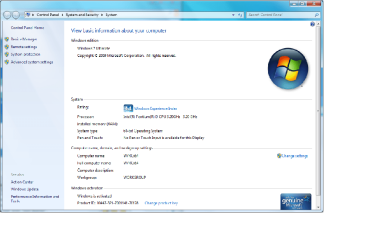
Having said that, one of the reasons I decided to play around with the 64-bit version was that I had upgraded from 2 to 4 GB of memory and understood that 32-bit systems could not see beyond about 3.25GB. So what do I get? Well, I ran the Windows Experience Index and it only reports 3.25GB of Ram. When I look at the System info via START/RC Computer/Properties I see nothing reported under "Installed Memory". Oh well, I didn't have anything to do this weekend anyway. So now that I finally got x64 installed I will proceed to find out what's up with the memory usage.

Thanks for the help everyone.
 

Attachments

  • X64Build7100.png
    X64Build7100.png
    49.1 KB · Views: 10
Last edited:

My Computer My Computer

Computer Manufacturer/Model Number
Custom Made
OS
windows 7 RC
CPU
Pentium D 945 3,2GHz Dual Core
Motherboard
Abit I45-C
Memory
4 GB
Graphics Card(s)
ATI Radeon x1300
Sound Card
Onboard
Monitor(s) Displays
Acer P221w (22in LCD WS)
Screen Resolution
1680x1050
Hard Drives
2 - WD 80GB IDEs
1 - WD 500GB SATA
Cooling
plenty
Keyboard
MS Ergonomic 4000 v1.0
Mouse
Logitech TrackMan Wheel
Internet Speed
Comcast @ 15Mb
Great pdj1952, Good news about the x64 loading for you, the memory thing is a bios setting or new drivers or some such thing,easy fix for that. enjoy, lm
 

My Computer My Computer

Computer Manufacturer/Model Number
Gateway GT5692
OS
Windows 7 Ulti. x64
CPU
AMD Phenom 8450 triple-core 2.10 ghz
Memory
4GB
Graphics Card(s)
ATI Radion HD 3200
Monitor(s) Displays
Gateway FPD1775W
Screen Resolution
1280x720
Hard Drives
465.6613 Gibibytes
Actually my Abit I-45CV states it will accept 4GB (2-2GB sticks) of RAM and the BIOS counts up the full 4GB. So, it's off to the races again. Hey, Rome wasn't built in a day either:sarc:...
 

My Computer My Computer

Computer Manufacturer/Model Number
Custom Made
OS
windows 7 RC
CPU
Pentium D 945 3,2GHz Dual Core
Motherboard
Abit I45-C
Memory
4 GB
Graphics Card(s)
ATI Radeon x1300
Sound Card
Onboard
Monitor(s) Displays
Acer P221w (22in LCD WS)
Screen Resolution
1680x1050
Hard Drives
2 - WD 80GB IDEs
1 - WD 500GB SATA
Cooling
plenty
Keyboard
MS Ergonomic 4000 v1.0
Mouse
Logitech TrackMan Wheel
Internet Speed
Comcast @ 15Mb
I agree with ccatlett1984 100%

under no circumstances can you 'upgrade' from a 32 bit install to a 64 one, period.

My suggestion is to completely wipe the drive, or at least start from a clean partition for your 64 bit OS. Installing overtop other installs without removing them first can get messy, and end up with a large windows.old folder. once you go 64 bit though, you can always upgrade to new builds, resetting the trial timeout without registering.

good luck with this.
 

My Computer My Computer

Computer Manufacturer/Model Number
Myself
OS
Windows 7 64bit Ultimate Build 7268.0.090701-1900
CPU
Quad CPU Q6600 @ 2.4GHz
Memory
4GB 6400 Dual Channel
Graphics Card(s)
1GB DDR3 x16 + 512mb ddr2 x1
Sound Card
I dunno, but it puts out a good 7.1 sur through the fiber :D
Monitor(s) Displays
Quad-Monitor display (check out the photo)
Screen Resolution
1200x1600
Hard Drives
(2 x 1TB) + (1 x 500Gb)

tip: Always run your OS on a small Disk with away from your large storage files, and make sure theirs plenty of Cache (32mb recommnded).
PSU
1000w
Case
a block of wood
Cooling
Intel Standard. tip: Dont overclock with beta win7...
Internet Speed
15meg
Hey 'antalgebra', I'm running Win7 x64 Ultimate Build7100...I see you're running "Windows 7 64bit Ultimate Build 7228-1900" and I notice others are running latter builds, as well; where are these builds available? - Paul D.
 

My Computer My Computer

Computer Manufacturer/Model Number
Custom Made
OS
windows 7 RC
CPU
Pentium D 945 3,2GHz Dual Core
Motherboard
Abit I45-C
Memory
4 GB
Graphics Card(s)
ATI Radeon x1300
Sound Card
Onboard
Monitor(s) Displays
Acer P221w (22in LCD WS)
Screen Resolution
1680x1050
Hard Drives
2 - WD 80GB IDEs
1 - WD 500GB SATA
Cooling
plenty
Keyboard
MS Ergonomic 4000 v1.0
Mouse
Logitech TrackMan Wheel
Internet Speed
Comcast @ 15Mb
Hey 'antalgebra', I'm running Win7 x64 Ultimate Build7100...I see you're running "Windows 7 64bit Ultimate Build 7228-1900" and I notice others are running latter builds, as well; where are these builds available? - Paul D.

I believe there are some 7201's floating around, although I wouldn't be able to help you out getting anything newer (not for public use yet). Although you should be able to look forward to 7300 being available in a couple weeks.
 

My Computer My Computer

Computer Manufacturer/Model Number
Myself
OS
Windows 7 64bit Ultimate Build 7268.0.090701-1900
CPU
Quad CPU Q6600 @ 2.4GHz
Memory
4GB 6400 Dual Channel
Graphics Card(s)
1GB DDR3 x16 + 512mb ddr2 x1
Sound Card
I dunno, but it puts out a good 7.1 sur through the fiber :D
Monitor(s) Displays
Quad-Monitor display (check out the photo)
Screen Resolution
1200x1600
Hard Drives
(2 x 1TB) + (1 x 500Gb)

tip: Always run your OS on a small Disk with away from your large storage files, and make sure theirs plenty of Cache (32mb recommnded).
PSU
1000w
Case
a block of wood
Cooling
Intel Standard. tip: Dont overclock with beta win7...
Internet Speed
15meg
Back
Top