32-bit XP to Make USB to install 64-bit Win 7

eql2006

New member
Local time
3:56 PM
Messages
15
Hi All,
I just built a new computer that has no OS on it currently. I didn't buy an internal DVD drive because I have an external one. I thought that I would be able to install Win7HP from this external DVD drive, but it doesn't seem to be the case. I've been trying to make a bootable USB to install it but I've been having difficulty. I now have a copy of the 32-bit bootsec.exe (from elsewhere on this forum), but I'm not sure how to make the USB load the boot file (like in step 6 here)
Any help is greatly appreciated. I know a bit with cmd but i'm not great, so good instructions are appreciated.
After thoughts:
I'm running XP SP3 32-bit on my laptop (where i am trying to create the USB)
I'm trying to install Win7HP from a DVD
Thanks,
*EQL*
 

My Computer My Computer

At a glance

XP/7
OS
XP/7

My Computer My Computer

At a glance

ME/XP/Vista/Win7
OS
ME/XP/Vista/Win7
i have a OEM dvd version, not a downloaded version. I can create an .iso file but i'm not sure which file to select as the boot file.
*EQL*
 

My Computer My Computer

At a glance

XP/7
OS
XP/7
You only need to make the USB bootable then copy the contents (all the contents) of the DVD to the thumbdrive...better to copy the contents of the DVD to the hard drive then USB.
 

My Computer My Computer

At a glance

Windows 10 Pro (x64)Intel Core i7-3930K (3.2GHz - 4.5GHz)4x Samsung 4GB PC3-12800 DDR3 (16GB 1600MHz)Nvidia Geforce GTX 690
Computer type
PC/Desktop
Computer Manufacturer/Model Number
Alienware Aurora ALX R4
OS
Windows 10 Pro (x64)
CPU
Intel Core i7-3930K (3.2GHz - 4.5GHz)
Motherboard
Alienware Aurora-R4 x79
Memory
4x Samsung 4GB PC3-12800 DDR3 (16GB 1600MHz)
Graphics Card(s)
Nvidia Geforce GTX 690
Sound Card
SteelSeries Siberia Elite
Monitor(s) Displays
Dell UltraSharp U3011
Screen Resolution
2560x1600
Hard Drives
Samsung 850 Pro 256 GB, Seagate 1TB Desktop Hybrid HDD, 2x Western Digital 4TB Green HDD
PSU
875W Some Dell PSU <.<
Case
Alienware Aurora ALX
Cooling
Custom Liquid Cooling (EK CPU & GPU blocks) dual EK 480RAD
Keyboard
Logitech G710+ Mechanical
Mouse
Logitech G700s
Internet Speed
Verizon Fios (50 mbps average)
Other Info
Server: Intel NUC D54250WYK: i5-4250U, 16GB, 256 GB mSATA, Windows Server 2012 R2
Greg, do you know if this will work with OEM Recovery Discs? Seems like it should since they are bootable. Just wondering if you have any experience with them.

Reason I'm asking is I was just reading in a a forum (not sure which one at the moment) where A guy wanted to restore to factory using his OEM Recovery disc but his laptop DVD drive was broken. If this will work then I'll go find the post and suggest it to him.
 

My Computer My Computer

At a glance

Windows 10 Pro X64Intel Quad Core i7-4770 @ 3.4Ghz16.0GB PC3-12800 DDR3 SDRAM 1600 MHzIntel Integrated HD Graphics
Computer type
PC/Desktop
Computer Manufacturer/Model Number
Lenovo IdeaCenter 450
OS
Windows 10 Pro X64
CPU
Intel Quad Core i7-4770 @ 3.4Ghz
Memory
16.0GB PC3-12800 DDR3 SDRAM 1600 MHz
Graphics Card(s)
Intel Integrated HD Graphics
Sound Card
Realtek HD Audio
Monitor(s) Displays
HP 22" LCD
Screen Resolution
1680 x 1050
Hard Drives
250GB Samsung EVO SATA-3 SSD
2TB Seagate ST2000DM001 SATA-2
1.5TB Seagate ST3150041AS SATA
Keyboard
Dell USB
Mouse
Lenovo USB
Internet Speed
Cable via Road Runner 3MB Upload, 30MB Download
Antivirus
Windows Defender, MBAM Pro, MBAE
Browser
Seamonkey
Other Info
UEFI/GPT
PLDS DVD-RW DH16AERSH
I've never heard of Recovery Disks being written successfully to flash stick except using the special app which HP has for it. Others are probably catching up though since netbooks would almost demand it.

The problem is merging multiple disk ISO's which would take more expertise than I've yet seen applied. Anyone else? Theog will probably be up on it.

The tool I linked is limited to the long list of installers (mostly Linux) in the dropdown menu, which includes Vista and Win7. UltraISO will write most any ISO to bootable flash from its file or right off the DVD. But in the past it's taken WinToFlash to write Repair CD's for some reason.
 
Greg, do you know if this will work with OEM Recovery Discs? Seems like it should since they are bootable. Just wondering if you have any experience with them.

Reason I'm asking is I was just reading in a a forum (not sure which one at the moment) where A guy wanted to restore to factory using his OEM Recovery disc but his laptop DVD drive was broken. If this will work then I'll go find the post and suggest it to him.

A:Yes & NO.


If the OEM Recovery Discs, have been made using one DVD R or one DVD R DL, yes, use Method Two
http://www.sevenforums.com/tutorials/2432-usb-windows-7-installation-key-drive-create.html?ltr=U

If more than one, Recovery will ask for disk two, +.
 

My Computer My Computer

At a glance

ME/XP/Vista/Win7
OS
ME/XP/Vista/Win7
Do vendor recovery discs come on more than one DVD? I think I'll point him to Option 2 and see what happens (if I can find the post again). Thanks Greg and Theog.
 

My Computer My Computer

At a glance

Windows 10 Pro X64Intel Quad Core i7-4770 @ 3.4Ghz16.0GB PC3-12800 DDR3 SDRAM 1600 MHzIntel Integrated HD Graphics
Computer type
PC/Desktop
Computer Manufacturer/Model Number
Lenovo IdeaCenter 450
OS
Windows 10 Pro X64
CPU
Intel Quad Core i7-4770 @ 3.4Ghz
Memory
16.0GB PC3-12800 DDR3 SDRAM 1600 MHz
Graphics Card(s)
Intel Integrated HD Graphics
Sound Card
Realtek HD Audio
Monitor(s) Displays
HP 22" LCD
Screen Resolution
1680 x 1050
Hard Drives
250GB Samsung EVO SATA-3 SSD
2TB Seagate ST2000DM001 SATA-2
1.5TB Seagate ST3150041AS SATA
Keyboard
Dell USB
Mouse
Lenovo USB
Internet Speed
Cable via Road Runner 3MB Upload, 30MB Download
Antivirus
Windows Defender, MBAM Pro, MBAE
Browser
Seamonkey
Other Info
UEFI/GPT
PLDS DVD-RW DH16AERSH
The latest HP Recovery disks for a new laptop are 3 DVD's. They wanted a 12gb flashstick which is more than I want to bother with since I don't want the bloatware anyway. The new HP minimalist option Recovery is very close to a clean reinstall so worth preserving the OEM partitions IMO and having a set of backup disks.

I suppose with other makers you could try writing each CD's ISO to a 4gb+ flash stick then swap sticks when it prompts for next disk.

With HP's you can use their flash stick utility here: http://h10025.www1.hp.com/ewfrf/wc/...&dlc=en&cc=us&lang=en&os=4062&product=4057188
 
Nah, that's more work than I care to do or ask someone else to do.

Thanks
 

My Computer My Computer

At a glance

Windows 10 Pro X64Intel Quad Core i7-4770 @ 3.4Ghz16.0GB PC3-12800 DDR3 SDRAM 1600 MHzIntel Integrated HD Graphics
Computer type
PC/Desktop
Computer Manufacturer/Model Number
Lenovo IdeaCenter 450
OS
Windows 10 Pro X64
CPU
Intel Quad Core i7-4770 @ 3.4Ghz
Memory
16.0GB PC3-12800 DDR3 SDRAM 1600 MHz
Graphics Card(s)
Intel Integrated HD Graphics
Sound Card
Realtek HD Audio
Monitor(s) Displays
HP 22" LCD
Screen Resolution
1680 x 1050
Hard Drives
250GB Samsung EVO SATA-3 SSD
2TB Seagate ST2000DM001 SATA-2
1.5TB Seagate ST3150041AS SATA
Keyboard
Dell USB
Mouse
Lenovo USB
Internet Speed
Cable via Road Runner 3MB Upload, 30MB Download
Antivirus
Windows Defender, MBAM Pro, MBAE
Browser
Seamonkey
Other Info
UEFI/GPT
PLDS DVD-RW DH16AERSH
Do vendor recovery discs come on more than one DVD? I think I'll point him to Option 2 and see what happens (if I can find the post again). Thanks Greg and Theog.

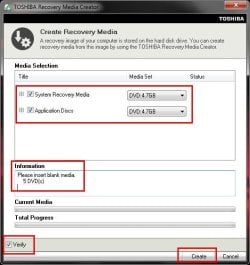
The Toshiba L450/L450D takes one DVD+R DL or two DVD R's.
But a screenshot from Toshiba Q/A say 5 disks.

start_menu04.jpg
 

My Computer My Computer

At a glance

ME/XP/Vista/Win7
OS
ME/XP/Vista/Win7
Back
Top